
Visual Studio Magazine highlighted the release’s interactive workflow additions. Microsoft’s Aspire team and the project’s own release documentation confirm the core changes, while also documenting several behavior changes that deserve more attention than the dashboard refresh.
 Interactive terminals arrive, but they are not a debugging replacement
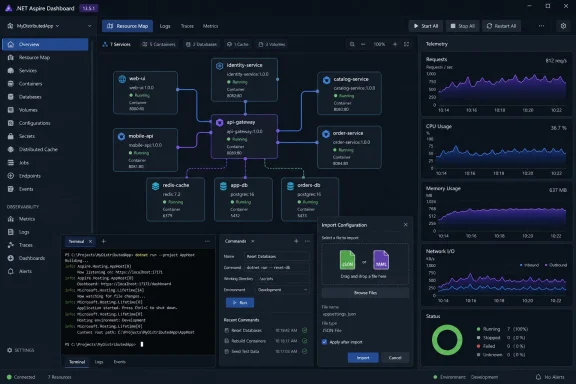
The marquee API is WithTerminal(). An AppHost author can apply it to a resource so the Aspire dashboard exposes an interactive stdin/stdout session rather than only its captured console output. That makes a practical difference for a REPL, a shell, a text user interface, or a command-driven tool that cannot be operated through logs alone.
Microsoft says dashboard users can attach and detach from the same terminal session, switch between a terminal and conventional console logs, and connect through matching aspire terminal commands from a local shell. Multiple viewers can observe the same session. For a developer running a stack with an interactive database client, a language REPL, or a tooling container, that removes the awkward handoff between an Aspire-managed process and a separate terminal window.
There are two important limits. WithTerminal() is experimental in Aspire 13.5, as are TerminalOptions and the terminal CLI commands. C# callers must suppress the ASPIRETERMINAL001 diagnostic, and the CLI feature must be explicitly enabled before the terminal subcommands are available.
More significantly, Microsoft says terminal-enabled resources currently run as ordinary processes and must be debugged manually. In other words, the feature improves interaction, not process-level debugging integration. Teams should not assume that putting a terminal in the dashboard provides the breakpoint, attach, or lifecycle behavior they would expect from a fully integrated IDE debugger.
The 13.5 breaking-changes record also removed TerminalOptions.Shell and now rejects zero or negative terminal dimensions. That is a reminder that experimental APIs may shift even during the same feature rollout. Treat terminal support as an opt-in developer convenience, not a contract to build automation around.
Resource commands can now collect real input
The more durable change in 13.5 is the expansion of Aspire’s Interaction Service and resource-command arguments. Resource commands can declare named parameters that render as input controls in the dashboard and become --<name> switches from the Aspire CLI. A command that imports a configuration, selects a deployment region, seeds a database, or runs a one-off maintenance operation can collect values before it begins rather than expecting developers to construct opaque environment-variable sequences.
Microsoft’s example is telling: a resource command can open a file selector constrained to JSON or YAML, enforce a file-size limit, pass a stream back to the AppHost, and then report useful progress. The mechanism is materially better than documenting “copy this file somewhere, then run this command from this directory,” especially for internal platforms where setup steps accumulate faster than their documentation is maintained.
The maturity labels matter here. Microsoft identifies the core Interaction Service prompt and input APIs, along with file input, as stable in 13.5. Progress dialogs remain experimental and use ASPIREINTERACTION001. Dashboard-only interactions—including message boxes, notifications, confirmations, and progress dialogs—should therefore not be treated as portable command-line behavior.
There is a second operational wrinkle. Microsoft’s Interaction Service documentation says code must check whether interaction is available. A command launched in noninteractive CLI circumstances cannot assume a dashboard-style prompt exists. Developers adding these flows should provide a fallback, fail clearly, or accept values through declared command arguments. Otherwise, a polished dashboard command can become a brittle CI or deployment command.
This is where the release adds real practical value. Aspire has long been strongest when it describes a distributed application in one place; 13.5 allows that description to capture a controlled portion of the human workflow around the application as well.
TypeScript support is broader—and the release messaging is muddled
Aspire 13.5 expands AppHost capabilities for TypeScript, including custom health-check callbacks, container file copying, command arguments, terminal support, and Interaction Service parity. Microsoft’s 13.5 documentation describes TypeScript AppHosts as generally available and says older apphost.ts projects can be migrated to the newer apphost.mts format using aspire update --migrate.
But Microsoft’s own Aspire 13.4 announcement had already declared TypeScript AppHosts generally available. The apparent duplication does not mean TypeScript AppHosts became GA twice. The practical reading is that 13.5 extends the already-GA TypeScript authoring model, particularly with richer AppHost features and tooling alignment, while Microsoft’s 13.5 overview repeats the GA language.
That distinction matters for teams planning an adoption. A JavaScript or TypeScript team does not need to wait for 13.5 to regard AppHost authoring as supported; it should assess 13.5 for the new capabilities it actually adds. Those include better health checks, container-file handling, interaction primitives, and the migration path for prior TypeScript AppHost layouts.
There is also an update that the original 13.5 reporting could not safely leave as a footnote. Microsoft released Aspire 13.5.1 on August 21, three days after the August 18 13.5 release. The patch fixes a compatibility regression in which TypeScript or Java polyglot AppHosts using the 13.5 SDK could crash with MissingMethodException when launched through an older 13.4.x CLI. Microsoft says the newer code generation accessed Type System members that were absent from the older CLI contract.
The patch changes the generated behavior so an older CLI skips unsupported additive features instead of failing AppHost startup. It also updates the Developer Control Plane to address a macOS startup crash affecting polyglot AppHosts. Any team using TypeScript or Java should start at Aspire 13.5.1 rather than 13.5.0, even if it plans to maintain older CLI installations during a transition.
New templates change how dotnet run behaves
A less visible 13.5 change affects new C# AppHosts created from the templates. They now set AspireUseCliBundle=true, directing dotnet run to resolve a matching Aspire CLI bundle and delegate execution to aspire run. Microsoft says existing projects remain unchanged unless they opt in; the SDK default stays false.
For Windows development teams, this is a version-consistency feature. A project can carry the intended CLI behavior with it, limiting the chances that one developer’s globally installed CLI differs from another developer’s or from CI. Microsoft says the resolution flow can use an explicit CLI path, a forced DNX invocation, the CLI on PATH, or DNX.
The consequence is that a plain dotnet run is no longer necessarily the old direct path in newly scaffolded projects. It may acquire and invoke Aspire’s bundled CLI. That is generally useful, but it changes troubleshooting: when a launch behaves differently after a template upgrade or new project creation, administrators should inspect AspireUseCliBundle, the resolved CLI version, and whether their build environment permits the required acquisition step.
The same release makes the CLI available through npm and Nix, in addition to Homebrew, WinGet, NuGet, mise, and the existing install scripts. That broadens installation options, but it also makes version drift more likely unless teams pin or routinely update the CLI as part of their repository workflow.
Dashboard and deployment changes carry upgrade work
Aspire 13.5 refreshes the dashboard, adds timestamp and numeric filtering for telemetry, adds text filtering for console logs, and opens terminal-enabled resources directly in a terminal view when they are running. Microsoft also removed the dashboard’s AI Assistant chat entirely. Organizations that had normalized that chat in internal demos or support processes will find it gone after the update.
The Visual Studio Code extension gets a dashboard side panel, Bun and .NET MAUI debugging support, resource commands in the tree, and improved AppHost discovery. However, it no longer opens the dashboard automatically. Microsoft requires an explicit opt-in through the Aspire dashboard-browser setting or launch.json. That is a small change with a large effect on developer expectations: an extension upgrade can look like a dashboard launch regression when it is actually a deliberate default change.
For deployments, Aspire 13.5 adds experimental persistent-volume modeling for Kubernetes and Azure Kubernetes Service. It can express storage class, capacity, access mode, and bindings, with workloads using persistent storage rendered as StatefulSet resources. It also adds APIs to model existing Azure resources across resource groups, subscriptions, and tenants. These are welcome improvements for real production topologies, but the persistent-volume API carries the ASPIRECOMPUTE002 experimental diagnostic.
Before updating, teams should review the documented compatibility changes rather than treating 13.5 as a cosmetic release:
- Code using hosting-context
ServiceProvidermust move toServices, while publish-mode code usingPublishAsConnectionStringshould move towardAddConnectionString. - Scripts that depend on
aspire ps --resourcesor--include-hiddenneed to useaspire describeor the remainingaspire resourceoptions. - Proxyless endpoints with no explicit public port now receive a port earlier in processing, from the default
10000-32767range unless overridden throughASPIRE_PROXYLESS_ENDPOINT_PORT_RANGE. - Projects relying on the deprecated
Aspire.Hosting.GitHub.Modelspackage should plan a migration to Azure AI Foundry integration before the package is removed.
Aspire 13.5 is a meaningful developer-workflow release, not merely a dashboard redesign. Its best features let AppHosts request the information and interaction a real application workflow needs. But teams should deploy 13.5.1, audit their CLI and SDK combinations, and keep experimental terminal and infrastructure APIs out of assumptions that must survive a future Aspire upgrade.
