
For students, families, browser-centric workers, and anyone who spends most of a day in Google Workspace, web apps, streaming services, and lightweight Android apps, the Asus Chromebook Flip CX1 is a notably well-specified option. But shoppers cross-shopping Windows laptops should look beyond the attractive headline price. A lower-cost Windows PC can run traditional desktop applications and support a broader range of peripherals and workflows, while this Chromebook’s strengths depend heavily on accepting ChromeOS’s more focused model.
 Overview: A Practical Chromebook With Premium Aspirations
The CX1400FKA-AS88FT is the touch-enabled convertible variant of Asus’s Chromebook Flip CX1 family. The reviewed configuration pairs an Intel Celeron N4500 processor with 8GB RAM, 128GB eMMC storage, and a 14-inch 1,920 x 1,080 touchscreen. It also includes two USB Type-C ports, two USB Type-A ports, a microSD card reader, a headphone jack, and a 720p webcam. The published review lists the chassis at 3.59 pounds and 12.85 x 9.01 x 0.73 inches.
That is a more generous I/O selection than is typical on many thin consumer laptops. In particular, USB-C on both sides matters more in everyday use than it may appear on a specification sheet. It makes charging less fussy on a crowded desk, in a classroom, or on an airplane, while support for power delivery and external-display output expands the laptop’s usefulness when it is connected to a monitor.
The central idea is simple: deliver a conventional 14-inch laptop experience with the flexibility of a 2-in-1 Chromebook. Asus is not trying to sell a tiny tablet with a keyboard attached. This is first and foremost a laptop, one that can fold into alternate positions when touch input, video viewing, or a small-space setup makes that useful.
That distinction should shape purchasing expectations. Buyers looking for an iPad-like slate will find the CX1 physically substantial. Buyers seeking a familiar clamshell computer that can occasionally become a touch display, presentation stand, or tent-mode video screen will see the stronger value proposition.
The Important Correction: ChromeOS Is More Than a Browser
One point in the supplied reporting needs useful context. ChromeOS is often described as a browser-based operating system, but it does not literally run only the Chrome browser. Modern Chromebooks can use web applications, Chrome extensions, Progressive Web Apps, and—on compatible machines—Android applications through the Google Play Store. Google’s own Chromebook guidance lists web and Android options for productivity work, including Google Docs, Microsoft Word, Google Sheets, Microsoft Excel, Microsoft Teams, Zoom, Adobe Express, Canva, and several creative tools. Google’s current Chromebook app guidance makes clear that the software ecosystem is wider than a single browser window.
That clarification does not erase ChromeOS’s limitations. It explains why the platform can work well for a larger group of users than the “browser only” description implies.
Where ChromeOS works exceptionally well
ChromeOS is a natural fit when daily computing is built around cloud services and the web:
- Google Workspace: Docs, Sheets, Slides, Drive, Gmail, and Meet.
- Microsoft 365 on the web: Word, Excel, PowerPoint, Outlook, and OneDrive workflows.
- Streaming and communication: YouTube, Netflix, web-based video calls, social media, and messaging.
- School platforms: Learning-management systems, browser-based testing, research, and collaboration portals.
- Light creative work: Photo editing, Canva projects, basic video tools, and web-based design platforms.
- Casual Android apps and games: where compatibility and performance are appropriate.
Google confirms that Android apps can be downloaded through the Play Store on supported Chromebooks, although not every Android title is compatible with every Chromebook model. Its support documentation also notes that administrators can disable Play Store access on school or work-managed devices.
Where ChromeOS remains a compromise
The operating system becomes less compelling for buyers who rely on full Windows software. Traditional desktop tools—specialized accounting packages, engineering applications, legacy business clients, some local database tools, PC games, full Adobe desktop applications, and advanced peripheral utilities—may not have a direct equivalent on ChromeOS.
The distinction is especially important for Microsoft Office users. Browser-based Microsoft 365 is capable for basic document, spreadsheet, and presentation work, but it is not a complete replacement for the full Windows desktop versions of Excel, Access, Outlook, Word, or PowerPoint. Complex macros, niche add-ins, offline workflows, large datasets, and enterprise integrations are all reasons to think carefully before choosing a Chromebook.
ChromeOS can also work offline, but it works best when its owner is comfortable keeping files and services synced through the cloud. Google supports offline Gmail, offline files, downloaded content, and compatible Android applications, yet the experience is necessarily more selective than on a traditional Windows PC with locally installed desktop software. Google’s offline-use documentation outlines those capabilities and their boundaries.
Design and Build: The 360-Degree Hinge Is the Main Event
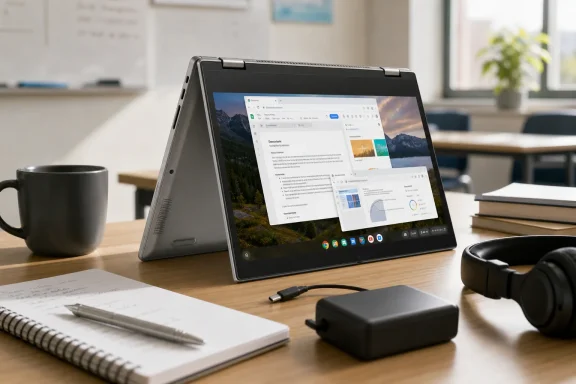
The Chromebook Flip CX1’s headline feature is its 360-degree hinge. It supports four familiar postures:
- Laptop mode for typing, web browsing, and schoolwork.
- Tent mode for video calls, streaming, or recipes on a countertop.
- Stand or presentation mode for movies and touch-first interaction.
- Tablet mode when the keyboard is folded behind the screen.
According to the review, the hinge holds the device reliably in tent and presentation positions, which is essential. A convertible design is only useful if it feels solid rather than floppy or unstable. The source review specifically describes the hinge as sturdy and durable in those modes.
The drawback is physics. At 3.59 pounds, the CX1 is light enough for a 14-inch laptop bag, but it is not light enough to mimic a comfortable handheld tablet. Holding a nearly four-pound, 14-inch device in one hand while tapping with the other is workable for a few minutes, not an activity most people will want to sustain through a long reading session.
That does not make the conversion mechanism a failure. It simply changes its purpose. Tablet mode is best seen as an occasional convenience: scrolling a webpage from the couch, signing a document, annotating something in a compatible app, or handing the screen to a child. Tent and stand modes are more convincing daily use cases because the screen can remain touch-accessible without requiring the user to bear the machine’s weight.
A more polished look than the price suggests
The reported Transparent Silver finish and two-tone interior give the Chromebook Flip CX1 a more deliberate visual identity than many low-cost notebooks. The review describes a silver exterior and keyboard deck paired with black keys and display bezels, as well as a finish that resists fingerprints reasonably well. Those details are drawn from the original hands-on assessment.
For budget devices, aesthetics are not merely cosmetic. A machine that feels rigid, cleanly assembled, and pleasant to touch can influence how often it gets used. Cheap laptops frequently advertise good specifications while compromising on flex, finish, keyboard feel, or port placement. The CX1’s appeal is that it appears to put some of its budget into the physical experience rather than only the specification list.
Still, buyers should resist equating “premium-looking” with “premium-class.” This is an affordable Chromebook using modest internal storage and a low-power processor. The polished exterior improves the ownership experience, but it does not turn the CX1 into an ultraportable workstation.
Display, Keyboard, and Touchpad: Strong Everyday Fundamentals
The 14-inch Full HD touchscreen is arguably the right display format for this category. A 1,920 x 1,080 resolution gives text and web pages adequate sharpness without asking too much of the entry-level integrated graphics hardware. It also provides enough desktop room for side-by-side documents, a video call beside notes, or a browser split between research and writing.
The review characterizes the panel as vivid and responsive, reporting 93% sRGB coverage and 250 nits of peak brightness. Those measurements should be treated as review-specific figures rather than universal guarantees for every retail unit, particularly because display panels can vary by regional SKU and production run. PCVarge reports those numbers for its reviewed CX1400FKA-AS88FT configuration.
In practical terms, 250 nits is adequate for indoor classrooms, home offices, libraries, and coffee shops. It is less ideal outdoors or in rooms flooded with direct sunlight. This is a familiar compromise in the affordable Chromebook segment: resolution is good, touch is welcome, but peak brightness is not designed for demanding outdoor work.
A keyboard that matters more than benchmark numbers
The keyboard may be the machine’s most consequential advantage. A Chromebook built for school papers, messages, web research, and cloud documents lives or dies on typing comfort. The review praises the spill-resistant keyboard’s large, spaced keys and reports 1.4 mm key travel with 71 grams of actuation force. Those measurements and the positive typing assessment appear in the review’s input-device section.
Key travel under 1.5 mm is not exceptional, but it need not be a problem when the keys have consistent feedback and good spacing. For this device’s intended workload—email, essays, web-based coursework, chat, and spreadsheets—predictability is more valuable than dramatic travel depth.
Below it, the 4.1 x 2.4-inch touchpad is reported to respond accurately to swipes and ChromeOS gestures. A large, responsive touchpad is particularly useful on ChromeOS because navigation frequently revolves around browser tabs, multitouch scrolling, overview views, and window management. The review identifies the touchpad dimensions and describes reliable gesture response.
Performance: Enough for Real Work, Not for Heavy Work
The Intel Celeron N4500 is a low-power processor designed for basic mobile computing. One technical correction is important here: the N4500 is a two-core, two-thread processor—not a four-core chip. Intel’s product comparison data lists the Celeron N4500 with two cores, two threads, a 1.1 GHz base frequency, and burst frequency up to 2.8 GHz. Intel’s official comparison page provides those processor specifications.
That correction reinforces rather than undermines the overall assessment. The CX1 is appropriately specified for light and moderately demanding browser-centric work because it combines that processor with 8GB of RAM. In a Chromebook, 8GB is a meaningful advantage over 4GB configurations, helping the system better retain browser tabs and apps in memory.
What the CX1 should handle comfortably
This Asus Chromebook Flip CX1 should be comfortable with:
- Several browser tabs for research, shopping, and social media.
- Google Docs, Sheets, Slides, and web-based Microsoft 365.
- Video streaming at Full HD resolution.
- Email, video meetings, messaging, and online classroom platforms.
- Light photo editing in browser or Android applications.
- Simple Android apps and casual games.
- Cloud-storage workflows through Google Drive, OneDrive, Dropbox, and similar services.
The source review reports that the system could handle a dozen Chrome tabs alongside 1080p video playback, though it also observed some delay while switching between tabs. That is a useful real-world characterization of the device’s performance ceiling.
Where performance will start to feel constrained
The Celeron N4500 is not intended for sustained heavy multitasking. Large spreadsheet models, dozens of tab-heavy websites, high-resolution image projects, complex web applications, virtualized development environments, and demanding Android games can expose its limits. Even if a task technically opens, responsiveness can diminish once multiple processes compete for CPU time.
The 128GB eMMC storage also deserves scrutiny. It is a better capacity than the 32GB or 64GB storage found in many inexpensive Chromebooks, but eMMC remains slower than a quality NVMe SSD and is generally not intended for enormous local libraries. That matters less for cloud-first owners and more for users who download large media collections, keep offline course materials, or install many Android apps.
Google also cautions that Android applications consume local storage and may not be optimized for all device types. Its Chromebook deployment guidance specifically advises testing Android apps and accounting for their local storage demands. That is particularly relevant to a Chromebook with 128GB of fixed eMMC storage.
Battery Life and Mobility: A Genuine Selling Point
The supplied review lists battery life at up to 11 hours and considers the result one of the CX1’s leading strengths. PCVarge’s evaluation positions it as an all-day system for students and light productivity users.
“Up to” remains the operative phrase. Battery results vary with brightness, Wi-Fi conditions, streaming, Android app usage, video calls, extensions, and the number of active tabs. A day spent writing in Google Docs at moderate brightness is radically different from a day filled with video conferencing, streaming, and several live web applications.
Even so, the expectation of long endurance is reasonable for a ChromeOS laptop built around a low-power Celeron platform. The machine does not need a high-wattage processor, discrete GPU, or large cooling system, which lets it prioritize quiet, efficient general computing.
For students, this can be more valuable than a marginal performance gain. A laptop that lasts through lectures, library work, and a commute without a charger can be more useful than a faster model that requires constant power management.
Security, Updates, and Long-Term Ownership
ChromeOS’s automatic-update model remains a meaningful advantage for casual users and families. Google says ChromeOS devices receive automatic updates that cover the operating system, browser, and hardware-related components, with the current policy providing 10 years of updates from the platform release date for supported devices. Google’s Auto Update policy explains both the update model and its device-specific conditions.
However, prospective buyers should verify the exact Auto Update Expiration date shown for the particular device before purchase. Chromebook support is tied to the underlying platform, not necessarily the retail date or the date a store lists a particular SKU. Google provides a device update schedule tool, and the Chromebook itself can display its update information in Settings. Google’s support page on checking update schedules explains what happens when a device reaches its final software update.
This is not a minor purchasing detail. A Chromebook with limited remaining support may still function, but it may no longer receive ChromeOS and browser updates after its final update notification. The difference between several remaining years of updates and a short runway should influence the price a buyer is willing to pay.
The machine’s cloud-first design also makes backup habits important. Google notes that a Chromebook factory reset erases local data, including files in the Downloads folder, while files stored in Google Drive or external storage remain unaffected. Google’s Powerwash documentation is a helpful reminder to keep important local downloads backed up.
Who Should Buy the Asus Chromebook Flip CX1 CX1400FKA-AS88FT?
The best buyer for this model is not someone looking for the lowest possible Chromebook price. It is someone who values a better screen size, more comfortable keyboard, touch support, flexible ports, and 8GB of RAM without stepping into premium Chromebook pricing.
The CX1 is a strong match for
- Students writing papers, accessing learning portals, attending remote classes, and using Google Workspace.
- Families who want a shared machine for web browsing, streaming, email, shopping, and basic documents.
- Cloud-first workers who live in Chrome, web apps, Microsoft 365 online, or Google Workspace.
- Travelers who prioritize battery life and USB-C charging flexibility.
- Older or less technical users who benefit from ChromeOS’s straightforward interface and automatic-update approach.
- Users who prefer a larger display than the 11-inch and 13-inch screens common at the lower end of the Chromebook market.
Buyers who should choose a Windows laptop instead
The Asus Chromebook Flip CX1 is less suitable for:
- People who need full desktop versions of Microsoft Office.
- Users of Windows-only software, peripherals, or corporate VPN/security tools.
- Gamers who expect native PC gaming.
- Creators working with large Photoshop, Premiere Pro, CAD, engineering, or audio-production projects.
- Developers who need broad local toolchains, VMs, or uncompromised Linux workflows.
- Shoppers seeking a genuinely comfortable handheld tablet.
A budget Windows laptop may offer more storage and a more expansive software catalog, but it can also bring slower performance, shorter battery life, more maintenance, and weaker build quality at the same price. The decision is not simply “ChromeOS versus Windows 11”; it is whether the buyer’s actual workflow benefits more from simplicity and endurance or from maximum software compatibility.
Final Verdict
The Asus Chromebook Flip CX1 CX1400FKA-AS88FT succeeds because it focuses on the experiences that matter most in everyday Chromebook use. Its Full HD touch display, well-regarded keyboard, 360-degree hinge, practical port selection, 8GB of RAM, and claimed 11-hour battery life give it a better-rounded profile than many bare-bones budget machines. The original review’s four-out-of-five conclusion is justified by that balance of usability, design, and value.
Its weaknesses are real but predictable. The Intel Celeron N4500 is suitable for routine browser and cloud work rather than demanding multitasking; 128GB eMMC storage is adequate but not expansive; and the 3.59-pound chassis makes tablet mode more of a secondary feature than a core reason to buy. ChromeOS also remains restrictive for anyone dependent on specialized Windows desktop software.
For the right audience, though, those are sensible trade-offs. The Asus Chromebook Flip CX1 is a capable 14-inch Chromebook 2-in-1 that feels more refined than its entry-level hardware class suggests. It is best approached as a reliable, tactile, long-lasting laptop that can occasionally fold into something else—not as a high-performance PC or a replacement for a lightweight tablet.
