
 Overview
GPU tuning software has an awkward but essential role in the enthusiast Windows ecosystem. It sits between the graphics driver, the board partner’s firmware, Windows’ shifting display stack, and the user’s own expectations around thermals, noise, performance, and telemetry.
That makes even apparently minor bug fixes significant. A monitoring graph that does not render can make diagnosis harder. A fan curve that does not apply to every physical fan can undermine the cooling behavior a user deliberately configured. A resolution-change crash can be particularly frustrating on systems with multiple displays, games that switch display modes, capture workflows, remote-desktop sessions, or dynamic resolution configurations.
ASUS’ release notes describe GPU Tweak III 2.1.6.0 as a stability and behavior update rather than a feature release. There are no headline-grabbing additions to overclocking controls, no new benchmark mode, and no stated performance uplift. Instead, ASUS has targeted four areas that determine whether tuning software can be trusted in day-to-day operation: monitoring visibility, profile persistence, fan control, and resilience to display changes. ASUS’ support page identifies all four fixes.
For Windows enthusiasts, that restraint is a positive. GPU utility software can become a source of instability when developers attempt broad interface redesigns or alter low-level control routines without solving basic reliability issues first. GPU Tweak III 2.1.6.0 appears to prioritize the unglamorous work that matters most: making existing controls operate consistently.
The Four Fixes in GPU Tweak III 2.1.6.0
Monitoring charts should no longer disappear with smaller metric selections
The first correction addresses a monitoring-chart display issue. According to ASUS, GPU Tweak III could fail to show monitoring charts when the number of selected monitoring items fell below a certain threshold. ASUS’ official patch notes do not specify the threshold, the exact metric combinations involved, or whether the fault appeared in the detached monitor window, the main dashboard, or both.
The limitation was especially inconvenient because minimalist monitoring is often intentional. Many users do not need a crowded telemetry page tracking every available sensor. A practical Windows gaming overlay or second-screen dashboard may focus on only a small set of values:
- GPU core temperature
- Hotspot temperature
- Fan speed
- GPU utilization
- Clock speed
- Board power
- VRAM usage
- Frame rate or frame time
When charts vanish because the user has selected too few inputs, the software effectively penalizes a sensible configuration. A well-tuned system does not necessarily benefit from dozens of live graph lines fighting for attention.
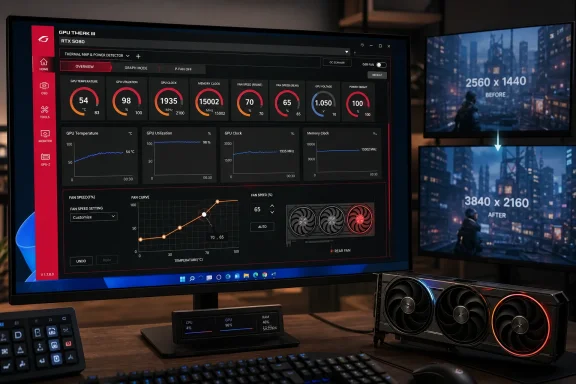
GPU Tweak III’s monitor window is central to how ASUS presents the application. ASUS documents a split interface in which the monitoring panel and the tuning controls can be linked or detached, while the software also includes a dedicated monitor window and on-screen-display settings. ASUS’ GPU Tweak III introduction describes those dashboard, monitor, and OSD functions. That design makes the chart fix more important than a cosmetic repair: monitoring is not an optional side panel but one of the utility’s core use cases.
The fix should also improve troubleshooting discipline. When users test a custom undervolt, validate a newly imported fan curve, or investigate unusual clock behavior, they need the relevant sensor data to remain visible. A missing chart is not merely annoying; it obscures the evidence needed to judge whether a tuning change had its intended effect.
Resolution changes should no longer close the application unexpectedly
The second stability fix concerns Windows display resolution changes. ASUS says GPU Tweak III could close unexpectedly when the system’s display resolution changed, and version 2.1.6.0 resolves that behavior. ASUS’ official release notes provide no further technical root-cause explanation.
On a modern Windows system, resolution changes occur more often than users may realize. They can be triggered by games entering or leaving exclusive full-screen modes, changing primary monitors, connecting a TV or projector, activating a capture device, using remote access software, switching refresh-rate profiles, docking a laptop, or recovering from a brief display-driver reset.
The crash matters because GPU Tweak III is designed to do more than expose simple clock sliders. ASUS positions it as a utility for overclocking, voltage adjustment, fan control, monitoring, OC Scanner functions, and Voltage-Frequency tuning across NVIDIA and AMD desktop GPUs. ASUS’ support documentation describes those functions. If the program shuts down during a display transition, users can lose access to monitoring at the moment when they may be trying to observe a game, workload, or screen configuration.
A resolution-change closure also creates uncertainty around the state of active settings. The patch notes establish that the application itself could exit, but they do not say whether the crash ever interrupted fan control, profile application, OSD operation, or saved settings. That distinction remains unverified. Users who rely on an aggressive custom profile should therefore treat the update as a welcome stability improvement, while still confirming that their preferred mode and fan behavior are active after installation.
Imported rear-fan curves are fixed on fresh installations
The third fix is the most consequential for owners of ASUS graphics cards with more complex cooling layouts. ASUS says that, on fresh installations of GPU Tweak III, a rear fan could fail to follow an imported fan-curve profile. ASUS’ patch notes specifically identify fresh installations and imported fan curves as the conditions involved.
This is a useful example of why profile portability needs testing rather than blind trust. Enthusiasts commonly preserve tuning configurations before reinstalling Windows, moving to a new PC, replacing a boot drive, or troubleshooting corrupted software. The expectation is straightforward: export a known-good profile, reinstall the utility, import it, and restore prior behavior.
The defect meant that expectation was not fully met for systems using a rear GPU fan. A user could import a curve, see the expected settings in the software interface, and reasonably assume that the cooling policy had been restored. But one fan could remain outside the intended behavior. That introduces the possibility of uneven cooling, altered acoustic characteristics, or lower confidence in the profile itself.
The practical importance depends on the card. Not every graphics card has a rear fan, and not every user creates custom curves. But the issue is especially relevant on ASUS’ premium multi-fan designs. The standard ROG Astral GeForce RTX 5090 is described by ASUS as its first quad-fan graphics card, with four Axial-tech fans and a large cooling assembly. ASUS’ ROG Astral RTX 5090 product page details the quad-fan design and GPU Tweak III integration.
The company’s special ROG Astral RTX 5090 Edition 20 goes further, combining high-end cooling hardware with features intended for extreme performance and monitoring. ASUS says that card can draw up to 800 W in its dual-power configuration, underscoring why correctly applied thermal controls matter on such specialized hardware. ASUS’ Edition 20 product page outlines the dual-power design and stated 800 W capability.
That does not mean the imported-profile bug created an immediate thermal hazard on every affected system. Modern GPUs retain firmware-level thermal safeguards, and the ASUS notes do not claim otherwise. Still, software fan curves exist precisely to let owners define the balance they want between temperature, noise, ramp rate, and sustained load behavior. A profile that applies only partially is not a minor defect.
Fan-curve adjustments return for the “RX9700 series”
The fourth fix is the release’s most confusing item because ASUS’ own release notes say fan curve adjustments were prevented for “RX9700 series” models. ASUS’ official listing uses that exact wording.
The likely explanation is a naming error. AMD’s public product pages identify the relevant gaming cards as the Radeon RX 9070 and Radeon RX 9070 XT, within the Radeon RX 9000 Series. AMD’s Radeon RX 9070 product page and Radeon RX 9070 XT product page use the 9070 designation, while AMD’s broader desktop Radeon catalogue lists the RX 9070 family rather than a Radeon RX 9700 gaming series. AMD’s Radeon desktop graphics page
That context strongly suggests ASUS intended to reference the Radeon RX 9070 series. The source reporting that surfaced the update also flags the mismatch, noting that there is no Radeon RX 9700 gaming product line and interpreting the release-note reference as an apparent typo. VideoCardz’ report reaches the same conclusion.
The wording is not a reason to dismiss the fix. It is, however, a reason to exercise care when interpreting its exact scope. ASUS has confirmed that a fan-curve adjustment issue was resolved for a family it calls “RX9700 series”; AMD’s official naming makes the RX 9070 series the obvious real-world match. Owners of compatible ASUS Radeon RX 9070 and RX 9070 XT cards should therefore see GPU Tweak III 2.1.6.0 as the relevant update, but should verify fan response after installation rather than relying solely on the label in the change log.
Why Fan Curve Reliability Matters
A fan curve is often reduced to a simplistic choice between “quiet” and “cool,” but its real purpose is more nuanced. It controls the relationship between measured temperature and fan speed, allowing users to shape how quickly the card responds to heat and how aggressively it prioritizes acoustics.
An effective curve can help avoid abrupt fan surges during short load spikes while still responding decisively to a sustained gaming session or compute workload. ASUS’ documentation exposes settings for a fan-speed update period, temperature hysteresis, and a custom relationship between GPU temperature and fan speed. ASUS’ GPU Tweak III guide explains that a longer update period reduces the frequency of fan-speed changes, while higher hysteresis reduces frequent speed fluctuations.
That flexibility can be valuable, but it introduces a burden: the configuration must apply accurately and predictably. Users cannot evaluate a curve from its plotted line alone. They need to observe the fans during a real workload.
The imported-profile repair in 2.1.6.0 is therefore more than a convenience fix. It addresses the basic expectation that a stored thermal policy should be restored in full after a clean install. The RX 9070-related repair is similarly fundamental: if a GPU control utility exposes a custom fan-curve editor, the ability to make adjustments on compatible hardware is not an advanced extra—it is a core function.
A sensible validation routine after updating
Following an update to GPU Tweak III 2.1.6.0, a cautious validation process is appropriate:
- Record current settings first. Capture screenshots of custom clock, voltage, power, and fan settings before changing anything.
- Install only the official package. ASUS hosts version 2.1.6.0 through its support channel and publishes a SHA-256 value for the 112.99 MB download. ASUS’ download page lists the checksum as
EBC2C636EED531A0DB24F3E93912E871F1861F5FC79E0B4BE32835172C9F1654. - Restart when the installer requests it. ASUS’ installation instructions explicitly direct users to restart after setup to complete the installation. ASUS’ installation guide describes the process.
- Re-import profiles carefully. If using a saved profile, confirm that every configurable fan responds as expected rather than assuming a successful import message proves full application.
- Test a controlled GPU workload. Observe temperatures, clock behavior, fan RPM, board power, and acoustic response under a repeatable game, benchmark, or rendering task.
- Test the display scenario that previously mattered. Users who change resolution frequently should switch modes, connect or disconnect displays where practical, or launch a full-screen application to confirm GPU Tweak III remains open.
- Keep tuning conservative during initial validation. Do not combine the software update with a new overclock, deep undervolt, or radically revised fan curve. Isolating one variable makes it easier to identify the cause if behavior changes.
This approach is not a declaration that the update is unsafe. It is standard practice whenever low-level GPU tuning software is updated, especially on systems where profiles control more than cosmetic preferences.
GPU Tweak III’s Broader Place in the ASUS Ecosystem
GPU Tweak III is not limited to a basic slider interface. ASUS describes the tool as supporting NVIDIA and AMD desktop GPU parameter adjustment, including overclocking, voltage control, fan control, and related functions. ASUS’ official support FAQ positions it as a cross-vendor desktop utility, even though some advanced features remain specific to particular ASUS hardware.
That distinction matters. The application can be useful on a broader set of supported graphics cards, but hardware-integrated features are more tightly tied to ASUS’ premium product stack. ASUS says its Thermal Map, which uses embedded sensors across components such as VRMs, chokes, and VRAM, is supported only on ROG Matrix and ROG Astral models. ASUS’ FAQ states that limitation.
The same applies to Power Detector+, a feature that ASUS says can detect anomalies across 12VHPWR power pins and notify the user to reseat the cable. ASUS’ support documentation limits the feature to ROG Matrix and ROG Astral models, while the newer Astral Edition 20 page extends its description to the card’s ASUS Advanced BTF motherboard connection. ASUS’ product documentation details those power-monitoring capabilities.
This is where GPU Tweak III differs from a generic third-party overclocking tool. It can operate as a conventional tuning utility, but it also serves as the user-facing control layer for ASUS-specific sensors, safety features, and board-level capabilities. That makes software correctness more consequential for owners of supported flagship hardware.
A monitoring graph rendering fault may be an annoyance on a mainstream card. On a premium card using sensor-specific telemetry and cable-monitoring functions, users may reasonably view visibility and stability as part of the hardware’s overall value proposition.
Strengths of This Release
The strongest quality of GPU Tweak III 2.1.6.0 is its focus. ASUS has addressed issues rooted in normal user activity rather than chasing superficial feature expansion.
The practical strengths are clear:
- It repairs a monitoring workflow issue that affected users with intentionally compact metric selections.
- It improves Windows display-stack resilience by fixing closures tied to resolution changes.
- It restores expected profile behavior after clean installations for cards with rear fans.
- It corrects fan-curve functionality for the Radeon family named in the notes, almost certainly the Radeon RX 9070 series based on AMD’s official product nomenclature.
- It supports both Windows 10 and Windows 11 64-bit, preserving utility availability for enthusiasts who have not moved to Windows 11. ASUS’ download page lists both supported operating systems.
The update also follows a recognizable pattern from the immediately earlier release. GPU Tweak III 2.1.4.0, published one month earlier, addressed a Voltage-Frequency Tuner curve that could extend beyond the graph’s boundaries. ASUS’ version history shows that previous repair. Together, the releases suggest ASUS is actively addressing defects in visual tuning and control behavior rather than leaving such issues unresolved for extended periods.
The Risks and Caveats
The most obvious caveat is the “RX9700 series” nomenclature error. AMD’s official lineup uses Radeon RX 9070 and RX 9070 XT for its RX 9000-series gaming cards, making ASUS’ wording difficult to interpret literally. AMD’s RX 9070 listing provides the official naming context. The likely typo does not erase the fix, but it does reduce the precision of the documentation.
ASUS also does not provide detailed reproduction conditions for any of the four bugs. The release notes do not state:
- Which monitoring-item counts could trigger missing charts.
- Which rear-fan-equipped models were affected.
- Whether imported profiles from older versions were implicated.
- Whether the resolution-change crash occurred with specific multi-monitor arrangements.
- Whether the Radeon fan-curve correction is exclusive to certain ASUS board variants.
That lack of detail is common in consumer utility patch notes, but it limits an enthusiast’s ability to determine whether the update addresses a particular symptom before installing it.
There is also a broader operational risk inherent in all GPU tuning software: configuration complexity. Fan curves, voltage-frequency curves, power limits, and automatic tuning can interact in ways that are not obvious from a single dashboard. ASUS includes OC Scanner and Voltage-Frequency Tuner capabilities in GPU Tweak III, and those are powerful tools when used carefully. ASUS’ product materials describe both functions. But the more variables a profile controls, the more important it becomes to validate the result under a real workload.
Finally, users should avoid interpreting a software repair as a replacement for basic hardware and system maintenance. A correct fan curve cannot fix clogged heatsink fins, poor case airflow, an improperly seated power cable, a failing fan, or an unstable overclock. GPU Tweak III 2.1.6.0 improves the reliability of the control layer; it does not remove the need to inspect the physical system when temperatures, noise, or instability look abnormal.
Conclusion
GPU Tweak III 2.1.6.0 is a modest but meaningful ASUS update for Windows 10 and Windows 11 systems. Its value lies in correcting the essentials: monitoring charts should remain available with smaller metric selections, imported fan profiles should properly control rear fans after a fresh installation, affected Radeon RX 9070-series owners should regain fan-curve adjustment, and resolution changes should no longer force the application to close unexpectedly.
For users running GPU Tweak III as a lightweight monitor, the chart and resolution fixes are the immediate wins. For owners of multi-fan ASUS cards and users who migrate or restore tuning profiles, the rear-fan correction may be the release’s most important improvement. And for Radeon RX 9070 and RX 9070 XT users, the update is especially relevant despite ASUS’ imprecise “RX9700” wording.
The release does not transform GPU Tweak III, but it makes the software more dependable in precisely the situations where enthusiasts need it to be dependable. In the world of GPU tuning, that is often more valuable than a longer feature list.
