
Explosion’s August 5 write-up points to TechPowerUp’s Matrix Platinum review as fresh benchmarking news, but the review itself was published months earlier, on April 28, 2026. Independent coverage from ComputerBase, Tom’s Hardware, and other review outlets had already established the key result: ASUS’ limited-edition card is among the quickest air-cooled RTX 5090 implementations, but the performance uplift is far smaller than the jump in power allowance suggests.
The practical conclusion is straightforward. The Matrix Platinum is a collector-grade overclocking platform built to turn a roughly 575 W reference RTX 5090 into an 800 W experiment. It is not evidence that an RTX 5090 suddenly needs 800 W to run demanding games such as Assassin’s Creed Shadows at 4K.
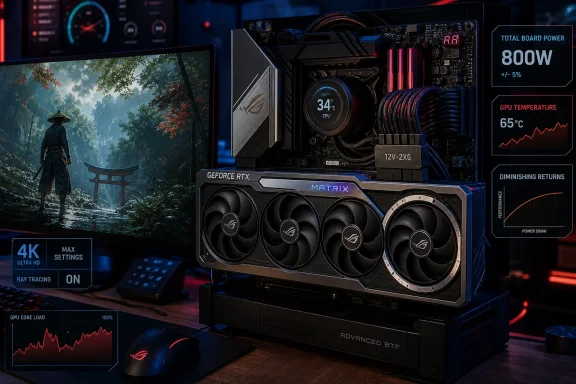 The 800 W figure is a conditional ceiling
ASUS describes the Matrix Platinum’s dual-input arrangement as providing “up to 800 watts” and “up to 10% more” performance or overclocking headroom. The company’s wording matters: 800 W is the maximum enabled by both power paths, not the card’s normal draw in every PC and not a standard 12V-2x6 configuration.
A conventional GeForce RTX 5090 Founders Edition is rated by NVIDIA at 575 W total graphics power. NVIDIA lists a 1,000 W system power recommendation for that reference card, with the usual caveat that the full PC configuration changes the requirement. ASUS’ own current PSU guidance is much less subtle for an RTX 5090 in 800 W mode: it recommends a 1,600 W power supply across the CPU classes in its compatibility table.
That recommendation reflects system-level reality. An 800 W GPU paired with a high-end Ryzen 9 or Core Ultra 9 processor, memory, storage, fans, pumps, USB-powered accessories, and the transient load behavior of modern high-end graphics cards has little room for a 1,000 W or 1,200 W PSU. A quality 1,600 W ATX 3.x unit is not an optional luxury for the fully enabled Matrix configuration; it is the baseline ASUS itself publishes.
The motherboard requirement is even more restrictive. The Matrix’s full mode relies on ASUS’ proprietary BTF high-power graphics-card connection plus the standard 12V-2x6 cable. Owners of normal ATX motherboards can physically use the Matrix Platinum through its conventional cable, but they do not get the architecture that makes the 800 W setting possible.
That is a major difference between “requires a specialized PSU setup” and the more accurate statement: the card requires a specialized ASUS platform as well as a specialized PSU setup if the buyer expects its defining feature.
ASUS built a four-fan overclocking card, not a triple-fan RTX 5090
The source description also gets the cooler wrong. ASUS specifies a quad-fan design, not a triple-fan, triple-slot cooler. The Matrix uses three-ounce copper PCB layers, liquid metal on the GPU die, a copper vapor chamber, heatpipes, and a fourth fan intended to improve airflow through the card’s large heatsink assembly.
This is a purpose-built response to a familiar problem with extreme GPU overclocking: getting a higher power limit is useful only if the card can sustain clocks without thermal limits, voltage limits, or fan noise undermining the gain. ASUS says its four-fan design increases airflow pressure by up to 20% and improves thermal performance by up to 10%; those are vendor figures, not a standardized cross-vendor measurement.
Independent testing supports the general premise without fully endorsing the marketing arithmetic. ComputerBase tested the Matrix at 600 W through the conventional cable, then at 800 W through both connections, with an additional manually overclocked 800 W configuration. TechPowerUp’s published assessment, reproduced by HardForum and summarized separately by The FPS Review, placed the card roughly 9% ahead of a reference RTX 5090 at its standard 600 W configuration and around 10% ahead with the BTF-enabled 800 W mode.
The uncomfortable implication for anyone shopping rationally is that the majority of the Matrix Platinum’s advantage comes before the extra 200 W is even unlocked. The card’s unusually high factory clock, robust board design, and cooling system do most of the work. The 800 W setting extracts the remaining margin at sharply diminishing returns.
That is exactly how modern flagship GPUs behave near their frequency-voltage limits. Raising power can preserve a higher sustained boost clock, but it does not scale game performance linearly. An increase from 575 W to 800 W is a roughly 39% increase in the reference power budget. A performance increase around 10% versus the Founders Edition is impressive for an add-in-board model, but it is also a reminder that brute-force wattage is a very expensive way to gain the last few frames.
Assassin’s Creed Shadows remains a credible stress test — but the submitted numbers leave out the test
Using Assassin’s Creed Shadows in a GPU review is sensible. Ubisoft Quebec’s 2025 game combines dense vegetation, complex open-world scenes, demanding lighting options, and modern ray-tracing features. It is a useful game workload precisely because it can expose the limits of a graphics card at 4K before frame generation turns a rendered-frame result into a much larger displayed-frame figure.
But the August 5 report does not provide the actual Matrix Platinum result it invokes. It does not state the tested resolution, preset, ray-tracing mode, DLSS setting, frame-generation setting, CPU, memory configuration, driver version, or the achieved average and low-frame-rate figures. Claiming that the card “likely” clears 100 fps at 4K Ultra based on its specifications is not a benchmark result.
That omission is more important than the game choice. Shadows can mean very different workloads depending on whether the reviewer uses native 4K, DLSS Quality, DLAA, ray tracing, extended ray tracing, or Multi Frame Generation. A card can exceed 100 displayed fps with frame generation while its native rendered performance sits considerably lower. Those figures answer different questions about image quality, latency, CPU behavior, and GPU performance.
TechPowerUp’s broader testing conclusion is still useful: the Matrix Platinum is at the top of the RTX 5090 stack, and its 800 W mode can add a measurable amount over a standard 5090. It should not be translated into a blanket “100 fps native 4K” claim without the accompanying chart and settings.
NVIDIA’s current RTX 5090 specifications list DLSS 4 support, including Multi Frame Generation. NVIDIA did announce DLSS 5 at GTC in March 2026, with the company describing it as a later-2026 technology intended to add generative AI-based lighting and materials. That announcement does not make present-day Assassin’s Creed Shadows results less useful. It makes careful benchmark labeling more necessary, since “native,” “upscaled,” and “frame-generated” performance are becoming easier to blur together.
The $0.99 Steam claim does not survive a basic price check
The source’s sidebar about Assassin’s Creed Shadows pricing is also materially wrong for the U.S. Steam store. SteamDB currently lists the base game at $69.99, with a lowest recorded Steam price of $31.49 during a June 25, 2026 sale. There is no evidence in the current Steam price history of a $0.99 U.S. price.
Steam’s DLC page lists two add-ons: the Claws of Awaji expansion and the Premium Starter Pack. The store data does confirm that the game contains purchasable content, but it does not support the claim that spending around $90 in DLC is required to obtain 100% completion achievements. Nor does the supplied report identify the specific achievements supposedly gated behind that spending.
That distinction should not be dismissed as a minor storefront footnote. A game’s Steam price and DLC model have no bearing on whether it is a technically valid GPU benchmark, but inaccurate claims about them weaken confidence in the surrounding hardware reporting. The benchmark should stand on settings, measured frame rates, power telemetry, temperatures, and repeatable methodology — not on unrelated review snippets.
A $3,999 platform purchase for a single-digit gaming gain
The Matrix Platinum launched at $3,999, twice NVIDIA’s $1,999 suggested price for the RTX 5090 Founders Edition, and ASUS limited production to 1,000 units worldwide. Tom’s Hardware reported that early availability disappeared quickly, which is consistent with a collector-oriented halo product rather than a broadly available gaming recommendation.
Its price also understates the real buy-in. A buyer who wants the advertised 800 W configuration needs the card, a compatible ASUS Advanced BTF motherboard, a suitably spacious case, a serious cooling plan for the rest of the system, and a 1,600 W power supply. The system cost can climb by thousands of dollars before the Matrix’s final 800 W mode is even enabled.
For Windows enthusiasts and system builders, that makes the card’s value proposition unusually clear. At 600 W, the Matrix Platinum is an extravagant but exceptionally engineered RTX 5090. At 800 W, it becomes an ASUS-specific overclocking showcase whose final performance margin will be visible in benchmark charts more often than it will be felt during a game.
The meaningful number is therefore not 800 W. It is the roughly 9% to 10% performance advantage independent reviewers have found over a reference RTX 5090 — achieved at a cost in hardware compatibility, electricity, heat, and purchase price that places the Matrix Platinum far outside a normal high-end PC build.
