

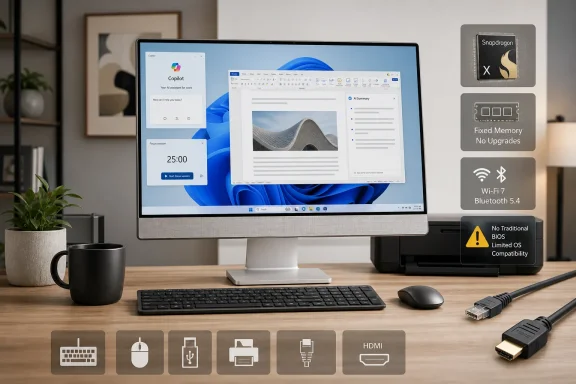
Outlook Business, which published a hands-on review on August 11, describes the VM441 as quiet, thin and effective for general productivity after several weeks of use. Asus’ specifications and independent launch coverage confirm the basic premise: this is a 24-inch-class Windows 11 all-in-one using an eight-core Snapdragon X X1-26-100 processor, Qualcomm Adreno graphics and a 45-TOPS Hexagon NPU. But the full spec sheet shows a more constrained machine than its “AI desktop” positioning suggests.
This is a credible family-room, reception-desk or home-office PC. It is a much less straightforward choice for an IT-managed workstation or anyone who depends on specialist devices, legacy utilities, local virtualization, demanding graphics software, or the ability to upgrade memory later.
Snapdragon X arrives on the desk with last year’s silicon
The VM441QA uses Qualcomm’s Snapdragon X X1-26-100, an eight-core chip clocked at up to 3.0 GHz. Notebookcheck identified it as the same older Snapdragon X part Asus used in the previous-generation Zenbook A14, a detail conspicuously absent from the broad “Snapdragon X” branding. It meets Microsoft’s Copilot+ PC hardware bar because the NPU reaches 45 TOPS, but that qualification should not be mistaken for a desktop-performance class.
Asus has placed what is fundamentally a lower-power Windows-on-Arm laptop platform behind an all-in-one display. That approach can deliver a compact, quiet system for browsers, Microsoft 365, video calls, streaming and light photo work. Outlook Business reports that the design feels premium and remains quiet in day-to-day tasks, which tracks with a chip designed around efficiency rather than large cooling hardware.
The desktop format changes the usual Snapdragon sales pitch, though. Battery runtime is one of the biggest practical advantages of Arm laptops; a plugged-in all-in-one does not benefit from it. The VM441’s case for Arm therefore rests on silence, compactness and the NPU-backed Windows features—not a clear performance advantage over similarly priced x86 desktops.
That makes the choice of the X1-26-100 more important. This is not Asus introducing a newly announced desktop-specific Qualcomm processor or a higher-tier Snapdragon X2 system. It is a desktop enclosure around a proven entry-level-to-mainstream Arm PC platform. Buyers should evaluate it as such.
The screen is competent, but the all-in-one cannot replace a monitor
Asus specifies a 23.8-inch, 1,920 × 1,080 touchscreen with an anti-glare coating, 100% sRGB coverage and a 75 Hz refresh rate on the Indian retail configuration. The display should be serviceable for office work and casual media, and the 5-megapixel IR camera includes a physical privacy shutter and Windows Hello support. The camera is a better-than-usual inclusion on a consumer all-in-one, especially for shared workspaces and frequent video calls.
The panel is still Full HD at 23.8 inches, however, and Asus lists 300 nits of brightness. That is appropriate for an indoor desktop, but it is not a high-density display for users accustomed to 1440p or 4K workspaces, nor is it a particularly bright panel for sunlit rooms. A 24-inch all-in-one is already a space-saving compromise; at this price tier, the display deserves as much scrutiny as the processor.
More importantly, Asus lists one HDMI 2.1b output, not an HDMI input. The VM441 can send video to another display, but the published specifications do not identify any way to feed a laptop, console or another desktop into its own built-in screen. In practical terms, buyers should treat it as a single-purpose computer/display appliance, not as a monitor that can remain useful after the internal PC ages out.
That distinction is easy to miss in product photography, where an all-in-one resembles an external display with a computer tucked behind it. It is a long-term ownership limitation. A conventional mini PC plus monitor can be upgraded or repurposed in stages; the VM441 packages those decisions into one device.
Memory is fixed at 16GB, while storage is the only configuration choice
Asus’ published VM441QA specifications list 16GB of LPDDR5X memory on board. That wording means the RAM is soldered, with no stated expansion path. Storage comes in 512GB and 1TB PCIe 4.0 NVMe SSD configurations, and the product page identifies the SSD as M.2, but Asus does not promise user-serviceable access or list a second storage slot.
For a browser-and-Office machine, 16GB remains viable. It is less generous for a device that Asus wants customers to keep on a desk for years, particularly when Windows 11, browser tab-heavy workflows, Teams calls, local AI features and enterprise endpoint software increasingly coexist. The machine’s all-in-one construction already limits component replacement; fixed memory tightens that constraint further.
Asus’ port selection is practical but modest: one USB-C port and a combo audio jack on the side, with one USB 3.2 Gen 1 Type-A, two USB 2.0 Type-A ports, Gigabit Ethernet and HDMI output at the rear. Wi-Fi 6E and Bluetooth 5.3 are included. The mixture is adequate for a keyboard, mouse, headset and occasional external drive, but the two USB 2.0 ports underline that this is not intended as a high-throughput desktop hub.
The included wireless keyboard and mouse also reinforce the intended audience: buyers who want a complete, minimally assembled PC rather than a workstation to customize. Asus lists a 90W power adapter and a total system weight of 5.47 kg, further emphasizing the thin, appliance-like design over component access.
Windows on Arm still requires a compatibility audit
The VM441 runs Windows 11 Home, not Windows 11 Pro, on the configuration Asus currently lists in India. That alone should give business buyers pause. Windows 11 Pro can be added through an upgrade, but organizations considering this platform should establish their edition, management and deployment requirements before purchase rather than treating the all-in-one as a normal Intel or AMD PC.
Microsoft supports x86 and x64 application emulation on Windows 11 on Arm, and most mainstream productivity software is no longer a reason to reject the architecture outright. But emulation has a performance cost, and Microsoft’s own Windows-on-Arm documentation is explicit about the limit that matters most in managed environments: kernel-mode drivers and user-mode print drivers must be native Arm64 binaries. They cannot be emulated.
That turns the VM441 purchase into a peripheral and software inventory exercise. A standard web application, Microsoft 365 workload, Teams meeting or modern browser is unlikely to be the problem. The risk lies with the software that sits outside that obvious path: a specialist label printer, industrial USB device, smart-card middleware, corporate VPN component, endpoint security tool, legacy scanner, proprietary database client, older hardware-management utility or virtualized test environment.
Developers have a related concern. Visual Studio and Visual Studio Code have native Arm versions, and Microsoft supports Arm64 development and testing workflows. Yet projects carrying architecture-specific native dependencies, kernel components or x64-only build assumptions need verification on Arm hardware. An all-in-one that looks like a consumer desktop can therefore become useful test hardware, but it should not be the only machine a developer relies on before confirming their entire toolchain.
For ordinary households, that warning should be read more narrowly: do not assume an old peripheral’s Windows 10 or Windows 11 installer will work merely because the desktop runs Windows 11. Check for an Arm64 driver first. For businesses, it means testing the exact image, applications, hardware and security stack—not approving Snapdragon X based on a successful Office trial.
The price makes the compromises harder to overlook
Moneycontrol reported that Asus launched the VM441 in India on May 25, starting at ₹101,990, with 512GB and 1TB SSD models. Asus’ own Indian store later listed the 16GB/1TB touch configuration at ₹104,990 on promotion, against a far higher stated maximum retail price. Regional pricing and configurations may differ, and Asus says availability varies by market; buyers outside India should not assume that an announced model has local retail support or the same bundled software.
At roughly the Indian starting price, the question is not whether the VM441 can handle daily work. It can. The question is whether an integrated 1080p panel, fixed 16GB memory, entry-level Snapdragon X processor and Arm-specific compatibility checks are an acceptable exchange for a clean desk and quiet operation.
Asus’ move is significant because it brings Windows on Arm into a category traditionally dominated by Intel and AMD laptop chips mounted behind a display. Outlook Business is right to identify Snapdragon X as the VM441’s defining feature. It is also the reason the machine needs more diligence than a conventional all-in-one: the design’s convenience is real, but so are the architectural boundaries buyers inherit.