
That arrangement is not new in principle, but the 2026 refresh appears to be the point where ASUS has combined the hardware with enough display quality, battery capacity, and integrated graphics performance to make it a credible primary mobile workstation rather than an unusual demo machine. In a six-month review published by Fstoppers on July 31, the Zenbook Duo is presented as a practical replacement for a desktop-style two-monitor editing setup when working away from the desk.
Independent testing from Tom’s Hardware, Notebookcheck, and Expert Reviews supports the broad hardware case: the Zenbook Duo UX8407 is among the first high-profile systems built around Intel’s Core Ultra Series 3 family, better known by its Panther Lake codename, and its Arc B390 integrated GPU represents a meaningful step up from the integrated graphics in the prior Zenbook Duo generation.
 The Second Screen Is a Workflow Decision, Not a Spec-Sheet Extra
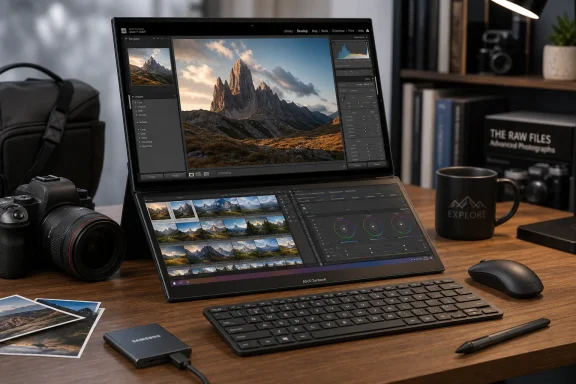
The Zenbook Duo’s value is easy to misunderstand if it is reduced to “a laptop with two displays.” The lower OLED panel is not intended merely for a chat window or an always-on video feed. Its real role is to prevent creative applications from covering the work itself with their own controls.
For photographers, the obvious layout is an image or loupe view above, with Lightroom Classic’s Develop controls, filmstrip, histogram, or comparison view below. Photoshop users can leave the canvas unobstructed on the upper panel while placing layers, history, brushes, and adjustment tools on the lower screen. Video editors can use the same space for a timeline, bins, scopes, or transport controls.
That is the difference between added screen area and usable screen area. A conventional 14-inch laptop can technically run Lightroom, Photoshop, a browser, and a file manager at once. It cannot do so without turning each into a compromise. The Zenbook Duo instead creates a vertical workspace with 5,760 by 1,800 pixels available across two panels, although Windows still treats them as separate displays rather than one continuous canvas in the conventional sense.
The physical implementation is what makes that configuration viable. ASUS includes a detachable MagLatch keyboard and trackpad assembly that can sit on top of the lower display for ordinary clamshell use. Remove it, deploy the rear kickstand, and place the keyboard in front of the machine to expose both screens. The keyboard works wirelessly when detached, avoiding the awkward “where does the keyboard go?” problem that has weakened several earlier dual-screen designs.
There is still a practical limitation: a two-screen layout requires space. The Duo works best on a table, tray table, or stable desk. It can function in a lap as a conventional laptop, but its defining configuration is not built for cramped seating or a crowded conference room.
Two OLED Panels Raise the Bar for Mobile Image Work
ASUS specifies two Lumina Pro OLED touchscreens, each measuring 14 inches and running at 2,880 by 1,800 pixels with a 144Hz variable refresh rate. The company rates the panels for full sRGB and DCI-P3 coverage, roughly 500 nits in SDR, and up to 1,000 nits peak brightness for HDR content, with Dolby Vision support.
For photo work, the important part is not simply OLED’s familiar deep black levels. It is the ability to judge local contrast and shadow detail without the gray haze associated with IPS backlight bleed. Fstoppers found the screens strong enough for culling, first-pass grading, portfolio review, and client-facing work, while appropriately stopping short of treating a laptop panel as a substitute for a calibrated reference display used for final color-critical delivery.
That distinction matters. Color gamut claims are useful, but professional color management still depends on calibration, ambient lighting, application support, and a known output target. OLED also carries its usual tradeoffs: panel brightness can fall when much of the screen becomes bright white, and static application interfaces remain a long-term consideration for anyone who spends years with the same tools, palettes, and panels in the same location.
Still, ASUS has addressed a major weakness of glossy OLED laptops by applying an anti-reflective treatment. A pair of high-resolution OLED displays is arguably the most compelling component of the device for Windows users whose work depends on visual judgment rather than pure CPU throughput.
The 144Hz refresh rate is less essential for photo editing, but it is not wasted. Windows scrolling, catalog browsing, window movement, touch interaction, and pen-like slider adjustments all benefit from the smoother response. It also helps the Zenbook Duo avoid feeling like a specialist machine built only for creative software.
Panther Lake Gives the Design More Headroom
The UX8407 reviewed by Fstoppers uses Intel’s Core Ultra X9 388H, a 16-core Core Ultra Series 3 processor with a maximum turbo frequency of 5.1GHz. Intel lists the chip with Arc B390 integrated graphics, while ASUS pairs it here with 32GB of LPDDR5X-9600 memory and a PCIe 4.0 SSD.
The processor is important because dual high-resolution displays create a baseline workload before Lightroom, Premiere Pro, DaVinci Resolve, or Photoshop even enter the picture. A two-screen machine cannot afford sluggish window behavior, weak media acceleration, or an integrated GPU that collapses under a 4K export.
Notebookcheck’s testing found the Panther Lake-equipped Zenbook Duo well ahead of the previous Intel Core Ultra 9 285H Zenbook Duo in several general productivity tests, while Tom’s Hardware also identified the Arc B390 as the significant component of the configuration. Intel’s own specifications place the X9 388H at the top of the consumer Panther Lake stack, with the full Arc B390 GPU rather than the more limited graphics included with some lower-tier Series 3 chips.
The practical consequence is that the 2026 Duo is not only a display-first laptop. It has enough CPU and GPU capacity for the editing tasks that make the second screen worthwhile: large RAW catalogs, AI-assisted masking, denoising, layered image work, and moderate 4K video projects. The system’s neural processing unit is rated at up to 50 TOPS, also qualifying the configuration as a Copilot+ PC for supported local Windows AI features.
That does not make it a replacement for a mobile workstation with an Nvidia RTX GPU. Sustained 8K video work, demanding 3D applications, large panorama or focus stacks, and lengthy renders still favor heavier systems with dedicated graphics and larger cooling systems. The Duo’s thin chassis also means fans will become audible under extended load. The point is narrower: integrated graphics are no longer automatically the reason a creative user must reject an ultraportable.
ASUS Has Packed in the Ports Creative Users Still Need
The Zenbook Duo’s connectivity is unusually complete for a thin dual-screen notebook. ASUS includes two Thunderbolt 4 ports, HDMI 2.1, a 10Gbps USB Type-A port, and a 3.5mm audio jack, along with Wi-Fi 7 and Bluetooth 5.4.
That should matter to photographers more than another abstract performance score. A USB-A card reader, wired headphones, an HDMI display, or a fast external SSD can connect without immediately requiring a dock. The Thunderbolt ports provide a path to external storage and displays, although users should note that one port will normally be occupied during charging.
A 1080p IR webcam with Windows Hello is also a modest but useful quality-of-life feature. In a machine aimed partly at mobile professionals, fast biometric sign-in is more valuable than a spec-sheet flourish. It helps the Duo behave like a normal Windows 11 notebook when the keyboard is attached, rather than asking owners to accept daily friction in exchange for a novel form factor.
Battery Life Is the Price of Lighting Two Panels
ASUS fits the Zenbook Duo with a 99Wh dual-battery system, close to the largest capacity airlines generally allow in carry-on electronics. That capacity is necessary rather than extravagant: two OLED panels, a 144Hz refresh rate, and a high-end Intel processor can consume power quickly when all are active.
Fstoppers reported roughly eight to 10 hours of mixed use, falling to around four to five hours during more power-intensive work. Those figures should be treated as workload-specific rather than universal, but they identify the expected tradeoff. In standard laptop mode with the lower screen covered, the Zenbook Duo can approach all-day use for lighter work. In full dual-screen mode at high brightness while editing photos or video, battery endurance will be materially shorter.
Windows users who buy this machine should plan around that reality. The lower screen can be the productivity feature that justifies the premium, but it is also the component that turns battery management into a real part of the day. ASUS’s 99Wh capacity softens the cost; it does not erase it.
The More Serious Constraint Is Soldered Memory
The reviewed configuration’s 32GB of LPDDR5X memory is suitable for serious creative work today, particularly alongside an integrated GPU that shares system memory. But it is soldered and cannot be upgraded later.
That is a more consequential compromise than the extra weight. At 3.64 pounds with its keyboard, the Zenbook Duo is heavier than a conventional 14-inch ultraportable but still entirely portable. Unchangeable memory, by contrast, determines how well the machine ages as Photoshop files, AI workflows, browser use, and GPU memory demands grow.
The ASUS Zenbook Duo UX8407 is therefore not a universal recommendation. Users content with one screen will get better value, lighter weight, and often longer battery life from a conventional 14-inch OLED notebook. But for photographers, video editors, developers, and heavy Windows multitaskers who routinely work across two monitors, this machine offers something more substantial than novelty: a portable workspace that finally preserves the layout they use at home.
