
@Jira actions to the Jira Cloud for Microsoft Teams app, allowing users to create, update, and assign work items from a chat thread.The practical change for Microsoft 365 administrators is more substantial than another chatbot appearing in Teams. Rovo can search Atlassian data alongside connected services such as SharePoint, then turn the results into Jira or Confluence actions. But Atlassian’s own deployment documentation shows the channel and group-chat experience requires a tenant-to-Atlassian connection, Microsoft consent, and an Atlassian-controlled service account. This is an integration that crosses collaboration, identity, data-access, and change-control boundaries—not a plug-in users should install without review.
Atlassian detailed the launch in its Rovo blog, while its current support documents describe the Teams offering as an early access program. That qualification is absent from much of the launch language and matters for organizations deciding whether to expose project and documentation context to an AI agent in everyday Teams conversations.
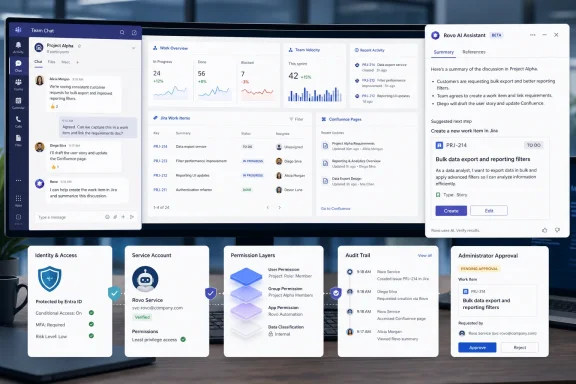 Rovo turns the Teams thread into a Jira intake surface
The new @Jira behavior is aimed at a familiar operational gap: a decision is made in a Teams standup, channel, or group chat, but someone must later reconstruct it as a Jira ticket, status change, or assignment. Atlassian says a user can mention Jira and issue a plain-language request such as moving a work item to review, creating a task from a feature request, or assigning a work item to an AI coding agent.
The important feature is not merely natural-language command parsing. Atlassian says Jira can use the surrounding conversation to pre-fill context when creating or updating work. In a well-run team, that could reduce the routine loss of acceptance criteria, rationale, owners, and links that happens when a chat decision becomes a thin ticket hours later.
It also creates a new point where conversational ambiguity can become tracked work. A Teams thread often contains tentative proposals, sarcasm, competing requests, and fragments from multiple participants. Teams users should expect to review the resulting title, description, project, assignee, priority, and workflow state before confirming an action. Atlassian’s Rovo support material says the agent shows a preview and asks for confirmation before it creates or updates Jira work items or Confluence pages; that confirmation step is a control, not an optional nicety.
The company is presenting @Jira as part of the existing Jira Cloud for Microsoft Teams app, which it says already has more than one million users for notifications, previews, and quick actions. That installed base makes the feature more consequential than a standalone AI pilot: Teams tenants that already permit the Jira app may find the new capability reaches users through a familiar surface.
There are two Teams experiences, and they do not use the same mention
Atlassian’s naming makes the rollout easy to misunderstand. The newly announced Jira Cloud app command is @Jira, focused on Jira actions inside a Teams conversation. Rovo’s separate Teams application is invoked as @Rovo in channels and group chats, or used in a one-to-one direct message. The Rovo app can search across Jira, Confluence, SharePoint, Figma, Google Drive, and other configured connectors, summarize material, create Jira work items, update them, and draft or publish Confluence pages.
Those are related but distinct workflows. @Jira is the narrow path for turning a conversation into a tracked Jira action. @Rovo is the broader assistant experience that retrieves knowledge and can perform actions across the Atlassian estate. Administrators should make that distinction explicit in user guidance, because employees may assume every Rovo capability is available through the Jira mention—or assume a Jira app installation automatically gives them the broader Rovo assistant.
Rovo’s Microsoft 365 Copilot availability is a third surface. Atlassian says the agent is available in Microsoft 365 Copilot and Teams, and its announcement directs users to the Microsoft Copilot Agent Store. In that environment, Rovo is intended to answer questions that connect Jira work, Confluence decisions, and connected Microsoft 365 content rather than returning a conventional document-search results list.
That promise depends heavily on configuration quality. A concise answer about a project’s status is only useful if the underlying Jira states, Confluence pages, ownership fields, and connector permissions reflect reality. Rovo can reduce context switching; it cannot repair stale backlogs, undocumented decisions, or inconsistent project taxonomy.
The real deployment issue is the service account
Atlassian’s support documentation sets out an important constraint for Teams channels and group chats: an Atlassian organization administrator must connect the Microsoft 365 tenant, grant the required Microsoft Teams permissions, install the app, and create a service account. Direct messages with Rovo work without that organization-wide setup, but shared conversations do not.
The service account is used to search Jira and Confluence and to plan actions on behalf of the group. Atlassian describes this as a two-layer permission model. In a direct message, Rovo returns content the individual user is allowed to see in each source system. In a channel or group chat, the service account’s access determines what Rovo can search and use for action planning, while the individual user’s own rights govern whether an action can actually be carried out.
That model has a practical consequence: the group’s discoverability ceiling can be lower than an individual’s normal Jira access. A developer might personally be authorized to view a project, yet Rovo may fail to find it in a Teams channel if the service account lacks read access to that Jira space. Conversely, granting the service account broad visibility can make more project context searchable within a shared conversation than teams intended.
Atlassian says it will not surface content the service account cannot access and will not execute actions outside the initiating user’s permissions. That is a meaningful protection against simple privilege escalation. It does not remove the need to treat service-account permissions as a data-governance decision. The account should have the minimum read access needed for the channels where Rovo will be used, and its Jira and Confluence scope should be reviewed like any other non-human identity.
For Microsoft 365 teams, consent also deserves scrutiny. Atlassian says Rovo needs additional Microsoft permissions to summarize chats and perform actions in channels and group chats. Before enabling it broadly, Teams and Entra administrators should examine precisely which delegated or application permissions are requested in their tenant’s consent screen, how chat data is processed, and what audit records are available after the app acts.
Copilot licensing and Atlassian eligibility limit the audience
The announcement’s “available” language should not be read as universal availability to every Teams user. Atlassian’s documentation says Rovo access requires an active Jira Cloud or Confluence Cloud account on a site where Rovo is enabled. Atlassian also says Rovo is included with paid Jira, Confluence, Service Collection, and Teamwork Collection Cloud subscriptions, while Atlassian Government organizations do not receive its AI capabilities.
For the Microsoft 365 Copilot path, Atlassian’s existing Jira Cloud plugin documentation lists a Microsoft 365 Copilot license as a prerequisite. The Rovo Teams documentation, meanwhile, describes Teams access separately and focuses on the Microsoft 365 tenant, Rovo access, and administrator approval. In practice, organizations should evaluate the Copilot and Teams deployments independently rather than assuming a Copilot entitlement is necessary for every Rovo-in-Teams scenario.
There is also an organizational eligibility requirement on the Atlassian side. Atlassian says Rovo must be enabled by an organization administrator and that the organization needs a verified business domain; generic email domains such as Gmail or Outlook.com are not eligible for Rovo activation. That makes the offering an enterprise Cloud integration, not a consumer Teams add-on.
Atlassian has not provided broad rollout timing beyond the August 26 launch, and its support page’s early-access label leaves room for behavior and administration requirements to change. Organizations with change-management rules should pilot the app with a limited set of Jira spaces and Teams channels before presenting it as a general replacement for manual ticket triage.
Treat agent assignment as a tracked workflow, not a chat shortcut
One of Atlassian’s examples assigns a Jira work item to “Jira Coding Agent” from Teams. Its separate guidance on AI-agent collaboration explains that agents can be assigned to work items or triggered as work moves through a workflow, with their outputs returned for review in the work item. The work remains tracked in Jira, which is preferable to asking an autonomous tool to operate invisibly from chat.
Still, assigning a ticket to an agent is not the same as assigning it to a human engineer. Teams should define what work an agent may receive, what repositories or services it can reach, whether generated code can create pull requests, and who reviews the result. A natural-language command that can route work in seconds can also bypass the normal moment when a team considers security impact, ownership, and implementation scope.
The strongest use case is therefore controlled acceleration: use Teams to capture a decision while the thread is fresh, create a properly reviewed Jira work item, and keep the durable record in Jira. The weak use case is turning a fast-moving Teams channel into an ungoverned automation console.
Rovo’s arrival in Microsoft 365 Copilot and Teams gives Atlassian customers a more direct bridge between discussion and delivery. The immediate work for IT is to decide which Jira and Confluence spaces that bridge may see, which Teams conversations can invoke it, and whether the service account behind the assistant has only the access it needs.