
For Windows users managing large local music libraries, this is more consequential than another media player with visualizers. AudioAuditor is designed to answer questions that ordinary players leave unanswered: Is this purported FLAC actually sourced from a lossy file? Is the “stereo” track just duplicated mono? Was the file clipped during mastering? Does it contain silence that could disrupt a podcast, DJ set, or archival workflow? And, more experimentally, are there embedded clues that a track may have been generated or watermarked by an AI music system?
That breadth makes AudioAuditor compelling. It also creates a high bar: analysis software earns trust not through the length of its feature list, but through transparent methods, careful interpretation, and results that do not promise more certainty than the evidence supports.
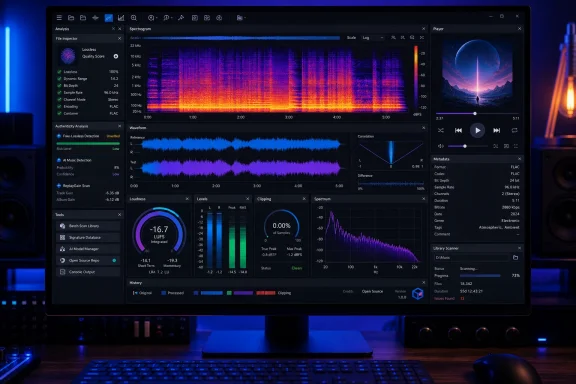 Overview: A Windows Audio Toolkit Rather Than a Single-Purpose Checker
AudioAuditor is built around a simple proposition: people with music collections should not need a separate tool for every form of inspection. The application groups audio analysis, metadata handling, spectrogram viewing, comparison tools, library maintenance, playback, exports, and service integrations in one interface. The official project describes it as a toolkit for “audiophiles, producers, and collectors,” while its feature list makes equally good sense for archivists, podcasters, editors, and anyone who has accumulated a long-running folder of downloaded, ripped, or self-recorded files. AudioAuditor’s feature overview frames the product around verifying a library rather than merely browsing it.
The graphical desktop application requires Windows 10 or later on x64 hardware. The project’s separate CLI is positioned as a cross-platform option for Windows and Linux, while macOS CLI support is still listed as forthcoming. The official download information therefore makes AudioAuditor especially relevant to Windows power users, even if the project’s shared core and command-line direction suggest a longer-term interest in broader platform coverage.
Under the hood, the project uses .NET 8 with a Windows Presentation Foundation interface for the desktop app. Its repository identifies a platform-independent AudioAuditor.Core engine shared by the GUI and CLI, while the desktop layer handles WPF-specific experiences such as playback, theming, Windows media integration, and visual rendering. The project architecture also lists NAudio, TagLibSharp, SkiaSharp, ClosedXML, and other recognizable.NET dependencies, making the codebase appreciably more inspectable than a proprietary black-box utility.
That matters because “open source” is not merely a price point. An Apache 2.0 license lets others examine, modify, and redistribute the code under broad terms, although the repository notes that the AudioAuditor name, logo, website, and associated brand assets are excluded from that grant. The project’s licensing statement draws an important distinction between the code people can reuse and the branding they cannot.
The Analysis Engine Is the Real Story
The player portion is substantial, but AudioAuditor’s core appeal lies in its inspection engine. The tool attempts to consolidate many of the checks typically scattered across specialist utilities.
Its analysis categories include:
- Full metadata extraction and editing
- Spectral analysis and spectrogram viewing
- Fake-lossless or upsampling detection
- Fake-stereo detection
- Digital and scaled clipping detection
- Loudness, True Peak, dynamic-range, ReplayGain, and BPM information
- MQA and MQA Studio detection
- AcoustID fingerprinting and MusicBrainz-based identification
- Silence-gap detection
- AI music detection in beta
- Waveform and spectrogram comparison
- CSV, TXT, PDF, XLSX, and DOCX report export AudioAuditor’s analysis and export documentation
This is an impressive scope for a free Windows audio analyzer. It is also a scope that needs to be interpreted in layers. Some results are relatively concrete—such as metadata fields, measured peak levels, or the presence of recognizable MQA markers. Others are heuristic judgments, such as whether a file appears upsampled, whether stereo information is materially distinct between channels, or whether an AI-related watermark is present.
Fake Lossless Detection: Useful, but Not an Absolute Verdict
One of AudioAuditor’s headline functions is identifying files sold or stored as lossless but suspected of being sourced from lower-quality lossy material and later converted to FLAC, WAV, or another lossless container. It uses FFT-based spectral analysis to estimate the effective high-frequency cutoff and flag patterns consistent with upconversion. The official description specifically describes the feature as detecting files that claim higher quality while appearing to have been upsampled from lower-bitrate sources.
This is useful because file extensions and bit-depth labels are not proof of source quality. A 24-bit/96 kHz FLAC can hold a genuinely high-resolution recording, but it can also hold a low-quality MP3 expanded into a much larger file. Those are not equivalent listening or archival assets, even though both might look “lossless” in File Explorer.
Still, users should read an automated verdict as an investigative signal, not a prosecution-grade finding. Low-pass behavior can be introduced for reasons other than fraudulent upsampling: mastering choices, source limitations, age of the recording, restoration work, codec behavior, or intentional filtering can all affect the upper spectrum. A responsible workflow is to use the flag as a reason to inspect the spectrogram, compare alternate editions where available, and retain the original acquisition information.
AudioAuditor’s advantage is that it makes that follow-up inspection available in the same program. It does not simply label a file “fake” and end the conversation.
Spectrograms With Enough Depth for Serious Inspection
The application uses a 4096-point Hanning-windowed FFT in its standard spectral workflow, with an optional Hi-Fi mode that switches to a 16384-point Blackman-Harris-windowed FFT for more detailed viewing. It also offers zoom up to 20×, a stated analysis floor down to −130 dB, logarithmic and linear display modes, channel and difference views, PNG export, and a dedicated full-screen spectrogram experience. The repository’s spectrogram documentation lays out the options in useful technical detail.
Those settings are not trivia. FFT length and the selected window shape affect what the viewer can resolve and how spectral content is displayed. Windowing reduces discontinuity artifacts in a sampled segment, but it introduces trade-offs involving resolution, peak width, side lobes, and acquisition time. Tektronix’s explanation of FFT window functions describes why a spectrum analyzer’s window is not a cosmetic choice: it changes the balance between leakage control, amplitude representation, noise behavior, and detail.
The default 4096-point mode should be a sensible practical compromise for library-scale analysis. The 16384-point Hi-Fi option is more appropriate when a suspicious spectral cutoff, a faint artifact, or a remaster comparison deserves closer examination. The more elaborate Blackman-Harris window is generally associated with strong side-lobe suppression, though it can yield wider spectral peaks than approaches optimized differently. Tektronix’s comparison illustrates why “more detailed” does not automatically mean “more universally accurate”; the best display parameters depend on the question being asked.
For Windows users who have relied on a stripped-down spectrogram utility, the combination of analysis data, saved views, batch PNG export, and an in-app player could be the biggest practical upgrade. It moves spectral inspection from a specialist task into something that can happen during normal music-library maintenance.
Comparison Modes Go Beyond a Typical Player
AudioAuditor’s comparison feature is particularly notable. It can compare waveform and spectrogram data using stacked, overlay, and wipe modes; the overlay option includes a pixel-level difference heatmap according to the project documentation. AudioAuditor’s comparison feature is aimed at evaluating files side by side rather than looking at isolated graphs.
That could be useful in several scenarios:
- Comparing an older CD rip with a purported high-resolution remaster.
- Checking whether two releases genuinely differ beyond metadata and album art.
- Investigating whether an edited track has altered intros, outros, fades, or silence.
- Comparing an original recording against a transcoded, restored, or repaired version.
- Determining whether duplicate files in a library are functionally identical.
The caveat is that a visual difference is not automatically an audible or meaningful difference. Level changes, timing offsets, alternate mastering, codec padding, and metadata-driven playback behavior can all make files appear different. AudioAuditor gives users the evidence; it cannot make every interpretation on their behalf.
Metadata, Identification, and Batch Housekeeping
Music-library management often collapses under the weight of inconsistent tags. Album artists are missing, track titles use incompatible conventions, sample-rate details are unclear, and anonymous files linger in old downloads folders with filenames such as track_final_v2.flac.
AudioAuditor addresses this with a full metadata editor and a batch GUI that can enrich missing tags through MusicBrainz. It also supports AcoustID fingerprinting for identifying unknown tracks, with the project describing an automatic fpcalc setup and MusicBrainz lookup path. The official feature list says it supports editing ID3, Vorbis, APE, and M4A tags while offering MusicBrainz-assisted enrichment.
The metadata and analysis grid can include:
- Artist and title
- Sample rate and bit depth
- Channels and duration
- File size and reported bitrate
- BPM and ReplayGain
- True Peak and LUFS
- Dynamic range
- MQA data
- AI-detection status
- Fake-stereo and silence findings
- File dates and path details The project’s export-field documentation
Batch tools expand that into housekeeping. The project lists duplicate detection, metadata stripping, playlist import, cue-sheet parsing, auto-renaming from tags, and archive handling. AudioAuditor’s batch-tool overview suggests the app is intended to work on folders and collections rather than one file at a time.
This may prove more valuable than the flashier AI features. A carefully tagged, deduplicated library with accurate paths and consistent albums is immediately useful every day. Even users who never inspect a spectrogram may find the tool worthwhile if its metadata workflow reduces the friction of organizing local audio on Windows.
AI Music Detection Is Ambitious—and Must Be Treated Carefully
The feature most likely to draw attention is AI audio detection. AudioAuditor presents a three-state result—Yes, Possible, or No—with a confidence percentage. The tool can inspect metadata, raw byte patterns, C2PA or Content Credentials markers, watermark identifiers, and experimental spectral checks; it can also use the optional SH Labs API for cloud-based detection. The project’s AI-detection documentation specifies both the checks and the confidence thresholds used for the displayed verdict.
The local checks are conceptually sound as evidence gathering. Embedded provenance data, explicit generator markers, recognizable service identifiers, and known watermark signals can all be meaningful. An application that surfaces those clues in a desktop file-analysis workflow is potentially useful for curators, moderators, rights-management teams, journalists, and producers managing submissions.
But the important word here is evidence, not certainty. AudioAuditor’s developer explicitly warns that the feature is beta and that its results can be inaccurate, advising users not to use findings to defame or harass anyone. The project’s own warning is exactly the right posture for the category.
An AI detection result is strongest when it identifies a specific, independently understandable marker: trustworthy C2PA provenance, a detectable watermark, or clearly embedded metadata from an AI service. It is weaker when it relies on broad correlations, generic byte patterns, or experimental spectral characteristics. A “Possible” finding should therefore be treated as a prompt for further review, not as a basis for public accusation, contractual action, copyright claims, or reputational harm.
What the Confidence Score Really Means
AudioAuditor averages the enabled detector scores and maps them to verdicts: 70% or higher becomes “Yes,” 35% to 70% becomes “Possible,” and below 35% becomes “No.” The documented threshold system makes the app more transparent than services that simply provide a vague red-or-green label.
However, a confidence percentage in this context should not be mistaken for a calibrated statistical probability that a song “is AI.” It is a product-defined score representing the strength and combination of evidence from selected detectors. Changing which detectors are enabled, whether the optional cloud service is used, or whether a file has recognizable embedded information can affect the outcome.
That does not undermine the feature. It clarifies the feature’s proper role. AudioAuditor can be a triage and inspection tool for AI-related signs in an audio file, particularly when creators or distributors preserve machine-readable evidence. It is not a universal AI lie detector.
A Full Player, Not an Afterthought
Audio analysis programs often treat playback as a barebones preview button. AudioAuditor takes a different route. It includes native 96 kHz and 192 kHz playback with fallback resampling, a 10-band parametric EQ, crossfade controls, gapless playback, peak-based normalization, queue management, loop modes, visualizers, a floating mini player, and Windows media-overlay integration. The built-in player feature list is closer to a conventional enthusiast player than a diagnostic utility.
The EQ covers 32 Hz through 16 kHz with ±12 dB adjustment per band, built-in presets, profile saving, and soft-clipping protection. AudioAuditor also advertises spatial-audio processing including HRTF-style crossfeed, interaural delay, head-shadow effects, and early reflections. The official player specifications make it clear that listening features are meant to be part of the package rather than decorative extras.
The player has configurable crossfades from one to 15 seconds, four fade curves, a deck-style shuffle implementation, session-persistent loop modes, and six visualizer styles: Bars, Mirror, Particles, Circles, Scope, and VU Meter. The project’s player documentation also lists Windows System Media Transport Controls support, allowing playback information and controls to integrate with the operating system’s media experience.
For users accustomed to foobar2000, MusicBee, or older Winamp-style customization, AudioAuditor is unlikely to replace every mature workflow immediately. Those applications have long histories, deep plugin ecosystems, and devoted communities. But AudioAuditor offers an appealing alternative proposition: a player where the file you are listening to can be inspected, verified, tagged, compared, and exported without switching between half a dozen utilities.
Privacy Design Deserves Attention
Local media software becomes less attractive when it turns a personal library into a data source. AudioAuditor’s privacy positioning is unusually explicit: the project says there is no telemetry or analytics, that network activity is tied to user-invoked features, and that analyzed or played files are not used to train generative AI systems. AudioAuditor’s data and privacy section details the project’s stated approach.
The app’s listed optional network triggers include:
- Searching a configured music service
- Discord Rich Presence
- Scrobbling to Last.fm, Libre.fm, ListenBrainz, or Maloja
- User-initiated AcoustID and MusicBrainz lookups
- Optional SH Labs AI detection
- An opt-in GitHub version check The documented network destinations
The project also offers an Offline Mode intended to disable connections in one step. Local settings, cache information, favorites, EQ profiles, session data, and optional listening statistics are stored under %AppData%\AudioAuditor\, according to the repository. The local-data inventory is helpful because privacy claims are more credible when accompanied by a clear description of what is kept and where.
There is one nuance worth noting: the optional SH Labs function is cloud-based, although the project says raw audio does not leave the device and that the opt-in mechanism requires privacy consent. The integration details should still lead privacy-sensitive users to read the relevant service terms before enabling it. “No telemetry” is not the same thing as “no network capability,” and AudioAuditor appears refreshingly clear about that distinction.
Where AudioAuditor Could Stumble
The most obvious strength of AudioAuditor—its all-in-one nature—is also its chief risk. The application is trying to be an audio-quality checker, forensic-lite inspection suite, metadata manager, fingerprinting tool, batch processor, desktop player, lyrics client, visualizer, scrobbler, Discord integration, report generator, and AI detector. That is a lot of surface area for a comparatively young open-source project.
A broad application can reduce workflow friction, but it can also make testing, maintenance, and UI clarity harder. Every enabled analysis stage adds processing time, every service integration creates a potential maintenance burden, and every detector needs careful communication to avoid overconfident conclusions. The project does offer controls for disabling individual analyses and setting CPU and memory usage limits, which is a sensible response to that complexity. AudioAuditor’s configuration and performance options allow users to tailor the feature load.
The project also supports a substantial range of formats and has a self-contained CLI with JSON output, optional fast mode, individual feature flags, and batch-friendly commands. The CLI documentation is a strong sign that it can fit more technical Windows workflows. Yet command-line parity and long-term stability will matter as much as the graphical feature list, especially for users hoping to scan large collections or integrate analysis into scripts.
Users should also download from the project’s official website or GitHub repository. The repository warns that other distribution sources are unofficial and could contain malware. The developer’s download guidance is sound advice for any newly discovered Windows utility, particularly one that opens archives, processes media files, and may be granted access to a large music library.
The Bottom Line
AudioAuditor is one of the more interesting Windows audio tools to emerge from the open-source community because it does not force a choice between library management, quality analysis, and playback. It attempts to put all three in one place, while keeping its methods and code available for inspection.
Its strongest practical value is likely to come from the fundamentals: spectrograms, fake-lossless investigation, clipping and loudness checks, metadata work, AcoustID-assisted identification, duplicate cleanup, comparison tools, and report export. Those are established problems that benefit from an integrated workflow.
The AI music detection feature is a timely addition, and its emphasis on metadata, watermarks, provenance, byte patterns, and opt-in services is more useful than a mysterious one-click declaration. But its beta status and developer warning should be taken seriously: a detection result is evidence to investigate, not proof to weaponize.
For Windows 10 and Windows 11 users who want to audit a local music library without assembling a patchwork of paid utilities and browser services, AudioAuditor is an unusually comprehensive proposition. Its long-term success will depend on sustained development, careful validation of its heuristics, and the discipline to keep its many features understandable. Even now, though, it makes a persuasive case that a free Windows audio analyzer can be both technically ambitious and genuinely useful.
