
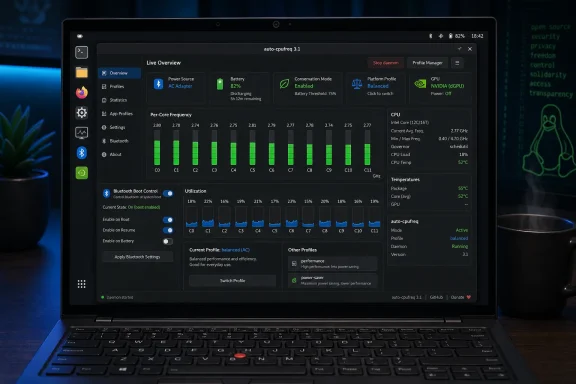
 Overview: A Power Tool Becoming Easier to Trust
Auto-cpufreq is an open-source Linux CPU speed and power optimizer aimed chiefly at mobile systems. Its daemon watches operating conditions and applies different policies depending on whether a machine is on AC power or battery, with controls for CPU governors, Turbo behavior, frequency bounds, and selected platform-level power settings. The project describes its default behavior as automatically making decisions from variables including CPU utilization, temperature, and system load. Its documentation also makes clear that advanced users can define separate charger and battery configurations.
That purpose places auto-cpufreq in a complicated part of the Linux stack. Modern notebooks may expose CPU frequency scaling through intel_pstate, amd-pstate, or acpi-cpufreq; vendor firmware can add its own thermal and performance modes; and desktop environments may run a separate power-profile service. A utility that changes the wrong setting at the wrong time can leave performance unnecessarily constrained, consume more power than expected, or fight with another daemon.
Version 3.1.0 is therefore more than a small GUI refresh. It targets two common pain points: the difficulty of seeing what the tool is doing, and the unpredictability that can result when Linux hardware exposes familiar controls in unfamiliar locations. The release adds graphical monitoring and Bluetooth controls, expands Lenovo battery conservation support, introduces a policy for respecting manual platform-profile changes, and resolves a collection of bugs that could affect both performance and battery drain. Phoronix’s release coverage independently highlights the same combination of GUI monitoring, Bluetooth management, Lenovo improvements, platform-profile control, and broader sysfs compatibility.
For Windows users experimenting with Linux on a notebook—whether through dual booting, a retired Windows laptop, or a gaming system running a Linux distribution—this is relevant because it illustrates a recurring Linux reality: effective power management often requires an awareness of the kernel, firmware, desktop environment, and vendor-specific drivers all at once. Auto-cpufreq 3.1 attempts to reduce that complexity without pretending it has disappeared.
GUI Monitoring Brings the Most Important Improvement
Visibility is now part of the product
The headline feature is monitoring mode in the GTK GUI. Earlier releases already offered detailed command-line monitoring, but version 3.1 puts system and CPU information into the graphical application. That change gives users a much clearer way to inspect per-core CPU frequency, utilization, and temperature without committing to an always-running auto-tuning daemon. UbuntuHandbook’s examination of the update says the mode presents per-core speed, utilization, and thermal data in a layout comparable to the command-line monitor view.
This matters because power tuning is notoriously hard to evaluate from battery percentage alone. A notebook that appears to have poor endurance could be dealing with a CPU stuck at an elevated minimum frequency, an overactive discrete GPU, firmware set to a performance-oriented thermal profile, a problematic peripheral, or a simple workload spike. A user needs a way to distinguish between observed behavior and assumed behavior before applying more aggressive settings.
The new GUI monitoring mode changes auto-cpufreq from being only a policy engine into a more approachable diagnostic tool. That is particularly useful for users who want to retain GNOME’s or KDE’s native power management but still investigate system behavior. A monitor-only use case is less invasive than installing another system service that alters policy continuously.
The distinction between monitoring and controlling matters
There is an important conceptual separation here. Viewing CPU frequency does not mean a tool is controlling it, and setting a performance or powersave policy does not guarantee the CPU will always run at a fixed clock rate. Linux CPU scaling works through policy objects, drivers, governors, thermal limits, and hardware-level decisions. The kernel documentation notes that the performance governor requests the highest frequency allowed by the current maximum policy limit, while powersave requests the lowest frequency allowed by the current minimum limit. The Linux kernel’s CPU performance-scaling documentation stresses that those requests are bounded by configured limits.
That nuance is precisely why a graphical monitor is valuable. It can reveal whether a selected configuration is producing the expected direction of travel—lower activity and lower frequencies on battery, or sustained headroom under load while plugged in—without promising a simplistic one-to-one mapping between a profile label and real-world clock speeds.
It also helps users avoid a familiar mistake: treating the highest reported frequency as inherently bad for battery life. Modern CPUs often boost briefly to finish work sooner, then return to low-power states. The relevant question is not simply whether a peak occurred, but whether the system remains elevated without a workload that justifies it. Auto-cpufreq’s new monitoring presentation gives users a better starting point for that judgment.
A welcome GUI enhancement, but not a complete performance laboratory
The monitor mode is a significant usability win, although it should not be mistaken for an exhaustive hardware telemetry suite. The Linux platform-profile interface itself is explicitly designed for selecting a profile rather than reporting every condition that may prevent that profile from reaching its theoretical performance target. Heat from other components, room temperature, airflow, and firmware constraints can still limit results. The kernel’s platform-profile documentation makes that limitation explicit.
That is not a criticism unique to auto-cpufreq. It is a constraint of the underlying system. But it is a good reason for the project to keep improving its explanations around monitored values: a core frequency, a selected governor, and a platform profile each represent different layers of the power-management picture.
Bluetooth Controls Move Into Advanced Settings
Auto-cpufreq 3.1 also adds Bluetooth controls to the GUI, matching a capability previously exposed through command-line options. The project’s release notes identify the change as both a GUI addition and a fix for Bluetooth configuration updates involving commented lines. The v3.1.0 changelog lists the improvement as a standalone feature.
The practical objective is straightforward: allow users to choose whether Bluetooth should be enabled at boot. For someone who rarely uses wireless headphones, mice, controllers, or phones with a Linux notebook, keeping Bluetooth off until it is needed can remove a small but unnecessary radio workload. For a user who relies on Bluetooth peripherals every day, the same option prevents the tool from making an inconvenient default choice.
Auto-cpufreq’s documentation distinguishes between bluetooth_boot_off and bluetooth_boot_on. The former turns Bluetooth off on boot while still permitting manual re-enablement later; the latter restores an enabled-on-boot preference. The project’s command documentation explains that the boot-off behavior is intended to stop GNOME from automatically switching Bluetooth back on after a reboot or resume event.
Convenience should not become a false battery-life promise
Bluetooth management is useful, but it should be framed correctly. Disabling the radio may contribute to reducing idle draw on some systems, yet it is not a universal answer to poor Linux battery life. A CPU locked to a high ceiling, a discrete GPU that refuses to enter a deep idle state, a display refresh rate set too high, or an application preventing sleep can have a much larger effect.
The strength of auto-cpufreq’s GUI approach is that Bluetooth control sits beside system monitoring and power options rather than being sold as a miracle switch. Users can make the change, observe behavior, and decide whether it meaningfully affects their own hardware.
Lenovo Conservation Mode Support Becomes Less Fragile
Moving beyond a single hardcoded control path
The release strengthens support for Lenovo’s conservation_mode capability. Instead of relying on one fixed path to locate the relevant file, auto-cpufreq now searches common locations, a change intended to improve support across a broader variety of Lenovo systems. The merged implementation discussion says the new lookup scans known paths specifically because IdeaPad and Legion systems can expose their control files differently.
This is an unglamorous but important correction. Linux laptop support is often uneven not because a feature is conceptually unsupported, but because vendors, ACPI drivers, firmware revisions, and model families expose that feature through different interfaces. A program that assumes a single location can fail silently on a laptop that otherwise has fully functional kernel support.
Auto-cpufreq already documents battery threshold support for Lenovo ThinkPad, IdeaPad, general Lenovo laptop, and Legion families, subject to the right ACPI kernel driver being installed. It also supports an IdeaPad-oriented conservation setting that limits the battery’s upper charge level to roughly the 60–80 percent range depending on model behavior. The project’s battery-threshold guide details the supported device classes and conservation mode configuration.
Why conservation features are valuable
Keeping a lithium-ion battery at or near full charge for extended periods can be undesirable for users whose laptop spends most of its time connected to power. Lenovo’s conservation approach is intended to reduce that pattern by capping the charge level. For a desktop-replacement notebook, a gaming laptop, or a work system that lives on a docking station, the feature can matter more to long-term battery condition than CPU governor switching does.
The caveat is that battery charging thresholds are firmware- and driver-dependent. A configuration that works perfectly on one Lenovo series may not exist, may be exposed differently, or may be overridden by another utility on another model. Auto-cpufreq warns that competing battery-health controls can conflict and may even leave a battery unable to charge as expected. Its documentation specifically cautions against running a separate battery-preservation feature alongside its own threshold management.
That warning deserves emphasis. The expanded lookup in 3.1 improves the odds of detecting the right control, but it does not eliminate the need to verify the outcome. Users enabling thresholds should inspect the actual configured values, test charger behavior, and retain a record of their prior defaults.
enforce_platform_profile Gives Users Back Their Hardware Shortcut
A new option for a real laptop ownership problem
The most technically interesting new setting is enforce_platform_profile. It governs whether auto-cpufreq should continually reapply its selected platform profile or only set that profile when the machine transitions between AC and battery states. The feature pull request explains that the setting defaults to true, maintaining the project’s prior behavior.
On systems with vendor hotkeys—such as the Fn+Q shortcut found on some Lenovo Legion hardware—that distinction is substantial. Before this option, a user could press a hardware key to select a temporary firmware profile only to have auto-cpufreq overwrite the choice during its next daemon cycle. The implementation discussion says that loop occurs every two seconds, leaving little opportunity for a manual override to persist. The project’s merged design notes describe the prior behavior and the motivation for changing it.
With the setting left at its default:
enforce_platform_profile = true
auto-cpufreq continues to insist on the profile declared in its configuration. That is appropriate for users who want consistent, centrally managed behavior and do not intend to use vendor hotkeys.
With the setting disabled:
enforce_platform_profile = false
the program applies the configured profile during an AC-to-battery or battery-to-AC transition, then permits a manual override to remain active until the next transition. The project supports configuring this separately under charger and battery sections, enabling a laptop owner to preserve strict behavior on AC while allowing manual control on battery, or vice versa. The configuration example and behavior definition lay out that per-profile design.
Platform profiles are broader than CPU frequency
This option is valuable because a platform profile can influence much more than processor clocks. The Linux kernel describes platform-profile selection as a generic sysfs interface for system mechanisms that dynamically adjust characteristics such as performance, temperature, fan behavior, and related hardware settings. The official kernel documentation also notes that profiles commonly express a bias toward either low-power operation or performance.
In other words, an auto-cpufreq configuration might be asking for a lower-power CPU policy while the laptop firmware is simultaneously configured for an aggressive performance profile. Or the opposite may be true. The new setting acknowledges that users may need to negotiate between automated policy and immediate manual control rather than choosing one forever.
This is a well-judged addition because it preserves the project’s original automation-first behavior while making room for vendor-specific workflows. It does not force users into an all-or-nothing choice.
Fixes That Matter More Than Their Changelog Labels Suggest
Frequency limits now follow Turbo updates
Auto-cpufreq 3.1 changes the order in which frequency limits and Turbo state are applied. The release fixes an issue where CPU frequency limits could be set before Turbo behavior was updated, leaving the maximum frequency stale on certain Intel configurations. The merged fix explains that scaling_max_freq could remain at a non-Turbo cap even after Turbo had been enabled.
The corrected logic recomputes limits on each relevant call, checks live values, and applies frequency settings after Turbo decisions. This is the sort of repair that users may never see in the GUI, but they may absolutely feel it: a system configured for higher performance while plugged in should not remain quietly limited by an old ceiling.
It is also a useful reminder that Linux power tuning is stateful. Charger status, frequency limits, Turbo policy, and driver behavior can change independently. Correct automation depends as much on applying settings in a sensible sequence as it does on choosing the settings in the first place.
Corrected EPP and EPB fallback reporting
The update also fixes incorrect fallback profiles reported by auto-cpufreq --stats for Energy Performance Preference (EPP) and Energy Performance Bias (EPB). The official release notes list the correction among the 3.1 improvements.
On supported Intel systems, EPP allows software to provide a performance-versus-efficiency hint to the processor’s hardware-managed P-state logic. The kernel exposes this through the energy_performance_preference attribute and translates supported strings or numerical values into the processor’s EPP or EPB mechanism. The kernel’s intel_pstate documentation explains the relationship between the user-space hint, EPP, and EPB.
A stats display that reports the wrong fallback state can mislead users into changing configurations that were not actually responsible for the observed behavior. Fixing the report is therefore not cosmetic. Accurate observability is a prerequisite for safe tuning.
Better behavior on unconventional systems
Version 3.1 improves power-consumption calculations for systems that lack a power_now file and adds support for machines without the conventional /sys/class/power_supply/ sysfs directory. The release notes identify both compatibility changes.
This broadens the project’s resilience on desktops, unusual embedded-style hardware, devices with atypical power interfaces, and systems where a battery is simply not present. It also avoids a common open-source pitfall: assuming that every target machine matches the developer’s laptop.
The improvement should not be read as a promise of full battery telemetry on every device. Sysfs interfaces remain hardware- and driver-dependent. Still, graceful operation is materially better than a crash or a missing GUI simply because one expected path is absent.
Avoiding needless NVIDIA GPU wake-ups
One of the most practical power fixes prevents auto-cpufreq from writing a platform profile again when the requested profile is already active. The change was prompted by a bug report involving an NVIDIA discrete GPU held in a higher-power state, draining battery, when platform-profile configuration was repeatedly applied. The merged pull request links the unnecessary writes to a case in which an NVIDIA dGPU could be kept at D0 power state.
This is a strong example of why “write the desired setting every loop” is not always harmless. On hybrid graphics laptops, a seemingly unrelated firmware or ACPI interaction can wake hardware that would otherwise remain idle. The fix is modest in code terms but potentially meaningful for battery life on affected systems.
Installation Choices and the Conflict Problem
Auto-cpufreq remains available through multiple routes, including the project’s Git-based installer, Snap, the Arch User Repository, Gentoo’s GURU repository, and NixOS-oriented packaging. The project’s documentation says its own installer is the preferred route for users who want the full graphical experience. The installation section also documents AUR, NixOS, and Gentoo options.
The Snap package remains an important exception. The project states that its command-line functions work, but the GUI is unavailable because Snap confinement prevents the needed integration. The Snap guidance explicitly recommends the project installer for users who need the graphical interface.
Existing installations can be updated with:
sudo auto-cpufreq --update
According to the project documentation, this command clones the current repository revision, runs the installer process, and redeploys the daemon. The update instructions note that the default clone location is /opt/auto-cpufreq/source.
Do not stack competing policy engines
The most important operational warning remains unchanged: do not casually run multiple CPU and power-policy tools at the same time. Auto-cpufreq recommends removing TLP when both would manage CPU frequencies, warning that overlapping controls can yield unwanted results, including overheating. The project’s compatibility guidance similarly identifies GNOME Power Profiles as a potential conflict and says its installer disables the service when detected.
This does not mean every Linux laptop must abandon its desktop environment’s power-management framework. It means users should decide which layer owns CPU and platform policy. A clean setup might involve GNOME Power Profiles alone, auto-cpufreq alone, or a deliberately tested advanced configuration—but not several autonomous daemons racing to write the same sysfs values.
Before installing the daemon, a disciplined approach is preferable:
- Use the new GUI monitor mode first to understand normal behavior.
- Identify existing services such as
power-profiles-daemon, TLP, TuneD, or vendor utilities. - Choose one primary policy engine for CPU and platform management.
- Enable battery thresholds only after confirming kernel-driver support.
- Test AC and battery behavior separately, including sleep/resume and external-display scenarios.
- Keep configuration changes incremental so that any regression can be traced to a specific setting.
The Bottom Line
Auto-cpufreq 3.1 is a mature release because it improves both control and restraint. The new GTK monitoring mode makes the utility easier to inspect before trusting it with system-wide automation. Bluetooth controls bring another routine convenience into the GUI. Lenovo conservation-mode discovery improves a feature that is especially important for docked laptops, while enforce_platform_profile recognizes that firmware hotkeys and user intent should not always be overridden by a background loop.
The fixes are equally consequential. Correcting stale CPU frequency caps after Turbo changes, reporting EPP and EPB states accurately, handling nonstandard power-supply systems, and preventing unnecessary platform-profile writes that can wake NVIDIA discrete graphics all address the unglamorous edge cases that determine whether laptop power management feels dependable.
For Linux laptop users, auto-cpufreq 3.1 is not a promise of universal battery-life gains. Hardware, firmware, workloads, graphics drivers, and desktop services still shape the outcome. But it is a carefully targeted update that makes the project more transparent, more respectful of manual control, and better prepared for the real-world variation of modern Linux hardware.
