
For Android travelers, the significance is not simply that another flight tracker has arrived. Plenty of services can show an aircraft moving across a map. Aviate’s more ambitious premise is that a flight should be treated as a broader travel event: one that begins with packing and documents, continues through terminal navigation and gate changes, and ends in a personal travel log.
That ambition makes Aviate worth watching. It also means the app arrives with a longer list of promises—and more areas where travelers should set realistic expectations—than a narrowly focused flight-status utility.
 An Android-Native Answer to an iPhone Travel Favorite
The comparison to Flighty is unavoidable. Flighty has established a strong reputation among Apple users by placing high-value flight information—delay forecasts, inbound aircraft status, gate changes, airport disruptions, and trip sharing—into a fast, polished interface. Its official App Store listing promotes features such as delay reasoning, an extended “Where’s My Plane” view, airport intelligence, live updates, calendar and TripIt integration, personal flight history, and private flight sharing. Flighty’s App Store page also positions the product as a global, real-time tracker rather than a tool tied to any one airline.
Flighty remains confined to Apple’s ecosystem, with iPhone, iPad, Mac, and Apple Watch support listed in its App Store entry. That leaves an opening on Android for an app that can deliver similar convenience without feeling like a second-best port of an iOS design. Aviate’s comparison page explicitly targets that gap, arguing that Android users have lacked a dedicated Flighty-style experience built around Android conventions rather than copied from iPhone software.
Aviate’s developer, KLL Studios LLC, says it intentionally built for Android first because premium flight tracking has been underserved on the platform. The company identifies Aviate as a product of an independent studio led by Killian Lelong and describes it as a single-developer effort. Aviate’s company page frames this not as a limitation but as a product philosophy: features are shaped by the same airport frustrations encountered by the developer using the app.
That story gives Aviate a distinct personality. It is not trying to become a generic corporate travel portal or an airline-branded companion. It is trying to be a personal Android flight tracker with enough polish to feel at home on a Pixel, Galaxy, OnePlus, or other modern Android handset.
Material 3 Is More Than Surface-Level Styling
The most immediate difference between Aviate and many travel utilities is its visual direction. Flight tracking apps often favor dense aviation data, dark radar maps, or utilitarian screens packed with codes and schedules. Those approaches can be useful, but they do not necessarily make an app feel integrated with Android itself.
Aviate says it was built with Material 3, also known as Material You, and uses dynamic color, fluid transitions, and familiar navigation patterns designed to make the app feel native to Android. The developer’s overview specifically identifies Material 3 as the design foundation. That matters because Material 3 is not merely a color palette; it is a system for hierarchy, adaptable theming, touch targets, motion, and readable information layout.
For an app used under travel stress, that design decision could prove important. A traveler checking a gate change while walking through a crowded terminal does not need visual novelty. They need a large, clear answer. A widget should convey the next departure and countdown at a glance. A notification should make it obvious whether a flight has merely shifted by a few minutes or whether a gate, terminal, or itinerary has changed.
Aviate’s public product page says the core experience includes:
- Real-time flight status
- Gate, terminal, weather, and delay information
- Flight performance and delay statistics
- Customizable trip checklists
- Interactive route maps
- Calendar synchronization
- Boarding-pass scanning and storage
- Shareable flight status
- Personal travel history and statistics
The company also says its flight screen shows the latest information it has received, while directly advising users to confirm time-sensitive details with the airline or airport. That caveat appears on Aviate’s official site and is a responsible one. Design can make information easier to consume, but it cannot eliminate the operational reality that flight data can change suddenly, vary between providers, or appear first in an airline’s own systems.
Widgets and Wear OS Fill an Important Android Gap
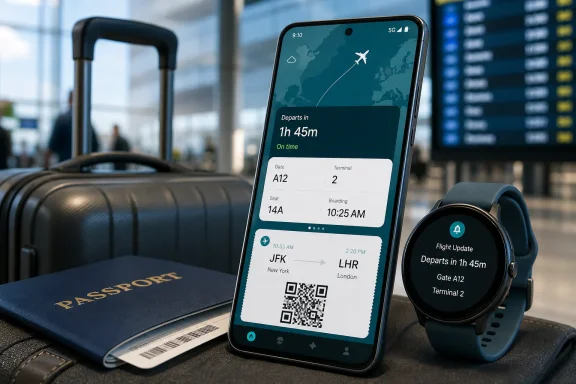
Aviate’s Google Play listing says the app includes home-screen widgets that surface upcoming flights and countdowns without requiring users to open the full application. It also lists a companion app for Wear OS. The Play Store description positions those features as central parts of the product rather than afterthoughts.
This is exactly the kind of Android-specific integration that makes the launch more interesting than a simple Flighty clone. Android users have long valued glanceable information: lock-screen cards, persistent notifications, widgets, watch complications, and flexible home-screen setups. A serious Android flight tracker should take advantage of that flexibility.
Aviate’s paid tier adds live notification behavior and, on supported Android versions, a Now Bar style presentation. According to the developer’s pricing page, the user explicitly enables live tracking for a chosen flight; an ongoing notification can then continue polling after the main app screen is closed, and a visible Stop control ends that tracking session.
That opt-in model is a sensible implementation on paper. It acknowledges the value of persistent updates while giving users a direct way to control a potentially battery- and data-intensive feature. The real test, however, will be whether alerts are timely, accurate, and restrained enough to be useful during disruptions without turning a phone into a noisy travel companion.
Aviate Wants to Manage the Whole Trip, Not Just the Aircraft
The strongest case for Aviate is not necessarily its map. It is the way the app attempts to bring multiple small travel tasks together.
A flight is rarely just a flight. It comes with boarding passes, luggage lists, airline accounts, lounge plans, travel documents, pickup coordination, parking details, and time-sensitive terminal decisions. Users usually handle those with a mix of airline apps, Google Wallet, calendar entries, notes apps, browser tabs, email searches, and screenshots.
Aviate is trying to consolidate some of that fragmented workflow.
Boarding Passes and Travel Documents
The app can add flights by airline and flight number or by scanning boarding-pass barcodes using the phone camera. Aviate says it supports AZTEC, PDF417, and QR formats, storing a local boarding-pass copy in the app’s private storage. For sensitive fields stored on its servers, the company says it uses AES-256-GCM encryption. Aviate’s FAQ also says the boarding pass can increase screen brightness automatically to improve barcode scanning at a gate or lounge.
That feature set is compelling, especially for people who have experienced a buried airline email, a forgotten screenshot, or a boarding pass that would not load because of weak airport Wi-Fi. The possibility of offline access is particularly valuable. Aviate’s Play Store listing says boarding passes remain accessible without signal and can be enlarged for easier scanning.
Still, users should view a third-party boarding-pass archive as a convenience layer—not the only source of travel documentation. Airline apps and original boarding passes remain the essential fallback, particularly for international travel, irregular operations, seat reassignment, or a last-minute itinerary change. The same caution applies to visas, passports, identity documents, and any document that an airport, airline, or border authority must accept in a specific format.
Checklists, Documents, and Parking Details
Aviate also includes trip checklists, document storage, and trip organization. The Play Store page says users can attach flights, files, checklists, and parking information to trips, while its calendar integration can update events when flight times move. Google Play’s Aviate listing further describes reusable packing templates and custom lists with progress tracking.
That is a practical direction. A simple packing checklist may not sound like an advanced flight-tracking feature, but it can be more useful than another animated globe for the traveler who needs a reminder to pack a passport, medication, charging cable, power bank, or adapter.
The broader issue is focus. As Aviate adds document management, travel statistics, airport guidance, airline loyalty information, jet lag planning, groups, public profiles, and even aviation trivia, it must avoid becoming bloated. The best travel companion apps make complex journeys feel simpler; they do not force people to learn a new miniature operating system before departure.
Airport Navigation and Recommendations
Aviate Pro also includes indoor airport maps, gate navigation, walking-time estimates, and recommendations for restaurants and lounges near the user’s gate. Aviate’s feature overview says these maps are meant to help travelers find amenities and plan a route through unfamiliar terminals.
This could be one of Aviate’s most useful differentiators if map coverage and terminal data are broad and current. Anyone changing planes at a large airport knows that “Terminal 2” and “Gate B24” do not answer the practical question: How far away is it, and is there time to stop for food?
However, terminal layouts, concession availability, gate assignments, and walking routes are exceptionally changeable. The value of this feature depends on how current the underlying data remains and how clearly Aviate labels uncertainty. The app’s own guidance to verify time-sensitive information with airlines and airports should apply here as strongly as it does to departure times.
Flight Tracking: The Essential Test Still Comes Down to Data
Aviate’s paid features include several capabilities that aviation-minded users will recognize immediately: live flight maps, aircraft tracking before departure, gate prediction, delay predictions, airport activity, weather tools, and LiveATC access.
The headline feature is Where’s My Plane, which allows a passenger to track the aircraft expected to operate their flight before boarding. Aviate lists this as a Pro capability alongside live plane position on a map. The Play Store page also lists gate prediction, flight replay, tower-radio access, and a layover planner among the premium functions.
The concept is familiar because it has been a major differentiator for Flighty. Flighty Pro says it tracks multiple flights around each one entered by the user and uses those data relationships to identify inbound-aircraft issues, delay forecasts, and other disruptions earlier. Flighty’s Pro explanation lists push alerts, Live Activities, delay predictions, Where’s My Plane, connection assistance, and automation features such as email and TripIt import.
Aviate does not need to duplicate every part of Flighty’s data strategy to be useful. But the comparison raises the standard. A flight tracker earns trust in the hard cases:
- When the airline has not yet explained why a flight is delayed.
- When an inbound aircraft is late and the scheduled departure still looks deceptively normal.
- When a gate changes during a connection.
- When a cancellation or equipment swap affects travel plans.
- When airport congestion, weather, or air-traffic restrictions create a rapidly evolving situation.
No third-party consumer application should be treated as the definitive authority for operational instructions. For gate closures, boarding deadlines, rebooking, baggage status, and final cancellation decisions, the airline remains the authoritative channel. Yet a strong independent tracker can provide context earlier and present it in a more usable way.
Aviate’s own site does not overstate this point. It says the app monitors a flight from departure to arrival and shows the newest status it has received, but again advises confirmation with the airline or airport for time-sensitive details. That wording is worth taking seriously, particularly while the public release is still new.
Pricing Is Flexible, but Prospective Lifetime Buyers Should Be Measured
Aviate’s monetization is one of its more consumer-friendly ideas. The free tier is not a stripped-down demo. According to the developer, it includes real-time flight tracking, gate and terminal updates, delay and cancellation alerts, boarding-pass barcode scanning, encryption for sensitive server-side fields, checklists, widgets, route maps, calendar sync, in-app flight sharing, and an ad-free experience. Aviate’s pricing page says these free features are intended to remain available without ads.
That is an unusually broad foundation for a newly launched flight companion. It lets users evaluate the basic experience before deciding whether they need premium monitoring and travel tools.
The Pro tier gates the more expensive, data-heavy, or specialized features:
- Live tracking notifications and supported Now Bar activity
- Where’s My Plane
- Real-time aircraft maps
- Airport indoor maps and AI-assisted recommendations
- Walking-time estimates
- Shareable web links for non-users
- Custom app icons
- Passport achievements
- In-app LiveATC feed browsing and playback
Aviate’s current official pricing page lists a $1.29 one-week Pro Pass, $2.49 for two weeks, $2.99 for three weeks, $39.99 annually, and $199.99 for Lifetime Pro. It also says annual subscribers receive their first month for $0.99. The official pricing FAQ states that passes can be stacked for up to three months and that subscription management occurs through Google Play.
There is a small but notable pricing discrepancy in launch coverage. The July 27 launch report listed the first weekly pass at $1.99, while Aviate’s current pricing page lists it at $1.29. The annual, two-week, three-week, and lifetime figures align. Travelers should rely on the price displayed in the app’s purchase screen at checkout, since regional pricing, promotions, and post-launch adjustments can change storefront offers.
The short-term passes are arguably Aviate’s smartest commercial decision. A traveler taking a once-a-year vacation may reasonably want live notifications, aircraft context, and airport navigation for a single week without adding another annual subscription to their budget. A three-week pass also makes sense for a long international trip.
The $199.99 lifetime purchase requires more caution. Aviate says Lifetime Pro includes access to Pro features “for as long as Aviate exists.” Its pricing page is clear on that condition. Because Aviate is made by a small independent developer and has just transitioned from alpha to public availability, buyers should not interpret “lifetime” as a guarantee of a fixed service horizon, unchanged feature set, or permanent availability of every third-party data source. That is not an indictment of the product; it is simply the practical reality of paying a substantial one-time fee for an online service whose value depends on ongoing infrastructure, aviation data, platform support, and maintenance.
The sensible order is straightforward:
- Use the free tier on an ordinary upcoming trip.
- Try a short Pro Pass when the added features have real value.
- Evaluate alert accuracy, boarding-pass reliability, battery impact, map usefulness, and watch integration.
- Consider annual or Lifetime Pro only after the app has become a routine part of travel.
Privacy Promises Deserve a Close, Specific Reading
Aviate places privacy near the center of its marketing. Its developer says the service has no ads, does not use behavioral tracking, and encrypts server-stored boarding-pass fields using AES-256-GCM. Aviate’s about page also says optional crash diagnostics were made default-off in a prerelease version.
Those are encouraging commitments for a travel app, where a single account can potentially reveal itineraries, airports, timing, boarding information, frequent-travel patterns, and social connections. The absence of advertising reduces the incentive to turn travel behavior into a targeting profile, while encryption claims are relevant for stored boarding-pass data.
But “privacy-first” should not be read as “collects nothing.” Google Play’s developer-provided Data safety section says Aviate may share location with third parties and may collect location, personal information, and several other categories of data. It also states that data is encrypted in transit and that users can request deletion. The Google Play data-safety disclosure notes that these practices are supplied by the developer and may vary by use, region, and age.
There is no necessary contradiction between a claim of no behavioral advertising and a disclosure that an app handles location or personal data. Flight tracking, airport navigation, weather, sharing, airline-account connectivity, boarding passes, and notifications inherently need information to work. Still, travelers should make informed choices:
- Grant location access only if airport navigation or location-aware functionality is useful.
- Avoid storing documents that do not need to be in the app.
- Review sharing settings before sending public flight links.
- Understand that LiveATC is an independent service with its own availability, regional, privacy, and terms considerations, as Aviate notes in its pricing documentation.
- Use a device lock, biometric protection, and secure account credentials, especially when boarding passes or itinerary details are stored locally.
This is not unique to Aviate. It is the baseline discipline required for any application that becomes a container for travel identity and movement data.
The Early Verdict: A Promising Android Flight Companion, Not a Replacement for Airline Operations
Aviate’s public release is good news for Android users who have wanted a polished, modern flight tracker that embraces the platform rather than treats it as an afterthought. Its free tier is unusually capable, and its blend of real-time status, boarding-pass handling, widgets, Wear OS support, checklists, travel statistics, and optional advanced tracking is far more ambitious than a bare-bones arrivals-and-departures app.
The app’s strongest potential advantage is not that it can imitate Flighty’s best-known ideas. It is that Aviate can combine those ideas with Android-native interaction models and broader trip-management features. Material 3 design, flexible Pro passes, offline boarding-pass access, customizable widgets, and an explicit focus on Android all make the product feel purpose-built rather than transplanted.
There are risks appropriate to a young, independent travel service. Aviation data quality must prove itself over time. Premium features need to justify their cost with dependable, actionable updates. Airport maps, predictions, public sharing, and live monitoring must remain useful without compromising clarity, battery life, or privacy. And no flight tracker—Aviate included—should displace the airline’s own app or official airport communications when plans change.
For now, Aviate earns attention because it provides something Android travelers have not often received: a serious, visually cohesive Android flight tracker and travel companion that is willing to compete on both design and depth. The free plan makes it easy to test, while the short Pro passes provide a low-risk way to see whether advanced alerts and airport tools improve a real journey.
