
The July 30 guidance from the Microsoft Workloads on AWS blog positions FSx for ONTAP as iSCSI block storage for SQL Server on Amazon EC2. AWS recommends keeping active database files on its SSD-backed Performance Tier while using the Capacity Pool for cold backups, snapshots, and read-only archive filegroups.
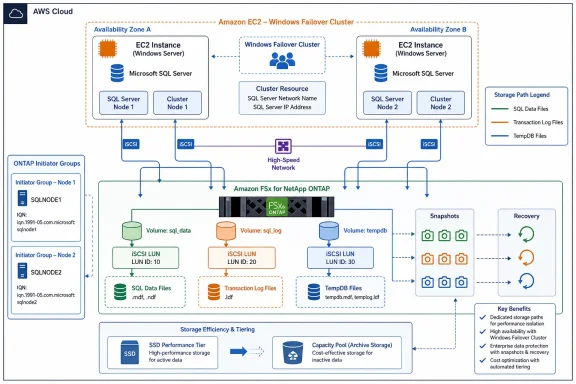 The 1:1 Volume-to-LUN Rule Is About Recovery, Not Just I/O
AWS’s central recommendation is a one-to-one relationship between ONTAP volumes and LUNs. That arrangement makes storage administration more granular, but the larger benefit is operational: ONTAP snapshots and deduplication work at the volume level.
For a conventional SQL Server database, the .mdf data file and .ldf transaction log should therefore live on separate volumes and separate LUNs. The data path is dominated by parallel, random I/O during checkpoints, while SQL Server writes a transaction log sequentially. Combining them forces very different I/O patterns to share the same storage container and complicates restores.
The snapshot advantage is equally important. AWS says a volume-level restore can complete in minutes regardless of database size, but only for the contents of that volume. A shared volume holding many databases may be simpler to provision, yet it sacrifices the ability to restore one affected database without involving its neighbors.
For SQL Server instances hosting hundreds of databases, AWS suggests a compromise: give the most SLA-sensitive databases dedicated data and log volumes, then pool lower-priority databases onto shared data and log volumes where broader recovery scope is acceptable.
TempDB Gets Its Own Decision Tree
TempDB should be placed on a dedicated volume and LUN rather than alongside user data or transaction logs, according to AWS. The reasoning will be familiar to SQL Server administrators: sorts, hash joins, temporary objects, and version-store activity can make TempDB unpredictable and noisy.
AWS offers a rough sizing range of 10% to 25% of total database size for OLTP-oriented workloads, but the more notable caveat is hardware-specific. When an EC2 instance includes local NVMe instance storage, AWS recommends considering instance store for TempDB to achieve better performance.
That recommendation requires a corresponding availability plan. Instance-store data is ephemeral, so TempDB is a natural candidate because SQL Server recreates it at startup; user databases and logs do not have the same luxury.
SSD Capacity Needs Headroom Before Snapshots Arrive
The AWS blog recommends sizing the FSx for ONTAP SSD Performance Tier to 1.35 times the total database size. The additional 35% is intended to preserve room for snapshots, clones, and normal operational growth rather than treating the provisioned SSD tier as a fully consumable database target.
Read-only or inactive filegroups can be an exception to the “keep it on SSD” rule. FSx for ONTAP applies tiering at the volume level, so archive-oriented filegroups need their own volumes if administrators want them to move economically into the Capacity Pool.
AWS’s recommended division is straightforward:
- Active data volumes and transaction logs should use the
nonetiering policy and remain on SSD. - Snapshot-heavy data volumes can use
snapshot-onlyto move snapshot blocks after the cooling period. - Read-only archive filegroups can use
auto, while fully archival volumes can useall.
The practical constraint is that a tiering policy cannot distinguish individual SQL Server files inside one volume. Database architecture has to establish that isolation first.
Scaling Can Mean Splitting SQL Server Storage Across File Systems
AWS also advises that SQL Server workloads exceeding a single FSx for ONTAP file system’s capacity, throughput, or IOPS profile can be distributed across multiple file systems. A data-filegroup estate with random-I/O pressure can be assigned to one file system, while sequential transaction-log traffic is placed on another tuned for throughput.
The latest FSx for ONTAP Generation 2 configurations support up to six high-availability pairs and 1 PiB of SSD Performance Tier capacity, though scale-out is limited to Single-AZ 2 deployments. Multi-AZ 2 supports scale-up rather than scale-out, a distinction that matters for teams designing around availability zones and future growth.
For clustered SQL Server deployments, AWS further stresses that iSCSI access must be controlled through ONTAP initiator groups. In a two-node SQL Server Failover Cluster Instance, both Windows nodes’ IQNs belong in the same igroup so they can access the mapped shared LUNs without exposing them broadly to other EC2 instances.
The larger takeaway is not that FSx for ONTAP changes SQL Server’s storage fundamentals. It reinforces them: isolate unlike I/O, map recovery boundaries to business boundaries, and decide where archival data belongs before the database estate becomes too large to reorganize cleanly.
