

The announcement, published by Microsoft Digital on the company’s Inside Track site, describes Managed Cloud Labs—formerly MyWorkspace—as an internal Azure service used by support, engineering, testing, release, and solution-architecture teams. These are not disposable demo VMs in the narrow sense: a lab can reproduce a customer’s enterprise configuration, hold a support investigation in progress, or provide a test bed for release validation. That makes an indiscriminate shutdown policy risky even when machines spend much of their time idle.
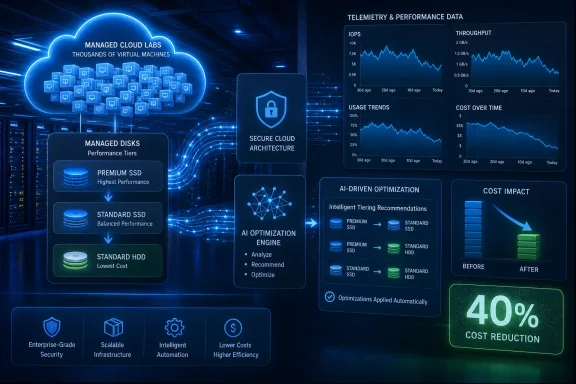
Microsoft’s stated solution is a telemetry-driven workflow hosted on Azure AI Foundry. It examines 30 days of disk activity, including read and write operations, IOPS, throughput, historical usage trends, configuration information, workload behavior, and cost signals. It then recommends—or, after validation, applies—a lower-cost disk SKU or performance tier where the evidence indicates the higher tier is unnecessary.
The important detail for Azure administrators is less glamorous than the AI branding: Microsoft is attacking provisioned storage performance, not simply turning off unused compute. A stopped VM can stop consuming compute charges, but its OS disks and data disks remain billable. In a large lab fleet where teams set quotas for their largest conceivable environment, that distinction can turn conservative provisioning into a persistent storage bill.
Premium disk performance is the cost lever
Azure managed disks are priced in part around provisioned capacity and performance. For Premium SSD disks, the selected performance tier governs available IOPS and throughput, and Azure bills at that tier while it remains selected. Microsoft’s Azure documentation also makes clear that a Premium SSD performance tier can be lowered without changing disk capacity or taking the disk offline.
That gives Microsoft Digital a relatively safe optimization target. A support lab may need a 1 TiB disk to preserve an image, database, logs, or reproduction data, while rarely coming close to the IOPS and throughput associated with a high Premium SSD tier. Reducing capacity would risk running out of space; lowering a performance tier changes a separate part of the price-and-performance contract.
Microsoft says its broader Managed Cloud Labs estate has reduced premium-disk deployment from 95% to about 16% while hosting the same scale of labs. It also says the platform now operates at 20% to 30% lower cost. Those are substantial figures, but they describe different measures: premium-disk deployment share, total platform cost, and MCAPS storage cost are not interchangeable.
A fall from 95% to 16% in premium-disk usage does not mean storage cost fell by 83%, and it does not prove that the remaining 16% is the only performance-sensitive workload. Azure disk prices vary by disk size, redundancy, tier, region, transaction behavior, and whether on-demand bursting is enabled. Some workloads also genuinely require premium or higher-end disk options, particularly database, transaction-heavy, and consistently low-latency workloads.
Microsoft has not said how much of the 40% MCAPS reduction came from tier changes within Premium SSD, how much came from migration to Standard SSD, or whether disks were detached, deleted, resized, or consolidated. That omission matters because the operational risk and reversibility differ sharply among those actions.
The 30-day window is a practical compromise, not a guarantee
The workflow’s stated method is to assess 30 days of disk telemetry before making a recommendation. Thirty days is long enough to capture ordinary weekly work patterns and short enough to keep recommendations current in a rapidly changing lab service. It is also a meaningful improvement over treating the maximum quota ever requested as each lab’s permanent requirement.
But a one-month observation period cannot, by itself, establish that every lower-tier recommendation is harmless. Customer-support and release-validation labs can be quiet for weeks and then become critical when a specific case, incident, patch, or scale test arrives. The system needs to distinguish a genuinely overprovisioned disk from a low-frequency environment whose rare peak is exactly why the premium tier was requested.
Microsoft says it has built multiple validation layers, policy-driven guardrails, pre-production testing, and phased deployment into the process. It began in observation mode, producing recommendations without changing resources, then expanded only after validating results across progressively larger VM populations. That is the correct operational pattern for automated infrastructure changes, particularly when the decision engine is acting on historical rather than application-declared requirements.
The company’s published account does not disclose the confidence threshold that triggers a recommendation, the excluded workload classes, the number of recommendations rejected by policy, or the rollback mechanism when a downgraded disk proves inadequate. It also does not say whether an affected team can pin a disk to a required SKU or prevent an automated tier change for a known workload.
Those details are not academic. In Azure, disk performance is only one part of the I/O path: VM-size limits, host caching configuration, queue depth, application patterns, and network constraints can all cap realized performance. Microsoft’s own Azure guidance cautions that a VM can constrain the IOPS delivered by attached disks. A low observed disk utilization number may therefore show that a workload did not need the disk tier—or that another bottleneck prevented it from using the tier in the first place.
Azure Advisor did not solve Microsoft’s disk problem
Microsoft says it already used Azure Advisor, Azure’s native recommendation service, before building the Managed Cloud Labs workflow. Azure Advisor can identify underutilized VMs and VM scale sets for shutdown or resizing, using machine-learning-based recommendations and recent utilization data. Microsoft’s new tool appears to fill a more specific internal gap: making disk-level performance decisions across a lab platform whose workloads are heterogeneous and whose owners have deliberately provisioned for exceptions.
That scope is important. This is not evidence that Azure Advisor has been replaced, nor is it a general customer-facing release of an autonomous cost-cutting product. Microsoft describes an internal service designed around Managed Cloud Labs’ own inventory, telemetry, business rules, and rollout controls. Its usefulness comes from being embedded in the platform that provisions the labs and understands the operational context around them.
The announcement also calls the system “AI-powered,” but does not identify the model or models, explain whether the core recommendation is statistical forecasting, classification, a large language model, or a hybrid rules engine, or quantify the model’s error rate. Azure AI Foundry is a platform for hosting and governing AI applications and models; its use does not reveal what decision method Microsoft Digital actually deployed.
For IT teams, that missing implementation detail changes the lesson. The reproducible part is not “send disk metrics to an AI model.” It is collecting reliable time-series telemetry, pairing it with configuration and billing data, establishing hard safety policies, generating recommendations before taking action, testing against representative workloads, and retaining a straightforward rollback path. Those controls—not the label attached to the model—are what prevent a FinOps project from becoming an incident generator.
The reported savings are real only within Microsoft’s stated boundaries
The strongest claim in the announcement is also its narrowest. Microsoft says MCAPS, the Customer and Partner Solutions organization that uses labs to replicate customer environments, has reduced Azure Storage costs by 40% since working with the system from January. The company attributes that savings to targeting underutilized disks for lower-cost SKUs while preserving required performance.
Microsoft separately says Managed Cloud Labs as a whole now runs at 20% to 30% lower cost, and that premium disk deployment has dropped to roughly 16%. The announcement does not provide a pre-optimization baseline, a measurement period for the platform-wide figure, an absolute spend amount, or an independently auditable savings calculation. It describes annual Azure resource cost as having reached eight figures, which establishes scale but leaves a wide range—from $10 million to nearly $100 million—behind the headline percentage.
There is no second public account of the rollout, its timing, or its performance results; Microsoft’s Inside Track post is the available source for the platform size, savings rates, and deployment process. The company also does not say whether the AI service is offered to Azure customers, whether Managed Cloud Labs customers outside Microsoft can use it, or whether the underlying workflow will appear in Azure Advisor, Cost Management, or another Azure product.
That makes this an internal operating result rather than a new Azure feature announcement. It is still useful evidence that Microsoft sees persistent disk provisioning—not idle VM compute—as a large enough cost problem to justify specialized automation at its own scale.
What Windows and Azure teams should take from the rollout
Windows lab administrators should be especially cautious about copying the percentage claims without copying the controls. Test and support environments are often purposefully oversized: a Windows Server domain reproduction may be modest most days but need high I/O during a SQL Server restore, Windows Update test pass, or customer-scale load simulation. A blanket move from Premium SSD to Standard SSD can turn a sensible cost program into intermittent and difficult-to-diagnose performance failures.
The safer pattern is to start with data disks attached to predictable, low-intensity workloads; separate capacity requirements from performance requirements; and set documented exceptions for databases, build systems, indexing workloads, and scale-testing environments. Recommendations should initially be reviewable changes, with baseline measurements before and after the move and clear ownership for reversing it.
Microsoft’s internal result shows why that work is worth doing: storage continues billing when the virtual machine is quiet, and a quota designed for the rarest peak can become the default price for every ordinary day. The concrete next step for Managed Cloud Labs is whether Microsoft publishes the guardrail and rollback details that would let other Azure operators judge whether its 40% storage-cost result is reproducible rather than merely impressive.