
As reported by Redmondmag, the Azure portal now exposes purpose-built agents for infrastructure work such as deployment, troubleshooting, optimization, resiliency, migration, and observability. Microsoft’s Azure Copilot documentation, updated August 10, confirms that direct selection is available from the New chat control in the Copilot pane: choose the arrow beside New chat, then select an available agent.
For IT teams, that creates a useful operational distinction. A broad prompt such as “why is this application slow?” can still go through Azure Copilot’s general conversational interface. But an engineer who already knows they are investigating an incident, drafting Terraform for a new environment, or reviewing resiliency can begin in the corresponding specialist workflow instead of trusting a general router to choose it.
The key administrative takeaway is that this is not an unrestricted new set of agents for every Azure user. Azure Copilot access remains governed at the tenant level, and Global Administrators can enable or disable individual agents in the Azure Copilot admin center. The new picker changes how approved agents are invoked; it does not bypass Azure RBAC, Privileged Identity Management, Azure Policy, resource locks, or the permissions already assigned to the person using the portal.
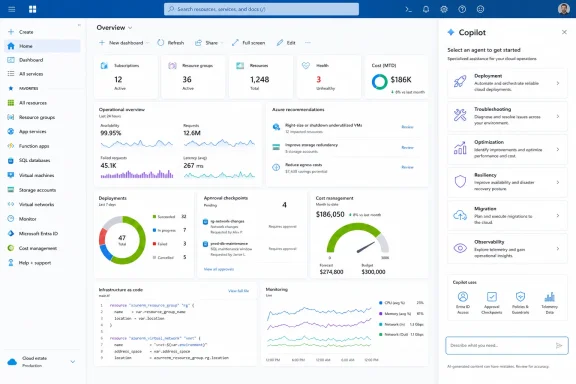 The picker does not expose every agent in the same way
Microsoft’s own documentation makes a distinction that gets lost in the headline. Deployment, Troubleshooting, Optimization, and Resiliency are the agents that can currently be directly invoked in the Azure Copilot chat experience.
Migration and Observability are different. Microsoft says the Migration Agent continues to be opened through Azure Migrate, while the Observability Agent continues through its Azure Monitor experience. Those products still integrate with Azure Copilot, but an administrator should not expect the new chat picker to replace the existing workflows for a migration project or an Azure Monitor investigation.
That matters for teams planning internal enablement. “Azure Copilot agents” is now a collective label for six specialized experiences, but they do not share a single interface, release status, billing model, or action set. Treating them as one product risks a rollout that promises a unified operator console before Microsoft has delivered one.
Microsoft’s training material identifies the six agents as:
- Deployment Agent for architecture design, infrastructure-as-code generation, and deployment workflows.
- Migration Agent for Azure Migrate planning, readiness assessment, business-case analysis, and landing-zone guidance.
- Observability Agent for Azure Monitor investigations and telemetry analysis.
- Optimization Agent for efficiency and cost-related analysis.
- Resiliency Agent for availability and resilience guidance.
- Troubleshooting Agent for diagnosing Azure resource problems.
The direct-chat agents can propose actions and generate artifacts such as scripts, but Microsoft says no action is performed without user approval. That approval requirement is an important guardrail, although it does not remove the need for standard change controls. An engineer with broad Azure permissions can still approve a bad recommendation; Copilot inherits the user’s practical reach rather than creating a separate, safely constrained permission boundary.
Tenant admins now have a per-agent control point
The most consequential operational change is not the drop-down menu itself. It is the per-agent enablement control in the Azure Copilot admin center.
A Global Administrator can open Azure Copilot admin center > Settings > Access management, then select or clear individual agent checkboxes. Microsoft also offers broad controls to enable all generally available agents or all preview agents. Access can be restricted to named Microsoft Entra users and groups through the Copilot for Azure User role, rather than being left available tenant-wide.
That is materially better than a preview model in which organizations had to request access to an agent bundle or wait for allowlisting. It allows a cloud platform team to pilot deployment assistance with a small infrastructure-as-code group while withholding troubleshooting or observability capabilities until it has reviewed how those agents use resource metadata, logs, and production telemetry.
There is a catch that deserves more attention than Microsoft’s product framing gives it: disabling an agent affects more than future use. Microsoft says that when an administrator removes access to an agent that was previously enabled, users can no longer open it and their past conversations with that agent are no longer available in chat history. Organizations should therefore notify users before changing agent availability and should not treat the checkboxes as a harmless UI experiment.
Azure Copilot’s general access model still applies. By default, it can be made available tenant-wide, or administrators can confine it to Entra users and groups. The service acts only within the user’s existing Azure permissions and requires confirmation before taking a change. For environments that block the required Bot Framework websocket endpoint, Azure Copilot will not function regardless of role assignments.
Migration remains planning assistance, not an automated move button
The Migration Agent is a good illustration of the boundary between agentic guidance and unattended infrastructure operations. Microsoft’s Azure Migrate documentation says the agent can analyze discovered inventory, interpret readiness assessments, compare migration strategies, develop business-case and ROI information, and help reason through landing-zone configurations.
It can also apply tags and generate planning artifacts from Azure Migrate data. For VMware workloads, Microsoft documents end-to-end migration planning support, with additional migration assistance for discovered Hyper-V and physical servers.
But it cannot replicate a server, run a test migration, execute a cutover, or move a workload on the operator’s behalf. Those actions remain in the Azure Migrate portal. Workflows that require Azure Migrate to interact with Azure Backup or Azure Site Recovery are also not currently supported by the agent.
That limitation is healthy, not disappointing. Migration cutovers carry operational risk, and an assistant that can summarize inventory or flag readiness blockers is easier to evaluate than one that can initiate replication against a production estate. The immediate value is in shortening analysis and documentation work—not in removing the approval gates that should exist before a workload moves.
The Deployment Agent has a more action-oriented scope. Microsoft says it can turn requirements into a deployment plan, generate Terraform configurations, open generated files for review, and create a GitHub pull request. Teams should still treat its output as untrusted infrastructure code until it passes the same linting, policy checks, security review, pull-request process, and non-production validation applied to code written by a human.
“No extra cost” is not true across the agent portfolio
The submitted report says that Azure Copilot pricing has not changed and that enabling it requires no additional subscription or licensing fee. Microsoft’s high-level Azure Copilot overview does say that capabilities available today are included at no extra cost, while cautioning that future capabilities may be priced separately.
However, Microsoft’s own billing documentation establishes an important exception: the Azure Copilot Observability Agent is billed. Billing for that agent began on July 1, 2026, according to the Azure Monitor documentation. Its consumption is measured in Azure Agent Credits, with charges attached to the Azure subscription associated with the monitored resource.
Microsoft identifies several billable Observability Agent patterns, including natural-language exploration of telemetry, deep investigations that correlate signals and produce reports, and other AI work performed by the agent. A simple request about a metric uses less work than an extended multi-step investigation, so spending will depend on how frequently operators ask the service to inspect logs, metrics, traces, and related incident data.
The practical conclusion is straightforward: there may be no new per-user Azure Copilot license attached to the picker, but direct access does not mean cost-free usage. FinOps owners should identify which agents are enabled, determine whether any use metered services, and validate which Azure subscriptions receive the charges before encouraging on-call staff to make agent-led investigation their default response.
Microsoft’s status labels need clarification
Microsoft’s current public documentation also contains a release-status discrepancy. The main Agents in Azure Copilot page labels Observability as generally available and Migration as preview. The access-management page, also updated August 10, lists Migration as generally available and Observability as preview.
Both pages agree that Deployment, Troubleshooting, Optimization, and Resiliency are preview agents. But the reversal of Migration and Observability statuses is not a trivial clerical detail: preview status affects an organization’s risk assessment, support expectations, and decision to enable a service for production operations.
Until Microsoft resolves that mismatch, administrators should not rely on either label alone when approving an agent. Check the individual agent documentation, the Azure Copilot admin center, and any applicable product terms for the tenant’s actual availability and billing status.
For now, the right deployment pattern is selective: enable one agent for a defined team, use it against a bounded non-production or low-risk scenario, review its recommendations and generated artifacts, and measure any consumption before broadening access. The picker makes Azure Copilot’s specialist workflows easier to find; it does not make their output self-validating, their permissions narrower, or every investigation free.