

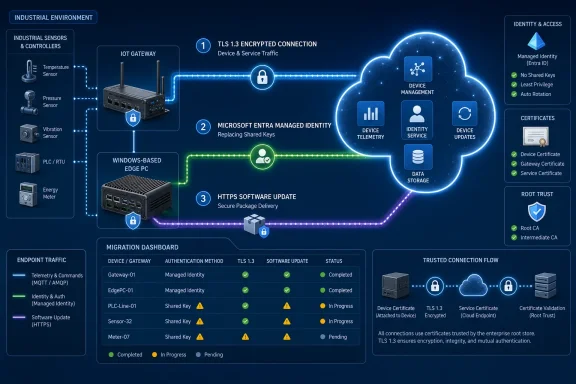
Petri reported on August 13 that Microsoft is strengthening Azure IoT security across those three areas. Microsoft’s own Azure Learn documentation confirms the underlying capabilities, while adding operational limits that the report leaves out: the original IoT Hub hostname remains on TLS 1.2, Device Provisioning Service managed-identity links are still labeled preview, and old embedded update agents may fail when asked to fetch an HTTPS package.
For organizations running industrial sensors, gateways, edge PCs, or Windows-based IoT devices, the immediate task is not simply to turn on TLS 1.3. It is to inventory which clients can use the new names, send Server Name Indication during the TLS handshake, negotiate Microsoft’s restricted cipher suites, trust the right certificate roots, and survive a changed update URL.
TLS 1.3 arrives on additional IoT Hub endpoints
Azure IoT Hub now exposes two supplemental names: <hub>.device.azure-devices.net for device traffic and <hub>.service.azure-devices.net for backend service traffic. Microsoft says both support TLS 1.3 as well as TLS 1.2 with a restricted cipher set. The existing <hub>.azure-devices.net hostname—the one most deployments already use—continues to support TLS 1.2 and remains the default for existing workloads.
That detail changes the practical reading of the announcement. This is not an in-place protocol uplift for connections already pointed at the classic hostname. A device fleet stays on the old endpoint until an administrator changes its connection strings, provisioning configuration, or application settings to use the device endpoint. Backend code must separately move to the service endpoint; Microsoft explicitly says not to use that service hostname for device connections.
The new endpoints are automatically provisioned on IoT Hubs, and Microsoft allows customers to migrate gradually or roll back by restoring the classic hostname. That reduces the risk of a single cutover, but it does not remove compatibility testing. The new endpoints require SNI and security-compliant cipher suites. Older network stacks, custom TLS implementations, and constrained firmware that lack SNI support will not connect even if they otherwise claim TLS 1.2 or TLS 1.3 compatibility.
TLS 1.3 itself cuts out older handshake options and uses modern cryptographic construction, which generally means safer and more efficient connection establishment. But a device does not become safer merely because its fleet manager switches DNS names. The relevant gain comes when the client and server actually negotiate TLS 1.3—or at least a permitted TLS 1.2 cipher suite—on the new path.
Microsoft’s documentation also says TLS 1.2 clients may use the new endpoints if they support the required cipher suites. That makes the migration less binary than “TLS 1.3 or nothing,” but it also means administrators should check real connection telemetry rather than infer the negotiated protocol from a configuration setting.
The endpoint change can expose dormant device limitations
Microsoft has offered TLS 1.2 enforcement and strong-cipher requirements for IoT Hub for some time, and ended IoT Hub support for TLS 1.0, TLS 1.1, and weak cipher suites on August 31, 2025. The TLS 1.3 endpoint work moves the baseline further, but older hardware remains the principal constraint.
A useful rollout begins with IoT Hub’s Successful Connects metrics and diagnostic connection logs, which Microsoft says can be filtered by TLS version and cipher suite. That lets an administrator identify whether a population is already relying on a cipher configuration that the new endpoint will reject. Test groups should include every meaningful device variation: manufacturing batch, firmware version, TLS library, cellular modem, gateway model, and proxy path.
Private Link deserves particular attention. Microsoft warns that organizations reaching IoT Hub through Azure Private Link need the new device and service names to resolve to private IP addresses within their virtual networks. Many configurations will handle that automatically, but static private-IP arrangements or exhausted subnets may require manual changes. A TLS migration that succeeds from the public internet but fails within a private DNS zone is an availability incident, not a security improvement.
The recommended sequence is straightforward:
- Validate SNI, TLS support, cipher suites, and DNS resolution in a staging environment before changing production connection strings.
- Move device-side clients only to the
.device.azure-devices.netendpoint and backend service clients only to.service.azure-devices.net. - Keep the classic endpoint as a rollback route while monitoring connection success by device class and negotiated protocol.
- Review Private Link DNS and IP allocation before enabling the new names for isolated networks.
Managed identities remove a high-value provisioning secret
The more consequential operational change may be in Azure Device Provisioning Service, or DPS. DPS needs write access to an IoT Hub device registry so it can create device identities and establish initial device-twin configuration during enrollment. Historically, the link between DPS and an IoT Hub could be backed by an IoT Hub shared access policy and connection string—an administrative secret that must be stored, protected, and rotated.
Microsoft now lets a DPS instance link to IoT Hub using a system-assigned or user-assigned Microsoft Entra managed identity. The identity must receive the IoT Hub Data Contributor role, or an equivalent custom role granting RegistryWrite and ServiceConnect, on the target hub. Once configured, the service authenticates with its Entra identity instead of holding an IoT Hub shared access key connection string.
Petri accurately describes this as a move away from shared secrets, but “passwordless authentication” needs a narrower interpretation. This does not replace the device’s own authentication method. A device can still use a symmetric key, X.509 certificate, or another supported enrollment attestation approach. The managed identity covers the service-to-service relationship in which DPS accesses the linked IoT Hub, not every credential used by every physical device.
That distinction matters in a compromise scenario. Replacing a broadly privileged, long-lived shared access key with a managed identity reduces the number of secrets that must be copied into deployment systems or rotated after exposure. It also allows access to be managed through Entra role assignments. It does not by itself eliminate symmetric keys already embedded in field hardware, nor does it turn a weak device enrollment model into certificate-based authentication.
Microsoft lists managed-identity links as preview, and its setup requirements introduce a permissions task that teams should plan carefully. The DPS resource must first have the managed identity enabled, then that identity must receive the needed role on each target hub. The preview status is a reason to pilot it against a noncritical hub before treating it as the default pattern for a production provisioning estate.
There is another migration wrinkle: a linked IoT Hub’s endpoint type cannot be changed in place with the current Azure CLI update command. Microsoft’s guidance is to create a new DPS linked-hub entry using the desired hostname type, then delete the old link by full hostname. Where DPS allocation policies distribute devices across multiple hubs, mixing classic and TLS 1.3-capable endpoint types can send identical device models down different connectivity paths. Administrators need to ensure every device eligible for allocation supports every endpoint it might receive.
HTTPS updates protect confidentiality; signatures still establish trust
Azure Device Update for IoT Hub now supports HTTPS package downloads, and Microsoft’s updated guidance says HTTPS is the default for new deployments. The service can therefore deliver update content through TLS 1.2 or TLS 1.3 rather than plain HTTP, protecting the package transfer from passive inspection while it is in transit.
There is an important nuance in the security model. Microsoft’s Device Update documentation already describes signed update manifests and file hashes that the agent validates after download. Those checks are what establish that a binary is authorized and unmodified. HTTPS adds transport confidentiality and server authentication; it does not replace manifest-signature and hash verification.
That is particularly relevant for teams that previously accepted HTTP downloads on isolated networks because integrity checks existed. They may now have a clear route to encrypt transfer traffic too, but must test the device agent rather than assume it gains HTTPS support automatically. Microsoft says selecting HTTPS changes the URL delivered to a device; it does not alter an agent that only understands HTTP URLs.
The likely break point is older or constrained firmware. Microsoft specifically warns that the Azure IoT Middleware for FreeRTOS and its samples currently use HTTP-oriented download handling and may need changes to use TLS transport and parse HTTPS URLs. Devices also need root certificates in their trust store. Microsoft says the download endpoint normally presents an ECC certificate chain rooted in DigiCert Global Root G3, with DigiCert Global Root G2 used for RSA fallback.
Pinning a Microsoft intermediate certificate is the wrong fix. Microsoft warns that intermediate CAs can rotate without notice and advises trusting the root CAs instead. Devices must also support at least one compatible cipher suite; the documented primary option is an ECDSA cipher suite, while an RSA suite is available as a TLS 1.2 fallback.
Treat the three changes as one lifecycle migration
The common thread is not merely newer encryption. Azure is shifting parts of the IoT lifecycle—provisioning, ongoing connection, and software delivery—toward identities, endpoint controls, and transport security that are easier to audit than copied connection strings and HTTP download paths.
For Windows admins responsible for Azure-connected gateways or fleets managed through IoT Hub, the concrete consequence is a change-control project: test the TLS endpoint migration, replace the DPS-to-hub secret with a managed identity where preview risk is acceptable, and verify each update agent can consume HTTPS content with current root certificates. Leaving existing configuration untouched remains supported, but it leaves the fleet on the classic TLS 1.2 endpoint, key-based DPS linkage, or HTTP update delivery it uses today.