
The practical takeaway is more constrained than the usual “turn settings down” advice: target a stable 60 FPS at 1080p or 1440p, preserve native output resolution where your GPU can sustain it, and lower the options that add scene complexity before sacrificing texture detail. Game Freak’s action RPG depends heavily on timing parries and enemy tells; a sharp but uneven 90 FPS is a worse experience than a stable 60 in a game where combat rhythm matters.
Destructoid recommends a 60 FPS frame-rate setting after seeing stutters at higher limits, and that recommendation now has useful context. TechRadar reported 75–90 FPS at 4K with DLSS Quality on an RTX 4080 Super, with occasional dips in enemy-heavy moments, while performance at 1440p stayed above 90 FPS in that test. PC Gamer, meanwhile, saw regular sub-60 FPS drops at Medium with FSR 3 enabled on a laptop just below the recommended specification, including intermittent trouble on Low.
Those results do not establish that 60 FPS is a hard engine limit. They do show that the game’s performance varies sharply by system and scene, and that aiming for a higher refresh-rate ceiling can expose the dips more severely on midrange machines. For most Windows PCs, the 60 FPS cap is therefore the sensible starting point, not a cure for every hitch.
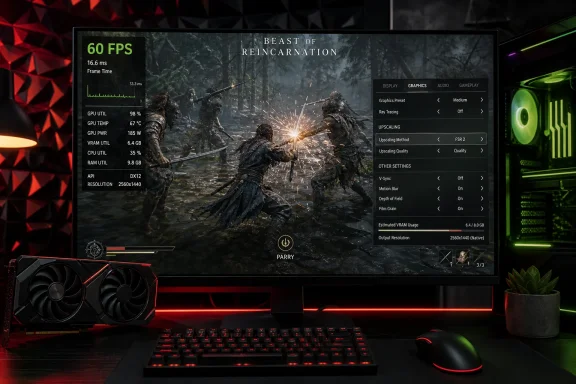 The 60 FPS target matches the game’s published PC target
The published recommended specification targets 1080p, Medium, 60 FPS with Performance-mode upscaling, using either an Intel Core i7-12700K or Ryzen 7 5800X, 16 GB of RAM, and an RTX 3060 12 GB or Radeon RX 6700 XT 12 GB. The minimum target is 1080p Low at 40 FPS, also with Performance-mode upscaling, on a Core i5-8400 or Ryzen 5 3600 and an 8 GB graphics card.
That small print changes how players should read the specifications. The advertised 1080p targets are not native-resolution targets: Performance mode typically renders far below the monitor’s output resolution before reconstructing the image. In other words, a PC that meets the recommended line is being asked to produce a 60 FPS result from a substantially reduced internal resolution, not from native 1080p.
Destructoid’s experience is revealing here. Its test system uses a Ryzen 7 5700X—close to Game Freak’s recommended Ryzen 7 5800X—and a newer Radeon RX 9060 XT, yet it still required substantial cuts for steadier play. That does not make the settings guide wrong; it shows why “recommended” should be treated as a target configuration rather than a guarantee that every setting can be raised or every frame-rate cap removed.
An SSD is also part of both published requirement tiers. Installing this game on a hard drive is outside the stated support target and is one of the few variables players should eliminate before trying to tune individual sliders.
Start with this performance-first preset
For a desktop around the minimum or recommended tier, begin with the following configuration. It follows Destructoid’s tested guidance but corrects the upscaler choice for Nvidia systems based on the options independently observed by TechRadar and the requirements published for the game.
- Set the output resolution to your monitor’s native resolution, then reduce internal rendering through the game’s upscaler rather than selecting a lower desktop resolution first.
- Cap the game at 60 FPS and set cutscenes to the Performance option if the menu provides it. Do not leave the gameplay limit uncapped until you have verified frame-time consistency in combat and while moving through dense outdoor areas.
- Turn VSync off initially. Enable it only if screen tearing is more distracting than the small latency cost and reduced headroom it can introduce.
- Turn ray tracing off. It is the clearest high-cost feature to remove when the goal is consistent performance rather than maximum image quality.
- Use the Medium graphical-fidelity preset as the baseline, then lower Mesh Quality, Shadow Resolution, and Shadow Quality to Low if the game still falls below its cap.
- Leave Lighting on Medium before lowering it further. Lighting affects the game’s atmosphere more visibly than several other settings, while shadows and meshes are generally safer first cuts.
- Turn Contact Shadows off and set Post-Processing to Low or Medium. Disable Motion Blur and Depth of Field for a cleaner image and fewer effects competing with combat readability.
- Set anisotropic filtering to 2x if chasing every last frame, but consider 4x or higher if it does not affect performance on your machine. This setting usually has a much smaller performance cost than shadows, ray tracing, or resolution scaling.
- Keep texture quality around 60% only when VRAM pressure is evident or your card has 8 GB of memory. Texture quality is not the setting most likely to resolve traversal stutters, and lowering it too far can make the large, foliage-heavy environments look muddy without fixing the underlying hitch.
- Use 80% resolution scaling only after trying the appropriate upscaler. It is a reasonable fallback for lower-end systems, but it compounds the image-quality loss of Performance-mode reconstruction.
The important ordering is intentional. Turn off ray tracing, reduce shadows and meshes, and use a 60 FPS cap before slashing resolution scaling and textures. Those first changes should preserve more of the game’s image while reducing the options most likely to raise GPU load in outdoor scenes and multi-enemy fights.
Choose DLSS on Nvidia, FSR on Radeon hardware
One part of Destructoid’s guide needs qualification. It suggests FSR 1 for older AMD cards, FSR 3 for supported Radeon hardware, and TSR for Nvidia users. However, the published hardware targets explicitly name DLSS for RTX 20-series through RTX 50-series hardware, and TechRadar tested the game with DLSS on an RTX 4080 Super. Nvidia owners should therefore use DLSS first when it is available and working correctly, rather than treating TSR as the default recommendation.
For Radeon players, FSR 3 is the appropriate first option on systems that support it. Destructoid’s FSR 1 advice for older GPUs is consistent with the minimum specification, which explicitly calls for FSR 1 in Performance mode on the low 1080p/40 FPS target. That is a compatibility solution, though, not a visual ideal: Performance-mode FSR 1 requires a steep cut in internal resolution.
There is also evidence that the upscaler settings have rough edges. TechRadar reported that the upscaler selection on a Lenovo Legion Go S reset each time the game restarted. If that behavior also appears on a desktop PC, check the graphics menu after every launch before assuming a driver update or background process changed your performance.
Do not use an upscaler merely because it is named in a guide. Test one repeatable area: a dense outdoor route followed by a crowded fight. If Native, Quality, Balanced, and Performance modes are all available, select the highest mode that keeps the frame rate pinned to the cap in both situations. The best setting is the one that avoids repeated drops below 60, not the one that produces the highest number in a quiet interior.
Lower settings cannot guarantee stutter-free play
This is the limitation missing from any one-size-fits-all launch guide. A lower average GPU load can improve frame rate, but it cannot automatically remove every frame-time spike—the brief pauses players perceive as stutter even when the frame counter looks respectable.
PC Gamer reported frequent drops below 60 FPS at Medium with FSR 3 on a below-recommended laptop and occasional instability even at Low. SteamDeckHQ found that the game could hold 30 FPS on Steam Deck using Low settings and FSR 1 Performance, but still saw drops and stutters while traversing or fighting groups of ten or more enemies. TechRadar saw occasional dips on a substantially more powerful RTX 4080 Super system when many enemies were on screen.
Across those tests, the common thread is scene load rather than a single setting failure. Lowering shadows, mesh quality, lighting, and rendering resolution can provide headroom, particularly during busy encounters. But the reports from both high-end and handheld hardware mean players should not mistake an unlocked frame rate or a high benchmark average for evidence that the game is fully smooth.
PC Gamer reported that a performance patch arrived shortly before its review was published, but the outlet had not yet tested its effect. Game Freak and publisher Fictions have not provided a detailed, public breakdown of which stuttering scenarios that update addresses. The Steam news hub also did not present accessible public patch details at the time of checking, leaving players without an official before-and-after performance target.
Handheld players should target 30 FPS, not 60
Steam Deck and other low-power handheld users should set their expectations separately from desktop advice. SteamDeckHQ’s testing found a workable 30 FPS experience at Low with FSR 1 in Performance mode, albeit with occasional traversal and large-combat stutters. That is the realistic baseline for the class of hardware, even though Fictions had previously said Steam Deck support was planned for launch.
Trying to force 60 FPS on handheld silicon would require image-quality compromises beyond what the published desktop minimum already assumes, while still offering no certainty of stable frame pacing. Use a 30 FPS cap, Low settings, ray tracing off, and the highest upscaling quality that holds that cap. A stable 30 is especially preferable during parry-focused encounters, where abrupt drops are more damaging than a consistently lower response rate.
For desktop players, start at 60 FPS, Medium, ray tracing off, DLSS or FSR selected for the GPU in use, and Low shadows and meshes. If that configuration still hitches, reduce resolution scaling to 80% and texture quality only as needed—but recognize that the remaining pauses may require a Game Freak patch rather than another pass through the settings menu.
