
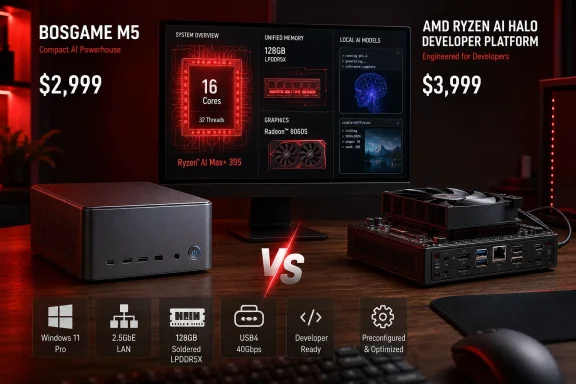
That price comparison is meaningful, but it needs a qualification that gets lost in the phrase “same CPU and memory.” The M5 is a consumer mini PC with Windows 11 Pro preinstalled, while AMD’s Ryzen AI Halo is a U.S.-only developer platform sold through Micro Center with AMD’s ROCm-oriented software positioning, preconfigured workflows, and ongoing platform support promises. The silicon is the same; the support model, software preparation, physical design, and I/O priorities are not.
For Windows users who want a compact workstation that can also play games and run large local models, the M5 looks like a compelling way to buy into Strix Halo. For an IT buyer expecting long-term vendor validation and predictable software images, the lower purchase price does not erase the difference between a mini-PC vendor’s one-year warranty and AMD’s purpose-built developer product.
 The M5’s real advantage is memory capacity, not its “AI PC” badge
AMD’s Ryzen AI Max+ 395 combines 16 Zen 5 CPU cores, 32 threads, a 40-compute-unit Radeon 8060S integrated GPU, and an XDNA 2 NPU in one package. AMD rates the chip at up to 126 TOPS overall, but the NPU itself is rated at up to 50 TOPS. That distinction matters for buyers interpreting AI-PC marketing: large local language models and image-generation workloads are frequently driven by the Radeon GPU and memory bandwidth, not simply by the NPU’s TOPS rating.
The M5’s 128GB of LPDDR5X-8000 is shared by Windows, the CPU, and the Radeon graphics. AMD says up to 96GB can be assigned as graphics memory on systems configured with 128GB, which is why these machines are attractive for local inference. A conventional desktop with a 16GB or 24GB discrete GPU may offer greater raw GPU throughput, but it hits a hard capacity ceiling on models that need more VRAM.
That does not make the M5 a substitute for a high-end Nvidia workstation. ServeTheHome explicitly found the Ryzen AI Max+ platform constrained relative to discrete accelerators by power limits, memory bandwidth, and the amount of compute hardware available. The case for this class of machine is different: it puts unusually large unified memory on a desk, at a power level that does not require a rack, a dedicated circuit, or a multi-GPU build.
Independent testing from Notebookcheck and Guru3D reached the same broad conclusion in 2025: the M5’s Radeon 8060S is unusually capable for integrated graphics, while 128GB of unified memory changes what can fit locally. Notebookcheck also measured the system sustaining around 120W in its higher-performance profile, confirming that this is not a low-power NPU box dressed up as a workstation.
The bargain comes with fixed core components
Bosgame has made storage access relatively painless. ServeTheHome found a bottom hatch that reaches the M.2 slots without dismantling the system, and the reviewed unit included a 2TB PCIe 4.0 NVMe SSD using YMTC NAND. A second M.2 slot is available for another SSD, which is a practical benefit for Windows users who need to separate a large model library, VM images, games, or project data from the operating system drive.
But the expensive parts of the system are fixed. The CPU and 128GB memory are soldered, so there is no upgrade path from a lower-memory model and no practical RAM replacement route if memory fails outside warranty. This is inherent to Strix Halo’s integrated-memory design, not a Bosgame-only flaw, but it changes the buying calculation: purchasers should treat 96GB versus 128GB as a permanent capacity decision.
Bosgame advertises a one-year limited warranty. That is ordinary for a consumer mini PC, but it is shorter and less reassuring than the service arrangements many organizations expect for developer hardware or managed workstation fleets. The company’s product page does not spell out a firmware-support lifecycle, Windows image-maintenance policy, or replacement-parts availability beyond the warranty language. Those omissions do not prove poor support; they mean the buyer must not assume an enterprise-style commitment from the hardware’s impressive specification sheet.
ServeTheHome says its sample shipped with Windows 11 Pro installed. That is useful for users who need Microsoft 365 apps, Windows-native engineering tools, game compatibility, Remote Desktop hosting, BitLocker management, or a familiar local workstation. AMD officially lists Windows 11, Ubuntu, and Red Hat Enterprise Linux support for the processor itself, but processor support is not the same as a complete device-support promise. Buyers planning Linux deployments should verify the M5’s BIOS behavior, sleep states, Wi-Fi stability, and power profiles before standardizing on it.
Three power profiles make the cooling trade-off visible
The front-panel performance-mode button is more useful than the M5’s decorative lighting. ServeTheHome measured three operating profiles and found that the low-power setting settled below 100W for the complete system, with only faint fan noise at one meter. Its normal setting measured about 38 dBA, while the performance mode reached roughly 45 dBA.
Those figures are a reminder that the same Ryzen AI Max+ 395 can behave very differently depending on the chassis and firmware limits around it. AMD specifies a configurable processor power range of 45W to 120W, and mini-PC makers decide where to place the compromise between sustained throughput, acoustics, temperature, and external power-supply size.
For a desk-bound Windows workstation, the normal mode is likely to be the sensible default: enough sustained power for general development, local model work, video processing, and occasional gaming without running a small blower at full tilt all day. The high-performance setting has a narrower role—long batch jobs, benchmarking, or workloads where a faster completion time outweighs noise.
The 240W external adapter is also part of the deal. ServeTheHome estimates the M5 will generally top out around 160W to 170W in real use without loading USB4 peripherals. The compact computer is therefore not a tiny power draw in the way an entry-level NUC or thin client is; it is a concentrated workstation with a laptop-derived power envelope.
The network port is the clearest cost-cut
Bosgame gives the M5 two USB4 ports, three USB 3.2 Gen 2 Type-A ports, two USB 2.0 ports, HDMI, DisplayPort, an SD card reader, Wi-Fi 7, and dual audio jacks. That is a stronger mix than many AI-focused compact systems, especially for someone connecting storage, displays, capture equipment, or serial adapters.
The conspicuous limitation is its Realtek 2.5GbE Ethernet port. ServeTheHome calls this the system’s biggest miss, and that assessment is fair for a machine being positioned around large local datasets and models. A 2.5GbE link can move data at roughly 280MB/s under ideal conditions; a 10GbE link can approach roughly 1.1GB/s. Pulling a 100GB model archive, copying virtual-machine images, or working from a fast NAS will expose that gap quickly.
A USB 10GbE adapter can work around it, as ServeTheHome notes, but it consumes a high-value port and adds another powered device, driver, and point of failure. Framework’s Ryzen AI Max Desktop, by comparison, includes 5GbE networking and a more conventional 4.5-liter desktop chassis with an accessible cooling arrangement, although its current configuration and component pricing follow a different model.
For a user with ordinary 1GbE or 2.5GbE networking, this is not a reason to reject the M5. For a home lab, content workstation, or office with 10GbE storage already in place, it should be considered part of the acquisition cost rather than an optional accessory.
It is a familiar platform in a different shell
The most consequential finding in ServeTheHome’s review is not the angled chassis or the RGB strip. The outlet reports that the M5 uses a newer revision of the Sixunited AXB35 motherboard previously seen in GMKtec’s EVO-X2, a Strix Halo mini PC reviewed last year. The front and rear I/O layouts align closely enough that the relationship is apparent even before opening the machines.
That is common in the mini-PC market, where system integrators build different products around shared original-design-manufacturer platforms. It may benefit buyers through mature board designs and known Linux experience—ServeTheHome says it has used the comparable GMKtec unit as a Linux networking workhorse. It also means Bosgame’s differentiation rests more on price, enclosure, cooling tune, storage bundle, Windows preload, and warranty handling than on a wholly unique motherboard design.
ServeTheHome reports that the M5 beat AMD’s far more expensive Ryzen AI Halo box in its Qwen model comparison, attributing the outcome to the Bosgame system’s larger volume. That result is worth watching, but it is a single outlet’s benchmark observation rather than a universal performance guarantee. Firmware revisions, power mode, drivers, model quantization, context length, and software back end can all change the outcome on this class of hardware.
The M5’s strongest argument remains simple: at its current $2,999 list price, it is a cheaper entry point to a 128GB Ryzen AI Max+ 395 Windows desktop than AMD’s $3,999 Halo developer platform. The trade is equally simple: buyers save money by accepting 2.5GbE, soldered memory, a consumer-grade support posture, and fewer assurances around long-term software validation.