
The test, originally conducted by Phoronix and summarized by TechPowerUp, used a high-end HP Z4 G6i with Intel’s 48-core Xeon 678X, 128GB of DDR5-6400 memory, and an NVIDIA RTX PRO 6000 Blackwell workstation GPU. HP’s own Z4 G6i specifications confirm that the platform supports the Xeon 678X and RTX PRO 6000 Blackwell hardware class, and that it is sold with both Windows 11 and Linux-oriented configurations. That makes this a more meaningful comparison than a consumer PC dual-boot test—but it does not make every result transferable to every professional workload.
The practical takeaway is straightforward: organizations buying Granite Rapids workstations for CPU-heavy rendering, compression, and simulation should benchmark their production stack on both Windows 11 and Linux before standardizing. Teams dependent on specific RTX renderers, Windows-only engineering tools, certified plug-ins, or existing device-management policies should be especially careful not to let one composite score override application behavior.
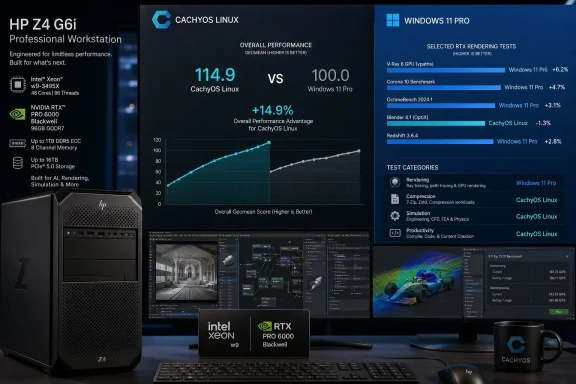 The 14.9% figure is an aggregate, not a workload guarantee
A geometric mean is designed to summarize results across benchmarks whose raw units cannot be added together: render samples per minute, compression throughput, frames per second, and other measurements. It is a defensible way to avoid one unusually large numerical result swallowing the rest of the chart. It also assigns each selected test substantial influence regardless of whether it represents five percent or 80 percent of a real studio’s work.
That is the central limitation in the CachyOS result. A workstation devoted to Blender CPU rendering will care deeply about a 10% or 12% gain. A visualization team that spends most of its day in V-Ray RTX may see the opposite outcome. An engineering firm whose critical application is certified only for Windows cannot convert a Linux benchmark advantage into a usable productivity gain at all.
TechPowerUp’s summary says CachyOS led in the suite’s geometric mean, with Windows at the bottom of that aggregate ranking. It also describes a benchmark set that frequently favored Linux in CPU-bound tasks, particularly CPU rendering and 7-Zip compression. That result is plausible on a 48-core Xeon platform, where scheduler behavior, compiler choices, library versions, power policy, and background services can all affect sustained multi-threaded throughput.
What the comparison does not establish is that CachyOS is 14.9% faster than Windows 11 for “workstations.” It establishes that it was 14.9% ahead across this particular collection of workloads, on this particular expensive configuration, with whatever software, drivers, power settings, and benchmark options the test used.
For an IT buyer, the distinction is not semantic. It is the difference between evaluating an operating system and evaluating a controlled benchmark stack.
Windows 11 still won some of the GPU-rendering tests
The most important counterweight to the overall ranking is that Windows 11 did not lose everywhere. According to TechPowerUp’s account of the Phoronix testing, Windows delivered about 6% more rays in V-Ray 6 RTX testing and held a smaller, roughly 2% advantage in V-Ray CUDA. In FluidX3D, Windows technically led as well, though by fractions of a percent.
Those outcomes are more useful than a single league-table position because they map to actual deployment questions. If a team uses V-Ray’s RTX path as its main renderer, then a measured Windows lead in that renderer is more consequential than a Linux lead in 7-Zip or a different GPU test. The same logic applies to software licensing, vendor support, color pipelines, peripheral support, scripting, and collaboration integrations.
The split results also make it hard to pin the outcome on a simple “Windows overhead” explanation. Windows trailed in several CUDA and CPU-rendering workloads, yet led in V-Ray’s CUDA and RTX tests. That points toward software-specific interactions—render engine implementations, driver behavior, API use, compiler paths, or test configuration—rather than a universal operating-system verdict.
TechPowerUp also reported mixed results from OSPRay Studio and LuxCoreRender, with Windows matching or beating Linux in some cases and falling well behind in others. Such variability is exactly why professional buyers should resist substituting a broad cross-platform benchmark suite for an acceptance test based on their own scene files, data sets, plug-ins, and automation scripts.
CachyOS’ tuning is part of the result—and a reproducibility problem
CachyOS is not intended to be a neutral reference distribution. It is an Arch-based Linux distribution that emphasizes performance-oriented choices, including its own kernel options and package optimizations. TechPowerUp specifically distinguishes a CachyOS “performance mode” result from the other tested operating systems, meaning the leading configuration is not simply equivalent to a default Windows installation or an unmodified enterprise Linux desktop.
That does not invalidate the result. If a tuned CachyOS install is stable, supportable, and compatible with an organization’s tools, its performance is real to the user running it. But it changes the question a buyer must ask: Which settings created the gain, and can we operate them consistently?
The submitted reporting does not identify the exact Windows 11 build, NVIDIA driver versions, Linux kernel builds, CUDA components, BIOS revision, storage configuration, or the precise changes encompassed by CachyOS performance mode. Nor does it say whether Windows used its standard Balanced policy, a High Performance power plan, or a workstation-specific firmware profile. On a 48-core system, those omissions can materially influence CPU-bound scores.
Windows administrators should be wary of treating the Windows numbers as a final ceiling until those details are known. A fleet image may carry endpoint protection, telemetry controls, encryption, management agents, power-policy enforcement, and vendor utilities that a clean benchmark image does not. Conversely, Linux deployments may introduce their own operational variables: NVIDIA driver packaging, kernel-update cadence, Secure Boot handling, support contracts, application certification, and centralized management.
The reproducible conclusion from the reporting is narrower: a performance-tuned CachyOS installation performed exceptionally well in this specific test suite. The conclusion that it will outperform a managed Windows 11 fleet for a particular organization remains unproven until that organization runs the same job on both environments.
AlmaLinux’s showing may matter more to managed deployments
CachyOS is the eye-catching winner, but AlmaLinux 10.2 may be the more strategically interesting result for enterprise users. It is a community-built distribution in the Red Hat Enterprise Linux family, aimed at users who may value longer-lived platform behavior and conventional enterprise administration more than an aggressively tuned desktop experience.
TechPowerUp reports that AlmaLinux kept pace with or surpassed Windows 11 in several rendering and compute tests, including some CUDA workloads, and was one of the few Linux configurations to edge Windows in OctaneBench. If that pattern holds under independently repeatable testing, it suggests that Windows’ shortfall in some CPU-heavy and GPU-compute tasks cannot be explained solely by CachyOS-specific tuning.
Still, AlmaLinux’s result should not be oversold. A favorable benchmark position does not automatically confer application certification, commercial technical support, or a ready-made workstation management model. Red Hat’s own workstation ecosystem, OEM validation, NVIDIA’s enterprise-driver support, and an organization’s application vendor matrix matter more than a general-purpose suite when the machines are production assets.
For Windows-centric organizations, the actionable implication is not necessarily a migration. It may be a targeted Linux partition for render nodes, simulation workers, batch compression, build agents, or compute jobs that do not require interactive Windows applications. That approach preserves Windows where it is operationally necessary while allowing a Linux stack to compete where the workload has demonstrated a measurable throughput advantage.
The benchmark is a reason to test, not a reason to generalize
The hardware makes this comparison notable. HP positions the Z4 G6i as a professional workstation with support for up to 48-core Xeon 600 processors, ECC DDR5-6400 memory, and high-end RTX PRO Blackwell graphics. Machines in that class are bought for expensive, sustained workloads, where even a single-digit performance gap can change job turnaround, workstation count, or cloud-bursting costs.
Yet the same class of buyer is least able to make a decision from a generic average. A studio may be bound to V-Ray RTX and Windows-certified plug-ins. A research team may spend its time in CPU rendering and command-line simulations. A CAD department may require specific Windows drivers and vendor-approved releases. Each group could look at the same Phoronix charts and reach a different, rational deployment choice.
As of August 19, no other outlet has published the same complete CachyOS-versus-AlmaLinux-versus-Windows scorecard described by TechPowerUp. Until the exact OS builds, driver revisions, power profiles, and benchmark commands are available for review, the 14.9% aggregate should be read as a strong prompt for workload testing—not as a universal ranking of Windows 11 against Linux.