
TidBITS first reported the paired releases on August 24. Flexibits’ Fantastical release notes date version 4.1.18 to August 14 and confirm fixes for Microsoft 365 calendar visibility, Exchange event editing through MCP or Siri, and a Microsoft 365 sync crash involving the America/Edmonton time zone. The company’s Cardhop release notes page, however, still displayed version 2.4.8 when checked on August 24, even though TidBITS reported Cardhop 2.4.9 and its Graph API change. That mismatch does not disprove the release, but it does mean administrators looking for a vendor-authored change log for Cardhop should retain the in-app update details and document the version deployed.
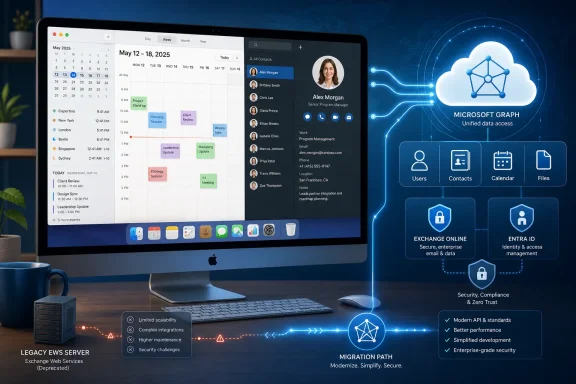 Cardhop’s Microsoft Graph change arrives before the EWS cutoff
Cardhop 2.4.9 now uses the Microsoft Graph API to connect to Microsoft 365 accounts, according to TidBITS. That is a material architectural change for an app that works with Exchange contacts and can search the Exchange Global Address List. Microsoft Graph is Microsoft’s current gateway for cloud mailbox data, including Outlook contacts and calendars stored in Exchange Online.
The timing is significant. Microsoft says Exchange Web Services, or EWS, will start being disabled globally in Exchange Online in October 2026 and will be fully disabled in April 2027. Microsoft has been pressing customers and application vendors to migrate dependencies to Graph, particularly after EWS became part of the security discussion surrounding the January 2024 Midnight Blizzard incident.
For a Cardhop user, the immediate result should be a more future-proof sign-in and data-access path for Microsoft 365 contacts. For IT teams, it means the application’s Entra consent record deserves another look after the upgrade. A Graph migration can change the resource endpoints an app calls and may trigger a fresh authorization flow, even where the eventual user-facing capability looks identical.
The key point is that “uses Graph” does not establish that Cardhop has tenant-wide access. Microsoft distinguishes between delegated Graph permissions, which act on behalf of the signed-in user, and application permissions, which can operate without a user and may cover every mailbox unless scoped. The reporting and available Flexibits documentation do not identify the exact permissions Cardhop 2.4.9 requests, whether it requires tenant-wide admin consent in any configuration, or whether existing Microsoft 365 connections must be removed and added again.
That leaves a straightforward administrative task: verify the consent prompt or the enterprise application’s permissions in Microsoft Entra ID rather than assuming the migration is permission-neutral. Users connecting their own work accounts should also expect their organization’s consent policies to determine whether a new Graph authorization is allowed.
Fantastical fixes calendar disappearance during Microsoft 365 stress
Fantastical 4.1.18 fixes an issue where calendars from Microsoft 365 accounts could disappear when Microsoft 365 was overloaded. Flexibits does not describe the condition in more detail, so there is no basis to say whether the underlying problem was throttling, a transient service failure, a client-side timeout, or another synchronization fault. But the user impact was serious: a calendar client that temporarily hides a work calendar can lead to missed meetings, incorrect availability checks, and duplicate scheduling.
The release also fixes a crash while syncing Microsoft 365 events using the America/Edmonton time zone. Time-zone failures in calendar clients are particularly difficult to diagnose because an event can appear correct for its organizer and wrong for an attendee, or because the defect surfaces only when a client reads a particular Exchange-generated time-zone identifier. Microsoft Graph’s Outlook endpoints expose both a selected response time zone and original event time-zone fields, so calendar clients must correctly translate that metadata rather than treat it as a simple display preference.
Another relevant fix addresses existing Exchange events that could not be modified or deleted through MCP or Siri. Flexibits does not specify which Exchange configurations were affected or whether the problem was confined to legacy Exchange connections rather than Microsoft Graph accounts. Still, organizations that allow users to create or manage meetings through AI-connected workflows or voice actions should test edits, cancellations, recurring events, and delegated calendars after applying the update.
The release is not a broad claim that Fantastical has completed every possible Exchange-to-Graph migration. Flexibits’ recent Fantastical release notes show the app has already been adding Graph-specific support, including Microsoft 365 room search and Graph calendar handling. Version 4.1.18 is best read as continued maintenance of the Microsoft 365 paths customers already use, including older Exchange-connected workflows that may still exist in the product.
Search and alert corrections are operational fixes, too
Several of Fantastical’s non-Microsoft-specific fixes will still be relevant on managed Macs. Version 4.1.18 adds partial-word matching in search, adds support for Google Labels, and introduces an option to show calendars and task lists configured through macOS Internet Accounts. The latter may reduce the gap between what macOS recognizes at the system-account level and what users see inside Fantastical.
Flexibits also corrected task search results that showed the wrong alert time and improved alarm handling when users switch calendars or toggle an item’s All Day status. Those are easy entries to dismiss as interface polish, but calendar alert bugs can produce real workflow errors. A task that displays an incorrect reminder time in a search result creates an unreliable audit trail for anyone using search to verify what is due next.
The fix that preserves an event’s custom color when it is moved to another calendar in the same account is more modest, but it also highlights a practical limitation: color and category metadata do not always behave the same way when events move between calendars, providers, and APIs. Teams that use color coding as an informal classification method should not confuse a client-side color with a retention label, a sensitivity label, or any Microsoft Purview control.
What Microsoft 365 administrators should check
For organizations that support Fantastical or Cardhop on macOS, this is an appropriate update to validate in a small pilot before broad deployment. TidBITS lists macOS 12 or later as the minimum operating-system requirement and says the apps are distributed through Flexibits and the Mac App Store.
A focused test should cover the points the update actually changes:
- Confirm that Cardhop can sign in to a Microsoft 365 account under the organization’s current Entra consent policy, and inspect the permissions presented during any new or renewed authorization.
- Test creating, editing, and deleting a personal contact, then test Exchange Global Address List searches if users depend on them.
- In Fantastical, verify that primary, secondary, shared, and delegated Microsoft 365 calendars remain visible after a relaunch and during a temporary connectivity interruption.
- Create and modify timed, all-day, and recurring Exchange events, including actions initiated through Siri or any enabled MCP integration.
- Test an event in the America/Edmonton time zone if the organization has users, room mailboxes, or external partners in that region.
- Record the deployed Cardhop version and release behavior locally, because Flexibits’ public Cardhop release-notes page had not yet caught up to version 2.4.9 on August 24.
Microsoft’s Graph documentation confirms that contacts and calendar data can be accessed with delegated permissions appropriate to the signed-in user, while broader application permissions require a very different risk assessment. The distinction is especially important in enterprises where a seemingly harmless contacts app may search directories, access shared folders, or operate under an administrator-approved service principal.
Flexibits has supplied a release that addresses real Microsoft 365 reliability issues while moving Cardhop toward the API Microsoft wants third-party clients to use. The practical next step is to install and test the update before Exchange Online’s October 2026 EWS disablement begins—not because Fantastical and Cardhop are Windows software, but because their behavior now depends directly on the Microsoft 365 identity, contact, and calendar services that IT teams are responsible for keeping dependable.