
The immediate action is straightforward. If you spot an unfamiliar device, browser, location, or sign-in route, end sessions across every device, secure the identity provider behind the account, and review what was exposed. But the vendor controls have meaningful blind spots—especially for ChatGPT users who connect third-party applications or sign in through an organization’s SSO system.
TechCrunch’s walkthrough is broadly supported by the account-management documentation from OpenAI, Anthropic, and Perplexity. The important addition is that each platform’s session page is an access-control tool, not a complete forensic log. A clean-looking list does not prove that an account was never accessed, and a forced logout does not undo copied chats, downloaded files, API activity, or prompts containing business information.
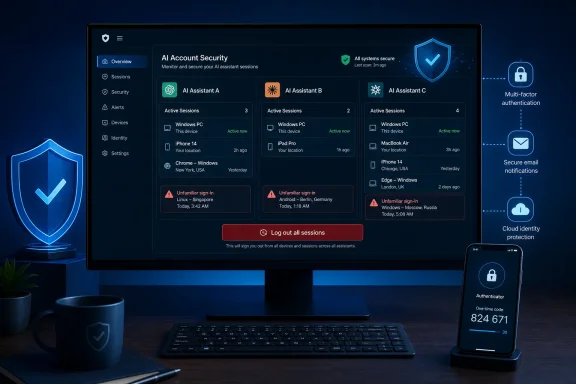 ChatGPT’s session page has useful detail—and defined gaps
OpenAI’s current ChatGPT security controls provide the richest session review of the three services. In ChatGPT, open Settings > Security > Active sessions to see recently active sessions and trusted devices. Depending on the session, the page can show device or browser details, approximate location, sign-in date and time, current-session status, and first-party product context such as ChatGPT, Codex, or the OpenAI API Platform.
That can help distinguish a legitimate Windows desktop browser from a device you do not recognize. It can also expose a session in a location that makes no sense for your travel history. But treat those location entries as clues rather than proof: OpenAI says the details may be approximate or incomplete, and a browser record can represent activity across more than one OpenAI first-party product.
The bigger limitation is what Active sessions does not cover. OpenAI says the list does not show or manage third-party app sessions, connected apps, “Sign in with ChatGPT” sessions used only on third-party services, or Codex CLI sessions. That exclusion matters for developers and IT staff who have attached external tools, granted integrations access, or use ChatGPT credentials outside the browser.
If the suspicious activity may involve one of those routes, logging out of a visible ChatGPT browser session is only one step. Review connected applications and sign-in methods separately, remove access you no longer recognize, and check whether a work account’s identity provider has its own sign-in and audit records.
For a suspect ChatGPT session, log out the individual device where possible. If there is any doubt, use Log out of all sessions. OpenAI says propagation to other devices can take up to 30 minutes, so do not assume a session is dead the moment you click the button.
OpenAI also makes an important distinction that is easy to miss during incident response: enabling multi-factor authentication does not automatically invalidate existing sessions. Turn on MFA, but still choose the global logout option when you believe someone may already be inside the account.
Secure the login method, not only the ChatGPT password
TechCrunch recommends a password reset after a suspected ChatGPT compromise, and that remains sensible for accounts created with an email address and password. However, OpenAI accounts can also be linked to Google, Microsoft, Apple, or enterprise SSO. A password reset will not secure an account whose actual entry point is a compromised Microsoft 365, Google, Apple, or SSO identity.
OpenAI’s documentation says accounts created through a social or SSO method generally must continue using that method; a conventional password reset may not work or may not send a reset message. For Windows users signed in through a Microsoft account or Microsoft 365 work identity, the incident response path therefore extends beyond ChatGPT:
- End ChatGPT sessions and inspect the account’s sign-in methods.
- Change or secure the password for the underlying Microsoft, Google, Apple, or work identity where applicable.
- Review that identity’s recent sign-ins, recovery methods, and unfamiliar devices.
- Enable MFA on the identity provider as well as in ChatGPT when the option is available.
- Remove unrecognized connected apps and revoke API keys or tokens that may have been exposed separately.
OpenAI currently offers several MFA methods, subject to device, country, account tier, and the way the account was created. Available options can include an authenticator app, push approval, SMS or WhatsApp codes, and passkeys. For a sensitive account, a passkey or authenticator-based method is generally preferable to relying solely on an email-delivered code. CISA has consistently advised users and organizations to enable MFA wherever possible because a second factor can block many account-takeover attempts even after a password is phished or reused.
There is one operational limitation for business administrators: OpenAI says MFA cannot currently be enforced at the ChatGPT workspace or API Platform organization level. That leaves organizations reliant on identity-provider controls, user policy, and periodic checks rather than a central ChatGPT setting that mandates MFA for every member.
Claude’s account security depends heavily on email or Google
Claude takes a different authentication approach. As TechCrunch notes, Anthropic does not use a traditional Claude password for email-link sign-in; users authenticate with a login link sent to email, or through Google login. That makes the mailbox—or Google account—the practical security boundary.
Anthropic’s official help documentation confirms that users can log out of all active Claude sessions from Settings > Account on the web version of Claude. The action signs the account out across web browsers, mobile devices, and desktop applications. Anthropic says that option is not currently available in Claude’s iOS and Android apps, so a Windows PC browser is the place to perform the account-wide reset.
TechCrunch reports that Claude’s interface can show active sessions and allow individual sessions to be terminated. Anthropic’s public support instructions confirm the account-wide logout flow but do not describe individual session inspection or termination. That discrepancy is worth noting: the interface may offer more granular controls for some users, but the dependable recovery measure documented by Anthropic is still to end every session from the web account settings.
For anyone using Claude with a work mailbox, this changes the order of operations. Secure the email account first or in parallel. An attacker who can read the mailbox can potentially receive a fresh Claude login link; an attacker who controls a Google account used for sign-in may be able to re-enter through that route. Resetting sessions in Claude without securing the email or Google identity can become a revolving-door fix.
Developers should also check Settings > Claude Code. Anthropic documents a separate token-management area there, where Claude Code authorization tokens can be removed. A global logout is valuable, but a retained development token is a different credential with a different risk profile.
Perplexity gives users a reset button, not a device inventory
Perplexity’s recovery posture is simpler and less transparent. TechCrunch reports that Perplexity does not show users a list of active devices or locations. Perplexity’s own account-settings documentation confirms the relevant response control: Sign out of all sessions logs the account out of every signed-in device and browser.
That is useful if a laptop was lost, a shared PC was used, or a suspicious prompt appeared in account history. It is less useful for determining which device accessed the account, when the access began, or whether an unfamiliar session is still active. There is no user-facing inventory to compare against a known device list.
The practical consequence is that Perplexity users who suspect compromise should skip investigation through the service itself and reset access broadly. Sign out of every session, secure the email account used to receive the sign-in code, then sign back in only from a device you trust. If the account is used for work research, review account history, saved materials, subscription settings, and any shared or team features for changes you did not make.
Treat AI chat history as potentially exposed data
A compromised AI account is not merely a billing risk. Many people use these services as scratchpads for code, system configuration, troubleshooting logs, internal documents, meeting notes, and draft communications. A session hijacker may be able to read past conversations without changing anything obvious.
That is why a forced logout should be followed by a short scoping exercise. Identify the period in which the account may have been exposed, review the chat and file-upload history in that period, and determine whether prompts included credentials, API keys, customer data, proprietary source code, incident details, or personal information. If a secret appeared in a chat, rotate it; deleting the conversation later does not make a previously viewed credential safe.
For organizational accounts, document the incident before clearing evidence unnecessarily. Record unfamiliar devices, locations, session timestamps, account emails, and any suspicious changes. Then follow the company’s security and data-handling process rather than treating the event as a private consumer-account cleanup.
The practical bottom line is simple: ChatGPT offers the most useful session evidence but does not cover every authentication path; Claude requires attention to the email or Google identity behind its passwordless flow; and Perplexity’s safest response is an account-wide logout because it provides little device-level visibility. In all three cases, session termination should happen quickly—but it is only the beginning of determining what an intruder may have accessed.
