
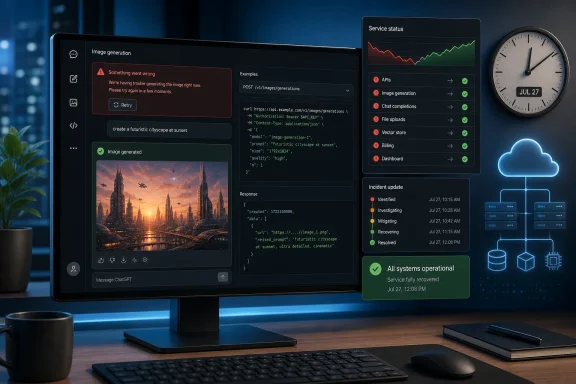
 From “Widespread Errors” to a Confirmed Service Incident
The first reports described a familiar but frustrating pattern: users attempting to create or edit AI-generated images in ChatGPT encountered repeated failures instead of completed results. The original report said the problem affected users internationally and cited OpenAI’s status page as confirmation that the company had identified elevated errors affecting image generation. Cedar News
That initial framing was accurate for the moment it was published. At the time, OpenAI had acknowledged elevated errors and said it was working on a mitigation, but had not given an estimated time for normal operation to return. The key update for readers arriving after the fact is that the outage is not ongoing: OpenAI’s public incident history now lists the affected image-generation services as recovered. OpenAI Status
This distinction matters. A status alert can reflect a live operational problem, while a later resolved notice tells a different story: whether the provider detected the incident, whether it acknowledged customer impact, and how long recovery took. For users who encountered image-generation errors on July 27, the official records confirm that the failures were not simply isolated browser, account, or prompt problems.
OpenAI’s status site posted an investigation update at 2:04 PM on July 27 stating that users were experiencing elevated errors and that mitigation work was under way. The incident was later resolved at 8:24 PM, with OpenAI saying all impacted services had fully recovered. OpenAI’s final ChatGPT incident update
What Was Affected
ChatGPT Image Generation
The clearest confirmed impact was to image generation inside ChatGPT. The status incident was explicitly titled “Image generation unavailable in ChatGPT,” and the affected component listed was ChatGPT. That means a user could still potentially reach ChatGPT, hold text conversations, or use other available capabilities while image creation and editing failed. OpenAI Status incident details
That separation is important for troubleshooting. A ChatGPT session that appears otherwise healthy does not necessarily mean every attached feature is healthy. Modern AI platforms are composed of multiple service layers, and an image request involves a different workflow from an ordinary text response.
For Windows users, the practical symptom may have appeared in a browser tab, the ChatGPT desktop experience, or another ChatGPT access point: an image request might fail, stall, return a generic error, or fail to apply an edit to an existing image. The initial reporting described repeated error messages while users tried to generate or edit visual content. Cedar News’ outage report
API Services Were Also Listed During Part of the Event
A separate July 27 incident entry covered both APIs and ChatGPT, again under the title “Image generation unavailable in ChatGPT.” OpenAI identified elevated errors, said it was implementing mitigation, and marked that incident resolved at 7:04 PM. OpenAI’s API and ChatGPT incident entry
The public records therefore point to a more consequential interruption than a front-end-only ChatGPT glitch. Developers and businesses using OpenAI’s image-generation capabilities through API integrations could have been exposed to failures as well, depending on the product path, model, usage tier, and timing of their requests. OpenAI’s own status page cautions that aggregate availability reporting can vary by subscription tier, model, and API feature. OpenAI Status history
The incident page does not provide a detailed root-cause explanation. It confirms customer-facing elevated errors and the application of mitigations, but it does not identify a specific infrastructure fault, deployment issue, model failure, capacity constraint, or third-party dependency. That absence should discourage overconfident claims about what technically broke.
Two Resolution Times, One Clear Outcome
OpenAI’s public status history records two related image-generation resolution events on July 27: one at 7:04 PM involving APIs and ChatGPT, and another at 8:24 PM involving ChatGPT. Both entries say that impacted services fully recovered. OpenAI Status history for July 27
The safest interpretation is straightforward: image-generation reliability was degraded during the afternoon and evening, mitigation was applied, and normal service was restored. The separate notices may reflect different scopes, service components, or incident-management records, but OpenAI has not publicly explained why the status history contains two entries with related titles.
For affected users, the operational conclusion matters more than the internal classification. The current official status indicates recovery, so a persistent image-generation error after the outage window should be treated as a potentially separate account, browser, network, prompt, policy, or rate-limit issue rather than assumed to be part of the July 27 platform event.
Why an Image-Generation Outage Has a Bigger Impact Than It May Seem
Image generation has become an increasingly practical part of AI-assisted work. Users rely on it for presentation artwork, concept visuals, UI mockups, marketing drafts, educational illustrations, photo-style edits, social graphics, and rapid iterations that would otherwise require separate design applications.
When that service becomes unavailable, the interruption is not merely aesthetic. It can halt a workflow at the point where a text brief becomes an asset. A writer may have completed copy but be waiting on a hero image; a developer may have an application feature that depends on generated visuals; a marketing team may be unable to approve a campaign variation; and a support organization may be unable to prepare an explanatory diagram.
The July 27 event also illustrates the risk of treating “AI” as one monolithic service. ChatGPT may be accessible while one function inside it is not. Conversely, an API integration may fail while an ordinary consumer chat appears to work, or recovery may occur at slightly different times across platform surfaces.
For enterprises, that is a reason to define operational dependencies precisely. “ChatGPT is down” is too broad to support a useful incident response. It is better to document whether a workflow relies on:
- Text conversation generation
- Image generation
- Image editing
- File uploads
- Downloads and asset delivery
- Specific API endpoints
- A particular image model
- A browser-based ChatGPT workflow
- An internal application connected to OpenAI’s API
The more specific the dependency map, the easier it becomes to identify the actual business impact when an incident occurs.
The Difference Between a Platform Outage and a Local PC Problem
A broad service incident does not eliminate the possibility of local technical problems. Browser extensions, network filters, VPNs, secure DNS products, damaged cookies, corporate proxies, and device-specific issues can all interfere with ChatGPT. OpenAI’s support guidance explicitly notes that generic errors may be caused by either transient server-side problems or conditions in the user’s local setup. OpenAI’s ChatGPT error-troubleshooting guidance
The challenge during an outage is that the same user-visible message can describe very different failures. “Something went wrong” may signal a genuine provider incident, but it may also arise from a browser session problem. Likewise, an endless loading state can be a service issue, a connectivity failure, or a conflict caused by privacy and security software.
That is why the status page should be the starting point rather than the final diagnostic answer. If OpenAI has posted an active incident related to image generation, repeatedly clearing cookies or reinstalling a desktop app is unlikely to accelerate restoration. On the other hand, once the platform reports recovery, local troubleshooting becomes more relevant.
A Practical Recovery Checklist for Windows Users
When ChatGPT image generation fails after a provider incident has been marked resolved, a disciplined sequence can avoid unnecessary work:
- Check the official service status first. Verify whether OpenAI still lists an active ChatGPT or API image-generation incident. OpenAI Status
- Retry the image request once in a new chat. Long or complex sessions can sometimes introduce unrelated interaction problems, and OpenAI recommends trying a new conversation when ChatGPT is unresponsive. OpenAI Help Center
- Refresh the browser or reload the app. A fresh session can clear a stale page state after service recovery.
- Try an InPrivate or incognito window. This helps determine whether extensions, cached data, or an existing browser profile are interfering with the request. OpenAI specifically recommends private browsing as part of troubleshooting general ChatGPT errors. OpenAI’s troubleshooting instructions
- Disable extensions temporarily. Ad blockers, privacy controls, security extensions, script filters, and content blockers can affect web applications in unexpected ways.
- Turn off VPN, proxy, or secure DNS tools for a test. OpenAI lists VPNs, proxies, and certain security filters among possible contributors to connection and loading problems. OpenAI Help Center
- Try another network or device. A successful request elsewhere helps distinguish a local networking issue from an account- or service-level issue.
- Avoid repeatedly submitting the same request at high frequency. During recovery, aggressive retries can create duplicate jobs, confusing histories, or API-side rate-limit complications.
This checklist does not “fix” a genuine provider outage. Its value is in quickly determining whether the failure persists after the provider has restored service.
What Developers Should Take From the Incident
Treat Image Generation as an External Dependency
For developers building Windows applications, web services, design tools, or internal automation around OpenAI image models, the most important lesson is architectural: image generation is an external dependency with variable availability, not a guaranteed instantaneous local capability.
A failed image-generation API call should not collapse an entire workflow. An application should be designed to preserve the user’s prompt, source image, crop instructions, metadata, and generation settings so that the request can be retried safely once the upstream service recovers.
The API path also brings a complication that does not exist in the same form for casual ChatGPT users: each account can have model- and usage-tier-specific rate limits. OpenAI says its default image-generation limits vary according to the image model and the account’s usage tier. OpenAI’s image-generation rate-limit guidance
That means a developer should not automatically classify every failed image request as an outage. A sound application distinguishes among:
- A provider-wide service incident
- A transient request error
- An authentication or authorization failure
- A malformed payload
- A content-policy rejection
- A customer-specific rate limit
- A timeout before the request reaches OpenAI
- A client-side network interruption
Build Better Error Handling
The best failure experience is not a spinning indicator that remains indefinitely. It is an understandable message that separates a temporary provider problem from an action the user can take.
For example, an application could communicate:
“Image generation is temporarily unavailable from the AI provider. Your request has been saved and can be retried later.”
That is materially better than telling a user that their prompt was invalid when the actual fault lies upstream. It also protects trust. Users are more tolerant of a transparent, temporary dependency failure than an unexplained loss of work.
Applications should also use bounded retries with exponential backoff rather than immediate retry loops. Repeatedly sending the same large image-edit request during an elevated-error incident can waste resources and amplify load without improving the odds of success.
Log the Details That Matter
OpenAI recommends that API customers troubleshoot errors by filtering service-health data carefully by model, service tier, and project. The company warns that mixing models, traffic tiers, or projects can obscure the actual source of a problem. OpenAI’s API troubleshooting documentation
In practical terms, a useful internal log for an image-generation failure should capture:
- Request timestamp and time zone
- The image model requested
- Project or application identifier
- HTTP status code, if available
- OpenAI request identifier, where available
- Response latency
- User-visible error message
- Retry count
- Service tier
- Whether the request was a generation or edit operation
Those fields allow an engineering team to establish whether it saw a single bad request, a localized failure, a rate-limit event, or a pattern that aligned with a provider’s public incident timeline.
Reliability, Transparency, and the Limits of a Status Page
OpenAI’s handling of the July 27 disruption had several strengths. The company publicly acknowledged elevated errors, identified the impacted services, communicated that it was implementing a mitigation, and eventually posted resolution notices. That is far more useful than leaving users to infer a global problem from scattered social posts and error screenshots. OpenAI’s July 27 incident record
The public status history also makes it possible to see that image-generation incidents are tracked independently from other service categories, including conversation failures, file-upload problems, and model-specific API performance issues. That granularity is valuable because it prevents a feature-specific failure from being mistaken for a full-platform blackout. OpenAI Status history
Still, there are limitations. The incident notices described the impact as elevated errors and confirmed recovery, but they did not provide a root cause, an affected-request percentage, a geographic breakdown, or a detailed explanation of how the two July 27 image-generation records related to one another.
Those omissions are not unusual for public operational communications, particularly while an incident is under investigation. But they leave enterprise customers with questions that matter for post-incident analysis: Was the issue capacity-related? Did it affect a particular image model? Were editing operations disproportionately affected? Did the service degrade gradually or fail abruptly? Was a deployment rolled back?
OpenAI’s own status language also notes that availability metrics are aggregated across tiers, models, and error types, and that individual experience can vary. OpenAI Status That disclaimer is sensible, but it underscores why organizations with production use cases should maintain their own telemetry rather than relying solely on a public dashboard.
A Recent Pattern of Image-Service Disruptions
The July 27 event did not occur in isolation. OpenAI’s public history lists other image-related incidents earlier in the month, including elevated ChatGPT image-generation errors on July 7, API image-generation errors on July 21, file-upload and image-generation issues on July 22, and API error-rate and latency issues involving gpt-image-2 on July 24. OpenAI Status history
That history should not be read as proof of one continuous fault or a single unresolved underlying issue. Each event has its own scope, timing, and operational context, and OpenAI marked those listed incidents as resolved. But it does show that image generation is a distinct operational surface with its own reliability profile.
For users, the practical point is that image workloads should be treated differently from ordinary text prompts. They may involve larger payloads, input-image uploads, safety checks, generation queues, post-processing, and asset-delivery steps. Even without public root-cause data for a particular incident, that broader workflow naturally presents more places where a request can be delayed or fail.
For organizations, the correct response is not to abandon AI image tools. It is to plan for interruption where the business impact warrants it. A creative team may need a fallback stock-image workflow. A product team may need a “generation pending” state. An API customer may need a queue that retries later rather than turning a temporary upstream outage into a permanent failed job.
The Bottom Line for ChatGPT Image Generation Users
The July 27 ChatGPT image-generation outage was real, was acknowledged by OpenAI, and has since been resolved. OpenAI’s records show elevated errors beginning in the afternoon, mitigation work during the incident, recovery of an API-and-ChatGPT entry at 7:04 PM, and full recovery of a ChatGPT image-generation entry at 8:24 PM. OpenAI’s July 27 status updates
For users who were blocked from generating or editing an image, the failure was consistent with a provider-side service disruption rather than evidence that every individual prompt, PC, browser, or account was at fault. For users seeing similar failures now that the incident is resolved, the appropriate next step is to check the current service status and then work through browser, network, and account-specific troubleshooting. OpenAI’s ChatGPT troubleshooting guide
The larger lesson is one of resilience. AI image generation is now embedded in real work across Windows PCs, browsers, developer tools, and creative pipelines. That makes transparent status reporting, careful error handling, preserved user inputs, measured retries, and realistic fallback plans essential—not because outages are exceptional, but because the consequences of even a few hours of unavailability are increasingly tangible.
