
Chrome and Microsoft Edge are adding a Windows-only H.264 screen-sharing change that should keep text, spreadsheets, terminals, and administration consoles readable when upload bandwidth collapses. The tradeoff is deliberate: rather than continually increasing compression until the image turns into blocky blur, Chromium will lower the effective frame rate once it reaches a defined quality floor.
Android Authority first reported the change on August 3, and the underlying Chromium code review confirms its core design: Media Foundation Video Encode Accelerator, Chromium’s Windows hardware-encoding path, gains software bitrate control for desktop capture. The review says the feature is enabled by default for that desktop-source path and limits maximum H.264 quantization parameter, or QP, to 35.
For Windows users sharing a dense Excel workbook, a PowerShell session, a CAD pane, or a troubleshooting dashboard, that is a more useful failure mode than today’s familiar alternative. A cursor may skip across the screen and animated content may look jerky, but the person on the receiving end should be able to read the UI.
The important qualification is buried in the implementation: this is an encoder-path improvement, not a general repair for every bad screen share. It applies when Chrome or Edge on Windows is sending screen content with H.264 through Media Foundation hardware encoding. It does not change the quality behavior of every codec, every operating system, or every desktop meeting client.
Hardware video encoders are built to make real-time video fit within a changing bitrate budget. When a connection weakens, a common response is to preserve the target frame rate and increase compression. That often makes sense for a webcam: a soft image of a talking head remains understandable.
Screen sharing is different. Its most important pixels are often small, sharp edges: letters, numbers, code syntax, cell boundaries, icons, and status indicators. Compression damage that would be tolerable on a webcam can make “O” and “0,” a hostname, or a single digit in an IP address impossible to distinguish.
The new Chromium work inserts a software bitrate controller ahead of the Windows Media Foundation encoder instead of depending wholly on the GPU driver’s own rate-control choices. In practical terms, the browser gets a stronger hand in choosing whether the next compromise should be lower visual fidelity or fewer delivered frames.
The QP cap is the centerpiece. In H.264, a higher quantization parameter means the encoder discards more image detail to save bits. The conventional maximum is 51. Chromium’s new desktop-sharing path stops at 35, which means it refuses the most visibly destructive levels of compression for the shared image.
That does not mean a screen share will remain pristine at any bandwidth. At sufficiently low upload capacity, even 35 can look degraded, and there may simply be too little capacity to send a usable high-resolution desktop feed in real time. The change narrows the range in which the encoder sacrifices text clarity before it begins discarding temporal smoothness.
The code review describes additional work around frame dropping, buffer fullness, and predictive buffer headroom. Those are not cosmetic tweaks. They address a behavior that becomes especially disruptive in low-bandwidth collaboration: the encoder can oscillate between sending too much, falling behind, receiving requests for a recovery keyframe, and spending still more bits trying to recover.
A keyframe is a self-contained video frame that lets a receiver rebuild the image without relying on prior frames. It is useful after loss or when someone joins a share, but it is substantially larger than an ordinary interframe. Repeated keyframe requests on a saturated uplink can turn a brief network dip into a more persistent freeze. Chromium’s change aims to keep those requests from compounding the congestion.
For a static presentation, the frame-rate penalty may be barely noticeable. A slide deck, dashboard, document review, or command-line diagnosis does not need 30 or 60 frames per second once the page is settled. For live drawing, fast scrolling, drag-and-drop demonstrations, video playback, 3D work, and remote-control-style support sessions, users will feel the compromise more directly.
That is still the right priority for the workloads this code targets. A presenter can pause for half a second while a screen share catches up; an IT administrator cannot safely ask a colleague to interpret an unreadable BitLocker recovery identifier or firewall rule.
That absence matters for IT teams. “Merged into Chromium” means the source change has landed; it does not mean that every managed Windows endpoint has the improvement today. Release branches, staged rollouts, GPU-driver exceptions, and enterprise browser-update policies can all delay when a particular device receives it.
The Android Authority report broadly named Google Meet, Microsoft Teams, and Zoom as likely beneficiaries. That needs a narrower reading. The improvement can help when those services are used through Chrome or Edge and the call negotiates the affected Windows H.264 hardware-encoding path. Microsoft officially supports Teams for the web in Chrome and Edge, while Zoom supports screen sharing in its Zoom Web App on those browsers.
It does not follow that the native Microsoft Teams desktop client or the installed Zoom desktop client will get this behavior. Those applications own their media stacks and release schedules; they do not become Chromium browser tabs merely because their web versions can run in Chromium. Organizations using the desktop clients should not treat this patch as a promised conferencing-client upgrade.
The same limitation applies to codec choice. The new logic is specifically for H.264. A service may negotiate VP9, AV1, or another route depending on the meeting platform, endpoints, policy, hardware, and network conditions. Chromium has separate media pipelines and rate-control work for other codecs, but this change should not be read as a universal screen-sharing quality policy.
The Chromium feature name,
That distinction explains why the change is aimed at compatible Windows systems rather than every Chrome installation. An endpoint without a usable Media Foundation H.264 hardware encoder, a device affected by Chromium GPU workarounds, or a call using a different codec may fall back to an existing behavior. The public change record does not list the GPU vendors, Windows releases, drivers, or hardware generations that will qualify.
For desktop administrators, that makes this a browser-update item to observe rather than a configuration change to push. There is no newly documented Chrome or Edge setting for users to enable, and the code review describes the feature as default-on in its intended path. The useful validation will be real: share a text-heavy application from a representative Windows device over a deliberately constrained uplink and compare receiver-side legibility and motion after the browser update arrives.
It will not make weak Wi-Fi good, and it will not prevent dropped frames where the network cannot sustain them. But it should reduce the more damaging outcome in which a call technically remains connected while the content being presented becomes unusable.
Until Chrome and Edge identify the release builds carrying the change, the most accurate expectation is modest: on compatible Windows systems, H.264 browser screen shares should favor readable pixels over smooth movement when bandwidth drops. For anyone presenting critical text over a mobile hotspot or congested office Wi-Fi, that is a better compromise than preserving motion in an image nobody can read.
For Windows users sharing a dense Excel workbook, a PowerShell session, a CAD pane, or a troubleshooting dashboard, that is a more useful failure mode than today’s familiar alternative. A cursor may skip across the screen and animated content may look jerky, but the person on the receiving end should be able to read the UI.
The important qualification is buried in the implementation: this is an encoder-path improvement, not a general repair for every bad screen share. It applies when Chrome or Edge on Windows is sending screen content with H.264 through Media Foundation hardware encoding. It does not change the quality behavior of every codec, every operating system, or every desktop meeting client.
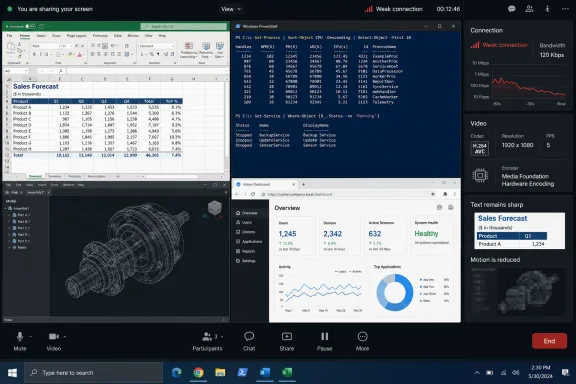 Chromium takes control away from the hardware encoder
Hardware video encoders are built to make real-time video fit within a changing bitrate budget. When a connection weakens, a common response is to preserve the target frame rate and increase compression. That often makes sense for a webcam: a soft image of a talking head remains understandable.Screen sharing is different. Its most important pixels are often small, sharp edges: letters, numbers, code syntax, cell boundaries, icons, and status indicators. Compression damage that would be tolerable on a webcam can make “O” and “0,” a hostname, or a single digit in an IP address impossible to distinguish.
The new Chromium work inserts a software bitrate controller ahead of the Windows Media Foundation encoder instead of depending wholly on the GPU driver’s own rate-control choices. In practical terms, the browser gets a stronger hand in choosing whether the next compromise should be lower visual fidelity or fewer delivered frames.
The QP cap is the centerpiece. In H.264, a higher quantization parameter means the encoder discards more image detail to save bits. The conventional maximum is 51. Chromium’s new desktop-sharing path stops at 35, which means it refuses the most visibly destructive levels of compression for the shared image.
That does not mean a screen share will remain pristine at any bandwidth. At sufficiently low upload capacity, even 35 can look degraded, and there may simply be too little capacity to send a usable high-resolution desktop feed in real time. The change narrows the range in which the encoder sacrifices text clarity before it begins discarding temporal smoothness.
The replacement for blur is slower motion
The obvious cost is frame rate. Once quality is constrained, Chromium has fewer ways to stay within the available bitrate. It can send fewer frames, drop frames more selectively, or make the shared content wait briefly rather than converting it into a low-detail approximation.The code review describes additional work around frame dropping, buffer fullness, and predictive buffer headroom. Those are not cosmetic tweaks. They address a behavior that becomes especially disruptive in low-bandwidth collaboration: the encoder can oscillate between sending too much, falling behind, receiving requests for a recovery keyframe, and spending still more bits trying to recover.
A keyframe is a self-contained video frame that lets a receiver rebuild the image without relying on prior frames. It is useful after loss or when someone joins a share, but it is substantially larger than an ordinary interframe. Repeated keyframe requests on a saturated uplink can turn a brief network dip into a more persistent freeze. Chromium’s change aims to keep those requests from compounding the congestion.
For a static presentation, the frame-rate penalty may be barely noticeable. A slide deck, dashboard, document review, or command-line diagnosis does not need 30 or 60 frames per second once the page is settled. For live drawing, fast scrolling, drag-and-drop demonstrations, video playback, 3D work, and remote-control-style support sessions, users will feel the compromise more directly.
That is still the right priority for the workloads this code targets. A presenter can pause for half a second while a screen share catches up; an IT administrator cannot safely ask a colleague to interpret an unreadable BitLocker recovery identifier or firewall rule.
Chrome and Edge inherit the code, but apps do not automatically inherit the fix
Because Edge is Chromium-based, the Windows browser should receive the same underlying encoder behavior once Microsoft incorporates the relevant Chromium code into an Edge build. Chrome should receive it through its usual Chromium development and release pipeline. Neither company has published a user-facing Chrome version, Edge version, or firm Stable-channel date for this specific change.That absence matters for IT teams. “Merged into Chromium” means the source change has landed; it does not mean that every managed Windows endpoint has the improvement today. Release branches, staged rollouts, GPU-driver exceptions, and enterprise browser-update policies can all delay when a particular device receives it.
The Android Authority report broadly named Google Meet, Microsoft Teams, and Zoom as likely beneficiaries. That needs a narrower reading. The improvement can help when those services are used through Chrome or Edge and the call negotiates the affected Windows H.264 hardware-encoding path. Microsoft officially supports Teams for the web in Chrome and Edge, while Zoom supports screen sharing in its Zoom Web App on those browsers.
It does not follow that the native Microsoft Teams desktop client or the installed Zoom desktop client will get this behavior. Those applications own their media stacks and release schedules; they do not become Chromium browser tabs merely because their web versions can run in Chromium. Organizations using the desktop clients should not treat this patch as a promised conferencing-client upgrade.
The same limitation applies to codec choice. The new logic is specifically for H.264. A service may negotiate VP9, AV1, or another route depending on the meeting platform, endpoints, policy, hardware, and network conditions. Chromium has separate media pipelines and rate-control work for other codecs, but this change should not be read as a universal screen-sharing quality policy.
Hardware support remains part of the eligibility test
Media Foundation is Windows’ multimedia framework, and Chromium uses it to access supported hardware encoders. That reduces CPU work compared with encoding all screen video in software, but it also means the benefit depends on the system being able to use the relevant encoder path.The Chromium feature name,
MediaFoundationUseSWBRCForH264Desktop, makes the division clear. “Software” here refers to the bitrate controller making the encoding decisions; it does not mean Chrome has abandoned hardware H.264 encoding. The browser is still using the Windows Media Foundation video encoder while applying Chromium’s own rate-control policy around it.That distinction explains why the change is aimed at compatible Windows systems rather than every Chrome installation. An endpoint without a usable Media Foundation H.264 hardware encoder, a device affected by Chromium GPU workarounds, or a call using a different codec may fall back to an existing behavior. The public change record does not list the GPU vendors, Windows releases, drivers, or hardware generations that will qualify.
For desktop administrators, that makes this a browser-update item to observe rather than a configuration change to push. There is no newly documented Chrome or Edge setting for users to enable, and the code review describes the feature as default-on in its intended path. The useful validation will be real: share a text-heavy application from a representative Windows device over a deliberately constrained uplink and compare receiver-side legibility and motion after the browser update arrives.
Text-first encoding is the practical change
The strongest consequence is that browser-based screen sharing on Windows is being tuned for information transfer, not the appearance of continuous motion. That is a sensible correction for the kinds of shares that make up much of enterprise work: documents, browser consoles, ticketing systems, code editors, device-management portals, and line-of-business applications.It will not make weak Wi-Fi good, and it will not prevent dropped frames where the network cannot sustain them. But it should reduce the more damaging outcome in which a call technically remains connected while the content being presented becomes unusable.
Until Chrome and Edge identify the release builds carrying the change, the most accurate expectation is modest: on compatible Windows systems, H.264 browser screen shares should favor readable pixels over smooth movement when bandwidth drops. For anyone presenting critical text over a mobile hotspot or congested office Wi-Fi, that is a better compromise than preserving motion in an image nobody can read.
References
- Primary source: androidauthority.com
Published: 2026-08-03T08:55:48+00:00
Loading…
www.androidauthority.com - Related coverage: issues.chromium.org
Loading…
issues.chromium.org - Related coverage: issues.chromium.org
Loading…
issues.chromium.org - Related coverage: learn.microsoft.com
Loading…
learn.microsoft.com - Related coverage: support.microsoft.com
Loading…
support.microsoft.com - Related coverage: learn.microsoft.com
Loading…
learn.microsoft.com - Related coverage: support.microsoft.com
Loading…
support.microsoft.com