
Google’s newly published Chrome Help documentation says Chrome can download on-device generative-AI models in the background when a PC has adequate hardware, an unmetered connection, and approximately 20GB of free disk space. Microsoft’s Edge documentation sets the same 20GB threshold for a Phi-4-mini download on the drive containing the Edge profile, with removal triggered once free space falls below 10GB.
The important correction to the broad “both browsers preload AI” framing is timing. Chrome explicitly says its models can arrive in the background to keep browser and web features ready. Edge’s current documentation says its initial model download occurs when a website first calls an API requiring an on-device model. That is still a meaningful storage and network event for users, but it is not the same documented behavior as Chrome’s pre-emptive background download.
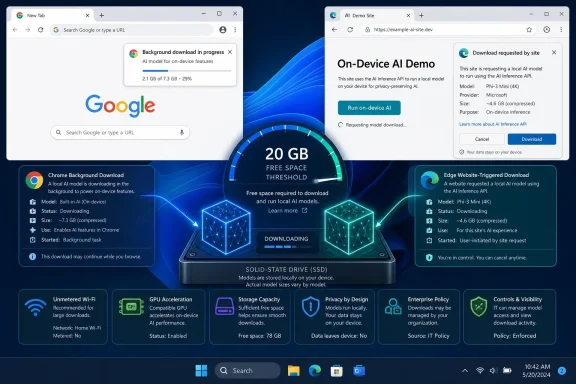 Chrome’s 20GB requirement is headroom, not a 20GB install
Google’s support page identifies writing and rephrasing help, scam warnings, webpage summaries, and tab organization as examples of Chrome features backed by local models. The company says it downloads those models only on supported hardware and only over an unmetered connection, but it does not publish a fixed download size because model packages can change as Chrome updates them.
That distinction has caused understandable confusion. Reporting by Android Authority, following reports from Windows Report and others earlier this month, says Google confirmed the local Gemini Nano model currently occupies roughly 4GB once installed. The browser’s 20GB requirement is therefore a buffer intended to avoid installing a multi-gigabyte component on a drive already close to capacity, rather than an indication that Chrome will consume 20GB itself.
For a Windows PC with a 256GB SSD, that policy may sound conservative. For older laptops, compact tablets, virtual desktops, or devices with a small system partition, it means Chrome simply will not provision its local AI stack until the volume has substantial slack space. A machine sitting at 14GB free may have enough room for the present model package, but Chrome’s documented rules still exclude it.
Google’s documentation also makes clear that the setting is per user and per device. Shared PCs can therefore have different outcomes depending on which Windows account runs Chrome and where that profile resides. For administrators who redirect browser profiles, use profile containers, or maintain tightly sized VDI disks, the relevant capacity is not necessarily the disk a user thinks of as the “main drive”; it is the storage location Chrome uses for that profile and its downloaded components.
The feature can be disabled in Chrome under Settings > System > On-device AI. Google says switching it off deletes the downloaded generative-AI model files and stops future downloads while the control remains off. Manually deleting files is the wrong fix: Chrome explicitly warns that manual removal is unsupported and does not prevent a future download controlled by the browser.
That is a meaningful improvement over the confusion surrounding Chrome’s earlier Gemini Nano downloads. In May, The Verge and follow-up reports from PC Gamer, Computerworld, and others documented users discovering an unexpected multi-gigabyte weights.bin file in Chrome’s profile data. Google now has a documented consumer control and a public statement of the free-space conditions, though the choice remains opt-out once an eligible installation decides the component is needed.
Edge has the same storage gate, but a narrower rollout
Microsoft’s 20GB number belongs to Edge’s Prompt API developer preview, not to every mainstream Edge user or every Copilot feature. According to Microsoft Learn, the API currently works on Windows 10, Windows 11, and macOS 13.3 or later, requires an unmetered connection, and needs a GPU with at least 5.5GB of VRAM. It is also limited by a device-performance classification Microsoft uses to keep latency and output quality predictable.
The model Microsoft documents for the Prompt API is Phi-4-mini, a small language model available locally through Edge. Microsoft introduced the Prompt and Writing Assistance APIs in Edge Canary and Dev beginning with Edge 138, and its June update says the APIs had used Phi-4-mini for the preceding year. Edge Canary and Dev beginning with version 150.0.4070 can also use the prerelease Aion-1.0-Instruct model.
Those channels and prerequisites matter. A Windows user running stable Edge should not assume that merely updating the browser will immediately cause Phi-4-mini to arrive. Microsoft’s own documentation describes this as a developer preview, and says the initial download is required the first time a site invokes an API that needs an on-device model. The browser can report download progress to developers through the API, but there is no indication in Microsoft’s public documentation of a Chrome-style consumer setting that lets an ordinary Edge user independently purge or preemptively block the model.
Microsoft does, however, document a storage safety valve: if free space on the volume holding the Edge profile falls below 10GB, Edge deletes the model. This is more than a housekeeping detail. It means local AI availability is conditional rather than permanent. A desktop app, intranet tool, or public website built around the API has to anticipate that the local model can disappear after a user installs a game, syncs a large OneDrive folder, or otherwise fills the drive.
For developers, that makes availability detection a required part of implementation rather than a one-time setup check. A site must cope with a model being unavailable because the device is unsupported, network conditions are metered, the first download has not occurred, or Edge has removed it to protect disk capacity.
Local processing changes the data path, not the permission model
Both vendors sell local inference on the same basic advantages: less dependence on an active network, faster responses for some small tasks, and reduced need to send a prompt to a remote model service. Those are real benefits when the task is appropriate for a smaller local model.
But “on-device” should not be mistaken for a blanket privacy guarantee. If a website uses a browser API to process text a user enters on that site, the model computation may remain on the PC while the website still controls the page, its scripts, and any information it chooses to collect independently. Local inference eliminates a particular cloud-model hop; it does not rewrite a website’s own privacy practices.
There is a second practical implication for Windows users: the workload shifts from a remote server to the client. The hardware requirements show the vendors are not treating this as trivial background logic. Chrome’s developer documentation has previously listed a 22GB threshold for its Built-in AI APIs and sets memory or graphics requirements that vary by processor path. Edge asks for 5.5GB of VRAM for its present preview. The newer Chrome consumer documentation now uses an approximate 20GB free-space threshold, while older developer material still lists 22GB in some API guidance.
That small mismatch is worth noting rather than smoothing over. Google’s consumer help page governs Chrome’s current background model-management behavior and says “20GB (approximate).” Its developer page addresses whether a machine can support Built-in AI APIs and still lists 22GB. The underlying point is consistent—both are guardrails, not package sizes—but admins should test against the release channel and API they actually deploy rather than hard-code a single capacity number from a news report.
Administrators need a policy decision before users discover the disk use
Google and Microsoft already expose similarly named enterprise policies: GenAILocalFoundationalModelSettings. In Chrome Enterprise, leaving the policy unset or allowing it permits automatic download and local inference; setting it to “Do not download model” blocks the local foundational model. Microsoft’s Edge policy documentation likewise says the policy controls whether Edge downloads the local foundational model and uses it for inference, with automatic download as the default behavior when no restriction is imposed.
That makes this an ordinary endpoint-management question, not an AI philosophy debate. Organizations with spacious managed desktops may choose to permit the models, test internal sites using the APIs, and document the local storage reserve. Organizations with non-persistent virtual desktops, engineering workstations that operate close to capacity, or field devices on limited connectivity should decide deliberately whether a browser is allowed to consume several gigabytes for an optional AI runtime.
A practical rollout should include these checks:
- Inventory available capacity on the volume holding Chrome and Edge user profiles, rather than checking only total physical drive size.
- Apply the browser policy before broad deployment if local model downloads are unacceptable on managed endpoints.
- Test Chrome’s user-level On-device AI toggle separately from enterprise policy, because a user preference and an administrator mandate are not equivalent controls.
- Treat Edge’s Prompt API as a developer-preview dependency and build a non-local fallback path for unsupported or storage-constrained PCs.
Chrome’s change is already operational for eligible users: the browser may download Gemini Nano in the background, and the documented toggle is now the supported way to remove it. Edge’s comparable model remains tied to a preview web platform and a site invoking the relevant API. For Windows administrators, the immediate task is simple: reserve the space knowingly, or set policy before the browser does it for them.