
That makes Windows Central’s newly published framing materially misleading. Its report correctly identifies build 16.0.20026.20182 as the point after which Copilot Chat and other entry points could vanish from classic Outlook, but it says the fault affected both Basic and paid Premium accounts. Microsoft’s support document says the opposite: the issue occurred when the user only had Copilot Chat (Basic), and did not occur with the paid Microsoft 365 Copilot entitlement.
For administrators and users still unable to find Copilot in classic Outlook, the practical conclusion is simple: do not treat a missing button as proof of a fresh August regression. First establish the user’s license, Outlook build, update channel, and whether the problem persists after a full Outlook restart. The incident that prompted the missing-button reports belongs to the June release cycle, not to a newly discovered Copilot removal.
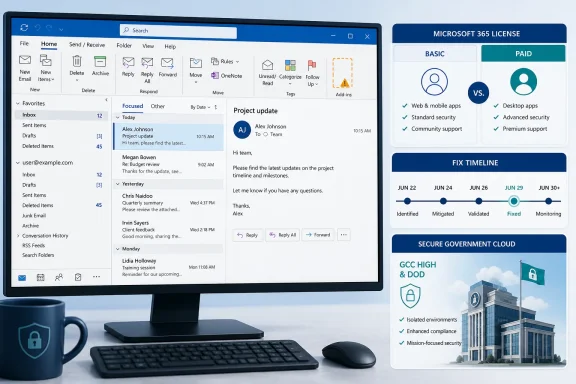 The build number was real, but the incident has moved on
Microsoft’s original known-issue notice identified classic Outlook for Windows build 16.0.20026.20182 and later as the trigger point. That build was released to Current Channel on June 16 as Version 2605, while build 16.0.20026.20168 — the rollback target Microsoft initially provided — was the immediately preceding Current Channel release from June 9.
The symptoms were unusually visible. Copilot could disappear from the upper-right area above Outlook’s ribbon, from the left-side app bar, or from the More Apps area. In some cases, Copilot remained listed under Add Apps, but pressing Open did nothing. Users who tried to restore it through ribbon customization could find the command unavailable or grayed out.
Those details explain why ordinary client-side fixes produced inconsistent results. Creating a new Outlook profile, clearing cache files, signing out and back into Microsoft 365, or restarting Windows could not reliably repair a service-side eligibility or feature-delivery problem. A visible app entry that fails to open is not the same thing as a removed ribbon setting.
Microsoft subsequently marked the incident FIXED. The company says the Outlook team applied its change on June 29 and instructed affected users to restart Outlook to receive it, then update Office from File > Office Account > Update Options > Update Now. BleepingComputer independently reported the fix in early July and described the same Basic-license limitation.
The official Outlook known-issues index also places the Copilot-button failure among the fixed issues from June 2026. That is an important record check because an individual support page can remain indexed long after the operational state changes. In this case, Microsoft has left the incident page available, but labels it fixed rather than investigating.
The license distinction changes the diagnosis
The difference between Copilot Chat (Basic) and paid Microsoft 365 Copilot is not a trivial wording correction. It changes which accounts an IT team should investigate and what hypotheses make sense.
Microsoft’s stated scope was users who had only the Basic Copilot Chat license. If a tenant’s paid Microsoft 365 Copilot users are missing Copilot controls in classic Outlook today, that does not match the known June incident as Microsoft documented it. Their problem may instead involve license assignment or propagation, the signed-in identity, organizational policy, connected-experience settings, update management, regional availability, or a separate Outlook defect.
That distinction also undercuts the suggestion that Microsoft somehow chose to make Copilot disappear from classic Outlook as a product decision. The company’s published record calls it an issue, provided a temporary workaround and rollback method, and later recorded it as fixed. There is no evidence in the support documentation that removing Copilot from classic Outlook was intentional or that the company used the incident to steer paid Copilot customers toward the new Outlook.
Classic Outlook remains a major operational dependency for organizations that rely on mature desktop-workflow features and Exchange integrations. But it is also a Microsoft 365 Apps client whose connected features can depend on tenant entitlements and service-side delivery, not merely the executable version installed on a PC. A ribbon command disappearing can therefore be a licensing or service condition even when Outlook itself opens, sends mail, and otherwise behaves normally.
GCC High and DoD are the remaining exception Microsoft names
Microsoft does still identify one population that may have continued to encounter the missing controls after the June 29 fix: customers in GCC High and Department of Defense environments. The company says those tenants could remain affected until Outlook for Windows Version 2508, build 16.0.20228.20000, had deployed.
That exception matters because government cloud environments often operate under distinct servicing and feature-release schedules. A commercial-tenant support outcome cannot simply be assumed to apply to GCC High or DoD, particularly when the vendor explicitly documents a different deployment milestone.
However, the exception should not be broadened into a claim that all classic Outlook users remain exposed. Microsoft did not publish a blanket warning covering paid commercial Microsoft 365 Copilot users, nor did it characterize the issue as an ongoing defect across every channel and tenant.
Admins in a regulated environment should confirm their installed Outlook version and their organization’s update policy before taking action. If a supported government-cloud client remains below the named Version 2508 build, the documented issue may still be relevant. If it is already current and Copilot remains absent, that is evidence to open a separate support case with the user’s license details and exact build number rather than repeatedly applying the old workaround.
What to check before rolling Outlook backward
Rolling back Microsoft 365 Apps is a disruptive response, especially now that Microsoft has already marked this particular incident fixed. The original rollback command targeted build 16.0.20026.20168, a June build that predates later feature, security, and reliability releases. Reverting a broad set of devices solely to recover one missing Copilot button can create more management debt than it solves.
A better triage sequence is:
- Confirm that the affected person is using classic Outlook for Windows rather than new Outlook or Outlook on the web, because the June issue did not remove Copilot from those other entry points.
- Check whether the account has only Copilot Chat (Basic) or has the paid Microsoft 365 Copilot license, because Microsoft’s stated scope covered the former and excluded the latter.
- In Outlook, use File > Office Account to record the installed version and build, then use Update Options > Update Now before attempting profiles, cache clearing, registry changes, or a channel rollback.
- Fully exit and restart Outlook after updating, because Microsoft says its June 29 repair was delivered through a service-side change that the client may need to pick up again.
- For GCC High and DoD users, compare the installed client with Outlook Version 2508, build 16.0.20228.20000, which Microsoft named as the relevant deployment threshold.
- If Copilot is still absent for a paid-license user on a current commercial build, collect tenant, license, identity, and policy details for support. Do not label it the June Basic-license bug without evidence.
The original incident was a legitimate example of how a small Outlook UI change can interrupt a feature users expect to be available. But the current support record is clear: the bug was fixed on June 29, it was scoped to Basic Copilot Chat users, and the remaining documented caveat concerns GCC High and DoD deployment timing. Anyone seeing a missing Copilot button now needs a current diagnosis, not a recycled June workaround.