
That omission changes the recommended first step for CISOs. A Claude inventory that starts with user-facing chat, coding tools, and agents—but does not include Console organizations, workspace API keys, files, skills, vaults, and the identities permitted to manage them—will miss the control plane that creates the autonomous workloads in the first place. Anthropic’s current documentation confirms that the Console and Claude Enterprise are different organization types with different administrative APIs and permissions.
Reco’s underlying point is sound: security teams cannot treat “Claude” as one application with one policy. But its five-surface framing understates the task it is asking enterprises to perform. The usable governance model is not five surfaces, or even six product boxes. It is a mapping of every Claude entry point to the identity, credential, data source, tool permission, network route, retention rule, and accountable owner behind it.
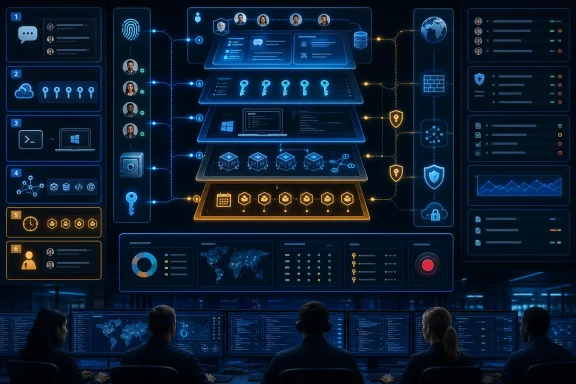 The missing sixth surface is where access is minted
Reco’s own Claude-risk page calls out “unmanaged API keys” in the Claude Platform Console as an exposure separate from enterprise chat. It warns that an old key can retain access long after the person or project that created it has faded from view. That directly conflicts with the article’s headline claim that Claude now runs “five different ways” inside a company.
The Console matters because it is where developers can provision the platform access used for API applications and Managed Agents. Anthropic’s documentation also distinguishes the enterprise organization used for Claude’s user-facing products from a Console organization, with different keys and different endpoint access. A company can therefore be disciplined about SSO, group assignments, and connectors in Claude Enterprise while still having a separate developer workspace with API credentials, agent definitions, files, and secrets outside that review process.
For Windows administrators, this is a familiar failure mode. It resembles governing Microsoft 365 identities while overlooking an Azure subscription where service principals, app registrations, and long-lived client secrets keep accumulating. The visible user application may be well managed; the automation plane is where the durable access lives.
The first correction to the guide’s advice is simple: inventory the Claude Platform Console as a separate asset class. Record every organization, workspace, API key owner, key creation date, last use, allowed cloud path, Managed Agent, sandbox environment, vault, file store, memory store, and webhook. If an enterprise cannot answer those questions, it does not yet have an inventory of Claude.
Standard audit logs are not the whole record—and neither is the guide’s description
The guide argues that chat and connected apps can be the least visible surface because audit logging may show that a connection occurred without revealing what data passed through it. That is directionally true for a narrow audit-event feed, but it leaves out a major enterprise control Anthropic already provides.
Anthropic says its Claude Enterprise Compliance API can provide activity events, chat histories, file content, and project data, filtered by user and time range. Its current documentation is unusually explicit about the privilege involved: a Compliance Access Key granted the relevant user-data scope can read every chat, file, and project in linked organizations, including content that the primary owner has not personally viewed.
That does not produce a single, ready-made incident narrative for every Claude surface. Anthropic separately says its Claude Platform Compliance API does not log inference activity—the prompts, model responses, and model-side actions—despite providing audit logs for control-plane and resource activity. Managed Agents also emit their own session events, while external tools such as SaaS connectors, MCP servers, endpoint agents, proxies, and cloud services retain evidence in their own logs.
But “the audit log shows only that the conversation happened” is incomplete advice for a Claude Enterprise deployment. The real operational question is whether the organization has enabled and integrated the Compliance API—and whether it has treated that powerful content-reading key as a privileged security system rather than an ordinary integration credential.
A CISO should decide this deliberately:
- Enterprise chat, files, and Projects should have an approved retention policy and a documented Compliance API collection path into the company’s eDiscovery, DLP, or SIEM tooling.
- Compliance Access Keys should be stored and monitored like domain-level administrative credentials because they can expose the very content teams may believe is protected by enterprise access controls.
- Claude Platform activity logs should be joined to cloud audit records, application logs, MCP service logs, and network telemetry rather than being treated as a full account of what an API-built agent did.
The distinction is important in an investigation. An Enterprise chat can have content available to compliance tooling, while an API-based agent may require you to reconstruct a data flow from session events, tool calls, proxy logs, application traces, and the destination system’s own audit trail. Those are different evidence problems and should not share a single generic “Claude logging” checkbox.
Managed Agents have guardrails, but enterprises must configure the blast radius
The guide correctly identifies Managed Agents as the sharpest transition from assistant to automation. Anthropic introduced scheduled Managed Agent deployments in June, allowing an agent to run on a cron schedule and use authenticated CLI tools and services. The product is still in public beta, according to Anthropic’s platform documentation.
Anthropic does not describe this as unconstrained execution. Managed Agents support permission policies, and the MCP toolset defaults to an always ask policy requiring approval before each tool call. Anthropic’s production tutorial also documents human-in-the-loop workflows. Those details matter because they contradict any impression that scheduled operation automatically means unrestricted action.
The risk arrives when an implementer changes those defaults, assigns broad credentials, or designs a workflow that can complete high-impact steps without an approval gate. Anthropic’s own examples show Managed Agents using vault-backed credentials for MCP servers and environment variables. Those credentials are write-only in the vault API, but the agent can use them to authenticate to external services. Security is therefore determined less by whether the model can print a secret and more by what the credential lets the runtime do.
Anthropic’s self-hosted-sandbox documentation states the shared-responsibility boundary plainly: tools run inside the customer’s sandbox with the permissions of the customer’s process. Without outbound restrictions, a compromised or misdirected tool execution can reach arbitrary external hosts. Anthropic recommends least privilege, limited directory mounts, isolated trust boundaries, and restrictive network egress.
That turns the practical control model into a conventional workload-security problem. Treat each Managed Agent as a non-human production identity with a defined purpose, scoped credentials, a narrow egress policy, a named owner, expiration or review dates, and an emergency disable procedure. Scheduled runs should be particularly constrained: do not allow them to send external communications, alter records, delete data, approve financial activity, or deploy code without a separate policy decision and a traceable approval step.
The guide’s service-account analogy is the right one. The useful refinement is that a Managed Agent is not like a service account; it is a workload that may exercise several service accounts, API tokens, OAuth grants, and network permissions during one task. The unit of review must cover the full chain.
MCP approval must cover behavior after installation
Model Context Protocol servers deserve their own governance path because they sit between Claude and tools that read or alter enterprise data. Anthropic’s Managed Agents documentation permits up to 20 MCP servers per agent and associates credentials with server URLs through vaults. It also notes that connectivity and credentials are not validated until a session runs, which means a clean-looking agent configuration is not proof of a working or appropriately authorized integration.
Anthropic’s support guidance warns that custom remote MCP connectors can access and take action in external services, and that malicious servers can contain hidden instructions intended to cause unintended actions. In a separate engineering note, Anthropic makes a further point that security teams should not skip: a remote tool can change behavior after it has been approved. Reviewing source code, pinning a version, and checking signatures can reduce conventional supply-chain risk, but it does not stop a hosted service from returning new tool descriptions or adversarial content later.
The correct approval object is therefore not simply “MCP server X is allowed.” It is a versioned and monitored contract: which endpoint is allowed, from which managed network path, with which OAuth scopes or token, which individual tools may be called, against which data classes, and whether each tool needs user approval. A server that can search an internal knowledge base is a fundamentally different risk from one that can send Slack messages, open tickets, modify CRM records, or execute deployment commands.
For Claude Code on Windows developer endpoints, the same approach applies locally. Route traffic through a corporate proxy where policy requires it, apply Anthropic’s managed settings and connector restrictions, prevent unmanaged MCP configuration where possible, and review filesystem and shell permissions as part of endpoint hardening. “The developer uses Claude Code” is not an access description; the relevant question is which repositories, folders, credentials, terminals, network destinations, and tool servers that installation can reach.
There is no Claude-specific benchmark, but there is no excuse to wait
Reco is right that there is no broadly adopted CIS Benchmark specifically for Claude. That absence should not be mistaken for a lack of usable controls. Anthropic now offers Enterprise role-based permissions, connector restrictions, SCIM, audit logs, retention settings, the Compliance API, managed Claude Code settings, Managed Agent permission policies, vault lifecycle operations, and AWS IAM actions for platform resources. The controls exist; they are distributed across products and require an organization to assemble them into a policy.
The immediate deliverable should be a Claude control register, not a broad ban or a generic acceptable-use document. It should contain the six product and control-plane surfaces, every human and non-human identity, every data connector and MCP endpoint, every credential and vault, each agent’s permission policy, network boundary, log source, retention setting, business owner, and kill switch.
The most consequential finding in Reco’s guide is its own contradiction: it says organizations must identify every Claude surface, yet its published five-surface article omits the Console exposure its companion page names as the sixth. Enterprises should not repeat that mistake. Start with the Console and keys that create access, then trace outward to chat, Projects, connectors, Claude Code, MCP tools, and scheduled agents.
