
Opsin has added support for Claude Cowork, positioning its AI-governance platform as a visibility and policy layer for Anthropic’s task-running agent as Cowork expands from the desktop to web and mobile. The announcement, published through Business Wire on July 31, targets a gap that Windows administrators and security teams will recognize immediately: Cowork can act across files and connected business tools, while native enterprise logging does not yet cover all of that activity.
That distinction matters more than the usual “AI assistant” label suggests. Claude Cowork is built to accept an outcome—prepare a spreadsheet, organize a contract repository, assemble a sales brief—and then work through the relevant files, connectors, and applications to produce it. Anthropic describes it as an agentic product for non-coding knowledge work, rather than a chat interface that merely proposes steps for a user to follow.
Opsin says its new integration records Cowork sessions, prompts, and individual tool calls; inventories the connectors in use; and generates alerts when actions touch sensitive enterprise data in risky ways. Those are vendor claims, and no independent technical evaluation of the Opsin integration was available at publication. But the product timing is significant because Anthropic’s own Cowork documentation says its Enterprise plan offers usage analytics, an Analytics API, and OpenTelemetry observability while Cowork activity is not yet captured in audit logs or the Compliance API.
The important operational change is not that Claude can write a document. It is that Cowork can pull material from a folder, email account, CRM, messaging service, calendar, or connected data source, combine it in one workflow, and prepare an output for review. Anthropic says Cowork prioritizes connectors and direct integrations, using browser-based computer interaction when needed.
For a Windows user, the desktop agent can work with selected local folders and apps. Anthropic’s product material lists Microsoft Office formats among the files Cowork can understand, including Word documents, Excel workbooks, PowerPoint presentations, CSV files, PDFs, and images. The result is an agent that can be useful for mundane but consequential jobs: turning an intake folder into a tracker, reconciling exports, preparing a recurring metrics deck, or sorting documents for an audit.
That also shifts the practical control point. A conventional data-loss-prevention product may inspect email, endpoint file activity, or a sanctioned SaaS upload. An agent can create a chain spanning all three: read a shared file repository, extract information from a workbook, retrieve context from email, and post a synthesized result through another connector. Each action could be allowed in isolation. The combination may not be.
Opsin’s pitch is that security teams need to see that chain rather than just an end result. According to the company’s announcement, its Cowork support maps who is using the service, what they asked it to do, the tools it used, and the data context behind individual actions. It also says it can identify connectors installed outside policy or used by the wrong team for a particular class of data.
This is a familiar problem in SaaS governance, but agents make it more immediate. In a normal workflow, a user’s intent is distributed across clicks, attachments, searches, and messages. In Cowork, a single natural-language instruction may supply the intent while an autonomous sequence supplies the execution.
As of August 1, 2026, that rollout is already under way; the supplied announcement’s reference to an August 3 launch should not be read as the start of web and mobile availability. Anthropic’s current product page describes web and mobile support as beta, while emphasizing that desktop remains the route to local folders and applications on a user’s own machine.
For IT teams, this makes the governing question less about whether Cowork is installed on a Windows endpoint. A scheduled task initiated from a browser or phone can continue after the laptop is shut. That is useful for legitimate work such as a recurring briefing or overnight document-processing task, but it weakens the old habit of treating the endpoint as the complete enforcement and monitoring boundary.
The cloud model also changes incident response expectations. Security teams may need to establish who can connect external services, which types of documents can be processed in remote sessions, and what revocation looks like when a user changes roles or leaves the company. A policy that assumes the activity stops when a device leaves the corporate network is plainly inadequate for cloud-hosted agent execution.
That containment model is useful, especially for local Windows work. Anthropic says credentials remain in the host keychain and that Cowork receives a session-scoped token rather than direct access to the user’s stored credentials. In principle, that limits the agent’s ability to range freely across a PC.
But containment and governance solve different problems. A sandbox limits what an agent can reach on a machine; it does not decide whether a user should have connected a given cloud source, whether an approved connector is suitable for HR records, or whether a legitimate sequence of actions created an unacceptable data transfer. Those are identity, authorization, classification, and audit questions.
Recent third-party security reporting also underlines why organizations should avoid assuming an agent’s technical boundary is permanent. TechRadar reported that researchers at Accomplish AI alleged a Claude Cowork escape from a local virtual-machine environment on macOS through a Linux kernel flaw. The researchers’ claim concerns a specific local configuration rather than a broad finding about every Cowork deployment, and Anthropic’s later cloud-default approach is reported to reduce exposure to that scenario. Still, the episode illustrates the larger point: agent security cannot rest on a single sandbox claim.
For Windows administrators, the right response is neither blind trust nor an automatic ban. It is to treat Cowork like a workload that combines endpoint access, SaaS permissions, identity delegation, and AI-driven automation.
Yet Anthropic’s statement that Cowork activity is not presently represented in audit logs or its Compliance API creates a clear opening for specialist governance products. Opsin is explicitly trying to occupy that space, alongside its existing coverage for Claude Enterprise, Claude Managed Agents, Microsoft Copilot, ChatGPT Enterprise, and Google Gemini.
The central question will be the fidelity of the data. “Every tool call” is a strong promise. Security teams evaluating the service should verify whether it captures the complete action sequence across desktop, web, and mobile; whether it sees native and third-party connectors equally; what latency applies to alerts; and whether the logs can be exported into Microsoft Sentinel, Splunk, or another established SIEM workflow.
They should also ask where the inspection happens. An AI-governance platform designed to analyze prompts, outputs, connector activity, and data sensitivity will itself process sensitive security telemetry. That does not make the model invalid, but it demands the same diligence customers would apply to any security vendor: data residency, retention, tenant isolation, role separation, encryption, incident notification, and API permissions.
A practical initial policy should include:
With Cowork’s web and mobile beta already broadening the agent’s reach beyond a single Windows PC, that audit trail is likely to become a deployment requirement rather than a premium add-on.
Opsin says its new integration records Cowork sessions, prompts, and individual tool calls; inventories the connectors in use; and generates alerts when actions touch sensitive enterprise data in risky ways. Those are vendor claims, and no independent technical evaluation of the Opsin integration was available at publication. But the product timing is significant because Anthropic’s own Cowork documentation says its Enterprise plan offers usage analytics, an Analytics API, and OpenTelemetry observability while Cowork activity is not yet captured in audit logs or the Compliance API.
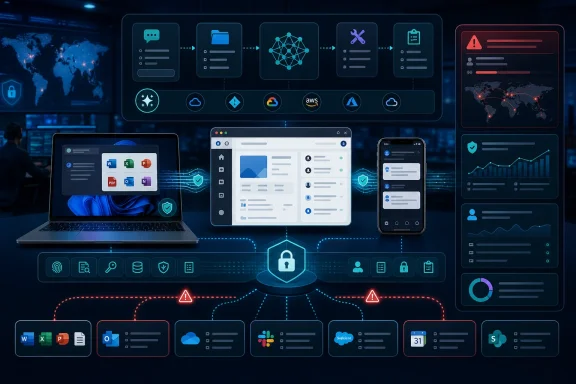 Cowork Turns the Connector Into the Security Boundary
The important operational change is not that Claude can write a document. It is that Cowork can pull material from a folder, email account, CRM, messaging service, calendar, or connected data source, combine it in one workflow, and prepare an output for review. Anthropic says Cowork prioritizes connectors and direct integrations, using browser-based computer interaction when needed.For a Windows user, the desktop agent can work with selected local folders and apps. Anthropic’s product material lists Microsoft Office formats among the files Cowork can understand, including Word documents, Excel workbooks, PowerPoint presentations, CSV files, PDFs, and images. The result is an agent that can be useful for mundane but consequential jobs: turning an intake folder into a tracker, reconciling exports, preparing a recurring metrics deck, or sorting documents for an audit.
That also shifts the practical control point. A conventional data-loss-prevention product may inspect email, endpoint file activity, or a sanctioned SaaS upload. An agent can create a chain spanning all three: read a shared file repository, extract information from a workbook, retrieve context from email, and post a synthesized result through another connector. Each action could be allowed in isolation. The combination may not be.
Opsin’s pitch is that security teams need to see that chain rather than just an end result. According to the company’s announcement, its Cowork support maps who is using the service, what they asked it to do, the tools it used, and the data context behind individual actions. It also says it can identify connectors installed outside policy or used by the wrong team for a particular class of data.
This is a familiar problem in SaaS governance, but agents make it more immediate. In a normal workflow, a user’s intent is distributed across clicks, attachments, searches, and messages. In Cowork, a single natural-language instruction may supply the intent while an autonomous sequence supplies the execution.
Web and Mobile Remove the “Managed Laptop” Assumption
The Opsin announcement arrives after Anthropic’s July 7 rollout of Cowork on the web and mobile in beta. Anthropic said the rollout would begin with Max subscribers and widen over subsequent weeks. Reporting from Notebookcheck and other outlets independently confirmed that the change moves compatible Cowork sessions toward cloud execution, allowing an employee to begin a task on one device and monitor or redirect it from another.As of August 1, 2026, that rollout is already under way; the supplied announcement’s reference to an August 3 launch should not be read as the start of web and mobile availability. Anthropic’s current product page describes web and mobile support as beta, while emphasizing that desktop remains the route to local folders and applications on a user’s own machine.
For IT teams, this makes the governing question less about whether Cowork is installed on a Windows endpoint. A scheduled task initiated from a browser or phone can continue after the laptop is shut. That is useful for legitimate work such as a recurring briefing or overnight document-processing task, but it weakens the old habit of treating the endpoint as the complete enforcement and monitoring boundary.
The cloud model also changes incident response expectations. Security teams may need to establish who can connect external services, which types of documents can be processed in remote sessions, and what revocation looks like when a user changes roles or leaves the company. A policy that assumes the activity stops when a device leaves the corporate network is plainly inadequate for cloud-hosted agent execution.
Anthropic Has Controls, but They Do Not Eliminate Governance Work
Anthropic has not left Cowork without safeguards. Its documentation says users choose the folders and tools the agent may access, that deletion requires approval, and that Enterprise administrators can disable Cowork or manage access through role-based controls. Anthropic also says the desktop implementation uses containment measures: Cowork originally ran in a full virtual machine, with only a selected workspace and the.claude folder mounted into that environment.That containment model is useful, especially for local Windows work. Anthropic says credentials remain in the host keychain and that Cowork receives a session-scoped token rather than direct access to the user’s stored credentials. In principle, that limits the agent’s ability to range freely across a PC.
But containment and governance solve different problems. A sandbox limits what an agent can reach on a machine; it does not decide whether a user should have connected a given cloud source, whether an approved connector is suitable for HR records, or whether a legitimate sequence of actions created an unacceptable data transfer. Those are identity, authorization, classification, and audit questions.
Recent third-party security reporting also underlines why organizations should avoid assuming an agent’s technical boundary is permanent. TechRadar reported that researchers at Accomplish AI alleged a Claude Cowork escape from a local virtual-machine environment on macOS through a Linux kernel flaw. The researchers’ claim concerns a specific local configuration rather than a broad finding about every Cowork deployment, and Anthropic’s later cloud-default approach is reported to reduce exposure to that scenario. Still, the episode illustrates the larger point: agent security cannot rest on a single sandbox claim.
For Windows administrators, the right response is neither blind trust nor an automatic ban. It is to treat Cowork like a workload that combines endpoint access, SaaS permissions, identity delegation, and AI-driven automation.
Why Opsin Sees an Opening in Anthropic’s Enterprise Stack
Anthropic has been building its own administrative controls around Cowork. Its current product page says enterprise admins can manage feature access, control spending, and track usage across the organization. It also advertises an Analytics API and OpenTelemetry observability. Those are meaningful building blocks for organizations that want to deploy the agent without making it a shadow-IT tool.Yet Anthropic’s statement that Cowork activity is not presently represented in audit logs or its Compliance API creates a clear opening for specialist governance products. Opsin is explicitly trying to occupy that space, alongside its existing coverage for Claude Enterprise, Claude Managed Agents, Microsoft Copilot, ChatGPT Enterprise, and Google Gemini.
The central question will be the fidelity of the data. “Every tool call” is a strong promise. Security teams evaluating the service should verify whether it captures the complete action sequence across desktop, web, and mobile; whether it sees native and third-party connectors equally; what latency applies to alerts; and whether the logs can be exported into Microsoft Sentinel, Splunk, or another established SIEM workflow.
They should also ask where the inspection happens. An AI-governance platform designed to analyze prompts, outputs, connector activity, and data sensitivity will itself process sensitive security telemetry. That does not make the model invalid, but it demands the same diligence customers would apply to any security vendor: data residency, retention, tenant isolation, role separation, encryption, incident notification, and API permissions.
The First Deployment Should Be Narrow, Not Silent
Organizations considering Claude Cowork should begin with a constrained pilot rather than a blanket enablement. Start with a group whose data sources are well understood, select a small connector set, and make task outputs subject to human review. Disable access to unrestricted shared drives, HR repositories, privileged engineering stores, and high-risk external destinations until ownership and monitoring are established.A practical initial policy should include:
- Cowork access should be assigned through an approved enterprise identity group rather than allowed through unmanaged individual subscriptions.
- Connectors should be approved by data owner and business purpose, with separate rules for finance, legal, HR, customer data, and source code.
- Scheduled unattended tasks should have named owners, defined retention periods, and clear revocation procedures.
- Security operations should be able to retrieve a session’s prompt, connected sources, tool actions, and resulting outputs during an investigation.
- Teams should test prompt-injection and oversharing scenarios before allowing agents to work across mixed-trust document repositories.
With Cowork’s web and mobile beta already broadening the agent’s reach beyond a single Windows PC, that audit trail is likely to become a deployment requirement rather than a premium add-on.
References
- Primary source: 01net
Published: 2026-07-31T19:59:00+00:00
Loading…
www.01net.it - Related coverage: techradar.com
It's not just OpenAI models escaping and running riot — experts show how Claude Cowork can break its bonds and access Mac files | TechRadar
Anthropic partially mitigated the issuewww.techradar.com - Related coverage: anthropic.com
Loading…
www.anthropic.com - Related coverage: claude.com
Claude Cowork on web and mobile: hand off work anywhere | Claude by Anthropic
Claude Cowork from Anthropic is rolling out to web and mobile. Hand Claude a task, close the laptop, and the work keeps going, while every decision still comes to you.claude.com - Related coverage: support.claude.com
Loading…
support.claude.com - Related coverage: notebookcheck.net
Loading…
www.notebookcheck.net - Related coverage: wired.com
Loading…
www.wired.com - Related coverage: androidauthority.com
Loading…
www.androidauthority.com - Related coverage: macrumors.com
Claude Cowork Expands to iPhone and the Web
Anthropic today said it is bringing Claude Cowork to mobile and the web, with beta access rolling out to Max users first. Claude Cowork is a feature that lets Claude access local files and connected tools, then autonomously complete tasks on your behalf. Claude Cowork tasks can now be started...www.macrumors.com - Related coverage: techradar.com
Loading…
www.techradar.com - Related coverage: time.com
AI Is Moving Past Chatbots. Claude Cowork Shows What's Next
An AI powerful enough to analyze DNA, file taxes, and grow tomato plants is being redesigned for everyday work, pointing toward life beyond chatbots.time.com