
That caution is more important than the article lets on. Social Media Examiner presents Cowork, based on an interview with AI consultant Isar Meitis, as a human-friendly path from a plain-language brief to a working automation across files, CRM data, Gmail, Google Drive, and browser-based services. Anthropic’s current documentation confirms that Cowork is built for exactly this type of multi-step knowledge work, with the same agentic approach as Claude Code but without requiring a terminal. It now supports paid Claude plans on Windows, macOS, web, and mobile, though local file access, browser use, and computer use still require the Claude Desktop app on the machine that holds those resources.
The critical distinction is that Cowork is not a conventional workflow engine with a fixed, visually auditable sequence. It is a model-driven agent that makes planning decisions while it works. A good requirements document can constrain that behavior, but it cannot turn a probabilistic system into a deterministic integration.
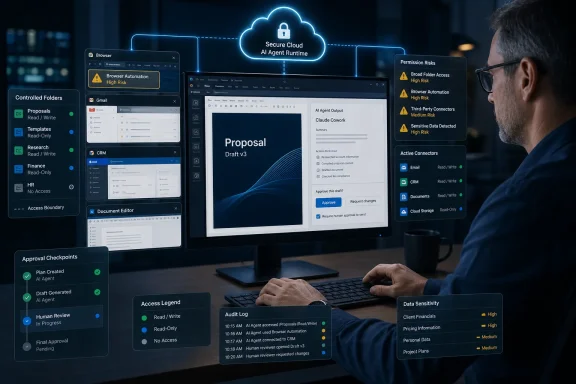 Cowork Has Moved Beyond the Folder Sandbox
The original appeal of Cowork was easy to understand: point Claude at a folder, tell it what to do, and let it organize files, generate documents, or analyze a local collection without handing it a full developer environment. TechCrunch reported at Cowork’s January 12 launch that Anthropic framed the assigned-folder model as a less intimidating, sandbox-like version of Claude Code for nontechnical users.
That remains partly true on Windows. Anthropic says local file access is limited to folders that the user explicitly connects through Claude Desktop. For a staff member processing a folder of invoices, call transcripts, product images, or exported CRM data, a dedicated project folder is a meaningful access boundary. It is also why Meitis’s recommendation to use a top-level “ClaudeCowork” folder should be treated carefully: a broad parent folder is convenient for Claude, but it also exposes every client, project, and draft below it.
The more consequential change is that Cowork sessions now run in Anthropic’s cloud by default, in beta. Anthropic says the agent loop, code execution, session history, and working files are stored with the user’s Claude account; the desktop application becomes a bridge back to connected local folders, browsers, and apps. If Cowork opens a local file through that bridge, its contents are processed on Anthropic’s servers rather than remaining solely on the Windows PC.
That does not make the service unsafe by definition. Anthropic says cloud sessions use isolated temporary environments, cannot reach private network addresses by default, and use short-lived session credentials. But it changes the data-classification question. A folder selection limits which local paths Cowork can reach; it does not mean the work stays local, and it does not isolate information already reachable through Gmail, Microsoft 365, Google Drive, Slack, or another authorized connector.
For Windows administrators, that means Cowork should be evaluated as a cloud-connected AI agent with desktop reach, not as a local productivity utility.
The PRD Advice Is Sound, but “Implement It” Is Not a Deployment Plan
Social Media Examiner’s strongest recommendation is to write a product requirements document before building the automation. Meitis proposes an interview-driven process in which Claude asks dozens of questions and creates a detailed document defining sources, output, workflow rules, and expected behavior. He then recommends finding the smallest useful minimum viable product rather than wiring the entire process at once.
That is sensible operational advice. The sales-proposal example should begin with a tightly bounded task: turn an approved discovery-call transcript into a proposal draft using a specified template. It should not begin by letting the agent research the prospect, update the CRM, write files to a shared drive, attach a PDF, and draft or send an email. Each additional connected system increases the impact of a mistaken conclusion, an ambiguous customer name, a duplicate deal record, or hostile text hidden in a transcript or web page.
Anthropic’s own guidance supports that restrained rollout. Cowork has three approval modes: Manual, Auto, and Skip. Manual pauses for action requests. Auto allows the system to proceed while it applies Anthropic’s own action screening; Skip removes both the pause and that automatic review. Anthropic explicitly advises close oversight for consequential work involving money, messages sent under the user’s identity, or important files.
The vendor’s terminology here can obscure a practical limit. “Auto” is not an approval workflow designed around a company’s business controls. It is Anthropic’s automated judgment about whether an action appears unsafe. A sales team’s policy — for example, requiring legal review for nonstandard contract language or manager approval for discounts over 15 percent — still has to be implemented as a hard stop outside the model’s discretion.
A realistic first Cowork automation on Windows therefore looks less glamorous but is more defensible:
- It reads a transcript and a controlled proposal-template folder, then produces a draft marked for human review.
- It records its research sources and assumptions in the output rather than silently turning them into sales claims.
- It leaves CRM changes, shared-drive publication, and email delivery outside the first version until the draft quality is consistently acceptable.
- It operates in Manual mode when the workflow touches customer information, external accounts, or write-capable connectors.
The claimed reduction from two hours to ten minutes is a testimonial from Meitis, not an independently measured benchmark. It may be achievable for a familiar, repetitive proposal process. It should not be used as a business case until an organization measures its own review time, correction rate, connector failures, and cost in Claude usage.
Connectors and MCPs Are the Real Security Boundary
Social Media Examiner correctly ranks native connectors and vendor-published Model Context Protocol servers ahead of custom integrations. Anthropic confirms that Cowork supports first-party integrations including Google Drive, Gmail, Google Calendar, GitHub, Slack, and Microsoft 365, alongside remote MCP servers, local desktop extensions, plugins, and custom-built connectors.
MCP is useful because it standardizes how an AI client discovers tools and calls them. It is not a trust label. Anthropic’s own connector directory includes both verified connectors and community-developed ones, while its safety documentation warns that plugins can bundle skills, connectors, and sub-agents, substantially expanding what Cowork can access or do.
The practical problem with “have Claude build a custom MCP from API documentation” is not whether the agent can generate the code. It often can. The problem is ownership after generation: credential storage, permission scope, token rotation, logging, change control, error handling, incident response, and whether a future update to the target service breaks the integration. A custom MCP that can alter CRM records or access mailboxes is an internal application, even if Claude produced its first version in an afternoon.
Anthropic also documents Windows management controls that deserve more attention than they receive in business-user tutorials. Organizations using mobile-device management can disable local MCP servers and desktop extensions. Enterprise administrators can disable Cowork entirely, restrict cloud sessions, set network-access policy, require fresh approval for permission-gated calls, and require trusted-device enrollment.
Those controls should be in place before Cowork reaches business systems. A security team should inventory every enabled connector, distinguish read-only access from write access, identify whether the connector is Anthropic-verified, vendor-operated, or internally built, and remove redundant grants. The safest connector is still the one Cowork does not have.
Browser Automation Is Powerful, but It Weakens the Clean-Integration Story
For systems without APIs or an MCP server, Meitis recommends the Chrome browser as the fastest route to an automation. Anthropic confirms Cowork’s escalating tool order: it prefers a connector, falls back to Claude in Chrome, and then can use direct screen interaction to click, type, and navigate desktop applications.
That hierarchy makes sense for reliability, but the browser step is where an automation becomes substantially harder to govern. A connector has an identifiable authorization scope and a defined set of tool calls. Browser automation is operating a signed-in human interface that can change without warning, expose unrelated tabs or content, and contain prompt-injection material in web pages, emails, documents, or chat messages.
Anthropic’s safety guidance is unusually direct on this point. It advises users not to let Claude in Chrome handle sensitive information and warns that computer use has no sandbox between the agent and what is on the screen. The company says Claude asks permission before accessing each application, but it also notes that an agent can follow a link from an approved app into another application. Users should assume screenshots may be taken to interpret the screen.
That makes browser automation a poor first choice for finance, HR, privileged administration, customer-data changes, or anything that sends externally. It is suitable for low-risk retrieval and preparation tasks where a person reviews the result before it leaves the organization. “Log in when prompted, then let it take over” is not a security model.
Cowork’s Memory Is More Structured Than a Markdown Folder — and More Persistent
Social Media Examiner describes Cowork’s persistent memory as markdown files that the agent reads and writes across sessions. That description captures a useful practice — keeping brand guidance, templates, process notes, and client-safe context in readable project files — but it is incomplete under Cowork’s current design.
Anthropic says Cowork projects now contain their own files, links, instructions, and memory, while sessions and files are saved to the user’s Claude account. Cowork also supports global instructions and folder-specific instructions, and Anthropic says it can update folder instructions during a session. The persistence is therefore not merely a set of markdown documents a user can inspect in Windows Explorer.
That is useful for continuity, but it creates a governance requirement. Treat persistent project instructions and memory as controlled operational material. Decide who may update them, keep approved templates in version-controlled or access-controlled locations, and avoid dropping credentials, sensitive customer histories, or policy exceptions into a “memory” layer simply because it is convenient.
Anthropic’s documentation reveals one more unsettled enterprise detail. Its product page says Cowork activity is not yet captured in audit logs or the Compliance API, while its newer safety and setup pages say Cowork activity from web and mobile is captured in the Compliance API and can be streamed to SIEM and observability tooling through OpenTelemetry. The most likely explanation is differing coverage by client surface, but Anthropic does not reconcile the statements on those pages. Organizations that need complete audit evidence should obtain written confirmation for the exact Cowork surface and plan they intend to deploy before declaring the activity fully logged.
Cowork can make a carefully constrained Windows workflow faster, especially when the output is a draft, a report, a file transformation, or a research package awaiting review. The moment it gains broad folders, browser control, mail access, CRM write permissions, and unattended schedules, it stops being a clever chatbot feature and becomes a production agent that needs the same access review, testing, logging, and rollback discipline as any other business automation.
