
That makes this more than the Google Workspace search integration Anthropic introduced in 2025. Cloud Wars described the broader connector rollout as a way to work with Google productivity apps inside Claude and correctly identified the headline capabilities. But Anthropic’s own documentation reveals an important complication for organizations considering deployment: its older Google Workspace Help Center article still says Gmail sending is disabled and that messages must be sent manually.
The practical conclusion is straightforward: admins should treat Claude’s Google Workspace connection as an active, write-capable integration, not merely an AI search layer. The current connector listings are the more recent and specific product record, but the contradictory support page means administrators need to test the permissions and approval prompts actually presented in their own tenant before allowing broad access.
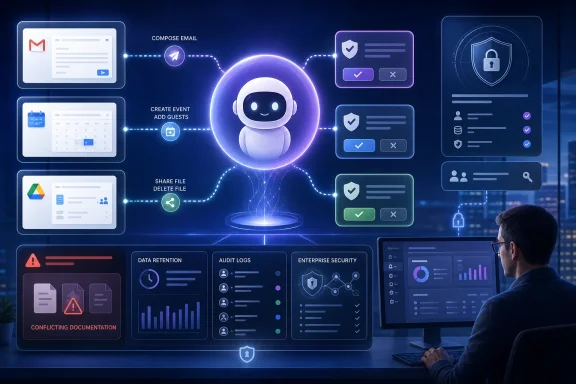 Gmail has moved from drafting to dispatching
Anthropic’s current Gmail connector description labels the integration “Read & write” and says Claude can search messages, generate drafts, send messages, reply to threads, and forward emails. The page says Claude asks for approval by default before a message goes out.
That approval step is meaningful, but it is not the same as retaining Gmail’s normal user-driven workflow. In a conventional email client, the employee selects the thread, composes the response, addresses it, and sends it. With a connector-enabled assistant, a single natural-language request can cause Claude to identify a thread, assemble context from related messages, formulate a reply, and prepare the outgoing action.
Tom’s Guide and TechRadar independently reported the newly advertised sending and Drive-management abilities around August 18. Both describe the change as an expansion from Claude’s prior ability to read and draft, though neither provides an enterprise rollout schedule or identifies whether every Google Workspace configuration receives the same action set at the same time.
The unresolved documentation mismatch is therefore not a minor copy-editing problem. Anthropic’s May 22 Help Center page continues to say that the Gmail connector can create drafts but “cannot send emails on your behalf,” and repeats that the send function is not enabled. The newer Gmail connector page says the opposite. Anthropic has not, in the material reviewed, published a dated change log explaining when sending was enabled, which plans received it first, or whether organizations can independently disable sending while retaining search and drafting.
For IT teams, the safe assumption is that permissions may be evolving faster than static support articles. Validate the live OAuth consent screen, Claude’s connector controls, and the exact authorization scopes granted to the connected Google account. A policy written when Claude could only create drafts may no longer describe what the integration can do.
Drive actions expand the blast radius
The Google Drive connector similarly goes beyond retrieving documents. Anthropic says Claude can search files; read Google Docs; pull data from Google Sheets as CSV; extract text from Google Slides; and share, move, or trash Drive files. It requests approval before changes by default.
This is useful for a legitimate administrative task such as locating a project folder, summarizing current documents, moving stale material into an archive, or distributing a briefing file to a named team. It also turns a conversational AI prompt into a route for changing file location and access. The distinction matters in environments where folder placement, sharing permissions, records retention, and e-discovery holds are controlled processes rather than individual convenience features.
Claude’s Drive connector page lists several functional boundaries. It does not support adding comments, converting Excel .xlsx files into Google Sheets, or converting PowerPoint .pptx files into Google Slides. Anthropic’s broader Workspace Help Center documentation also says embedded images in Drive documents are not processed. That means users should not assume Claude has evaluated every visual element, chart, scan, or image inside a file merely because it can summarize the document’s extracted text.
The current Help Center article says Claude can read Sheets, Slides, PDFs, images, and Microsoft Office files from Drive, whereas an older Claude documentation page describes a far narrower Google Docs-only integration and says Sheets and Slides are unsupported. That second inconsistency reinforces the deployment problem: Claude’s connector capability set has expanded, but its public documentation is not a single, internally consistent source of truth.
Organizations using Google Drive as a document repository should test representative file types—including PDFs, Office attachments, scanned documents, Slides decks, and spreadsheets—rather than authorizing the connector based on a generic description of “Drive access.”
Calendar creates a planning agent, not just a schedule viewer
Google Calendar access is less controversial than email dispatch or file deletion, but it can still change records and commitments. Anthropic says Claude can view calendars and events that the connected user can access, create, update, and delete events, find mutual availability, manage attendees, respond to invitations, and set recurring meetings.
This function is permission-mirrored: Claude is meant to see only calendar resources that the authenticated Google account can already access. That helps prevent privilege escalation through Claude itself, but it does not solve the familiar problem of overbroad calendar access. An executive assistant, project coordinator, or shared-service account often has access to calendars far beyond a single individual’s schedule.
The connector’s approval model should be treated as a workflow control, not a security boundary that eliminates operational risk. A user can approve a mistaken interpretation of “set up a weekly review with the platform team,” especially if multiple shared calendars, aliases, or similarly named contacts are involved. Recurring events and attendee changes deserve the same review discipline that teams apply to mail sends and Drive sharing.
For organizations subject to retention or audit requirements, the key question is also whether actions performed through Claude are sufficiently attributable in Google Workspace audit logs. Anthropic’s public connector descriptions describe user approval and mirrored permissions, but they do not spell out the audit-log fields, actor attribution, or administrative reporting that an enterprise should expect after Claude creates an event, sends a message, shares a file, or trashes content. That is a question to resolve in a pilot, not after a disputed action.
“Native” does not mean the data stays inside Google
The Cloud Wars article calls the experience native because users remain in Claude rather than toggling among Gmail, Calendar, Drive, and an AI chat window. That is accurate as a description of the interface. It should not be mistaken for a claim that Google Workspace data never leaves Google’s services.
Anthropic’s Help Center says data retrieved through connectors is stored on Anthropic servers and retained with the associated chat. It says the retrieved data can be deleted by deleting that chat, is encrypted in transit and at rest, and is not used to train Anthropic’s models. The same page also carries a consumer-account caveat: if a Free, Pro, or Max user has opted into chat and coding-session training, content manually copied or pasted from Gmail, Drive, Calendar, or Claude responses containing connector-derived details may be eligible for model improvement.
That split is operationally important. The connector data itself is described as excluded from training, while a user can still move similar material into a different data-handling path by copying it into a chat. Enterprise administrators need clear user guidance on that distinction, particularly where staff use personal Claude accounts alongside managed Google Workspace identities.
Anthropic says Claude retrieves only the minimum data needed for a request and only when the user explicitly asks for an action or answer requiring it. Those are useful limits, but they do not replace data classification, approved-use rules, and connector-specific access reviews. Asking Claude to “prepare me for the customer renewal call” can involve an inbox, shared calendar, and Drive materials whose combined sensitivity is greater than any single item.
Microsoft 365 shops should recognize the familiar control problem
For Windows and Microsoft 365 administrators, the immediate lesson is not that Google Workspace suddenly becomes a Claude-first environment. It is that AI vendors are standardizing a model in which the assistant becomes a cross-application control surface for email, calendars, and files.
Anthropic already lists a Microsoft 365 connector alongside its Google connectors. Its current Microsoft 365 guidance says availability spans Claude plans, while whether Claude can take actions such as sending email, updating a calendar, or creating files depends on what an administrator has enabled. That is closer to the policy granularity organizations will need from the Google Workspace connector as well.
Before enabling Claude across a tenant, administrators should run a limited pilot with a small set of non-sensitive accounts and verify four things:
- Confirm the exact Gmail, Calendar, and Drive actions available in the live tenant, because Anthropic’s public documentation currently conflicts on email sending and file support.
- Review Google OAuth consent, Workspace third-party-app controls, and the connector’s access scope before allowing end users to authenticate.
- Keep approval prompts enabled during evaluation and test error cases involving shared calendars, shared drives, external sharing, recurring events, and similarly named recipients.
- Define how users should handle sensitive data in Claude chats, including whether connector-derived material may be copied into accounts that have opted into model training.
Claude’s Google Workspace connectors make the assistant more useful precisely because they let it act on the systems where work happens. That also means the deployment decision belongs with identity, collaboration, compliance, and endpoint administrators—not solely with employees looking for a faster way to clear their inbox.