
For Windows and Microsoft 365 administrators, the important part is less the familiar “use AI responsibly” language than the operating model behind it. Clemson is tying AI access to its existing data-classification policy, approved software process and identity-managed services. It is also drawing a line many organizations still blur: an approved Copilot tenant does not automatically make every plug-in, connector, browser extension or meeting bot approved.
Clemson’s guidance applies to the new academic year, but its framework is broadly relevant to organizations rolling out Copilot in Microsoft 365. The university has chosen an approach that permits everyday productivity use while preserving a hard stop around the most sensitive categories of data.
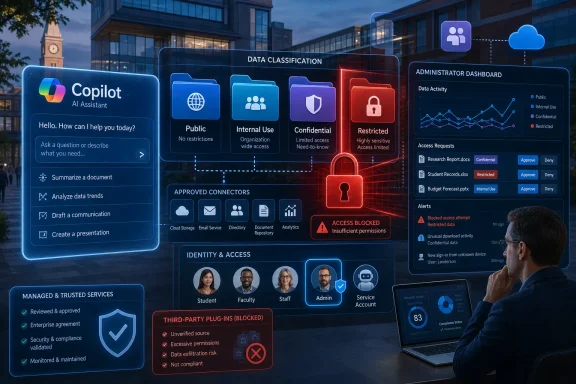 Copilot approval is conditional on the data in the prompt
Clemson’s AI Tool and University Data Use Guide lists “Microsoft Copilot + Chat” as approved for University data classified as Public, Internal Use or Confidential. The same guide gives ChatGPT Edu and Zoom AI the identical basic data allowance. None of those services may receive Restricted data.
That distinction is the practical news in Clemson’s announcement. A user working inside a university-managed Microsoft 365 account may have access to a tool with contractual and administrative safeguards, but the data owner must still classify the content before using it. Clemson’s policy defines four levels: Public, Internal Use, Confidential and Restricted. If a file, prompt or transcript includes multiple types of information, it must be handled according to the highest applicable classification.
The university’s Generative AI Guidelines put common higher-risk examples in plain terms. Confidential information can include student records protected by FERPA, personnel material, financial and vendor matters, and non-public intellectual property. Restricted information includes protected health information and particularly sensitive security information. Clemson’s non-academic quick guide adds a blunt technical rule: passwords, access tokens, private keys, credentials and security configurations should never be put into an AI prompt.
That makes Clemson’s policy more restrictive than the casual shorthand that “enterprise AI is safe for company data.” Its approved service list authorizes a data-and-tool combination, not indiscriminate use of an application.
The connector problem is where approved platforms can become risky
Clemson’s most useful warning is aimed at add-ons. The university says approval of the primary platform does not extend automatically to third-party plug-ins, bots, extensions or connectors, which it describes as a frequent pathway for data leakage.
This matters in Microsoft environments because Copilot use increasingly extends beyond a standalone chat window. A user may be offered connections to cloud storage, line-of-business systems, ticketing platforms, learning-management systems or third-party meeting services. Those connections can change which data is available to an AI feature, where it is transmitted and which vendor receives it.
Clemson’s published matrix takes a conservative position: Internal Use and Confidential information should not be placed in third-party add-ons unless they have been reviewed and approved through the university’s CheckIT process. Restricted data should never be put into such add-ons absent explicit, rare approval. Even a seemingly benign browser writing assistant can be a data-transfer risk if it reads email text, web forms or documents as they are being composed.
The policy has a direct administrative implication. A Microsoft 365 Copilot rollout cannot end with assigning licenses and enabling a tenant-level setting. IT teams need an inventory of enabled connectors, integrated apps, browser extensions, Teams bots and meeting transcription tools—and a review process that matches each of them to the organization’s data classes.
Clemson’s documents also distinguish its managed Microsoft Copilot environment from public AI services. Microsoft’s consumer Copilot policies are not a substitute for an institution’s Microsoft 365 configuration, licensing and contractual controls. Users should not infer that a personal Copilot account offers the same protections simply because both products carry the Copilot name.
Clemson’s academic-integrity rule rejects detector-only accusations
The university is also telling instructors to make AI expectations explicit in syllabi and assignment instructions: identify whether AI use is allowed, what kinds of assistance are permitted and whether disclosure is required. Clemson’s academic guidance says unauthorized AI-generated or ghostwritten graded work is prohibited, but it directs instructors who suspect misconduct to follow the undergraduate academic-integrity process rather than rely solely on an AI detector.
That is a significant procedural choice. AI detectors can generate false positives and provide, at best, an input to an investigation rather than conclusive proof of authorship. Clemson’s Graduate School guidance had already cautioned faculty against using detector results as the basis for academic-dishonesty allegations, citing the potential for ordinary edited text to be flagged as AI-generated.
For academic IT and instructional-design teams, the practical focus shifts away from detector procurement and toward clear course policy, assessment design and documented review procedures. If an instructor permits AI for brainstorming but prohibits generated final prose, that needs to be written into the assignment—not assumed after submission.
Clemson’s central AI guidance recommends that instructors consider specific uses separately, including outlining, draft feedback, code snippets and summarization. That is a more useful model than a universal “AI allowed” or “AI prohibited” declaration. It gives students defined boundaries and creates a record against which a potential integrity case can be evaluated.
Official communications remain a human approval job
Clemson is taking a much narrower position on AI-generated official communications than on internal productivity work. Its brand guidance permits AI for brainstorming, organizing and summarizing, but says it should not create final official communications. The rules also prohibit generating or publishing approximations of Clemson logos, the Tiger Paw, wordmarks and other university trademarks.
The university further bars AI-generated or materially inaccurate depictions of real Clemson people, campus locations, signage and events from being presented as authentic imagery. This is not primarily a model-quality argument. It is a provenance rule: official communications must be verifiable, use authentic Clemson material and receive human review.
Organizations deploying Copilot across Word, PowerPoint, Outlook and Teams should notice the separation Clemson has made. The same employee may be permitted to use AI to organize a meeting, summarize an approved transcript or draft an internal outline, yet may not use it to produce a final public statement under the institution’s name. Security approval and communications approval are different controls, owned by different functions.
The policy is a deployment checklist, not a ban
Clemson’s announcement does not retreat from AI adoption. It explicitly offers ChatGPT Edu, Microsoft Copilot, Adobe Firefly, Zoom AI Companion and Copilot in Teams, alongside teaching and research resources. Its position is that institutional AI can be useful when identity, procurement, data governance and review processes are attached to the tool.
The clearest takeaway for Microsoft 365 tenants is a four-step workflow Clemson is formalizing: classify the information, identify the exact AI service and any connected services, confirm the approved pairing, and verify outputs before acting on them. Where the tool, data type or connector is unclear, Clemson directs users to pause and seek review rather than experiment with real institutional data.
That is a more mature standard than treating Copilot access as a feature entitlement. As the fall term begins, Clemson has made the employee—and not the chatbot—the final control point for what enters an AI system.