
But the article’s headline promise — that each service wins at something Google and Cloudflare do not — does not survive a check against Cloudflare’s current documentation. Cloudflare’s standard 1.1.1.1 resolver is unfiltered, but its free 1.1.1.1 for Families endpoints already block malware, phishing, and, in the stricter option, adult content. That makes the practical choice less about finding a universally superior DNS provider and more about picking the filtering policy, privacy terms, management controls, and failure modes that fit a particular network.
For Windows users and home administrators, the important takeaway is simpler: changing DNS can add a lightweight control layer across browsers and many apps, but it is neither a complete ad blocker nor a replacement for endpoint protection, browser security, or supervised accounts.
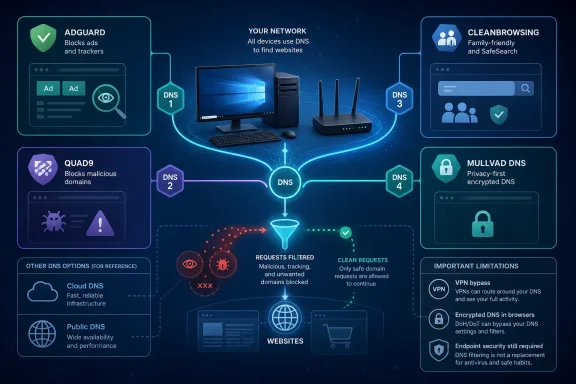 DNS filtering works only when the domain can be separated from the content
AdGuard DNS is the clearest fit for people who primarily want to reduce advertising and tracking across a device or an entire home network. Its free default resolver blocks advertising and tracking domains, while its family endpoint adds adult-content filtering and attempts to enforce Safe Search where the search provider supports it.
This is useful on devices where browser extensions are unavailable or undesirable: smart TVs, consoles, mobile apps, and shared Windows PCs. Configure the resolver at the router and every client that follows the router’s DNS settings inherits the policy without installing an extension on each system.
The catch is structural. A DNS resolver can deny a request for a known advertising or tracking hostname, but it cannot reliably remove an ad served from the same hostname that delivers the page or video itself. That is why DNS filtering is often effective against third-party tracking pixels, in-app ad networks, and many banner ad systems, while services such as YouTube remain difficult to treat this way.
MakeUseOf describes AdGuard as an ad-blocking choice, but AdGuard’s own current documentation says its default public resolver also blocks malicious domains. It is therefore more accurate to call it a broad consumer filter with a strong advertising and tracking emphasis, rather than an ads-only service.
For a Windows PC, this distinction matters when an application ignores the system resolver and uses encrypted DNS of its own. Modern browsers can do this; so can security products, VPN clients, and some applications. If a browser is configured to use a separate DNS-over-HTTPS provider, a router-level or Windows-level AdGuard setting may not see those queries at all.
Quad9 is a security control, not a malware cure
Quad9’s free security-focused resolver is the strongest of the four recommendations when the narrow goal is preventing connections to known malicious domains. The Switzerland-based nonprofit says it combines roughly 20 threat-intelligence sources and declines to resolve domains identified as malware, phishing, spyware, or other threats.
That is a meaningful layer of defense. A malicious link cannot load its destination if the device cannot obtain the destination’s address. In an unmanaged home environment or a small office without a DNS security gateway, Quad9 can reduce exposure to commodity phishing infrastructure and known malicious hosts without requiring an agent on every device.
It should not be presented as a substitute for Microsoft Defender, browser protections, patching, or email filtering. DNS sees the destination name, not the safety of every file, attachment, exploit, or login prompt that may be delivered through a legitimate domain. A phish hosted on a newly registered site may work until it is identified; a malicious advertisement or compromised page on an otherwise legitimate domain may also evade a domain-based block.
Quad9’s privacy position is also a differentiator worth stating precisely. The organization says it discards personal information associated with DNS transactions, including IP-address data, and does not store or retransmit it. That is a firmer stated posture than Google Public DNS, which documents temporary logs containing both IP addresses and query details for 24 to 48 hours, with longer retention possible for security and abuse investigations.
Cloudflare does not fit neatly into the comparison MakeUseOf makes. Its resolver policy says source IP addresses are not retained in non-volatile storage beyond limited sampled troubleshooting traffic, and that public-resolver logs are deleted within 25 hours. Those terms are not identical to Quad9’s approach, but they are plainly more specific than the article’s assertion that Cloudflare lacks a no-logs policy.
CleanBrowsing can enforce family rules, but DNS is easy to route around
CleanBrowsing’s Family Filter is built for a household policy rather than for generic browsing performance. The free service blocks adult content, mixed-content sites, malware, and phishing; it also enforces SafeSearch on Google, Bing, and YouTube. CleanBrowsing says the Family Filter blocks known VPN and proxy services as well, which is intended to prevent a child from bypassing the resolver by tunneling traffic elsewhere.
That makes it a reasonable option for a family PC, a tablet, or a router serving younger children. It has a simpler operational objective than a general-purpose content gateway: block broad categories at the DNS layer and accept that occasional legitimate sites may be caught in the net.
The limitation is not minor. A technically capable user can bypass network DNS policy with a VPN, a browser’s secure-DNS setting, a manually configured encrypted resolver, cellular data, or a device outside the household’s configuration. Blocking known VPN endpoints raises the hurdle, but it cannot convert DNS filtering into a comprehensive parental-control platform.
Windows administrators should also note the management gap in the free tier. CleanBrowsing offers a Windows application that can apply its filters across active interfaces and protect its settings with a local PIN. However, its fine-grained custom filtering and domain whitelisting are paid features. If a school site, game service, or video platform is incorrectly categorized, a family using only the public resolver has limited ability to create a targeted exception.
Cloudflare’s free family endpoints overlap heavily here. Its malware-only option uses 1.1.1.2 and 1.0.0.2, while the malware-and-adult-content option uses 1.1.1.3 and 1.0.0.3. Neither service is a full parental-control suite, but describing CleanBrowsing as offering a category Cloudflare does not is inaccurate.
Mullvad provides the clearest menu of free encrypted profiles
Mullvad’s public DNS service is the most flexible recommendation in the group if the requirement is a free, predefined filtering profile delivered through encrypted DNS. Its vanilla endpoint provides encrypted resolution without content filtering. The service then offers separate endpoints for ad and tracker blocking; ad, tracker, and malware blocking; a social-media-blocking extended profile; a family profile that adds adult-content and gambling blocks; and an all-inclusive profile that also blocks social media.
The submitted MakeUseOf article gets the general direction right but misses a material detail: Mullvad’s family profile does not merely trade social-media filtering for gambling filtering. According to Mullvad’s published blocklist configuration, the Family option includes ads, trackers, malware, adult content, and gambling; the All profile adds social-media blocking to that set.
Mullvad’s public service is also explicitly built around DNS-over-HTTPS and DNS-over-TLS rather than legacy unencrypted DNS. That is relevant for Windows users because encrypted DNS protects lookups from local-network observers and internet providers between the device and resolver. It does not hide the user’s browsing activity from the sites they connect to, and it does not provide the IP-address masking or full-traffic tunnel of a VPN.
The privacy claim needs the same care as every resolver comparison. Mullvad says it does not store activity logs, including DNS requests. That is a meaningful stated policy, but choosing Mullvad should be based on the service’s filtering profile and privacy commitments, not on the unsupported suggestion that Cloudflare sells resolver data or that it has no meaningful retention limits.
Test a resolver before making it a network-wide default
The best DNS provider is not necessarily the one that performs best in a global benchmark. Resolver latency depends on the user’s ISP, location, IPv4 or IPv6 routing, and the availability of nearby anycast infrastructure. A service that is fast for one household can be slower for another, and a filter that works well on a phone may break a game launcher, corporate VPN, hotel captive portal, or school service.
Before pushing a filtered resolver to a router, test it on one Windows adapter. Use nslookup or PowerShell’s Resolve-DnsName to confirm the selected resolver is actually answering requests, then visit the services and applications your household or organization depends on. Keep the previous DNS settings recorded so a rollback takes minutes rather than a router reset.
There is also a policy decision behind every blocked domain. AdGuard and Mullvad offer advertising-oriented choices; Quad9 concentrates on known threats; CleanBrowsing puts family restrictions first. Cloudflare supplies free malware and adult-content alternatives that cover much of Quad9 and CleanBrowsing’s basic territory, while Google Public DNS remains largely a non-filtering resolver by design.
The practical consequence is that a resolver swap can be worthwhile, but readers should reject the idea that four services each fill an empty gap left by both Google and Cloudflare. Select the DNS policy you need, verify it does not disrupt Windows applications or secure-DNS settings, and treat its blocks as one defensive layer rather than a complete security or parental-control solution.