
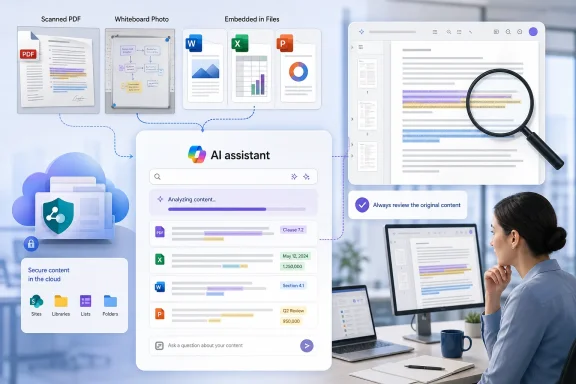
LiveMint described the capability as “Scanned Document Search,” presenting it as available through Copilot Chat and usable against SharePoint-held contracts. Microsoft’s own roadmap language is less sweeping. Roadmap item 559613 says Copilot Chat can “better match search results” from scanned PDFs and text inside images in Office files. Microsoft does not use “Scanned Document Search” as the feature’s formal product name, nor does the public documentation promise flawless text extraction, complete tenant coverage, or a particular service-level accuracy threshold.
That distinction is important for the people who will be asked to rely on the answers. A Copilot response can now be a faster route to a buried clause or a number trapped in a screenshot. It should still be treated as a route to the evidence, rather than evidence itself.
 Microsoft’s rollout record is less clear than the pitch
The submitted report makes the feature sound like a finished, universally available Copilot Chat capability. The available public rollout trail is more muddled.
Microsoft’s Copilot Chat “What’s New” page lists the ability to interpret embedded images in PDF, PowerPoint, and Word files among features that are fully released. That supports the broad claim that Copilot can use visual material inside those documents when answering questions. Microsoft’s support documentation also lists PDF, Word, PowerPoint, and Excel formats among files supported across Microsoft 365 Copilot experiences.
However, the more specific roadmap record for scanned-PDF and embedded-image search has been tracked inconsistently by Microsoft 365 roadmap-watch services. M365 Admin recorded roadmap item 559613 as a general-availability feature with a planned May 2026 release. CloudScout, which mirrors the same item, still showed it as “in development” after an update dated July 14, 2026. Other roadmap monitors described it as a July rollout. Microsoft’s public Copilot Chat page does not expose a build number, deployment wave, tenant eligibility list, or a release note that resolves that discrepancy.
As of August 15, 2026, the safe operational conclusion is that the capability is part of Microsoft’s released visual-document understanding work, but administrators should test it in their own tenant before telling users that scanned files are fully searchable. The gap between “Copilot can see embedded images” and “Copilot reliably retrieves every relevant phrase from every scan across SharePoint” is substantial.
This also changes the article’s claim that no re-scanning is required. A user should not need to create a new PDF merely to ask Copilot about an existing file. But an unreadable scan may still need remediation. A faint photocopy, skewed page, handwritten amendment, rotated table, stamp over text, or low-resolution image can defeat any text-recognition system. The original file format does not remove the quality problem embedded in the image.
Why Ctrl+F still has a job
Ctrl+F searches the text layer available to the application. If the relevant clause is pixels in a scan, it may have no usable text layer to search. A screenshot pasted into an Excel workbook has the same problem: a human can read it, while ordinary in-document search sees little or nothing.
Copilot’s value here is that it adds image interpretation and semantic retrieval to the question. Rather than searching only for an exact string such as “ninety days,” a user can ask for contracts with termination notice periods longer than 60 days or request a summary of expiry terms. Microsoft’s Semantic Index documentation explains that Copilot combines lexical matching with semantic understanding from Microsoft Graph and can scope queries to a SharePoint library or folder, including the library’s metadata as a relevance signal.
That makes the feature especially useful when the query is conceptual rather than exact:
- A procurement team can ask for contracts containing automatic-renewal language even if the clauses use different wording.
- An audit team can locate dates or control references that appear only in screenshots attached to PowerPoint decks.
- A project manager can identify a photographed whiteboard containing an old decision that never made it into the meeting notes.
But Ctrl+F remains better suited for confirming an exact term inside a specific document that already contains searchable text. It is deterministic, immediate, and transparent about what it found. Copilot is making a relevance judgment across files, images, permissions, and potentially ambiguous wording. Those are different jobs.
The better workflow is to use Copilot to identify candidate files and likely passages, then open the source file and verify the wording, page, table cell, or image. For a contract deadline, regulatory filing, pricing exception, or financial amount, that final check should be mandatory.
The most consequential change is discoverability
The feature’s biggest effect may not be document convenience. It may change what users can discover in SharePoint and OneDrive without knowing where it lives.
Microsoft’s Semantic Index uses Microsoft Graph data and respects existing role-based access controls. Copilot should not grant a user new permission to open a file simply because it can formulate a better search query. Yet better retrieval reduces the obscurity that has long protected poorly organized information. A decade-old vendor deck, a photographed whiteboard in a project folder, or a scanned agreement filed under an unhelpful name may become much easier for an authorized employee to surface.
For administrators, this is an information-governance issue rather than a reason to panic. A file that is broadly accessible in SharePoint has always been broadly accessible in principle. The change is that users no longer need to know its exact name, folder, or format to find it.
Before promoting the feature, organizations should review the places where discoverability can create surprises:
- SharePoint sites with inherited permissions that no longer match the sensitivity of their historical content should be reviewed.
- Old project libraries and teams with guest access should be checked for retained documents, screenshots, and scanned attachments.
- Sensitive files should use appropriate Microsoft Purview controls, retention rules, sensitivity labels, and access restrictions rather than relying on users failing to find them.
- Users should be reminded that a black box placed over text in a screenshot or Office document is not a sound redaction method.
Microsoft says administrators can exclude SharePoint Online sites from the tenant-level semantic index where needed, and that its data access remains gated by existing permissions. That is useful control, but it does not fix over-permissioned content. Copilot readiness remains, in large part, permission hygiene and records-management readiness.
Test the feature with real documents, not a polished demo
The scenario in LiveMint—a compliance manager compiling termination notice periods across scanned contracts—is exactly the kind of task that can save time. It is also the kind of task where an error can be expensive.
A sensible test should include a small, controlled SharePoint folder containing documents with known answers: a high-quality scanned PDF, a poor-quality scan, a scanned table, a Word document with a pasted screenshot, an Excel workbook with an image of figures, and a PowerPoint file with a whiteboard photo. Ask Copilot both direct questions and semantic ones, then compare its results with manual review.
Track four outcomes: whether Copilot identifies the correct source file, whether it finds the relevant visual text, whether it retains the correct context around dates and numbers, and whether it provides enough source detail for a user to verify the answer quickly. A system that finds nine of 10 contracts but misses the one with the unusual scan is not suitable as the sole control for a renewal process.
Teams should also separate retrieval from output generation. Asking Copilot to turn results into a Word table can be efficient, but a generated table can carry forward a mistaken date, clause, or number with an air of certainty. The table should identify the original document and point the reviewer back to it.
Microsoft’s enhancement addresses a genuine productivity gap that classic Office search left open for years. The immediate payoff is fewer manually opened files and less time retyping text from scans. The concrete consequence for businesses is equally clear: as visual content becomes easier to retrieve, old documents become more visible—and the quality of the answer will depend as much on document quality, permissions, and verification habits as on Copilot itself.
