

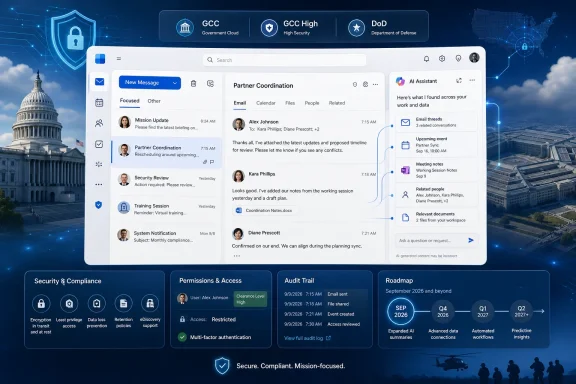
For Outlook users, the immediate payoff is straightforward: a prompt such as “What commitments did I make to this customer?” could draw on messages and meetings across the user’s account instead of only the email thread currently in view. For administrators, the significant part is licensing. Microsoft’s roadmap explicitly says the expanded data reasoning is for Microsoft 365 Copilot Chat users without the paid Microsoft 365 Copilot add-on.
That makes Roadmap ID 554934 more than another Outlook Copilot convenience feature. It extends a capability Microsoft has historically used to distinguish the paid Microsoft 365 Copilot tier from the Copilot Chat experience bundled with qualifying Microsoft 365 subscriptions.
Roadmap ID 554934 follows a worldwide rollout already marked as launched
The government-cloud entry is not Microsoft’s first attempt to ship this capability. A separate Microsoft 365 roadmap item, Roadmap ID 531910, carries nearly identical wording: Copilot Chat in Outlook expands from reasoning over one email thread to a user’s entire inbox, calendar, meetings, and other enterprise data. Microsoft’s Copilot release notes attach that behavior to ID 531910 and describe it as available for Android, Windows, iOS, Mac, and web.
The difference is deployment scope. Microsoft’s public worldwide roadmap record for ID 531910 is marked “Launched,” with a January 2026 general-availability target for standard multi-tenant environments. Roadmap ID 554934 was created on February 5, 2026, specifically names GCC, GCC High, and DoD, and is still in development. Its estimated date has also moved: archived copies of the government-cloud entry previously listed March and then August 2026; the current roadmap now says September 2026.
That delay should not be read as a simple copy-and-paste lag. Microsoft’s sovereign-cloud rollouts frequently require separate validation, feature gating, compliance review, and operational readiness work. Outlook data grounding touches Exchange mailboxes, calendars, meeting information, Microsoft Graph access, auditing, retention, and the organization’s existing identity and compliance configuration. Shipping the feature first in Microsoft’s commercial cloud does not establish that it is ready for GCC High or DoD.
The practical reading is that Microsoft is extending a feature that has already entered the worldwide service to customers operating under more restricted cloud requirements. September is a target, not a committed rollout date, and the roadmap provides no tenant-wave schedule, no minimum Outlook client version, and no indication of whether all three government environments will receive it simultaneously.
Microsoft’s own documentation has not caught up with its roadmap language
Microsoft’s roadmap and Copilot release notes are unusually direct: the expanded Outlook experience is said to work without a Microsoft 365 Copilot license. But Microsoft Support’s current Outlook documentation still draws a sharper line between licensed and unlicensed users.
The support page says users without the add-on can ask Copilot Chat about their inbox, calendar, meetings, and “other limited data,” and can perform Outlook actions such as drafting messages, scheduling meetings, flagging mail, and enabling automatic replies. It says users with a Microsoft 365 Copilot add-on can also synthesize material from chats and enterprise data.
Microsoft’s broader licensing comparison makes the distinction even clearer. It describes unlicensed Copilot Chat as having limited work-data reasoning, while a paid Microsoft 365 Copilot license receives full reasoning over meetings, emails, chats, files, and more. Outlook is marked as included in both tiers, but that label alone does not explain which organizational sources an Outlook conversation can search.
This leaves a material ambiguity in the September government-cloud deployment. “Other enterprise data” could mean mailbox-adjacent context available inside Outlook, such as the user’s messages, calendar, and meetings. Or it could mean a broader Graph-grounded search across data the user may access elsewhere in Microsoft 365, such as SharePoint files, OneDrive content, Teams chats, and shared documents.
Microsoft’s release notes use the broader phrase, but they do not enumerate the sources. The support page still reserves chats and enterprise data for paid-license examples. Neither document specifies whether the unlicensed Outlook experience will reach beyond Exchange and meeting data, whether it can retrieve documents by default, or which results depend on an organization’s Microsoft Graph, search, and permission settings.
That is more than wording. An organization deciding whether to purchase Microsoft 365 Copilot licenses needs to know whether the no-add-on Outlook experience can synthesize a user’s work context across the tenant, or whether it remains an advanced mailbox-and-calendar assistant. Microsoft has announced the expansion; it has not yet published a clean, authoritative boundary for it.
The assistant should inherit permissions, but inherited access can still expose oversharing
Microsoft’s Copilot architecture documentation says that work-data access is scoped to the signed-in user’s existing permissions. Copilot does not grant a user access to messages, documents, Teams content, or sites that the account cannot already open. Microsoft also says the service operates within the Microsoft 365 boundary and applies existing security, compliance, privacy, Conditional Access, and multifactor-authentication controls.
Those are important constraints, particularly in GCC, GCC High, and DoD. They do not make information governance irrelevant.
A mailbox is normally navigated through folders, search terms, conversation views, and individual messages. A grounded assistant changes the retrieval model: users can ask broad natural-language questions that prompt the service to connect information from many messages and meetings. If a user has accumulated access to stale shared mailboxes, overshared calendars, old project correspondence, or files that were never properly permissioned, the assistant can make that information easier to find and summarize.
That is an existing-permissions issue, not evidence that Copilot creates new access. But it is precisely why generative retrieval can reveal governance weaknesses that conventional search leaves buried. A user may technically have permission to read a document but never know it exists; a cross-mailbox or cross-calendar question can make that permission consequential.
For government-cloud administrators, the lead time before September should be used to validate the controls that already govern the underlying content:
- Review delegated mailbox access, shared-mailbox membership, calendar permissions, and long-lived group memberships that may expose unnecessary content.
- Confirm that Exchange, SharePoint, OneDrive, Teams, Microsoft Purview, and Microsoft Entra access policies reflect the organization’s current data-handling rules rather than inherited exceptions.
- Test representative prompts with controlled accounts when the feature reaches the tenant, including prompts that search across email, meetings, shared content, and sensitive project terms.
- Establish whether Copilot prompts and responses are covered by the organization’s audit, eDiscovery, retention, and incident-response procedures before encouraging broad adoption.
Microsoft says Copilot interactions are logged for auditing and eDiscovery, and that prompts and responses are not used to train the underlying foundation models. Those protections matter, but they answer a different question from whether an organization has correctly limited access to the data being reasoned over.
Outlook becomes the exception in Microsoft’s free Copilot Chat strategy
The licensing context explains why this roadmap item deserves attention. In March, Windows Central reported that Microsoft planned to remove Copilot Chat from Word, Excel, PowerPoint, and OneNote for commercial users who do not have a Microsoft 365 Copilot license, effective April 15, 2026. Microsoft positioned the paid add-on as the place for the “full” experience in those applications, including advanced reasoning and model choice.
Outlook was the notable exception. Microsoft retained Copilot Chat in Outlook for qualifying users without the add-on, with inbox and calendar grounding. The company’s current support documentation still reflects that exception: Copilot in Outlook is included for both Copilot Chat-only and paid Microsoft 365 Copilot users.
Roadmap ID 554934 deepens the exception. Rather than simply keeping an inbox helper alive for unlicensed users, Microsoft is planning to give that helper far more context in its three government cloud environments. This appears to be a product-positioning decision: Outlook is the place where a useful free work assistant can produce immediate value through mail and calendar tasks, while paid licensing remains tied to broader work-data reasoning, priority model access, advanced agents, and fuller Copilot integration elsewhere in Microsoft 365.
The unresolved issue is whether Microsoft can preserve that paid-tier distinction after telling unlicensed Outlook users that Copilot Chat will reason over “other enterprise data.” Until Microsoft publishes a data-source matrix specific to this feature, admins should not assume that the existing generic license comparison precisely describes the September experience.
Roadmap ID 554934 now points to September 2026 for GCC, GCC High, and DoD. Before enabling or promoting it, IT teams will need to test the actual data boundary in their own tenant—because Microsoft has announced the capability, but has not yet documented exactly where the free Outlook assistant’s new reach ends.