

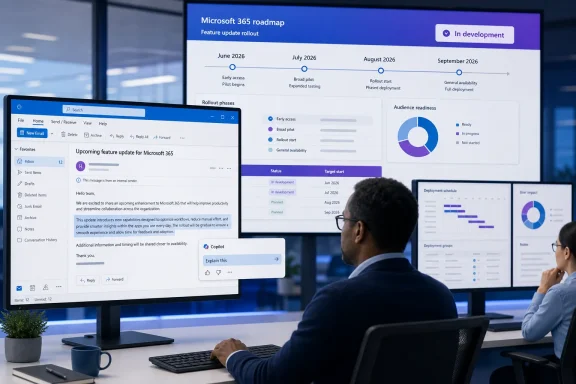
The feature itself is straightforward: a user selects text inside an email, invokes Copilot, and asks for contextual information. Microsoft’s earlier description and an accompanying screenshot identified the entry point as an “Explain this” action. The idea is to let a person interrogate a paragraph, policy statement, technical term, or other selected passage without manually copying it into a separate Copilot chat.
For Outlook administrators, the important news is not the new selection gesture. It is the schedule reversal. Roadmap ID 508524 was created in November 2025, slipped repeatedly through the following six months, and was most recently updated on August 10 to show an In development status and September general availability. A feature Microsoft had described as completing rollout by late June is therefore no longer presented by the company as broadly delivered.
Roadmap ID 508524 has missed every prior target
Microsoft initially scheduled Roadmap ID 508524 for a November 2025 preview and December 2025 general release. Historical Roadmap tracking by CloudScout shows those dates changed first to March and May 2026, then to May and June 2026. The current Roadmap entry supplied by Microsoft now lists May 2026 preview availability and September 2026 general availability, while retaining the “In development” label.
That record tells a more useful story than the terse Roadmap description does: this is not a newly announced September feature. It is an Outlook Copilot capability that has repeatedly been moved, and the latest update appears after the prior public rollout window was supposed to have closed.
Microsoft has not publicly explained why the feature was returned to development, whether an initial deployment was paused, or whether the September date reflects a fresh rollout rather than completion of work already underway. Those omissions matter. “In development” and “rolling out” have very different meanings for help desks trying to determine whether a missing command is a licensing problem, a client-build problem, a tenant rollout delay, or evidence that the feature is no longer enabled.
The May 15 Message Center post, identified as MC1311978 and preserved by Microsoft 365 change-tracking services including Modern Workspace Pro and the Message Center Archive, said preview began in early May and would conclude that month. It then gave early-to-late June for general availability. The post called the functionality on by default for eligible users and said it would be built into Outlook rather than delivered as a separate add-in.
Microsoft’s newer Roadmap status does not explicitly revoke that notice, but it does supersede its practical timetable. Enterprises should treat September 2026 as the current planning target—and treat it as a target, not proof that every Current Channel installation will receive the feature then.
This is a targeted Copilot command, not automatic email analysis
Microsoft describes the feature as user initiated. Copilot is not meant to scan every incoming email and proactively generate insights. The user has to select text and invoke the tool. That is a meaningful boundary for both users and compliance teams: the content sent to Copilot is determined by an intentional in-client action, even if users may not fully appreciate that selecting a sentence can send its context to an AI service for processing.
The feature also differs from Outlook’s existing Copilot functions. Summary by Copilot works at the message-thread level; Draft with Copilot and Coaching by Copilot operate while composing a reply; Copilot chat can search organizational and web information depending on the account and configuration. Roadmap ID 508524 narrows the interaction to a selected excerpt in a received or viewed email.
That narrower design is useful for real email workflows. A recipient reading a contract change, a service alert, an engineering escalation, or a dense management update may want a definition, explanation, relevant organizational context, or a plain-language interpretation of one specific passage. Requiring selection limits the request to the immediate point of confusion instead of asking the user to formulate a broader search or hand over an entire thread.
It also limits what Microsoft has promised. The Roadmap says only that Copilot will help provide “relevant information.” It does not say whether responses will be grounded solely in the selected text, the surrounding message, mailboxes and organizational data available through Microsoft Graph, web information, or a combination of those sources. It does not specify whether the command will work in reading pane and pop-out windows alike, on encrypted messages, on shared mailboxes, or when users are offline.
Those are not edge cases for classic Outlook deployments. They determine whether the new command is useful in the mailboxes where organizations most often have sensitive or operationally important correspondence.
Licensing and client state will decide who actually sees it
The May Message Center announcement said the change affects users with “Microsoft 365 Copilot capabilities” in classic Outlook for Windows. That is less precise than administrators need, especially because Microsoft’s broader licensing documentation now says all subscribers have some level of Copilot access in Outlook, while differentiating Copilot Chat (Basic), Microsoft 365 Copilot (Basic), and Microsoft 365 Copilot (Premium).
Microsoft has not published a definitive eligibility matrix for the exact user-initiated-insights command. The Roadmap entry does not name a SKU, a required Copilot tier, an Outlook version, or a minimum build. The practical consequence is that an organization cannot safely infer entitlement from the fact that a user already has a Copilot icon somewhere in Outlook.
Microsoft’s July support bulletin for classic Outlook illustrates why that distinction matters. After classic Outlook build 20026.20182, Microsoft acknowledged that users with only Copilot Chat (Basic) could lose Copilot Chat and other Copilot entry points in the desktop client. Microsoft said paid Microsoft 365 Copilot users were not affected and that it issued a service-side fix on June 29. GCC High and Department of Defense customers could remain affected until Outlook Version 2508, Build 16.0.20228.20000, was deployed.
That known issue does not prove that user-initiated insights require a paid Copilot license. It does show, however, that classic Outlook’s visible Copilot controls have recently varied by license tier and client/service state. A user selecting text and finding no “Explain this” action after September could be in an unsupported license cohort, on an unqualified build, awaiting tenant rollout, or encountering a separate UI issue. There is no separate add-in to install as a workaround.
Administrators should therefore avoid adding the command to employee training or support documentation before confirming it in their own tenant. The original Message Center guidance did say that existing Microsoft 365 security, compliance, and data-protection policies would continue to apply, but that is not the same as documenting exactly what data sources are used to answer a selected-text request.
The rollout scope remains narrower than “Outlook” suggests
Roadmap ID 508524 is explicitly for Outlook on the desktop platform, in Current Channel and Preview, for Worldwide Standard Multi-Tenant cloud instances. It is not an announcement for new Outlook for Windows, Outlook on the web, Mac, mobile, GCC, GCC High, Department of Defense, or sovereign cloud deployments.
That wording deserves attention because Microsoft increasingly uses “Outlook” to describe several distinct clients with different Copilot capabilities. Classic Outlook is the Win32 desktop application included with Microsoft 365 Apps. New Outlook for Windows is a separate, web-based client. A Copilot feature surfacing in one does not establish availability in the other, even if both display the same branding and connect to the same Exchange Online mailbox.
The new Outlook and Outlook on the web already host several Copilot experiences that do not map cleanly to classic Outlook. Microsoft’s support material, for example, limits some Copilot chat functionality to work or school accounts using new Outlook or the web. Conversely, the user-initiated-insights item is specifically notable because Microsoft is bringing a granular Copilot interaction into the client that many managed Windows environments continue to use.
For organizations that have intentionally stayed on classic Outlook because of COM add-ins, PST workflows, VBA, customized forms, or operating procedures, that is the operational significance of the feature. Microsoft is still extending Copilot inside classic Outlook rather than treating the legacy client as frozen. But it is doing so through service and channel rollout mechanics that are much less predictable than a simple Office feature update.
What IT teams should do before September
The immediate task is to correct any internal assumption that this feature completed deployment in June. If service desk staff were told to expect it based on MC1311978, that guidance is now stale. Microsoft’s August 10 Roadmap update is the current official planning record.
A measured preparation plan is appropriate:
- Verify which users have Microsoft 365 Copilot capabilities and which have only basic Copilot access, rather than using a visible Outlook Copilot button as the licensing test.
- Record the classic Outlook versions and update channels in use, particularly where Current Channel deployment is held back or where GCC High and DoD tenants operate on separate timelines.
- Test the command with non-sensitive sample messages once it appears, including messages in the reading pane, shared-mailbox scenarios, encrypted mail, and content governed by sensitivity labels.
- Update user guidance to require review of Copilot output before acting on it, especially where an explanation could be mistaken for legal, contractual, financial, or technical authority.
The more immediate reality is simpler: classic Outlook users should not be told that selected-text Copilot insights are universally available today. Microsoft’s latest Roadmap entry says September 2026, and it offers no explanation for why a feature previously scheduled to finish rollout in June has returned to development.