
The practical benefit is straightforward. Instead of converting a service-desk export or a SaaS administration report into a Word summary before Copilot can work from it, a user should be able to add the original comma- or tab-delimited file alongside documents, PowerPoint decks, OneNote pages, and other references. Microsoft says the additional context can help generate presentations, reports, and briefs.
But Roadmap 569210 is still marked In development, not rolling out. That distinction is more than routine calendar language: Microsoft’s current Copilot Notebooks support documentation does not yet list either .csv or .tsv among supported notebook reference formats. Administrators and users should treat the September and October dates as targets, not evidence that the files can be uploaded now.
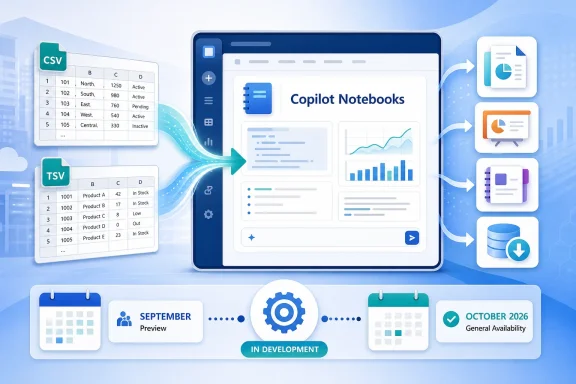 CSV and TSV fill a real gap between documents and data systems
Copilot Notebooks is designed as a scoped grounding workspace. Microsoft’s documentation says the service answers based on the references a user deliberately adds, rather than searching a person’s entire OneDrive, mailbox, Teams history, or the public web. That makes it useful for assembling a project dossier, but it has also left an awkward file-format boundary.
Excel workbooks are already supported. In many organizations, however, the data that needs explanation arrives as CSV or TSV: an Intune device inventory export, a Microsoft Defender incident list, a vulnerability scanner report, a project-management export, a purchasing extract, or a line-of-business system download. These are frequently treated as interchange files rather than spreadsheets. The recipient may open them in Excel, but the source record is still a delimited text file.
Adding direct reference support means those exports no longer need a conversion step solely to enter a notebook’s context. That can preserve column structure and cut down on a common weak workflow: opening an export in Excel, manually cleaning it, then asking Copilot to summarize a separately written narrative whose numbers may already be stale.
TSV support matters for a narrower but legitimate reason. Tab-delimited files are common where values themselves contain commas, particularly in research data, log-style exports, and some developer or analytics workflows. A TSV import does not eliminate data-quality problems, but it avoids treating every comma inside a free-text field as a potential column separator.
Microsoft’s announcement does not say that Copilot Notebooks will become a spreadsheet analysis environment. The company currently documents that notebooks cannot directly create charts, graphs, or images. The feature should therefore be understood as expanding the evidence Copilot can read when drafting and answering questions, not as a replacement for Excel’s analysis tools, Power BI, or a controlled data warehouse.
Microsoft has been widening reference support one format at a time
CSV and TSV support follows a visible 2026 pattern. Microsoft’s Message Center notices, mirrored by the independent Microsoft 365 Message Center Archive, show that Copilot Notebooks added TXT and RTF references in July and Markdown references in a rollout scheduled to complete in early August. Those earlier changes were also additive: users could bring more existing material into a notebook without first converting it into an Office document or PDF.
The progression tells a clearer story than the roadmap entry alone. Copilot Notebooks is being positioned less as a place for a handful of finished Office files and more as a curated project container that can combine formal documents with operational source material. Markdown opened the door to runbooks, README files, wiki exports, and technical notes; CSV and TSV are the equivalent move for tables exported from systems that do not produce .xlsx.
That is valuable for IT teams because much of their evidence is inherently heterogeneous. A post-incident brief may need a Word incident report, a OneNote review page, an exported ticket list, endpoint status data, and a change log. A notebook that can ground a draft against all of those sources may save time and make the resulting narrative easier to trace back to the materials selected.
There is a limit to that claim. Microsoft has not published the mechanics for CSV and TSV handling in Notebooks. Roadmap 569210 does not specify maximum file size, row or column limits, supported encodings, delimiter detection, quoted-field behavior, header requirements, whether multiple tabs are treated differently from comma-delimited files, or how malformed records are surfaced to the user. Those omissions matter more for flat files than for a conventional Word document: a misplaced delimiter or inconsistent header can quietly change the meaning of a dataset.
Microsoft’s separate CSV connector documentation illustrates the risk. That enterprise connector can index CSV data from SharePoint libraries or Azure Data Lake Storage for Microsoft Search and Copilot, but it documents restrictions including unsupported spaces in CSV column headers. The connector is a different product path from attaching a CSV file to a Notebook, so its limitations cannot be assumed to apply to Roadmap 569210. Still, it is a reminder that “CSV supported” is not a complete technical specification.
Grounding limits will shape large-export use cases
The new formats will be most useful for focused, bounded exports, not as a license to throw every operational dataset into a notebook. Microsoft says Microsoft 365 Copilot users can add more than 300 references to a notebook, though only up to the first 300 are used for grounding. Copilot Chat users can add up to 50 references, all of which are used.
Those are reference-count limits, not published CSV row limits. One large CSV may count as a single reference while containing hundreds of thousands of records, or the eventual service may impose ingestion constraints that Microsoft has not disclosed. Until the preview arrives, organizations should not assume a notebook can reliably summarize a full CMDB dump, years of telemetry, or a massive audit export.
A more defensible use is to create a purposeful extract for a specific question. For example, an endpoint team could export devices that failed a compliance policy in the past 30 days, add that file with the policy documentation and remediation notes, then ask Copilot to draft a leadership brief. The notebook is then grounded in the relevant slice of data rather than an undifferentiated archive.
That approach also reduces the chance of a polished but misleading response. Generative AI can describe trends in a table, but it does not repair stale, duplicated, incomplete, or poorly labeled source data. A file with mixed date formats, ambiguous status values, or an unfiltered historical backlog will remain ambiguous after it is attached to a Copilot Notebook.
Users should also verify the resulting output against the original file, especially where it includes counts, rankings, dates, compliance status, financial values, or operational recommendations. Microsoft describes Notebooks as a system for answers based on selected references; that is an important boundary on where a response comes from, not a guarantee that every interpretation of structured data is correct.
Permissions still govern the data, but sharing needs review
Microsoft’s existing Notebook documentation says Copilot uses only the files, folders, and sites that a user adds as references and has permission to access. That means CSV and TSV support should not, on its face, widen Copilot’s ability to crawl tenant data indiscriminately. The user must choose the export and have access to it.
The more consequential governance point appears when a notebook is shared. Microsoft says recipients of a shared notebook are invited to linked files unless those files fall outside their access or are premium sources, and the notebook owner must have permission to share each linked item. A raw CSV can contain more detailed information than the report eventually produced from it: device names, user identifiers, ticket descriptions, cost centers, vendor records, or system metadata may be present even when the final brief uses only aggregates.
For that reason, adding native CSV support should trigger a small update to adoption guidance. Teams should tell notebook owners to treat an uploaded export as a shareable source asset, not merely as temporary prompt input. The safest practice is to generate a minimally necessary extract, remove columns that are irrelevant to the question, and check the notebook’s sharing configuration before inviting collaborators.
The current Microsoft support guidance also says a SharePoint or OneDrive service plan is required to create notebooks, and the availability model differs between Microsoft 365 Copilot and Copilot Chat. Roadmap 569210 lists OneNote and Microsoft Copilot for Microsoft 365, with Android, desktop, iOS, and web platforms, plus both Preview and General Availability release rings. It does not say whether every listed client will receive CSV and TSV support simultaneously, whether the feature will require a particular Copilot license, or whether tenants can control it with an admin policy.
The September preview is where the unanswered questions should be tested
Microsoft has scheduled preview availability for September 2026 and general availability for October 2026 in its worldwide standard multi-tenant cloud. The roadmap entry names no government cloud availability, no specific rollout week, and no configuration instructions. It also does not state whether existing notebooks will accept CSV and TSV immediately or whether files must be newly added after the feature appears.
For administrators, the immediate action is preparation rather than deployment: identify the teams using Copilot Notebooks, locate the common export formats they handle, and establish a short test set that includes realistic CSV and TSV files with known totals and expected answers. Test column headers, international characters, commas within quoted text, tabs within values, missing fields, large files, and sharing behavior before encouraging staff to use production exports as AI reference material.
The important change in October will be that Copilot Notebooks can work from the same operational tables many IT and business teams already export every day. The important constraint is that Microsoft has announced a new input type, not a data-analysis guarantee. Until the preview documents its limits, the reliable workflow remains: prepare a focused export, retain the original system of record, and validate any decision-bearing narrative against the source table.
