
Gartner’s August 2025 forecast says 40% of enterprise applications will include task-specific AI agents by the end of 2026, compared with fewer than 5% at the time of the forecast. That is a forecast of embedded product capability, not evidence that 40% of enterprise applications will be trusted to run material work without people watching them. McKinsey’s November 2025 survey supplies the less promotional reality: 23% of respondents said their organization was scaling an agentic system in at least one function, while 39% were experimenting; in any individual function, fewer than 10% reported scaling agents.
The gap is the story. Vendors are adding agent features quickly, while enterprises are moving far more slowly when an agent must touch production systems, customer data or approval workflows.
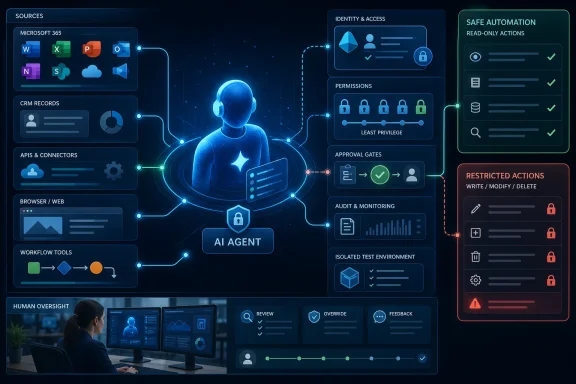 An AI agent is defined by its ability to act
A conventional chatbot generates an answer from the current conversation and whatever material it can retrieve. It may be useful, but it normally ends at the screen: a human reads the answer, decides whether it is correct and performs the next action.
An agent adds a loop around the model. It receives a goal, collects relevant context, selects a tool or workflow step, observes the result and either continues, retries, escalates or stops. Microsoft describes its Copilot agents in almost exactly these component parts: knowledge, actions, an orchestrator that selects among skills, and a model that supplies language understanding and reasoning.
That mechanism is why “AI agent” is more than a rebrand for a chatbot. A support agent that can read a ticket and draft a response remains mostly an assistant. One that identifies the customer, checks entitlement, updates a CRM case, issues a permitted replacement and records the result has crossed into workflow automation with probabilistic decision-making in the middle.
The useful test is straightforward: what can the software change without a person performing the change? If the answer is “nothing,” an organization has a capable assistant. If it can alter systems of record, communicate externally or launch a desktop flow, it is an agent that deserves the same design attention as a service account or integration.
This also means the popular perceive, plan, act, observe, revise model is a helpful architecture sketch rather than a guarantee. Production agents often use deterministic workflows, fixed approval gates, narrow tools and tightly scoped retrieval precisely because unconstrained planning is expensive, difficult to test and hard to audit.
The Salesforce adoption figure is widely repeated—and commonly misstated
The submitted guide says Salesforce Agentforce drove customer-service agent adoption from 39% to 66% of Salesforce’s customer base in a year. Salesforce’s own May 2026 report says something materially different: adoption of AI agents among surveyed customer service organizations rose from 39% in 2025 to 66% in 2026.
Salesforce surveyed 3,075 customer-service professionals worldwide between March 9 and April 4, 2026. The finding is useful evidence of rapidly growing interest in service automation, but it is not a count of Agentforce customers, and it does not establish that Agentforce itself caused the increase. Salesforce’s research covers the category and its own platform sits prominently within it.
That distinction matters when evaluating vendor claims. A platform provider can fairly point to market research showing more organizations use agents, but a buyer should ask for the deployment measures that the survey does not provide:
- The percentage of customer interactions resolved without a human, broken down by issue type and channel.
- The escalation rate, reopen rate, erroneous-action rate and customer-satisfaction result after deployment.
- The number of customers in production rather than in a pilot, trial or limited internal use.
- The actions the agent was allowed to perform, rather than merely the number of conversations it handled.
Salesforce has separately announced that more than 180 organizations selected Agentforce IT Service within four months of its general-availability launch. That is an adoption claim for a specific product, though “selected” is not the same as a verified count of sustained production deployments. It is a more precise metric than borrowing a survey result for the entire service-agent category.
Microsoft’s agent stack turns the issue into administration
For Windows and Microsoft 365 shops, the agent transition is already visible in administrative surfaces rather than future-facing slide decks. Copilot Studio agents can use organizational knowledge, invoke REST API-based tools, run workflows and publish into Microsoft 365 Copilot and Teams. Microsoft’s newer computer-use capability can automate browser and desktop applications through mouse and keyboard interactions.
The last capability is the dividing line. API automation generally exposes explicit permissions, structured inputs and logs that an engineer can inspect. Computer use can automate software that lacks an API, which makes it valuable for legacy line-of-business applications—but it can also inherit every brittleness and security weakness of screen-driven robotic process automation, then add a model that interprets changing content.
Microsoft’s own documentation says computer-use agents can encounter indirect prompt injection from screenshots, websites and other inputs. In plain terms, a malicious string embedded in a web page, ticket or document may try to persuade the model to take an unintended action. Microsoft recommends trusted, isolated environments, robust validation and human supervision. Its computer-use documentation also warns that hosted-browser capacity may be throttled and may not be suitable for production use.
Those are not minor implementation notes. A desktop-capable agent should not begin life with a privileged admin account and open web access. It should begin in a low-privilege, isolated environment, on an allow-listed set of sites and applications, with a test dataset and an action log someone actually reviews.
Microsoft has begun to build the controls that such deployments require. Copilot Studio supports agent inventory and auditing, and Microsoft Entra Agent IDs are being introduced to give individual agents identifiable permissions and Conditional Access treatment. Microsoft says that, beginning in July 2026, new Copilot Studio agents must have Entra Agent IDs; existing agents created before that rollout remain on app registrations until a future migration.
That change is important because an agent cannot be governed as a vague “Copilot feature.” It must be visible as a discrete principal with known connectors, known scopes, an owner and a lifecycle.
The dangerous permission is often the maker’s, not the model’s
The highest-risk failure mode is frequently not hallucination. It is an agent being connected to a useful tool under the wrong identity.
Microsoft’s guidance on maker-provided credentials spells out the problem. A maker can add a tool or connector authenticated with their own account; when another user invokes the agent, the agent may use the maker’s permissions rather than the end user’s. The result can be an employee retrieving data or executing an action they would not otherwise be allowed to access.
That is a familiar service-account failure dressed in new language. The remedy is equally familiar: avoid shared broad credentials, use an identity dedicated to the agent where possible, grant the least privilege necessary, separate read and write tools, and make approval flows explicit for irreversible actions.
Treat agent deployment as an application release, not a prompt-writing exercise. Microsoft recommends zoned governance that separates personal productivity experiments, collaboration deployments and enterprise applications. The design is sound because the risk changes sharply once an agent can use production connectors, customer information or financial systems.
A practical rollout should establish these controls before expanding scope:
- Every production agent should have a named business owner, technical owner, Entra identity, documented tool list and retirement path.
- Every external action should be traced to an authenticated agent identity and preserved in logs that security and operations teams can query.
- Development, test and production agents should use separate Power Platform environments, data policies and connector permissions.
- High-impact actions such as payments, entitlement changes, contract commitments, account closure and privileged administration should require a human approval step.
- Web browsing, public knowledge sources and computer use should be off by default until a specific workflow justifies them.
Microsoft’s Copilot Studio controls can restrict knowledge sources, connectors, publishing and data movement. They are useful guardrails, but controls only work if someone has decided which agents belong in which environment and who is allowed to approve exceptions.
Market-size numbers obscure more than they explain
The guide’s $201.9 billion “agentic AI-embedded enterprise software spend” figure is attributed to Gartner. Gartner’s accessible 2025 announcement for its 40% application forecast does not state that spending number. A search of Gartner material surfaced a separate March 2026 webinar estimating that $234 billion in enterprise application spending could be exposed to agentic arbitrage—a measure of spending at risk of value shifting away from legacy interface-driven software, not annual agentic AI spending.
Those are different concepts, and the difference should not be waved away. One is a forecast about product integration; another is a risk estimate about existing SaaS expenditure; a third would be a market-spending forecast. Combining them creates a deceptively precise market narrative without a clear, consistent definition of what is being counted.
The same caution applies to standalone-market projections. Market-research estimates often count licenses, platforms, infrastructure, professional services and adjacent automation differently. They are directionally useful for showing investment momentum, but they are not an IT business case. The business case is a controlled comparison: baseline process cost, measurable quality requirement, volume, exception rate, required integrations, licensing and the cost of human review.
The immediate opportunity is real in areas such as service-desk triage, information retrieval, draft generation, case summarization, internal knowledge routing and low-risk data-entry work. The cases most likely to disappoint are broad mandates to “replace a process with agents” before the process has clean data, stable ownership, documented exceptions and an accountable human fallback.
The 2026 decision is where to stop the agent
AI agents are becoming standard software features, particularly in Microsoft’s stack. The question for IT departments is no longer whether a vendor will offer them; it is whether the organization has decided exactly which data they may see, which tools they may invoke and which actions they must never complete alone.
Start with an agent that can read more than it can write, connect it to a narrow and observable workflow, and measure completed work alongside failures and escalations. Once its identity, permissions and logs are defensible, expanding autonomy becomes an operational choice rather than a leap of faith.
References
- Primary source: Business Outreach Magazine
Published: August 10, 2026 at 8:18 AM UTC
Loading…
www.businessoutreach.in - Related coverage: gartner.com
Gartner Predicts 40% of Enterprise Apps Will Feature Task-Specific AI Agents by 2026, Up from Less Than 5% in 2025
Forty percent of enterprise applications will be integrated with task-specific AI agents by 2026, up from less than 5% today, according to Gartner Inc., a business and technology insights company.www.gartner.com - Related coverage: salesforce.com
Loading…
www.salesforce.com - Related coverage: salesforce.com
Loading…
www.salesforce.com - Related coverage: mckinsey.com
Loading…
www.mckinsey.com - Related coverage: learn.microsoft.com
Loading…
learn.microsoft.com - Related coverage: learn.microsoft.com
What's new in Copilot Studio - Microsoft Copilot Studio | Microsoft Learn
Find information about new Microsoft Copilot Studio features and features releasing in the next few months.learn.microsoft.com - Related coverage: genai.owasp.org
Loading…
genai.owasp.org - Related coverage: genai.owasp.org