

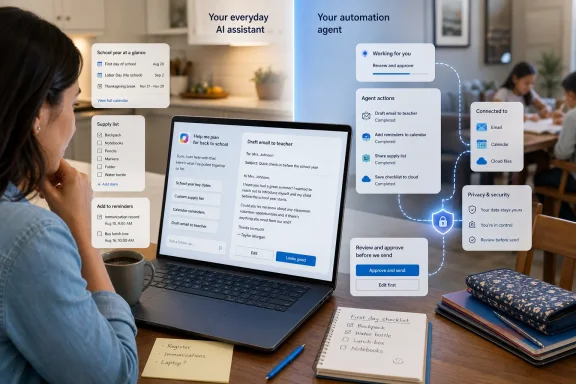
The source Microsoft Tech Community post behind the back-to-school advice was published on August 7, 2025, not last week. Its recommendations were straightforward consumer-Copilot use cases: share a supply list to find deals, ask for schedule help, prepare children for the school year, and draft messages to teachers or coaches. It did not announce Copilot Tasks, connected email and calendar automation, or a new system for ingesting school handbooks and syllabuses.
Those capabilities belong to Microsoft’s newer Copilot Tasks product, introduced in a research preview on February 26, 2026. Microsoft has since published support documentation describing Tasks as a way to give Copilot a goal, allow it to plan steps, and optionally schedule the work to run later or repeatedly. The back-to-school pitch is plausible, but it is not a new school-planning release and should not be read as one.
A 2025 prompt guide is being recast around a 2026 preview feature
Microsoft’s August 2025 Tech Community article, “Nail back-to-school planning with Microsoft Copilot,” was a marketing guide for parents. It suggested asking Copilot to sort a shopping list into essential and nonessential purchases, find products that meet a price or durability requirement, help organize schedules, and write emails.
That is familiar territory for a chat assistant. A user supplies information in a prompt, reviews the response, and does the follow-up work themselves. The guide was not a product announcement and did not set out a rollout schedule, eligible Windows versions, device requirements, or any school-account integration.
The new element in the August 2026 framing is Copilot Tasks. Microsoft’s Copilot blog launched that feature in February as a limited research preview designed to move Copilot from responding to requests to completing multistep work. Microsoft said Tasks could use its own browser and computer environment, interact across supported services, and handle work that runs once, at a set time, or on a recurring schedule.
That makes a recurring Sunday evening school-week checklist technically possible. It also makes the privacy and reliability questions much different from those involved in asking a chatbot to turn a paper supply list into a shopping checklist.
Windows Central and PCWorld both reported at launch that Copilot Tasks was limited to a research-preview program rather than broadly available to all Copilot users. Microsoft’s current support page still labels Tasks as preview and explicitly says that features, experiences, and usage limits can change. Microsoft has not published a general-availability date in the documentation reviewed for this report.
For families looking for a back-to-school organizer, that means availability is account-dependent. A person can use normal Copilot planning prompts today without assuming that the more ambitious automation layer will appear in their Copilot app.
Copilot Tasks expands the data exposure beyond a school checklist
The attractive part of Microsoft’s pitch is context. Instead of repeatedly copying dates out of a PDF, parents could give Copilot a calendar, reminders, school messages, or task instructions and ask it to keep track of deadlines. The trouble is that school material commonly contains more than dates: student names, contact details, class rosters, medical instructions, pickup arrangements, accommodation information, and login links can all be mixed into a handbook or newsletter.
Microsoft’s support documentation says Copilot Tasks may use connected services authorized by the user, including email and cloud storage, and may interact with websites. For browser-based tasks, it may also take screenshots of pages it works with; Microsoft says those screenshots are retained for a limited time and are not used for model training. Task prompts and response history are stored so users can review prior tasks, while task-specific memory may retain preferences or dates to help carry out future work.
Microsoft also says users signed in with a Microsoft account or another third-party authentication method can control whether their activity is used to train Microsoft’s generative-AI models. That setting is worth checking, but it does not eliminate the separate issue of giving an automation agent access to school-related records or the family inbox.
A parent using Copilot strictly as a drafting and summarization tool can reduce the risk by providing only the relevant excerpt: a list of supply requirements, a date table, or a redacted event notice. Uploading an entire school handbook simply because it is convenient is a different proposition, especially when the same file may contain policies, staff contacts, student-specific attachments, or information belonging to other families.
Microsoft advises users not to provide Tasks with confidential or sensitive personal data they would not want it to use in performing activities. That warning is unusually direct for a consumer productivity feature, and it applies squarely to school planning. A school document is not automatically sensitive, but many are sensitive in practice.
Approval prompts are a safeguard, not a substitute for review
Microsoft says Copilot Tasks will request approval, or return control to the user, before certain sensitive actions. The listed examples include completing payments, submitting personal information to external sites, sending emails or messages, deleting files, changing cloud-storage content, modifying account settings, and other account-altering actions.
That is a meaningful limit. Copilot should not silently purchase supplies, submit a registration form, or send a message to a coach without a person seeing the final step.
But the approval model does not turn generated information into verified information. Before a parent approves a registration, an email, or a task result, they still need to check dates, locations, eligibility rules, prices, supplies, and the exact recipient. Microsoft itself warns that Copilot can make mistakes, misunderstand instructions, and be manipulated by malicious hidden instructions in web content.
The last point matters for web research. Microsoft promotes Copilot as a way to compare after-school programs or laptops against school requirements. Those are good research starting points, but they are poor examples of decisions to automate. Program openings, fees, transportation provisions, age cutoffs, hardware specifications, return windows, and school technology policies can change quickly. An AI-generated comparison should lead a parent to the official program or retailer page, not replace it.
Copilot Tasks also may not work with every website. Microsoft says some sites can restrict automated interaction, require additional sign-in or manual steps, or trigger a request for the user to take over. In other words, the agent can collect and structure research, but it cannot guarantee completion of every workflow that a back-to-school checklist involves.
The useful boundary is planning assistance, not unattended administration
The sensible first use of Copilot for school planning is the least agentic one. Feed it a short, non-sensitive supply list and ask it to format a checklist. Give it known dates and ask for a family-friendly weekly calendar. Ask it to draft a polite email, then revise the details and send it manually. These uses preserve the time-saving benefit without creating a standing connection to school messages, cloud files, or multiple consumer services.
Tasks becomes more defensible when the work is repetitive and easy to verify: a weekly reminder to review the next seven days, a recurring Sunday packing list, or a prompt to flag schedule conflicts for a parent to inspect. The value is in compiling and surfacing information, not in giving a preview agent authority to make consequential choices.
For IT administrators, the distinction is equally important. This is a consumer Copilot feature tied to personal-account experiences, not a blanket new management capability for Windows 11 school devices or Microsoft 365 Education tenants. Microsoft’s back-to-school guidance does not announce Intune controls, tenant-level policy settings, education compliance commitments, or an administrator deployment path for Copilot Tasks. Schools should not infer any of those from consumer marketing.
Microsoft’s real message is that Copilot is moving from a chatbot people consult to an assistant that can schedule, browse, and act. Back-to-school planning makes for a friendly demonstration because the work is full of lists and deadlines. But the current product record is clearer than the marketing: Copilot Tasks is still a preview, its scope is not guaranteed across accounts, and the best early use is to organize family work for human review rather than to hand an AI agent the family’s school administration.