
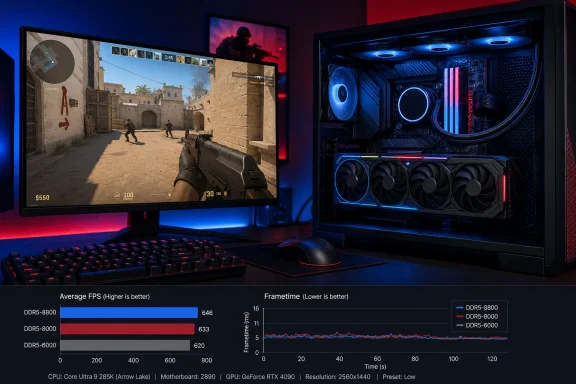
In its August 13 review, TechPowerUp found the XPG kit sitting roughly 4–6% behind the quickest memory configurations in its Counter-Strike 2 testing, while remaining about 4–5% ahead of baseline JEDEC DDR5-5600. But the same review’s normalized results put most tested DDR5 kits—spanning DDR5-6000 through DDR5-8800—within about 1–2% of the XPG kit on the Core Ultra 9 285K. That tighter comparison is the important one for anyone considering whether to replace already competent DDR5-6000 memory.
The result is less a triumph for inexpensive DDR5-6000 than a constraint imposed by Arrow Lake’s platform design. On a 285K, buying ultra-high-frequency DIMMs alone does not guarantee a commensurate uplift in game smoothness. The processor’s internal fabric and die-to-die connection can limit how effectively additional memory bandwidth reaches the workloads that might use it.
 DDR5-6000 CL30 remains a sensible 285K baseline
The XPG Novakey RGB kit tested by TechPowerUp uses a DDR5-6000 XMP profile with 30-40-40-76 timings. In practical terms, it is a conventional enthusiast configuration: two 16 GB DDR5 DIMMs at a speed that is easy for most Z890 boards to train and run reliably, rather than an extreme DDR5-7600 to DDR5-8800 setup dependent on stronger memory controllers, more aggressive motherboard firmware, and additional tuning.
That makes the review’s result more useful than a chart-topper result from an expensive specialty kit. TechPowerUp’s Counter-Strike 2 data says DDR5-6000 CL30 is already close enough to the leading configurations that an upgrade needs to be justified by more than the desire to improve a benchmark ranking.
For a new Core Ultra 9 285K build, DDR5-6000 CL30 therefore remains a defensible choice where capacity, price, compatibility, and stability matter. It is especially difficult to make a broad case for replacing such a kit strictly for Counter-Strike 2 when the tested gap is measured in a few percentage points under conditions designed to expose CPU and memory behavior.
The review also reports 95th- and 99th-percentile minimum-frame metrics alongside average frame rates, plus a frametime histogram and interquartile-range measurement. Those additions matter because average FPS can hide stutters or uneven delivery. Yet TechPowerUp’s overall finding still points toward a compressed field: the Novakey kit did not emerge as a poor frametime performer merely because it was slower on paper than much higher-clocked alternatives.
Arrow Lake’s D2D link limits the payoff from faster RAM
Intel’s own documentation explains the mechanism behind the review’s narrow margins. Core Ultra 200S processors use a tiled design, and Intel exposes tuning controls for the processor’s Next Generation Uncore fabric and its die-to-die, or D2D, connection. Intel’s 200S Boost profile can raise fabric and D2D frequencies along with supported DDR5 memory speeds, targeting workloads sensitive to latency and data movement.
For standard Core Ultra 200S K-series processors such as the Core Ultra 9 285K, Intel lists default D2D operation at 2.1 GHz. Intel’s newer Core Ultra 200S Plus processors, including the Core Ultra 7 270K Plus, use a 3.0 GHz default D2D setting. Intel’s 200S Boost profile can configure eligible systems as high as 3.2 GHz.
That distinction supports TechPowerUp’s explanation for its 285K results, but it also requires one qualification. The review suggests that the 270K’s higher default D2D behavior would scale more efficiently with fast memory. Intel’s published specifications confirm the higher default D2D setting on the Plus-series chip, but neither Intel nor TechPowerUp’s supplied 285K result establishes that every 270K system will deliver a specific advantage with every high-speed memory kit. Motherboard layout, firmware, DIMM type, memory-controller quality, and stability all remain variables.
What can be stated more firmly is that the 285K’s stock platform does not let memory frequency translate cleanly into gaming gains. A DDR5-8800 result may look impressive in a memory benchmark, but Counter-Strike 2 is exposing the whole path between memory and CPU execution. When that path includes a slower D2D link, faster DIMMs encounter diminishing returns.
This is why “DDR5-6000 versus DDR5-8000” is the wrong purchasing question for many Arrow Lake owners. The better question is whether the processor, board firmware, memory configuration, and game are all able to benefit from the extra bandwidth and lower effective latency. TechPowerUp’s result suggests the answer is often no—or at least not enough to justify a costly swap.
Intel 200S Boost adds little with this kit
TechPowerUp measured about a 1% gain after enabling Intel 200S Boost on the XPG Novakey RGB DDR5-6000 kit. That is consistent with the underlying setup: the profile can lift internal interconnect clocks, but it cannot turn a DDR5-6000 configuration into the high-frequency memory environment where its larger potential benefits may appear.
Intel describes 200S Boost as a preconfigured overclocking profile for supported unlocked Core Ultra 200S K-series processors, compatible Z890 motherboards, and qualifying XMP memory. It raises fabric, D2D, and memory operating limits, and Intel says use of the official profile does not void the warranty on eligible boxed processors. The support is conditional, however. Intel specifies one DIMM per channel for the program and says results and stability are not guaranteed.
There is also an important difference between being able to enable a BIOS setting and having a configuration validated under Intel’s program. Intel’s published 200S Boost memory list includes selected ADATA XPG products, but the listed examples are high-speed Lancer RGB DDR5-8000 kits rather than the Novakey DDR5-6000 CL30 kit tested by TechPowerUp. Intel also says its list is not exhaustive, so this does not establish that the Novakey kit is unsupported. It does mean buyers should not assume the review’s successful test automatically translates into formal validation for every board and BIOS combination.
For existing 285K owners with stable DDR5-6000 XMP memory, enabling 200S Boost may be worth testing if their motherboard vendor provides the option and if they are prepared to verify stability. But the review’s roughly 1% Counter-Strike 2 gain provides no evidence that it is a must-enable setting for this particular memory speed. A careful stability test is more valuable than chasing a change too small to notice in ordinary play.
Higher resolution erases most of the memory argument
TechPowerUp’s higher-resolution data supplies the clearest buying advice in the entire review. As rendering load rises, the RTX 4090 becomes the bottleneck and memory-kit differences narrow. The review reports that the top-to-bottom spread in 1% lows and its 95th-percentile metric contracts to only about 5 FPS.
That does not mean system memory never affects gaming. It means that its effect depends on the limiting component. At a resolution and settings combination that leaves the CPU waiting on memory and internal interconnect behavior, RAM tuning can move results. At a GPU-limited setting, the graphics card determines frame delivery more often, leaving less room for DDR5 frequency to matter.
Counter-Strike 2 players using competitive low settings and very high-refresh monitors are the most likely to see a measurable difference from memory and platform tuning. Players running higher resolutions, heavier visual settings, or a GPU below the RTX 4090 used in this test should expect the gap to shrink further. The review’s GPU-bound result should discourage readers from treating its CPU-bound chart as a universal ranking of DDR5 kits.
The practical upgrade path is capacity first, then tuning
For a Core Ultra 9 285K system already using stable 32 GB DDR5-6000 CL30 memory, TechPowerUp’s testing does not make a compelling case for replacing the kit solely to chase better Counter-Strike 2 frametimes. The potential return is limited, the faster configurations carry more compatibility risk and cost, and the benefit is most visible in conditions that intentionally minimize the GPU bottleneck.
A buyer choosing memory today should prioritize a two-DIMM kit, a capacity appropriate to the workload, a motherboard’s memory support guidance, and a proven XMP profile. Moving to 48 GB or 64 GB can make more practical sense for users who run memory-heavy games, virtual machines, development tools, content-creation software, or numerous background applications. More capacity will not raise esports FPS by itself, but avoiding memory pressure is a more meaningful system-quality improvement than a marginal synthetic advantage.
The XPG Novakey RGB DDR5-6000 CL30 result lands where a mainstream enthusiast kit should: comfortably above default DDR5 behavior, close to substantially faster memory in a real game, and unlikely to be the factor holding back a Core Ultra 9 285K build. On Arrow Lake, the expensive DDR5 race remains a tuning exercise, not a default upgrade recommendation.
