
PC Guide first highlighted the project this week, while its developer, RedRanger14, published the code and installation documentation on GitHub and described the release in the SteamOS community. The important qualification is immediate: Decky-Nexus is a beta community project, not a Nexus Mods or Valve product, and it modifies game files. It is promising precisely because it automates the per-game details that generic Linux mod-management tools frequently leave to the user—but it is not a substitute for backups or for checking whether a particular mod works under Proton.
 Gaming Mode becomes the mod manager
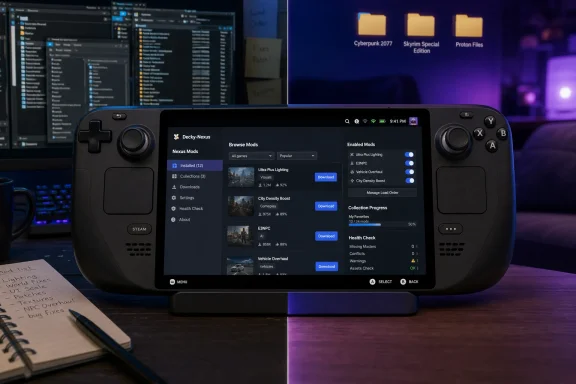
Decky-Nexus appears in Decky Loader’s Quick Access Menu panel rather than as a separate desktop application. With a supported game selected in the Steam library—or running in the foreground—the plugin can browse that game’s Nexus Mods listings, search and sort them, download files, show installed mods and updates, and enable or disable individual entries using controller-friendly controls.
That approach addresses a practical Steam Deck problem rather than inventing a new mod format. On a Windows desktop, tools such as Vortex, Mod Organizer 2, game-specific launchers, and manual file operations all have established workflows. On SteamOS, a player may have to switch to Desktop Mode, use a browser, manage Linux permissions, identify the right compatibility prefix for a Windows game, and then ensure the game launches with the required loader or launch options. A mod that works perfectly on a Windows PC can fail on a Deck because one dependency landed in the wrong directory or because a Windows helper executable was never run.
The plugin’s stated job is to make those decisions on a game-by-game basis. Its GitHub documentation says it can place content in a game’s mod directory, data directory, Proton prefix, or mod-loader profile as required. It also sets up supported ReShade packages and certain launch options automatically. That is the genuine reader value here: the tool is attempting to package the installation logic, not merely turn Nexus browsing into a prettier interface.
The limitation is just as important. Decky-Nexus is not a universal “install any mod” button. Each supported game needs dedicated implementation and hands-on testing, and the developer says manual load-order editing, Vortex-profile importing, and mods that require a separate Windows installation tool are not yet supported.
The supported-game list has already moved past the first reports
PC Guide reported nine supported games on August 20: Cyberpunk 2077, Elden Ring, Fallout 4, Fallout: New Vegas, Resident Evil 4, Skyrim Special Edition, Slay the Spire 2, Stardew Valley, and The Witcher 3. RedRanger14’s current GitHub README now lists 11 supported games, adding Helldivers 2 and Mount & Blade II: Bannerlord to that earlier list.
That discrepancy is not evidence that PC Guide’s reporting was wrong; it shows how quickly a newly released community project can change. The source repository describes itself as version 1.0 beta and says each currently supported game has been installed, modded, and played on real SteamOS or Bazzite hardware. The developer also lists Fallout 3, Hollow Knight: Silksong, and Palworld as groundwork or roadmap entries, explicitly warning that those titles are not ready to treat as supported.
For users, “supported” should be read narrowly. It means the plugin has logic for a game and the developer has tested a modded session, not that every Nexus upload, collection, overhaul, script extender, or patch combination will run safely on every Steam Deck configuration. That is especially true for Bethesda games, where load order and external tools are often central to a stable setup, and for Cyberpunk 2077, where mod requirements can include frameworks such as RED4ext, Cyber Engine Tweaks, ArchiveXL, and version-specific compatibility patches.
Helldivers 2 illustrates the boundary. The README says its live-service updates can break mods when game data changes, and the plugin can flag mods that predate the game’s latest patch. It cannot make an abandoned or outdated mod compatible. A clean installation is not proof that a mod is functional after the game updates.
Collections and FOMOD installers are the meaningful features
The headline feature—downloading Nexus Mods in Gaming Mode—is useful, but collections and FOMOD support are what separate Decky-Nexus from a basic file downloader.
Nexus Mods collections can involve many files, dependencies, and a prescribed installation sequence. FOMOD is a common installer format that presents configuration choices: texture resolution, optional features, compatibility patches, or one alternative package over another. Those installers are generally designed around desktop mice and file-manager workflows. Decky-Nexus says it can present FOMOD choices as a controller-oriented wizard and process collections in order, with a report for skipped items.
For a Steam Deck owner, this can remove a large amount of friction. It also introduces a less obvious risk: collections are only as reliable as their current dependencies and their compatibility with the game’s SteamOS/Proton setup. A collection built around Windows-only utilities, manual executables, or a precise Vortex workflow may still exceed what the plugin can handle. The project’s own documentation correctly lists Windows-tool-dependent mods among the unsupported cases.
Automatic load order is similarly useful but constrained. Decky-Nexus can apply a collection’s intended ordering where supported and has dedicated logic for Bannerlord. It does not yet provide hand editing of the load order. That makes it attractive to players seeking a known, curated setup; it makes it a poor fit for someone building a large, experimental Skyrim or Fallout 4 mod list who expects to resolve conflicts manually.
The health-check feature could save the most time
Decky-Nexus includes a Health page that reads the selected game’s own logs and tries to identify a concrete failure rather than issuing a generic error. In the best case, that is more valuable than the installer itself.
Mod troubleshooting on Linux handhelds often breaks down at the same point: the game fails to start, crashes after a logo, or silently ignores a mod, and the player is left guessing whether the cause is a missing dependency, a file path, a broken Proton prefix, an outdated mod, an anti-cheat conflict, or a bad load order. A log-aware diagnostic layer can narrow that list substantially.
But it should be treated as diagnostic assistance, not an authoritative compatibility verdict. Game logs do not always name the real root cause, and they cannot detect every conflict between scripts, assets, or injected libraries. The developer’s own wording is careful: the Health page aims to explain what is broken rather than guess. In a beta tool covering multiple engines and modding systems, users should expect it to catch common setup errors before it solves the hardest compatibility problems.
The project also offers a reset-to-vanilla function for every supported game. That is useful for recovery, though users should not confuse it with a full backup plan. The developer explicitly advises backing up saves before use, and that remains the correct precaution—particularly for games where mods can alter save-state data or where uninstalling content mid-playthrough can cause problems.
Premium access is a functional requirement, not a convenience perk
Decky-Nexus currently requires a Nexus Mods Premium account to download content. Free Nexus accounts can browse the catalogue in the plugin, but they cannot initiate downloads through the service’s API in this workflow.
The reason is not merely download speed. Nexus Mods promotes Premium as the route to automated collections installation, and the plugin documentation says free accounts cannot generate the API download links it needs. On a desktop PC, a free user can manually click through the Nexus website and hand files to a mod manager. Decky-Nexus is built to avoid that browser handoff entirely, so Premium is presently the price of its controller-first experience.
That changes the audience. Existing Premium subscribers who already mod on a desktop may find it an efficient way to bring a curated Steam library to a Deck. For a player who only wants a few manual mods, the plugin’s convenience comes with a recurring service requirement and an additional homebrew component in the Steam interface.
Installation is not entirely console-like, either. The plugin must currently be installed or updated manually from Desktop Mode, either by running its supplied installation script in Konsole or by using Decky’s developer installation path with a downloaded ZIP archive. The GitHub documentation says automatic updates are unavailable because the plugin is not yet served through Decky’s store mechanism.
Treat the AI disclosure and installation route seriously
RedRanger14 makes an unusually direct disclosure in the repository: nearly all of Decky-Nexus’s code was written by Anthropic’s Claude, with human direction and testing. That disclosure is not, by itself, proof that the code is unsafe or unreliable. The project is public, uses a standard Decky plugin structure, and its source can be inspected.
It does, however, raise the bar for cautious use. The supplied install path asks users to pipe a remote shell script into a terminal, then supply a Nexus personal API key. The repository says the key can alternatively be entered through the plugin settings page, and says the plugin stores its configuration outside its update folder. Users should still treat that key as a credential: install only from the project’s official GitHub repository, inspect changes before updating if possible, and revoke the Nexus API key immediately if they suspect it has been exposed.
The broader consequence is straightforward. Decky-Nexus makes Steam Deck modding more approachable for a defined set of games, but it does so by combining a third-party Steam UI loader, a beta plugin, write access to game files, a paid Nexus feature, and an API credential. For players comfortable with that tradeoff, it could turn previously desktop-only maintenance into something manageable from the couch. For everyone else, the prudent move is to wait until the project reaches a more mature release channel—or test it on one game with backed-up saves before trusting it with a long-running modded playthrough.