
install.wim files or VHD/VHDX images, the update closes the period in which a newly built PC or server is running Defender binaries and signatures that may be months old.
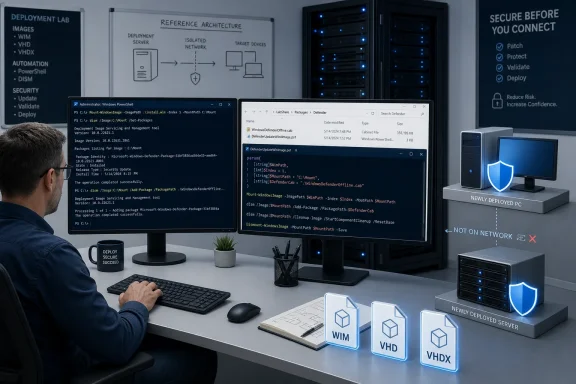
The important qualification is that this is not an ISO replacement download and it will not update existing endpoints by itself. Microsoft’s package is an offline servicing kit: admins download an architecture-specific ZIP, extract a Defender CAB and the DefenderUpdateWinImage.ps1 script, then apply the package to an offline Windows image before deploying it.
Microsoft updated its long-running KB4568292 installation-image guidance on August 13, three days after August 2026 Patch Tuesday. The company says the purpose is to reduce what it calls the Defender protection gap during the first hours of a new Windows deployment, before the device obtains regular antimalware updates.
For home users creating a USB installer and then connecting the new PC to the internet, this package is usually unnecessary. For organizations that image devices offline, ship machines before first boot, build isolated systems, or retain a gold image for long periods, it is a maintenance task worth putting back on the deployment calendar.
 Microsoft’s package is for offline images, not running Windows
The wording around “Windows ISO images” can create the wrong expectation. An ISO is often just the delivery container; Microsoft’s documented servicing target is the Windows image inside it, specifically WIM and VHD/VHDX files. The update is designed for offline servicing through DISM and PowerShell, not for installation on the Windows instance currently running on a technician’s PC or virtual machine.
Microsoft explicitly warns against using the kit on a live image because it can damage the running Windows installation. That warning deserves more attention than the version-number refresh: this is deployment engineering work, not another definition-update package to distribute through WSUS, Intune, Configuration Manager, or Windows Update.
The supplied package includes:
- The
defender-dism-[architecture].caboffline servicing package. - The
DefenderUpdateWinImage.ps1helper script. - Separate downloads for x86, x64, and ARM64 images.
The helper requires a 64-bit Windows 10-or-later technician environment, PowerShell 5.1 or later, the PowerShell Security and DISM modules, and an elevated PowerShell session. It also requires the administrator to identify the correct image index when a WIM contains multiple editions.
That last point is the operational trap. A standard Windows installation WIM can hold Home, Pro, Enterprise, Education, or Server editions under separate indexes. Applying the update to index 3 when the deployment task sequence installs index 6 accomplishes nothing for the machines actually being provisioned.
The August 13 refresh has a version-label discrepancy
Microsoft’s version information confirms the newly bundled platform, engine, and intelligence releases:
- Platform: 4.18.26070.9.
- Engine: 1.1.26070.7.
- Security intelligence: 1.455.50.0.
Microsoft Update Catalog also lists Defender platform update KB4052623 at version 4.18.26070.9, updated on August 4. That independently supports the platform version included in the image-servicing package.
But Microsoft’s own KB4568292 page currently contains a mismatch: its “Defender package version” line still displays 1.447.236.0, while the same page’s August 13 change log says the version information was refreshed and the listed security intelligence version is 1.455.50.0. Windows Report described the package itself as version 1.455.50.0, matching the intelligence release rather than the stale package label on Microsoft’s page.
For deployment documentation and change records, administrators should record the actual component versions — 4.18.26070.9, 1.1.26070.7, and 1.455.50.0 — rather than rely on that inconsistent package-version field. The version discrepancy does not establish that the download is defective, but it is enough to make post-integration verification essential.
Microsoft says it is not aware of known issues with the package.
The supported-image list is narrower than “Windows 10 and Windows 11”
The official support page lists Windows 11, Windows 10 ESU, Windows 10 Enterprise LTSC 2021, Windows 10 Enterprise LTSC 2019, Windows 10 Enterprise LTSB 2016, Windows Server 2022, Windows Server 2019, and Windows Server 2016.
That list matters for two reasons. First, it is centered on Windows versions likely to remain in managed deployment environments: Windows 11, long-term servicing Windows 10 editions, paid Windows 10 Extended Security Updates, and older supported Server releases. Second, Windows Server 2025 is not named on the current package page. Administrators should not assume a package intended for Server 2016 through Server 2022 has been validated for Server 2025 merely because the servicing mechanism sounds generic.
Likewise, Microsoft’s current page does not list ordinary, out-of-support Windows 10 Home or Pro installations as targets. A consumer may still install Windows from older media and update Defender once online, but that is a different scenario from offline image servicing under the supported package guidance.
The practical dividing line is whether a system has network access soon enough to receive current protection. A newly installed device that can immediately contact Microsoft’s update infrastructure will move beyond version 1.455.50.0 quickly. Microsoft Update Catalog was already listing broad-channel security intelligence builds in the 1.457.16x range on August 14, so the offline package should be treated as a secure starting point, not a substitute for normal post-install update compliance.
Add the Defender kit to the image-servicing sequence
Microsoft recommends servicing OS images on a three-month cadence. In practice, that should be the minimum rather than the entire plan. An organization that rebuilds reference images only quarterly but has a monthly cumulative-update process should decide explicitly whether Defender image servicing happens monthly, quarterly, or before each major deployment wave.
Microsoft also says there is no required order between applying the latest cumulative update and applying this offline Defender package. That removes one common reason to defer the work: teams can integrate the current LCU and Defender kit in whichever sequence fits their existing WIM maintenance pipeline.
A controlled process should look like this:
- Copy and preserve the last known-good WIM or VHD/VHDX before modifying it.
- Use
Dism /Get-ImageInfoto identify the image index or indexes that will actually be deployed. - Apply the package with
DefenderUpdateWinImage.ps1to every relevant index rather than only the first edition in the file. - Run the script’s
ShowUpdateaction afterward and record the platform, engine, and intelligence versions in the image-maintenance log. - Boot a test deployment, confirm Microsoft Defender Antivirus is healthy, then let it retrieve current cloud and intelligence updates once network access is available.
The backup step is not busywork. Although Microsoft’s tool provides a removal action, an image can contain multiple editions, language packs, cumulative updates, drivers, and deployment customizations. Rolling back a single component is not the same as having a recoverable pre-servicing artifact.
The payoff is strongest before a device reaches the network
This release is mainly about an exposure window that ordinary patch compliance reports often miss. A device can be “fully patched” by the end of its first day while still having started life with outdated antimalware components, especially if the initial deployment takes place on a restricted network or runs unattended tasks before Windows Update is available.
That risk is more concrete for bare-metal deployment lines, factory provisioning, branch-office staging, lab rebuilds, and recovery media than for a single consumer reinstall. It also applies to environments using a third-party endpoint security product, because Microsoft says the Defender package updates components that can deliver performance and protection improvements even where the built-in antivirus is not the primary security tool.
The immediate action is simple: deployment teams using WIM, VHD, or VHDX media should download the refreshed kit, validate it against a disposable copy of their image, and update the component versions in their build records. Do not mark the job complete just because a device eventually receives newer definitions online; the point of the package is ensuring protection is present before that first update cycle can occur.
