

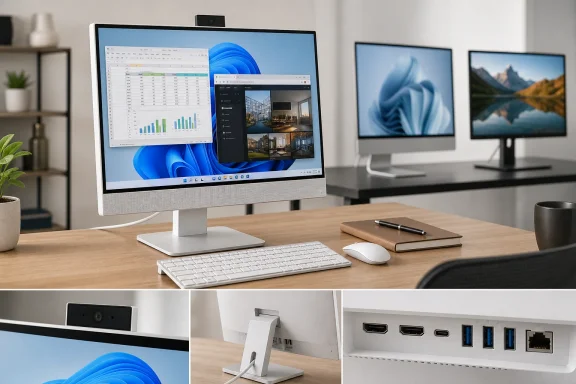
PCVarge’s central verdict—that a Core 5 120U, 16GB of DDR5, and a 512GB NVMe SSD provide responsive everyday Windows 11 performance—is reasonable. Dell’s own current base configuration matches those core specifications, and the machine has the practical virtues buyers expect from an all-in-one: one power cable, a large integrated screen, a pop-up webcam, wired Ethernet, and no separate tower occupying the floor or desk.
The review also gets one major judgment right. A 1920×1080 panel is a weak fit for a 27-inch desktop in this price range. It is usable, especially at normal desk distance and with Windows scaling applied, but it is the part of the system a buyer cannot meaningfully improve later. Storage and memory can be serviced; the screen defines every hour spent using the PC.
What the review misses is that Dell’s model naming now matters more than its broad “latest” framing.
EC27250 Is No Longer Dell’s Newest 27-Inch All-in-One
Dell’s current US store carries both the EC27250 and the newer EC27260. The EC27260 moves to Intel Core Ultra Series 3 processors, offers Wi-Fi 7 and Bluetooth 6.0, and can be configured with an 8MP infrared camera with presence detection. Dell’s support pages show EC27260 documentation updated in May 2026, before PCVarge marked its EC27250 review updated on July 8, 2026.
That does not make the EC27250 obsolete. The older system can still be the more rational purchase when it is substantially cheaper, because Core 5 120U performance is enough for Microsoft 365, browser-heavy work, Teams or Zoom calls, streaming, and ordinary photo management. But the difference between a current model and a clearance-friendly predecessor should be stated plainly, especially in a buying guide that calls the product “an easy recommendation.”
Dell listed the EC27250 base model at $1,149.99 when checked, configured with Windows 11 Home, the Core 5 120U, Intel integrated graphics, 16GB of DDR5-5200 memory, a 512GB SSD, and a non-touch 27-inch FHD display. PCVarge’s Amazon price widget showed $949.99 for what appears to be that same general configuration, but the article did not identify a Dell order code, a retailer SKU, or the exact configuration being compared.
That omission matters with this product. Dell sells EC27250 variants with different processors, touch options, storage capacities, cameras, and graphics. Micro Center, for example, has listed a much stronger EC27250 configuration with a Core 7 150U, 32GB of memory, a 2TB SSD, a touch display, and NVIDIA GeForce MX570A graphics. Calling all of those machines “the Dell EC27250” without the full SKU can make a bargain look better—or worse—than it is.
The practical rule is simple: buy the EC27250 only after comparing its exact order code against the EC27260 and against a separate desktop-plus-monitor setup. A $200 or $300 gap can justify choosing the older machine. A small difference should push buyers toward the newer platform, longer relevance, newer wireless hardware, and improved webcam options.
The 27-Inch FHD Screen Is Worse on Paper Than Dell’s Manual Suggests
PCVarge correctly flags Full HD as the EC27250’s main drawback, but Dell’s own documentation makes the issue more confusing. Dell lists the display as a 27-inch, 1920×1080 WVA panel with 99% sRGB coverage, a 100Hz refresh rate, and either touch or non-touch options. Those are respectable specifications for general use, particularly the 100Hz refresh rate, which makes scrolling and pointer movement visibly smoother than a conventional 60Hz office display.
Dell’s manual also lists the panel at 92 pixels per inch. That figure does not match the published resolution and physical dimensions. A 27-inch 1920×1080 screen works out to roughly 82 pixels per inch, and Dell’s stated 0.3114mm pixel pitch independently produces the same result. Ninety-two PPI is closer to what buyers would expect from a 24-inch Full HD panel.
The discrepancy appears to be a documentation error, but it reinforces the real issue: this is a relatively low-density desktop display. Text is not unusable, and a buyer upgrading from an older 21.5-inch or 24-inch office desktop may appreciate the physical size. Yet spreadsheet grids, browser text, coding windows, and detailed photo work will look less refined than on a 27-inch QHD display, which delivers about 109 PPI, or a 27-inch 4K panel at roughly 163 PPI.
This is not merely a creative-professional concern. A large screen is supposed to make side-by-side work easier, but lower pixel density limits how much information can fit cleanly on the desktop before text becomes small or fuzzy-looking. Windows 11’s scaling controls can make the interface more comfortable, but they cannot create more physical pixels.
The EC27250 does have HDMI input as well as HDMI output, which gives it a potentially useful second life as a display for another device. But Dell rates the HDMI 1.4 output on the integrated-graphics version at 1920×1080 at 60Hz. Buyers expecting the all-in-one to anchor a higher-resolution multi-monitor desk should inspect that limitation before ordering.
The Connectivity Claim Needs an Asterisk
PCVarge lists Wi-Fi 6E, Bluetooth, Gigabit Ethernet, HDMI connectivity, USB ports, and an SD card reader as EC27250 strengths. Dell’s support manual backs up the physical I/O: one 1GbE port, three 5Gbps USB-A ports, one 10Gbps USB-A port with PowerShare, one 10Gbps USB-C port, HDMI input, HDMI output, a headset jack, and an SD 3.0 reader. For a consumer all-in-one, that is a genuinely good selection.
The wireless specification is less settled. Dell’s current EC27250 storefront configuration identifies an Intel AX211 Wi-Fi 6E card, while Dell’s EC27250 owner’s manual lists an Intel AX201 module supporting Wi-Fi 6 rather than Wi-Fi 6E. Those cards are not interchangeable in capability: AX211 supports the 6GHz band; AX201 does not.
The likely explanation is configuration or documentation drift across the life of the product. Either way, PCVarge should not present Wi-Fi 6E as a universal EC27250 specification. Buyers who specifically need 6GHz wireless for a crowded office or home network should confirm the wireless card in the actual retailer specification, Dell order summary, or Service Tag details before checkout.
There is a second positive point buried in Dell’s manual that the review underplays. The EC27250 is more serviceable than many slim all-in-ones: Dell documents access to the M.2 2230 SSD, memory modules, wireless card, pop-up camera assembly, fan, and speakers. It has two SODIMM slots and supports up to 32GB of DDR5-5200 memory, while the SSD is a replaceable Gen4 NVMe M.2 2230 drive available in 512GB, 1TB, and 2TB capacities.
That is useful longevity, but it comes with a limitation. The Core processor and integrated graphics are effectively fixed, and Dell’s specified storage format is the less common 2230-length M.2 drive. An owner can add RAM or replace the SSD, but this is still an appliance-style desktop rather than an expandable tower.
“Review Unit” Claims Need Test Results
PCVarge says its review unit used the Core 5 120U, 16GB of memory, and a 512GB SSD, then describes quick boot times, fluid multitasking, fast application launches, and smooth switching among browser tabs. Those observations are plausible, but the review contains no benchmark scores, no sustained-load testing, no thermals, no fan-noise measurements, no SSD results, and no color or brightness measurements.
That absence is important because the review leans on performance as a reason to pay for the system. The Intel Core 5 120U is a 10-core, 12-thread mobile-class chip with two performance cores and eight efficiency cores. It is designed for efficient mainstream computing, not rendering workloads, AAA gaming, heavy local AI processing, or prolonged video exports. Paired with 16GB of RAM and a fast SSD, it should feel quick in ordinary Windows use; that is a different claim from proving that it performs exceptionally at the price.
The optional GeForce MX570A deserves similar restraint. Dell confirms that the discrete GPU version has 2GB of GDDR6 memory, and it will improve on integrated graphics in certain accelerated applications and lighter games. But 2GB of VRAM is a firm ceiling for newer games and GPU-heavy creative applications. It is an add-on for modest graphics headroom, not a route to a gaming all-in-one.
PCVarge’s conclusion would have been stronger if it had separated “adequate for the target workload” from “fast.” For a home office or reception desk, adequacy is often exactly the right standard. For a buyer spending close to four figures, test data is what establishes whether Dell’s compact design has imposed a meaningful performance, heat, or noise penalty.
Buy the Discount, Not the Description
The Dell EC27250’s appeal is tangible: a clean white chassis, an integrated display, a retractable camera that provides physical privacy when stowed, useful ports, replaceable RAM and SSD storage, and enough CPU performance for most Windows 11 office work. It can be a good machine for a kitchen desk, student room, small office reception area, or a user who values a tidy setup more than component-level flexibility.
But the PCVarge review overstates the case by treating an older platform as Dell’s newest 27-inch all-in-one, smoothing over configuration differences, and calling a specification-led overview a tested review without supplying test results. Its warning about the display is the one buyers should take most seriously: after the initial setup satisfaction fades, the EC27250’s 82-PPI Full HD panel is the compromise that remains.
At a clear discount below newer all-in-ones, the EC27250 earns consideration. Near the price of Dell’s EC27260—or near the cost of a modest desktop paired with a 27-inch QHD monitor—the older all-in-one’s clean desk comes at too high a long-term cost in screen quality and upgrade flexibility.