

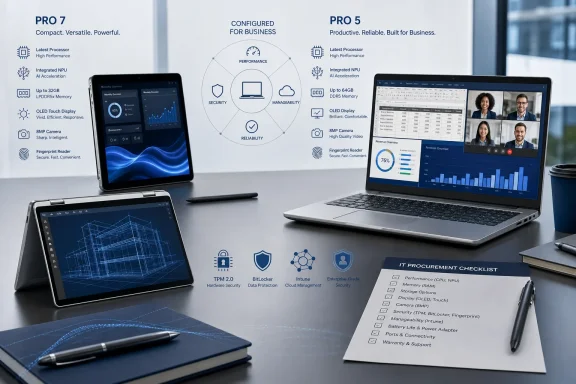
The article, published under ITPro’s Sponsored label and illustrated with Dell-supplied images, is best read as a set of deployment scenarios rather than independent product testing. It describes executives working in airports, consultants taking notes in tablet mode, finance leaders refreshing AI-assisted models, and hybrid workers handling sensitive data. Those are reasonable scenarios, but they are not evidence that every configuration carries the quoted capabilities—or that IT can treat the included Dell tooling as a substitute for endpoint management and support operations.
Dell’s own current product pages and manuals support the underlying lineup: Dell Pro 7 covers 13-inch and 14-inch conventional laptops plus 13-inch and 14-inch 2-in-1 variants, while Dell Pro 5 is the more conventional 14-inch and 16-inch line. Both ranges are now available with Intel Core Ultra Series 3 or AMD Ryzen AI Pro 400-series options in Dell’s current catalog. That overlap changes the old shorthand that Pro 7 means portability and Pro 5 means performance.
The Pro 7 Can Be a High-End AI PC, Too
The strongest correction to the sponsored guide is that the Dell Pro 7 is not confined to lightweight executive workloads. Dell’s current U.S. configurator lists Pro 7 14 systems with Intel Core Ultra Series 3 processors ranging up to a 16-core Core Ultra 7 366H vPro configuration, with a 50 TOPS neural processing unit. AMD Pro 7 configurations extend through Ryzen AI 9 Pro processors, including a 12-core Ryzen AI 9 HX Pro 470 with a 55 TOPS NPU.
Those figures matter because Microsoft’s baseline for a Copilot+ PC is an NPU capable of more than 40 TOPS, alongside at least 16GB of memory and 256GB of storage. Dell is selling qualifying Pro 7 configurations as Windows 11 Pro Copilot+ PCs. In other words, the Pro 7 is capable of the local Windows AI features Dell emphasizes, assuming the organization orders a qualifying configuration and keeps it on a supported Windows 11 release.
ITPro’s suggested use cases for the 13-inch Pro 7 and its 2-in-1 versions still hold up. A smaller device is easier to carry through a week of customer visits, and a convertible touchscreen has a real advantage for on-site annotation, whiteboarding, or presenting a design across a table. The 2-in-1’s tent mode is useful in cramped rooms where there is no desk space. Those are form-factor decisions, however, not a reliable proxy for processing power.
The important procurement consequence is that a senior executive, consultant, or project lead does not automatically need a Pro 5 to get a Copilot+ PC or a capable NPU. Conversely, a Pro 7 with a basic specification should not be assumed to match an extensively configured Pro 7 with 64GB of RAM, 2TB of storage, an 8MP camera, and a higher-end processor. Dell’s sales pages show those elements as configuration choices, not universal equipment.
“Copilot Out of the Box” Does Not Mean Microsoft 365 Copilot Is Included
The article repeatedly presents access to Microsoft Copilot as a ready-made business AI benefit. That phrasing compresses several distinct products into one word.
A Dell Pro 5 or Pro 7 ordered with Windows 11 can include Microsoft’s consumer and commercial Copilot experiences, and a qualifying Copilot+ PC can run Windows features that use the NPU locally. That can include supported Windows Studio Effects for camera framing, background effects, and audio processing, as well as other Copilot+ capabilities that Microsoft enables through Windows updates.
But a Copilot+ PC purchase does not include a Microsoft 365 Copilot license. The latter is the paid business service that connects to an organization’s Microsoft 365 work context under the tenant’s identity, compliance, and licensing rules. An IT department cannot buy a Dell fleet, hand it to finance leadership, and assume Excel, PowerPoint, Outlook, and Teams will suddenly provide the full licensed Microsoft 365 Copilot experience against company data.
Microsoft’s own deployment guidance also distinguishes application availability from service entitlement. The Microsoft 365 Copilot app can be automatically installed on eligible Windows devices with Microsoft 365 desktop applications, but it is not automatically installed for devices using the Semi-Annual Enterprise Channel. Installation still does not grant the underlying license or settle the organization’s data-governance questions.
The practical implication for the “finance leader refreshing an LLM” scenario is even more direct. An NPU accelerates compatible inference workloads and can improve battery efficiency for supported local AI features. It does not guarantee that a particular large language model, analytics tool, or enterprise Copilot workflow will run locally, fit in memory, meet an organization’s security policy, or deliver useful results without an internet connection. A 16GB entry configuration may meet the Copilot+ PC floor; it is not a blanket specification for local model experimentation.
For organizations seriously planning local AI workloads, testing the intended software stack on a quoted device is more valuable than relying on TOPS ratings alone. The processor, available RAM, storage capacity, graphics acceleration, model size, and the application’s own NPU support all determine the result.
The 8MP Camera and OLED Screen Are Options, Not Fleet Defaults
ITPro’s video-meeting case focuses on the Dell Pro 7’s 8MP HDR camera. Dell’s technical documentation confirms that an 8MP RGB HDR plus IR camera is offered on Pro 7 configurations, with 1440p video support, presence detection, temporal noise reduction, and a privacy shutter. Dell also lists lower-tier FHD camera configurations for the same family.
That distinction is important for organizations buying in volume. The business case for clearer executive calls, automatic framing, and improved image quality is credible, but it depends on the purchase order. An IT team that standardizes on a lower-cost webcam option cannot reasonably expect the result associated with Dell’s optional 8MP hardware.
The same applies to displays. OLED, high-brightness, touch, pen support, privacy-oriented panels, and higher-resolution screens vary by chassis and SKU. The sponsored guide describes OLED as an available Pro 7 choice, which is accurate, but it risks obscuring the trade-off: premium displays can affect purchase price, battery runtime, repair cost, and the consistency of the user experience across a fleet.
The Pro 5’s advantage is easier to explain in physical terms. Its 16-inch option gives finance, operations, and program-management users more room for a workbook, dashboard, document, and Teams panel without requiring an external display. Dell also offers high-end Intel configurations in the Pro 5 range, including 16-core chips, plus up to 64GB of memory and up to 2TB of SSD capacity in its product fact sheet. That makes it the safer default for users who routinely need screen real estate or sustained multitasking. It does not mean every Pro 5 is faster than every Pro 7.
Dell’s Hardware Security Helps, but Optional Features Must Be Ordered
The security section correctly identifies the building blocks Dell offers: TPM 2.0, optional biometric hardware, ControlVault3+, self-encrypting-drive options, BIOS protections, chassis-intrusion features on supported models, privacy screens, and physical-lock support. Dell’s documentation also confirms that ControlVault3+ is used across relevant Pro 5 and Pro 7 systems to protect biometric templates, smart-card data, credentials, and security codes in dedicated hardware and firmware.
Dell SafeBIOS and BIOS Verification deserve more precise treatment. Dell says its BIOS Verification capability compares firmware integrity through an off-host process, intended to give administrators a verification result without interrupting startup. That is useful visibility below Windows, where conventional endpoint tooling has less reach. It is not an automatic remediation service, and it does not eliminate the need for firmware patching, Secure Boot policy, administrator-password control, BitLocker recovery processes, and ordinary incident response.
Likewise, a TPM 2.0-backed BitLocker deployment improves protection if a laptop is lost or its storage is removed, but its effectiveness depends on the organization’s encryption policy, recovery-key handling, firmware settings, and whether users are forced into a recovery path after suspicious boot changes. The hardware creates the foundation; the operating model determines whether the foundation is used well.
A privacy display and fingerprint reader also need to be specified at purchase. Dell’s Pro 5 documentation, for example, lists the touch fingerprint reader with ControlVault3+ as available hardware, alongside smart-card-reader options. Those are good choices for legal, HR, and finance roles, but they should be part of a persona-based bill of materials rather than treated as inherent features of every Dell Pro laptop.
Dell Management Portal Is an Intune Extension, Not a Full RMM Platform
The most consequential omission in the sponsored guide concerns Dell Management Portal. ITPro describes it as a cloud dashboard through which IT can monitor laptops, provide remote support, standardize security policy, and roll out updates. Dell’s own description is narrower and more specific: the portal integrates with Microsoft Intune through Microsoft Graph, provides access to Dell BIOS-password and BitLocker-key information, makes Dell IT applications available for publishing into Intune, and supports pushing Dell firmware, software, and application updates.
That is useful functionality, especially for teams already committed to Intune. Centralizing Dell-specific firmware and software deployment can reduce the gap between Windows patching and OEM driver or BIOS maintenance. Central access to BIOS passwords and BitLocker recovery information also makes lifecycle work and support escalation easier—provided privileged access is tightly managed and audited.
It is not, by itself, a replacement for a remote monitoring and management platform, a help-desk system, endpoint detection and response, or Microsoft Intune’s device-management controls. Dell Management Portal’s value comes from closing Dell-specific management gaps inside an existing Microsoft management estate, rather than supplanting that estate.
Before standardizing on these models, organizations should demand a quote that names the exact SKU and confirms the following:
- The selected processor and memory configuration must meet the organization’s intended Copilot+ PC and local-AI requirements.
- The quote must explicitly include the 8MP camera, touch or pen support, privacy display, fingerprint reader, smart-card hardware, WWAN, and self-encrypting SSD options if those capabilities are required.
- Microsoft 365 Copilot licensing, tenant configuration, and data-governance policy must be budgeted separately from the PC purchase.
- Dell Management Portal should be piloted against the organization’s Intune tenant, role-based-access model, BIOS-password process, and firmware-update rings before fleet-wide deployment.
Dell’s Pro 7 and Pro 5 families give business buyers unusually broad latitude to tailor a Windows 11 fleet. The catch is that the latitude sits inside the configuration sheet. The right choice for an executive, consultant, finance director, or HR leader will be determined by the actual processor, camera, display, memory, security hardware, and management workflow attached to the order—not the number printed after “Dell Pro.”