
Notebookcheck’s advice to wait has the right conclusion for a particular kind of buyer, but its headline performance math needs context. The expected Core Ultra 7 XPS 13 is not merely a processor refresh. It is effectively the configuration that removes several constraints of the current low-cost machine at once: core count, graphics resources, memory capacity, memory-channel layout, AI hardware qualification, and port capability.
For someone replacing an aging laptop for general coursework, browsing, video calls, and Microsoft 365, the current XPS 13 remains a compelling purchase at its discounted price. But for developers, Windows power users, photographers working in Lightroom or similar tools, people who regularly keep dozens of browser tabs open, and anyone buying a sealed-memory laptop for four or five years, the cheapest XPS 13 is a deliberately narrow configuration.
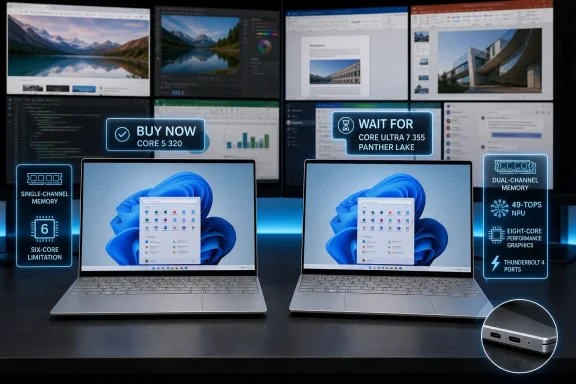 The $699 XPS 13 is built around real compromises
Dell’s current XPS 13 DX13260 pairs Intel’s Core 5 320 with either 8GB or 16GB of LPDDR5X-7467 memory. Dell’s own U.S. configurator identifies the entry configuration as 8GB of single-channel memory. The processor has six cores, 6MB of cache, and boosts up to 4.6GHz.
Those details explain why the machine can feel far more premium than its price suggests while still reaching a ceiling quickly under sustained work. The XPS chassis, 13.4-inch 2.5K 120Hz touchscreen, 52Wh battery, low weight, and industrial design are shared with the coming higher-spec model. The low price has not come from a visibly cheap display or a generic plastic shell. It comes from the platform below the keyboard.
Single-channel memory is particularly important in an ultraportable with integrated graphics. The processor’s graphics do not have dedicated VRAM, so they compete with the CPU for system memory bandwidth. That affects more than games: GPU-accelerated photo operations, video preview, displays attached through a dock, and some creative or AI-assisted software can all expose the limitation.
The 8GB option is the least defensible version of the XPS 13. Windows 11 itself, a browser-heavy workday, Teams or Zoom, OneDrive synchronization, endpoint protection, and a few productivity applications can make 8GB feel restrictive before the laptop is old. Because the memory is soldered, it cannot be upgraded later.
The 16GB Core 5 version is more sensible for a buyer whose workload is genuinely light. Yet it still carries the same six-core processor, lower-tier graphics, and limited expansion profile. It is a polished machine aimed at a price-sensitive audience, not a disguised replacement for a higher-end ultraportable.
Core Ultra 7 355 changes the configuration, not only the benchmark score
Dell and Intel have both outlined the Core Ultra 7 355 as an eight-core Panther Lake chip with a 12MB cache and turbo speeds up to 4.7GHz. Intel’s specifications also identify support for faster and broader memory configurations than the entry Wildcat Lake setup. Independent coverage from Tom’s Hardware, Windows Central, and Digital Trends has likewise reported that Dell planned the Core Ultra 7 XPS 13 as a post-launch option rather than part of the initial $699 launch.
The practical difference begins with the cores. The Core 5 320 uses a two-performance-core and four low-power-efficient-core design, while reporting around the Ultra 7 355 describes four performance cores plus four low-power-efficient cores. That should provide appreciably more headroom for compiling code, running local development servers, working with large spreadsheets, exporting photos, or simply multitasking while Windows updates, indexing, and cloud sync run in the background.
Notebookcheck says its testing of a Core Ultra 7 355-equipped XPS 14 indicated close to a doubling of raw CPU and GPU performance compared with the Wildcat Lake XPS 13. That is a useful directional warning, but it should not be treated as a promised result for the forthcoming 13-inch model. The XPS 14 has a different chassis, thermal capacity, display configuration, and power behavior; sustained benchmark results can change materially between two laptop designs using related silicon.
The larger point survives that caveat. The Core Ultra 7 355 has more CPU resources and a more capable integrated graphics configuration than the Core 5 320. Buyers should expect the XPS 13 Panther Lake version to handle intermittent demanding work more comfortably, even if Dell’s thin 13-inch chassis limits peak performance during long rendering or encoding jobs.
The coming configuration should also bring two Thunderbolt 4 ports, according to Dell’s published regional specifications. The Wildcat Lake version uses USB-C ports with more limited connectivity. That is not a cosmetic upgrade for a desk-bound user: Thunderbolt affects dock choice, high-speed external storage, display flexibility, and long-term compatibility with higher-bandwidth accessories.
Copilot+ eligibility is a substantive Windows difference
The Core Ultra 7 355’s NPU is rated at 49 TOPS. Microsoft’s Copilot+ PC baseline requires an NPU capable of more than 40 TOPS, at least 16GB of RAM, 256GB of storage, and Windows 11 version 24H2 or later. On those hardware requirements, the Panther Lake XPS 13 should qualify for the Copilot+ category.
That brings access to Windows features designed to process certain tasks locally rather than leaning entirely on cloud processing or the CPU and GPU. Microsoft’s Copilot+ positioning includes experiences such as Live Captions with translation, image-generation tools in Paint, enhanced Windows Studio Effects, and semantic search capabilities. Availability can still vary by Windows release, language, geography, feature rollout, and Microsoft’s changing product policy, so Copilot+ should not be the sole reason to postpone a purchase.
It does, however, change the long-term value calculation. The base Core 5 320 XPS 13 is an ordinary Windows 11 laptop with contemporary integrated hardware. The Core Ultra 7 355 model is positioned for Microsoft’s current premium Windows client feature set, while also meeting the 16GB memory floor that makes those features plausible alongside normal work.
For IT buyers, the distinction is less about novelty AI features and more about standardization. A 16GB-or-32GB machine with a 49-TOPS NPU and Thunderbolt 4 is a more flexible endpoint for developers, executive users, and mobile staff than a 8GB single-channel device that is otherwise trapped in the same sealed chassis. The present XPS 13 is suitable for light-use fleets; it is not the configuration to buy for employees whose role may expand.
Dell has not supplied the detail that decides the purchase
The most important missing information is price. Dell announced that the Core Ultra 7 355 XPS 13 would follow after launch, and Windows Central reported in June that Dell described the timing as later in summer 2026. With August 17 now here, Dell’s U.S. site continues to surface the Core 5 320 instead. Dell has not publicly posted a U.S. ship date, a full configuration matrix, or a final starting price for the Core Ultra 7 version.
Notebookcheck estimates a starting price around $1,000 to $1,100 based on Dell’s usual segmentation. That is reasonable inference, not a Dell-announced price. It also means the eventual decision may be less straightforward than “wait for twice the performance.” At $599 to $699, the Wildcat Lake XPS 13 occupies a relatively rare position: a well-built, compact Windows laptop with an excellent screen at a mainstream price. At roughly $1,100, it will face more laptops with 16GB memory, stronger processors, more ports, OLED options, and potentially better serviceability.
There is another unresolved point: battery life. Dell’s published battery claims for the current machine are tied to the Core 5 320 configuration, not the Core Ultra 7 355. Panther Lake is designed for efficient mobile use, but the higher-end processor, additional graphics capability, dual-channel memory, and different I/O hardware mean buyers should not assume that the lower-tier XPS 13’s endurance will carry over unchanged.
The same goes for acoustics. The existing XPS 13’s appeal rests partly on its thin, light design. A faster chip inside that design may produce better burst performance but different fan behavior or performance limits in long workloads. Neither Dell nor independent reviewers have yet published the testing needed to settle that question for this exact model.
The buying decision comes down to workload and patience
Buy the Core 5 320 XPS 13 now if the discount is real, 16GB is sufficient, and the machine will mostly be used for browser-based work, documents, streaming, videoconferencing, and travel. It is a sensible purchase at $599 or $699 precisely because its display and chassis are stronger than the price suggests.
Wait for the Core Ultra 7 355 model if the laptop must last through demanding coursework, software development, local virtual machines, image editing, heavy multitasking, or a growing collection of Windows AI workloads. The move to 16GB or 32GB of dual-channel memory alone makes waiting rational for many buyers, and the processor, NPU, graphics, and Thunderbolt upgrade turn the higher configuration into a more durable machine.
The catch is simple: Dell is still selling the bargain XPS 13 while withholding the U.S. availability date and price that would let buyers measure the premium. Until those appear, the Core 5 320 model is a good low-cost laptop, but the Core Ultra 7 355 is the XPS 13 configuration that makes sense to keep.