
The result is not a bargain Windows laptop. Dell’s XPS 14 starts at $1,600 before the company’s frequent discounts, placing it directly against Apple’s $1,599 14-inch MacBook Pro. But the important shift is that Dell is again offering a credible flagship Windows ultraportable rather than asking buyers to tolerate experimental controls and a nearly four-pound chassis for the privilege of owning one.
Dell revived XPS alongside a new XPS 16 at CES 2026 after only a year of selling laptops under simplified Dell, Dell Plus and Dell Premium branding. Dell’s own CES announcement confirmed that an XPS 13 is also planned for later in 2026. For buyers who remember XPS as Dell’s answer to the MacBook Pro, the 14-inch model is the more consequential relaunch: it sits in the high-volume sweet spot for developers, mobile professionals and enthusiasts who want real performance without a workstation-class bag.
 Dell Reverses the Most Visible Design Mistake
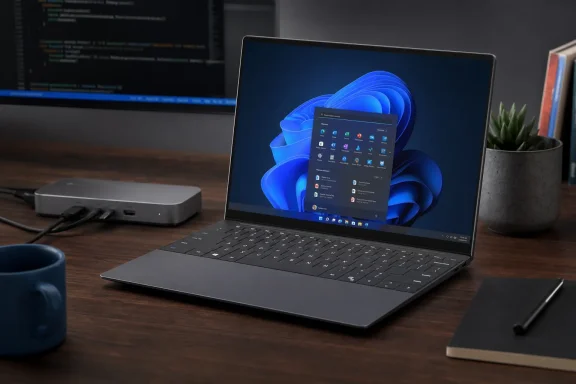
The new XPS 14 retains some of the visual language of the Dell 14 Premium, including its nearly borderless display, seamless-looking latticeless keyboard deck and large haptic touchpad. It also corrects the most controversial part of that design. The illuminated touch-sensitive Function row is gone, replaced with actual Esc, Function and media keys.
That is a small change on a specification sheet and a major one in daily Windows use. Physical keys allow a user to find Esc, volume controls or brightness adjustments without looking down and without wondering whether a capacitive surface registered a press. For IT professionals working through a remote session, a BIOS prompt or an application that has stopped responding, a dependable Esc key is not nostalgia—it is basic ergonomics.
Dell has also refined the keyboard itself. CNET found the keys firmer and less prone to wobble on off-center presses than the previous Dell 14 Premium. The haptic touchpad remains invisible in the sense that it has no conventional physical border, but Dell now etches subtle guide lines into the palm rest so users can feel and see its active area.
That is a more sensible compromise than abandoning the minimalist design altogether. The XPS 14 keeps the clean, modern appearance Dell was chasing, but it no longer asks the owner to learn around its controls.
A Portable Chassis That No Longer Feels Like a Penalty
Weight was the prior design’s more fundamental failure. CNET measured the outgoing Dell 14 Premium at 3.8 pounds, a remarkable figure for a 14-inch laptop without discrete graphics. The new XPS 14 weighs roughly 3.15 to 3.18 pounds depending on configuration, making it more than half a pound lighter while maintaining a rigid CNC-machined aluminum enclosure.
That puts the machine below the 3.5-pound weight of Apple’s 14-inch MacBook Pro, and it matters in the real world. A laptop carried through airports, offices and customer sites is experienced in pounds before it is experienced in benchmark scores. Dell’s thinner display bezels also allow the XPS 14 to remain notably compact, at roughly 12.2 inches wide and 8.3 inches deep.
Independent reviews have broadly agreed that the physical redesign is a success. WIRED, PCWorld, Tom’s Hardware and Notebookcheck each characterized the 2026 XPS 14 as a comeback or course correction, with the renewed XPS branding matched by a considerably more usable machine. That consensus is meaningful because it separates the relaunch’s marketing message from the practical changes reviewers can touch: lighter chassis, real function keys and improved keyboard behavior.
The design is not flawless. The XPS 14 is still not as cleanly integrated as a MacBook Pro. Seams around the keyboard deck and at the boundary between the keyboard and palm rest may collect dust and debris. The graphite finish is attractive, but Dell currently offers only that dark gray-black option; a champagne-like “Shimmer” color is expected later.
Panther Lake Gives the XPS 14 Its Range
The XPS 14 is among the first Dell systems built around Intel’s Panther Lake mobile platform, sold under the Core Ultra Series 3 branding. Dell offers three processor tiers: the Core Ultra 5 325, Core Ultra 7 355 and Core Ultra X7 358H. The latter is the configuration that makes the strongest case for the machine, with a 16-core CPU design and Intel Arc B390 integrated graphics.
CNET tested two configurations: a Core Ultra 7 355 system with 16GB of LPDDR5 memory, a 512GB SSD and a 1,920-by-1,200 IPS panel; and a Core Ultra X7 358H system with 32GB of faster LPDDR5 memory, a 1TB SSD and a 2,880-by-1,800 OLED touchscreen. The higher-end XPS 14 finished close to the similarly equipped MSI Prestige 14 Flip AI Plus in CNET’s CPU testing, while its larger integrated GPU delivered a sizable gain in graphics benchmarks over the Core Ultra 7 version.
The practical distinction is straightforward. The Core Ultra 7 configuration is aimed at office work, browser-heavy multitasking, coding, communication and typical business applications. The Core Ultra X7 system has enough graphics capacity for lighter creative work and modern gaming at sensible settings, though it cannot replace a laptop equipped with an Nvidia GeForce RTX 4050 or RTX 5050 discrete GPU.
CNET recorded 64 frames per second in Guardians of the Galaxy at 1080p and High settings on the OLED XPS 14, while Shadow of the Tomb Raider averaged 50 fps at its highest preset. More demanding games such as Assassin’s Creed Shadows and F1 24 needed reduced quality settings and Intel XeSS frame generation to exceed 60 fps. That is still an impressive result for an integrated-GPU ultraportable that remains quiet and cool rather than becoming a gaming notebook in disguise.
For developers and Windows power users, the more compelling point may be sustained productivity rather than frame rate. The XPS 14’s strong PCMark result, 32GB option and Thunderbolt 4 connectivity make it capable of running development tools, local virtual machines, media workflows and multi-display desk setups—within the limits imposed by its non-upgradeable memory.
The OLED Upgrade Is the One to Make
Dell’s display choice makes a visible difference. The standard IPS panel is a 1,920-by-1,200, 120Hz non-touch display, while the $150 OLED upgrade moves to a 2.8K, 120Hz touchscreen. CNET’s measurements found the OLED covered 100% of the sRGB and P3 color spaces and 95% of AdobeRGB, substantially ahead of the IPS configuration.
The IPS panel measured brighter at 535 nits versus 406 nits for OLED. But peak brightness is not the whole story: OLED’s near-zero black level produces vastly higher contrast, which can preserve perceived image clarity in bright environments. It also yields sharper text, better black levels for video and a much more convincing image for photographers, designers and anyone who spends long days in front of Windows 11.
There is a battery tradeoff, but it is not a painful one. CNET’s streaming test ran for more than 21 hours on the IPS model and nearly 15 hours on the OLED model. Those figures will vary with brightness, applications, power mode and peripherals, yet both results indicate a major strength of the platform. The OLED machine sacrifices endurance for visual quality; it does not sacrifice a full day away from an outlet.
The IPS model is the rational configuration for organizations prioritizing uptime and cost. The OLED model is the better personal purchase, particularly at this price. Spending $150 for a higher-resolution display, touch support, superior color coverage and deeper contrast is easier to justify than spending hundreds more for a marginal processor bump.
Premium Pricing Still Means Premium Compromises
The XPS 14’s real limitation is not performance. It is that Dell has retained a restrictive port selection: three Thunderbolt 4 USB-C ports and a 3.5mm audio jack. There is no HDMI, USB-A or SD card reader, and Dell does not include an adapter.
For a clean-desk owner using a Thunderbolt dock, this is manageable. For a field technician, classroom user or IT administrator who regularly connects legacy USB devices, displays, projectors and removable media, it means carrying a hub. At $1,600 and above, that omission remains difficult to defend.
Dell also includes an 8-megapixel webcam capable of 1440p video and Windows Hello facial recognition through an IR camera. The narrow-bezel camera design avoids a display notch, but the absence of a fingerprint reader is an unnecessary gap. Many premium Windows laptops provide both biometric methods, giving users a reliable fallback when lighting, camera placement or workplace policy makes face sign-in inconvenient.
The XPS 14 is Dell returning to its strengths, not overtaking Apple outright. CNET’s comparison found that Apple’s M5 MacBook Pro 14 remained ahead in most performance tests and battery life at a comparable $1,950 configuration. Windows buyers should not read that as a reason to dismiss Dell’s machine; macOS is not interchangeable with Windows, and Intel’s improved integrated graphics give the XPS 14 a distinct advantage in some Windows-native workloads and games.
Dell’s achievement is more modest and more important. The XPS 14 once again looks like a premium Windows laptop designed for people who use their computers all day, rather than a concept piece optimized for product photos. With Panther Lake efficiency, a 3.2-pound chassis and the return of the physical Function row, Dell has made the XPS badge feel earned again.
