
The announcement, carried by DHD on July 15 and subsequently reported by Radio World, describes a free macOS, Windows and Linux application that watches the network using Multicast DNS, or mDNS. RedTech independently described the tool as an IP discovery app for DHD-connected devices. DHD’s product page confirms that the Windows download is an x64 installer, while Linux users receive an AppImage-style package distributed as a .deb download and need a current distribution with FUSE support.
This is a small release, but it targets a persistent operational irritant in broadcast audio: commissioning hardware is often delayed less by DSP or routing work than by the basic task of identifying where a newly connected appliance actually lives on the network.
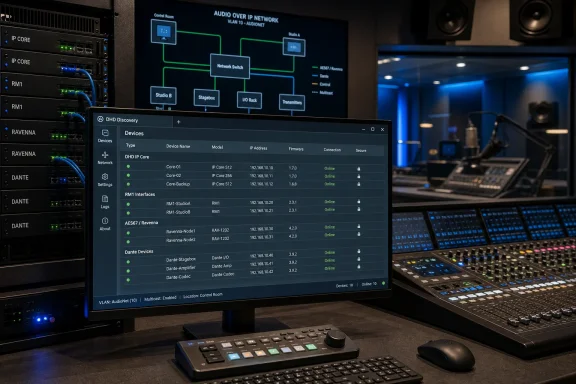 A Finder Window for DHD’s IP Audio Estate
DHD Discovery runs in the system tray and lists a device’s IP address, firmware version, serial number and connection condition. It also provides a local dashboard with search, filtering, favourites, and manual entries for devices outside the immediately discovered network. Selecting a device launches its WebApps interface, avoiding the familiar process of copying an address from a switch lease table or configuration worksheet and pasting it into a browser.
The software recognizes DHD IP cores, RM1 remote-production interfaces, AES67/Ravenna modules and Dante interfaces. DHD says it will distinguish whether a discovered device offers HTTP, HTTPS, or both, and will prefer the secure route when one is available. The tray presentation uses color-coded status indicators, can start automatically with the workstation, and updates itself through what DHD calls a signed update channel.
For a single-studio install, that may sound like a convenience feature. In a facility with multiple cores, portable RM1 units, temporary flypacks, or staging equipment moved between control rooms, it can remove a repetitive and error-prone part of support work. The dashboard also puts firmware and serial data beside the address, which is useful when confirming that an engineer is opening the intended unit rather than an identically named device in an adjacent studio.
The practical consequence is that DHD is moving discovery out of a heavyweight configuration workflow and into a persistent operational utility. It does not configure faders, load projects, route signals, or replace the engineering controls in Toolbox and WebApps. It shortens the path to those controls.
The Discovery Technology Was Already in DHD Systems
The key qualification is that DHD Discovery does not introduce mDNS capability to DHD equipment. DHD’s own Toolbox 10.0 release notes say device discovery was added through mDNS/Avahi, and the company’s Toolbox 10.1 notes say WebApps already included a front-page list of DHD devices found via mDNS. The 10.1 documentation also permits an administrator to disable that discovered-device list under System App network security settings.
In other words, the network-side discovery mechanism predates the new desktop app. Discovery is a new packaging of it: a cross-platform, tray-based view designed for people who need to locate and reach devices quickly, rather than enter a full Windows configuration application or sign in to the WebApps of a known core.
That distinction matters for existing estates. Installing DHD Discovery should not be treated as a substitute for firmware maintenance. A DHD installation running older device software without the necessary mDNS behavior may not gain the clean automatic inventory depicted in the release, and DHD has not published a compatibility matrix that identifies the minimum firmware or device generations required for every product category listed by the app.
DHD’s current Toolbox documentation is explicit that Toolbox and device firmware need to be kept in matching versions to avoid configuration complications. That rule remains in force. Discovery may identify a device and take an engineer to its interface, but it cannot remove the version dependency between a project file, Toolbox and the deployed device firmware.
The app is also separate from DHD’s paid or licensed WebApps. Recent reporting on DHD Firmware 10.4 lists the Discovery App among the company’s available app family, alongside Assist, Labels, Snapshot, System, Views and the Routing App. DHD’s new product page calls the desktop Discovery utility free, but it does not spell out whether every potentially discovered system feature is available without licensing once its web interface is opened. Administrators should therefore distinguish between free device location and access to the configuration or control functions exposed after clicking through.
Local Network Means Local Network
DHD’s press release says the dashboard supports manual entries for “other subnets,” which is a telling detail. The app’s automatic function is built around mDNS, a link-local multicast protocol. The mDNS standard defines local discovery on multicast addresses restricted to the originating network link; responses sent as link-local multicast do not reach a requester outside that local link.
For IT teams, that means a DHD unit on the same VLAN or Layer 2 segment as the Discovery workstation should be the uncomplicated case. An audio core in a segregated control-network VLAN, a remote machine across a routed site link, or a device behind a VPN should not be assumed to appear automatically merely because ordinary IP connectivity exists.
DHD has provided the manual-entry escape hatch, but it has not documented a built-in cross-VLAN discovery relay, controller, or central inventory service for Discovery. Sites that need automatic visibility across network boundaries will still need to design that behavior at the network layer—typically with a deliberately configured mDNS gateway or reflector and suitable firewall controls—or retain a managed source of truth such as IP address management, DHCP reservations, or a device inventory.
That is more than a deployment footnote. Broadcast facilities increasingly separate office, guest, wireless, control and media networks for resilience and security. A tool that works perfectly on a flat commissioning switch can appear to “miss” equipment once the system is placed on its production VLANs. In such cases, the absence of a device from DHD Discovery may describe the network boundary, not an offline core.
DHD’s manual entries make the utility usable in those designs, but they also mean engineers will still need accurate addressing and routing information for the systems most likely to be isolated intentionally.
Faster Access Does Not Change the Security Model
DHD positions the HTTPS preference as a security-conscious behavior, and its recent device software added encrypted web communication capabilities. But Discovery itself makes management endpoints easier to enumerate and open from a workstation. That is useful for a trusted engineering laptop; it also reinforces why access controls on those WebApps need to be correct before rollout.
DHD’s Toolbox 10.1 release notes already include controls to disable mDNS device discovery in the System App, while the same generation added password protection for sending Toolbox configurations and expanded WebApps user-rights management. Those controls should be reviewed alongside deployment of Discovery rather than after it. The app does not create a new remote administration plane, but it makes the existing one far easier to reach.
A sensible deployment sequence is short:
- Confirm that the Windows engineering workstation is on the correct management VLAN and can reach only the DHD interfaces it is intended to administer.
- Verify that device WebApps use HTTPS where supported and that default, shared or overly broad credentials have been removed.
- Decide whether mDNS discovery should remain enabled on each core, particularly in shared or less trusted network segments.
- Test what Discovery sees across each intended subnet boundary before relying on it for commissioning or incident response.
The release also leaves out several details administrators would ordinarily want before standardizing the tool: no published Windows installer version number, cryptographic hash, enterprise deployment method, update cadence, endpoint documentation, or support lifecycle appears in the announcement or the product page. DHD says updates are signed, but it does not identify the signing certificate, update service behavior, proxy requirements, or whether automatic updates can be centrally controlled or disabled.
For a free utility aimed at individual engineers, those omissions are not unusual. They are more significant for broadcasters that lock down engineering workstations, use application allowlisting, or require software packages to be deployed through managed endpoint tooling. The signed-update claim is welcome, but a signed channel alone does not answer whether the program fits a given organization’s software-governance policy.
A Cleaner Workflow, With Boundaries DHD Has Not Removed
The publication timeline is slightly muddled. DHD dates its own announcement July 15, 2026; RedTech’s report carries a July 13 date; and Radio World published its item on August 6. The official DHD product page now offers downloads, so the availability claim is not in doubt, but the public record does not establish a clean, single launch date earlier than DHD’s own July 15 announcement.
What is clear is the role DHD Discovery is intended to fill. Toolbox remains the Windows-based configuration environment for projects, firmware-related work and system setup. Device WebApps remain where users inspect and manage individual hardware. Discovery is the shortcut that tells an engineer what is online and gets them to the appropriate web interface.
That is useful precisely because it is narrow. For Windows-based broadcast engineering teams, DHD Discovery removes one of the most mundane delays in a networked-audio install: finding the appliance before managing it. It will work best where the network has been designed to let mDNS do its job, and it will expose every weakness in device inventory and VLAN planning where it has not.
