

The timing also needs correcting. StorageNewsletter published the supplied report on August 7, 2026, but Druva’s own release is dated July 21, 2026, and the company’s Microsoft 365 release notes show Copilot Chat Protection arriving on the Druva Cloud Platform on July 18. This is a delayed write-up of a three-week-old launch, not a same-day product announcement.
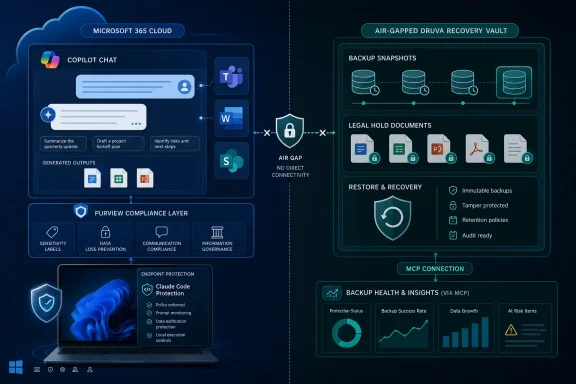
Druva groups four pieces under the “AI Resilience” name: Microsoft 365 Copilot Chat Protection, Claude Code and Claude Cowork protection, a Model Context Protocol server called Druva MCP, and the Dru SRE Agent for backup-health analysis. The common premise is reasonable: AI work produces information beyond the traditional document and database set, including prompts, conversations, generated output, local project state, configuration, and workflow context. The more important question is which of those records are already governed by the AI platform and which need an external, recoverable copy.
Copilot Chat protection is a second copy, not Microsoft’s missing compliance feature
For Windows and Microsoft 365 shops, Copilot Chat Protection is the portion of this launch that deserves the closest look. Druva says it captures prompts, responses, conversations, uploaded and generated files, cited files, and metadata, then applies retention, legal hold, eDiscovery, and recovery controls to that captured material. Its product page specifically describes the copy as air-gapped and independent of the Microsoft 365 production environment.
That independence is the product’s practical distinction. Microsoft documents that Copilot interaction data is stored in Microsoft 365 services and can be audited, discovered, retained, and investigated through Microsoft Purview. Prompts, responses, and referenced content can be retained under Purview policies; Microsoft also stores Copilot interactions as message-class items in the user’s Exchange Online mailbox for eDiscovery. Files created through Copilot remain in the relevant Microsoft 365 storage locations, such as OneDrive or SharePoint Embedded containers.
In other words, a tenant that has correctly configured Purview, Exchange retention, legal holds, sensitivity labels, SharePoint permissions, and backup already has a substantial governance baseline. Druva does not change Copilot’s access model, fix overshared SharePoint sites, or stop a user from prompting Copilot with data they were already permitted to access. Microsoft’s own documentation is explicit that Copilot respects the requesting user’s existing permissions; the security outcome still begins with access control and information protection.
What Druva adds is a copy held outside that same Microsoft 365 operational boundary. That can matter when an organization wants a separate recovery point after accidental deletion, malicious account activity, a bad retention-policy change, or a broader tenant-level incident. It can also simplify recovery administration for customers already using Druva for Exchange Online, OneDrive, SharePoint, Teams, endpoints, or other workloads.
Druva calls this “first-to-market backup for Microsoft Copilot” and separately calls its legal-hold capability the market’s first native eDiscovery functionality for AI workloads. The company’s July 18 release notes do confirm that Druva added Microsoft 365 Copilot Chat backup, restore, and legal hold then. But Microsoft Purview already provides retention, eDiscovery, and legal-hold mechanisms for Copilot interaction data inside Microsoft 365. The defensible reading of Druva’s claim is therefore first independent backup and legal-hold workflow of this particular type, rather than the first way to retain or investigate Copilot prompts and responses.
Druva’s Claude coverage has a hard boundary: it is endpoint backup
The Claude Code portion of the announcement is more narrowly scoped than the broad launch language suggests. Druva’s documentation says Claude Backup is delivered through Druva Endpoints and centrally managed across Windows and macOS. It protects locally stored data associated with Claude Code and Claude Cowork: project files, conversations, prompts, tasks, notes, settings, skills, connectors, plugins, and project artifacts.
That is useful for developers and business teams using Claude Code or Cowork as a local working environment. A failed automated edit can affect more than a source file: it can leave behind altered configuration, changed dependencies, broken task context, or a project session that is difficult to reconstruct. Git can restore committed code, but it does not inherently preserve local prompts, agent memory, skills, connector settings, or the state of an unfinished workflow. Druva’s pitch is to capture that working environment so that recovery can restore more than the repository.
But the boundary should shape purchasing decisions. Druva says it does not back up Claude.ai chat history, because those cloud-hosted chats live in Anthropic’s environment rather than on the endpoint. An organization that assumes this product creates a full archive of every employee’s browser-based Claude conversation will be buying the wrong thing. It protects local Claude Code sessions and Cowork project material stored on managed devices, not Anthropic’s complete cloud service history.
For Windows administrators, deployment questions therefore become conventional endpoint-management questions: Which devices are enrolled in Druva Endpoints? Where do Claude Code and Cowork store their working data? Are developers working in local folders, WSL distributions, remote development containers, or cloud-hosted repositories? And can the backup policy capture the specific directories and application state the team expects it to recover?
Druva’s public material does not provide a detailed support matrix for those edge cases, nor does it state recovery-point objectives, retention defaults, storage consumption, or how restores interact with active Git repositories and developer tooling. Those are not minor implementation details. They determine whether the platform is a safety net for a laptop-resident project or merely another copy of files already protected elsewhere.
Druva MCP exposes backup intelligence, but its automation limits are unclear
Druva MCP is the operational component of the announcement. Model Context Protocol is a standard interface used to let AI assistants access external tools and data under defined permissions. Druva says its MCP implementation allows compatible assistants such as Microsoft Copilot, Claude, and Cursor to retrieve resilience intelligence, query protection status, investigate events, generate reports, and run governed workflows against authorized Druva APIs.
The useful outcome is straightforward: an administrator could ask an assistant for workloads without protection, recent recovery failures, or a tenant’s backup health without manually working through multiple console pages. Druva says the MCP service inherits enterprise authentication and role-based access controls, and its public documentation says destructive delete operations remain blocked.
That last detail is more consequential than the launch release makes clear. Druva MCP may be able to inform investigations and recommend next actions, but the company has not published a complete action matrix showing which workflows an AI assistant can actually execute. It does not follow from “MCP-enabled” that a Copilot or Claude agent can initiate restores, change retention, modify policies, or perform response actions without a human in the Druva console.
Admins should also resist treating MCP as a security boundary by itself. It is an integration pathway into backup data and workflows. The security model still depends on least-privilege service configuration, identity controls, approved client applications, logging, and a clear distinction between read-only investigation tasks and mutating actions. Druva’s decision to block destructive deletion is sensible, but it also confirms that the platform is placing guardrails around agent access rather than handing unrestricted recovery administration to a chatbot.
“Available today” does not identify what customers can deploy
Druva says the AI Resilience products are available now, with capabilities in either general or limited availability. It does not identify, in the announcement, which of the four components fall into each category. There is no public price, SKU mapping, supported region list, minimum Microsoft 365 or Copilot licensing requirement, or statement of whether Copilot protection includes every Copilot surface and cloud configuration.
The company’s Microsoft 365 release notes add another limitation: Druva cloud-service updates are deployed in stages, and customers who do not yet see an update are told it will arrive in their region later. Those notes also say Copilot Chat Protection covers sessions across Teams, Word, Excel, PowerPoint, and the Microsoft 365 Chat interface, but staged availability means a feature announcement is not proof that every Druva tenant can enable it immediately.
The release notes contain one concrete infrastructure change relevant to Microsoft-centric customers: Druva added Microsoft 365 backup storage in selected Azure regions, initially East US, West US, Central India, UK South, Germany West Central, and Australia East. That may matter for data-residency requirements, but it should not be confused with the availability of Copilot protection itself.
No independent technical testing of Druva’s new AI Resilience capabilities was available at publication time. Druva’s claims about instant rollback, autonomous lockdown against AI-driven backup attacks, and the breadth of its MetaGraph-driven recovery analysis remain vendor assertions. The company has documented the feature set, but it has not publicly supplied the implementation detail needed to assess recovery fidelity, performance under a large Copilot estate, or how reliably its graph can identify a clean recovery point after complex agent-driven changes.
For organizations already running Druva, the immediate action is to verify whether Microsoft 365 Copilot Chat Protection is present in the tenant, determine which Purview retention and legal-hold rules already cover Copilot records, and decide whether an external copy addresses a documented recovery requirement. For Claude Code users on Windows, the decision turns on endpoint coverage and local data paths—not on the assumption that all Claude activity is being archived.