
The revised Microsoft Support article, published August 25, tells Edge users to enable “Allow Microsoft Edge to share browsing history with M365 Copilot Search” under Settings > Privacy, search, and services > Search and connected experiences. It presents the setting alongside consumer-facing history sync and personalized web-experience options. Microsoft Learn’s separate policy record adds material limits missing from that support explanation: the sharing feature is for users signed into Edge with an Entra ID work account, requires an eligible Microsoft 365 Copilot license, and does not apply to Edge profiles signed in with a personal Microsoft account.
For Windows users and IT administrators, the practical takeaway is straightforward: clearing Edge history, disabling sync, and opting out of browsing-history sharing to Microsoft 365 Copilot Search are three different controls. The privacy dashboard can help with account-associated history, but it is not the authoritative place to determine whether a managed Edge work profile is sending tenant-approved browsing activity into Copilot Search.
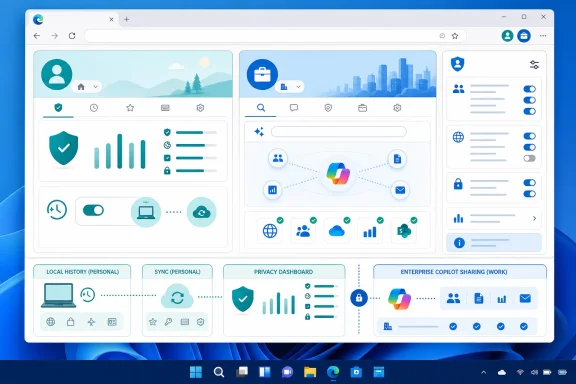 Edge 143 introduced a separate work-history path
Microsoft’s Edge release notes identify the feature as “M365 Copilot Search relevance using work browsing history.” It arrived with Edge version 143 for Windows and macOS, and Microsoft says it can use selected work-related browsing history to improve the relevance of Microsoft 365 Copilot Search results.
The stated purpose is fairly narrow. When a licensed user searches through Microsoft 365 Copilot Search, the service may surface recently visited work pages that are relevant to the query. Microsoft’s documentation says only work-related sites approved by the organization’s tenant are shared; it does not describe wholesale indexing of every page visited in Edge.
That scope matters. The feature is not the same as Copilot in Edge reading the current webpage, nor is it the same as Edge History sync moving a browsing timeline between a user’s devices. It supplies another retrieval signal to an enterprise search product: a user’s recent visits to sites their organization has allowed into the feature.
Microsoft’s broader Microsoft 365 Copilot documentation describes Copilot Search as a search layer across Microsoft 365 and connected third-party data sources. Browsing history adds a different type of context: it can elevate a page the user has already seen, even if that page is not a traditional document in SharePoint, OneDrive, Teams, or another Microsoft 365 repository.
For employees, that can make re-finding an internal portal, vendor console, knowledge-base article, or line-of-business web app faster. For administrators, it creates a data-flow question that sits between browser management and Copilot governance.
The privacy-dashboard article blurs personal and work profiles
Microsoft Support’s updated article correctly distinguishes history stored locally on a device from browsing history associated with an account and shown through the privacy dashboard. But its Copilot-sharing instructions are less precise than Microsoft’s enterprise policy documentation.
The policy, named ShareBrowsingHistoryWithCopilotSearchAllowed, is explicit on several points that the support article leaves out:
- The feature is supported on Windows and macOS beginning with Edge 143, but not on Android or iOS.
- It is available only in Edge profiles signed in with an Entra ID account and only for users with an eligible Microsoft 365 Copilot license.
- It does not apply to Edge profiles signed in with a personal Microsoft account.
- Only tenant-approved, work-related sites are intended to be shared with Microsoft 365 Copilot Search.
- Administrators can disable the capability through Microsoft Edge policy.
That means a consumer signed into Edge with an Outlook.com, Hotmail, Xbox, or other personal Microsoft account should not read the support article as evidence that their privacy-dashboard browsing history is automatically becoming Microsoft 365 Copilot Search input. Microsoft’s own policy record excludes those Microsoft-account Edge profiles from this feature.
Conversely, an employee may be using both a personal and a work profile in the same Edge installation. The visible browser window alone is not enough to tell them which rules apply. A personal profile’s history sync setting and a work profile’s Copilot Search sharing setting serve different accounts, different services, and potentially different administrative controls.
The documentation does not say whether Edge prominently explains that distinction when a user turns the sharing toggle on or off. That omission is significant because organizations that allow personal profiles in Edge alongside managed work profiles may field privacy questions that cannot be answered by looking only at the Microsoft privacy dashboard.
A cleared local history does not settle the Copilot question
Microsoft’s support guidance says that clearing browsing data in Edge removes history only for the profile currently in use. That is useful housekeeping, but it is not a complete answer to account retention or enterprise search indexing.
A user who clears local history can remove the browser’s on-device record for that profile. A user who clears activity through the Microsoft privacy dashboard can address account-associated browsing history exposed there. Neither action is described by Microsoft as an administrative switch for the separate Microsoft 365 Copilot Search feature.
For a managed Edge work profile, the relevant control is the Copilot Search history-sharing toggle, subject to policy. Microsoft says that if the ShareBrowsingHistoryWithCopilotSearchAllowed policy is disabled, Edge will not share browsing history with Microsoft 365 Copilot Search. The policy supports dynamic refresh, so an administrator can change the setting without waiting for a full software deployment cycle.
There is another detail worth checking in existing Edge configurations. Microsoft’s policy reference says that when the policy is enabled or not configured, browsing history is shared with Microsoft 365 Copilot Search by default, while users can turn sharing off in Edge settings. Organizations that want a definitive no-sharing posture should therefore not rely on the policy being absent. They should set it to disabled.
That default behavior changes the administrative burden. A tenant that has made work sites eligible for the feature and issued eligible Copilot licenses may need an affirmative policy decision, rather than assuming a neutral Edge configuration leaves the feature inactive. Microsoft’s August support article does not spell out that default in its consumer-style instructions.
What admins should verify in Edge management
The operational control is available in the Microsoft Edge administrative template as Allow sharing tenant-approved browsing history with Microsoft 365 Copilot Search. In Windows Group Policy, Microsoft lists it under Administrative Templates for Microsoft Edge. The corresponding registry value is ShareBrowsingHistoryWithCopilotSearchAllowed under SOFTWARE\Policies\Microsoft\Edge.
Administrators should first identify whether the organization actually has users who meet the feature prerequisites: Edge 143 or newer, an Entra ID-signed-in Edge profile, and an eligible Microsoft 365 Copilot license. The feature is per profile, which makes profile inventory more important than a simple machine-level rollout check.
Next, organizations should verify what qualifies as a tenant-approved work-related site. Microsoft says those sites are the only ones shared, but the Edge policy page does not explain in detail how administrators designate them, how quickly changes take effect, or how users can inspect the approved-site scope. That leaves a documentation gap for security teams that need to explain exactly which browser visits can influence Copilot Search ranking.
Finally, help-desk documentation should separate four user actions that are easy to conflate:
- Clearing Edge browsing data removes local browser history for the current profile.
- Turning off Edge History sync stops the cross-device synchronization of browsing history for that profile.
- Removing dashboard activity addresses history associated with the signed-in Microsoft account where that data is available.
- Turning off the M365 Copilot Search sharing toggle stops the distinct work-profile sharing path, unless organizational policy has locked the setting.
Users should also check whether Edge indicates that a setting is “managed by your organization.” If it does, the individual toggle is not the final authority; the browser is receiving the organization’s policy choice.
Microsoft needs to make the account boundary clearer
The new support page is useful insofar as it acknowledges that Edge history can move beyond the browser itself and gives users a path to manage dashboard data and local data separately. But it places an Entra ID-and-license-gated enterprise feature in the same flow as personal-account privacy guidance without clearly stating the boundary.
Microsoft’s release notes and Edge policy documentation provide the missing context: Microsoft 365 Copilot Search history sharing is designed for approved work sites, managed work profiles, and licensed enterprise users. The feature may be valuable for workers trying to recover a recently visited internal resource, but it is also a setting administrators should deliberately review rather than discover through a generic privacy article.
For organizations running Edge 143 or later, the immediate action is to inspect ShareBrowsingHistoryWithCopilotSearchAllowed and decide whether the default, user-controlled sharing model matches their Copilot and browser-data policy. For everyone else, the important distinction is simpler: the privacy dashboard remains relevant to account history, but it does not turn a personal Edge profile into a Microsoft 365 Copilot Search data source.
