
The important correction is timing. This is not merely a Canary experiment that may someday become a product feature: Microsoft has placed Apple Account sign-in in Edge Beta 152.0.4191.10, released August 6, and issued Beta 152.0.4191.19 on August 10. The company still calls it a controlled feature rollout, so even users on the appropriate Beta build may not see it immediately.
Edge Stable 152 is scheduled for the week of August 27, 2026. Microsoft’s published schedule labels that date a target rather than a guarantee, and the company has not committed to making Apple Account sign-in universally visible at Stable launch. For users who want to test it today, the practical requirement is Edge Beta or Canary on a supported desktop operating system—not waiting for an iPhone or iPad update.
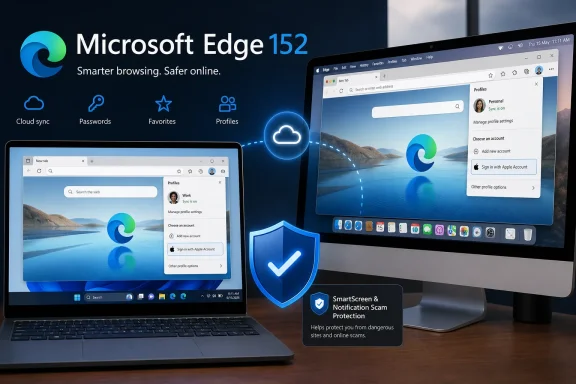 Apple Account sign-in reaches Edge Beta, not mobile Edge
Microsoft says Apple Account sign-in is available on Windows and macOS through the profile menu and Edge sign-in screen. In Canary, as Neowin reported, the work is exposed through the “Apple Sign-In Button on Profile Menu” and “Sign in with Apple” experimental flags; enabling them adds an Apple option beside the existing Google option.
The authentication step is handled through Apple’s sign-in flow, including an option to authenticate using an iPhone running iOS 17 or later. Apple’s own developer guidance supports Sign in with Apple on non-Apple platforms, so there is nothing technically unusual about a Windows browser sending users through that flow. The notable part is Microsoft treating an Apple identity as an Edge profile identity at all.
Microsoft began opening this door with Google accounts in Edge 150, released in June. Windows Central reported on the Google plan before the rollout, and Microsoft later confirmed Google sign-in for Windows and macOS under the same policy framework now used for Apple accounts. In two major releases, Edge has shifted from a browser whose signed-in consumer profile was effectively tied to a Microsoft account toward one that accepts identities from its two largest platform rivals.
That does not mean Microsoft is abandoning Edge’s own cloud services. It means the identity used to create and enter an Edge profile is becoming more flexible. The browser remains Microsoft’s product, and its profile, sync, password, and service integrations remain subject to Microsoft’s terms, controls, and architecture.
There is also a conspicuous platform boundary. Microsoft’s policy documentation explicitly lists the non-Microsoft account sign-in capability as supported on Windows and macOS from Edge 150 onward, while Android and iOS are marked unsupported. That fits the Beta release notes, which mention only desktop operating systems. An Apple Account button on Edge for Windows or Mac is therefore not evidence that Edge for iPhone and iPad can use the same profile identity.
The sync promise has an unresolved data boundary
The appeal of signing into Edge is synchronization. Microsoft’s general support documentation says an Edge profile can synchronize favorites, passwords, history, extensions, settings, open tabs, autofill entries, payment information, collections, and other data across devices using the same account. Neowin accordingly framed Apple sign-in as another route to carrying browsing data between devices.
But Microsoft has not yet published the detail that determines whether Apple Account users receive the full Edge Sync experience: a data-type-by-data-type compatibility list for non-Microsoft accounts.
That omission matters because Microsoft’s own current privacy documentation still draws a clear line around payment information. It says payment cards saved in Edge sync only between devices signed into Edge with the same Microsoft account. The Apple Account announcement does not say that rule has changed, nor does it identify a replacement storage or recovery model for cards associated with an Apple-signed-in Edge profile.
The same gap applies to data migration. Microsoft has announced a new Settings-based mechanism in Edge 152 to import Google account data—including passwords, bookmarks, history, and autofill data—after initial setup. Yet the company has not said whether users with an existing Microsoft-account Edge profile can convert it to an Apple Account identity, merge the two profiles, or move data between them without exporting and importing it manually.
Those are not minor implementation details. A person who starts a fresh Edge profile with an Apple Account may simply be creating a second profile with a separate local and cloud data history. A person who already has years of browser data under a Microsoft account should not sign out and assume that the Apple option will seamlessly inherit passwords, tabs, extensions, collections, payment cards, or settings.
The correct approach is to treat the Apple login as a new sign-in path until Microsoft documents profile linking and migration. Check the Sync page after sign-in, review every enabled category, and confirm the result on a second supported desktop device before deleting or resetting an established profile.
IT administrators can turn the feature off
For enterprises, the most relevant detail is not the Apple logo. Microsoft has placed Google and Apple sign-in behind the
NonMicrosoftAccountSignInEnabledpolicy, which is available on Windows and macOS beginning with Edge 150.
If that policy is enabled or left unconfigured, Edge can show non-Microsoft sign-in choices when a given feature is available. If administrators disable it, Edge hides and disables the Google and Apple paths even if associated feature flags are switched on. Microsoft accounts remain available.
The policy can be configured through the Microsoft Edge administrative template under Administrative Templates/Microsoft Edge/Identity and sign-in, or through the
NonMicrosoftAccountSignInEnabledregistry value in
SOFTWARE\Policies\Microsoft\Edge. It supports dynamic policy refresh, meaning an organization does not necessarily need to wait for a device restart or a new browser deployment cycle to suppress the new entry points.
This is a sensible control for environments that need browser profiles tied to Microsoft Entra identities, corporate compliance rules, or established data-governance workflows. It is also a reminder that the new option is aimed at consumer and mixed-device convenience, not an invitation to use personal Apple identities inside every work browser profile.
Administrators should test it before Edge 152 reaches Stable. Microsoft will start shipping Stable major releases every two weeks with version 152, beginning August 27, while Extended Stable retains its eight-week cadence. A browser identity change can affect support procedures, profile provisioning, sync expectations, and the handling of users who attempt to bring personal accounts into a managed profile.
Edge 152 also adds a notification safety net
The Apple Account change arrives alongside a more immediately defensive Edge 152 feature: automatic revocation of website notification permission when a notification leads the user to a page blocked by Microsoft Defender SmartScreen as a scam, phishing, or malware destination.
Microsoft says Edge will stop that source from sending further notifications and notify the user. This addresses a familiar push-notification scam pattern, where a deceptive site persuades a user to click Allow and subsequently serves fake virus alerts, bogus subscription warnings, or fraudulent support prompts through the browser’s notification system.
Users can review and restore revoked permissions in Edge’s site-notification settings. Like Apple sign-in, the notification feature is rolling out gradually. Its presence in the release notes is not a guarantee that every Edge 152 installation has it enabled today.
The two changes make an unusual pairing: Edge is lowering the friction to create a browser profile with an outside identity while adding a safeguard for one of the browser’s most abused engagement mechanisms. The first is valuable only if Microsoft clarifies which sync categories and migration paths work without a Microsoft account. The second has a simpler operational test: if SmartScreen catches a malicious destination opened from a notification, Edge should prevent that site from continuing to interrupt the user.
For now, Apple Account sign-in is best viewed as a desktop Beta capability with a pending rollout—not as a completed, cross-platform replacement for Microsoft-account Edge Sync. Edge 152 is due in Stable during the week of August 27; until Microsoft publishes the missing migration and data-scope details, users should test the new profile path without dismantling the one that already contains their browsing data.