
#edge-ai-search.That unchanged identifier is the key fact. Microsoft has altered the presentation and the flag description, which now says it “Enables AI Mode features,” but has not publicly documented a new service, a new search engine setting, or a new Edge release feature called AI Mode. For administrators and enthusiasts, this is an unfinished Canary experiment with no stated rollout schedule—not a setting to expect in stable Edge.
The rename also brings Edge’s terminology into direct alignment with Google Search’s AI Mode, an established Google product name used for its conversational, multimodal search experience. But sharing the name does not make the two products equivalent. Google’s AI Mode is a search destination built around follow-up questions, web links, image input, and other search functions; Edge’s current experiment appears to be a browser shortcut into Microsoft’s existing Copilot experience.
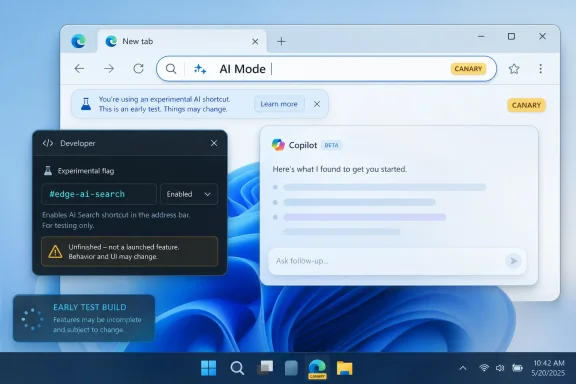 The flag changed names, but the underlying experiment did not
Windows Report found that Edge Canary now exposes “AI Mode” in the browser’s address bar and renames the visible flags-page entry from “Edge AI Search” to “Edge AI Mode.” The important technical detail is that the experiment still uses the same #edge-ai-search flag identifier. PiunikaWeb reported the same result after enabling the feature.
That leaves little basis for treating AI Mode as a separate Edge capability. Browser teams frequently preserve an internal feature name during branding changes, especially when an experiment is still moving between design concepts. Here, both the persistent identifier and the absence of a Microsoft announcement point to a rename of the existing AI Search test.
The practical consequence is modest: users who had previously enabled the AI Search flag should not interpret the new name as confirmation that Microsoft has switched them to a different AI backend or changed their default search provider. Neither publication found evidence that Bing was displaced as Edge’s normal search engine. AI Mode sits alongside conventional search controls rather than replacing the address bar’s standard search-and-navigation path.
That distinction matters in managed environments. The familiar Edge policy and configuration questions—default search provider, Microsoft Search in Bing, signed-in work profiles, data handling, and Copilot service availability—are not answered by a Canary label. Microsoft has not published a policy name, support page, privacy disclosure specific to AI Mode, or documentation describing whether the experiment will honor enterprise Copilot controls differently from ordinary Bing or Copilot requests.
“AI Mode” currently appears to be a Copilot entry point
PiunikaWeb reports that selecting AI Mode after entering a query led to a Copilot answer page with AI-generated results. In that account, the feature behaved as a direct route from the omnibox to Copilot-powered search rather than as a redesigned, self-contained results page inside Edge.
Windows Report observed a less complete state. Its testing found that choosing AI Mode in the Canary build did not produce a usable AI-search experience. That is not a trivial discrepancy, but it is consistent with how Canary experiments are often delivered: the local UI can ship before service-side components are enabled for every tester, region, account type, or experiment cohort.
The two reports agree on the parts that can be verified locally—the renamed button, renamed flag title, renamed description, and unchanged internal flag. They diverge on whether the click-through service was usable. Microsoft has not clarified whether that difference reflects an account-gated rollout, a short-lived service issue, geographic availability, or a partially implemented feature. No independent report located by this newsroom establishes the rollout scope.
For now, the safest description is that Edge Canary contains an AI Mode shortcut under active development, and the expected destination is likely Copilot. It is not yet possible to say that Edge has launched a new AI-native search interface.
This also makes the feature less disruptive than the branding suggests. A dedicated AI search mode could eventually change how address-bar queries are processed or displayed. The reported implementation does neither: ordinary searches remain ordinary Bing searches unless the user explicitly invokes the experimental AI control. That reduces the immediate risk of unexpected search-provider changes, but it also means the feature’s present value depends entirely on whether Copilot provides a better answer than a conventional results page.
Microsoft’s own Edge branding makes the new label unusually awkward
Microsoft’s AI naming history in Edge is already crowded. In May 2026, Microsoft announced it was retiring “Copilot Mode” as a distinct Edge offering while bringing its functions into broader Copilot-in-Edge experiences. The company said that Copilot Actions would continue under the name “Browse with Copilot,” initially for Microsoft 365 Premium subscribers in the United States.
Microsoft’s support documentation describes Browse with Copilot as an agentic browsing feature: Copilot can click, type, scroll, and navigate within a browser tab, while the user monitors its work. Microsoft explicitly warns that the feature remains experimental, may make mistakes, and can be affected by malicious instructions embedded in webpages. That is a materially different capability from the newly renamed AI Mode shortcut, which is reported as a query-to-Copilot search path.
The distinction is worth spelling out because the names are close enough to create confusion:
- AI Mode in Edge Canary appears to send a search query toward Copilot-generated answers.
- Browse with Copilot is Microsoft’s browser-action capability, with permission and safety implications that a simple search shortcut does not carry.
- Copilot in Edge is the broader product umbrella Microsoft is using after retiring the separate Copilot Mode label.
Microsoft may be trying to simplify its public language around browser AI. If so, “AI Mode” is a questionable choice because Google has spent more than a year using the identical name for a highly visible Search product. Google introduced AI Mode in March 2025 as an experimental Search experience, later expanding it with image, file, voice, personalization, and agentic functions. It has since become a major Google Search interface, including Chrome shortcuts on some platforms.
Microsoft is not accused of copying functionality simply because it uses the same phrase. “AI Mode” is generic branding. Yet the timing and placement make the resemblance hard to ignore: both companies are placing an AI-search option close to the browser’s primary query field, and both frame it as an alternative path for more complex questions. Microsoft has offered no explanation for the terminology change.
Edge Canary is the wrong place to infer a product commitment
Canary is Edge’s earliest public testing channel. Features can be incomplete, altered without notice, restricted by server-side experiments, or removed before reaching Dev, Beta, or Stable. The reports from August 11 show precisely why that status matters: one tester reached a Copilot answer page, while another could not make the experience work.
Microsoft has provided none of the information needed to assess a broader deployment. There is no public build number tied to the feature, no availability matrix by Windows version or market, no statement on whether work and school accounts are included, no enterprise policy documentation, and no indication of whether AI Mode will be available without a Copilot subscription. The company also has not said whether prompts sent through the feature will be handled under Bing, consumer Copilot, Microsoft 365 Copilot, or another service’s terms and controls.
The missing details are especially relevant for IT departments. An address-bar control can look like a harmless convenience feature, yet it may direct users toward cloud AI services that are disabled, restricted, or differently governed in corporate tenants. Until Microsoft publishes documentation, organizations should treat any appearance of AI Mode in Canary as a user-level preview artifact rather than a supported enterprise capability.
There is no operational reason for production users to enable the flag. Canary itself is unsuitable as a managed daily browser, and turning on an unfinished Copilot shortcut will not improve standard Bing search, change the default engine, or unlock a documented AI-search service.
The name change tells us more about Microsoft’s direction than its finished feature
The strongest conclusion from the reporting is narrow: Microsoft is testing a renamed Edge AI-search control and has not yet settled either its behavior or its public story. The retained #edge-ai-search identifier shows continuity with the earlier experiment; the conflicting test results show that the service path is not reliable enough to characterize as a launch.
What the rename does reveal is Microsoft’s interest in turning the address bar into a choice of query modes. Traditional web search remains Bing-led. AI Mode appears intended to send a deliberately selected question into Copilot. Browse with Copilot handles browser actions. Over time, those separate routes could make Edge’s main input field a more visible control surface for Microsoft’s AI services.
For the moment, though, the new label should be read literally and cautiously: it is an AI Mode experiment in Edge Canary, not a stable Edge feature and not evidence that Microsoft has replaced Bing search with Copilot. Until Microsoft documents the service, availability, controls, and final branding, the most concrete change is the text users see beside the address bar.