
As reported by How-To Geek, the setting is available under Windows 11’s per-connection DNS configuration and works with recognized resolvers including Cloudflare, Google, and Quad9. It is a worthwhile privacy control for unmanaged home PCs, but it also changes which DNS provider receives a device’s requests and can conflict with business-network DNS policies.
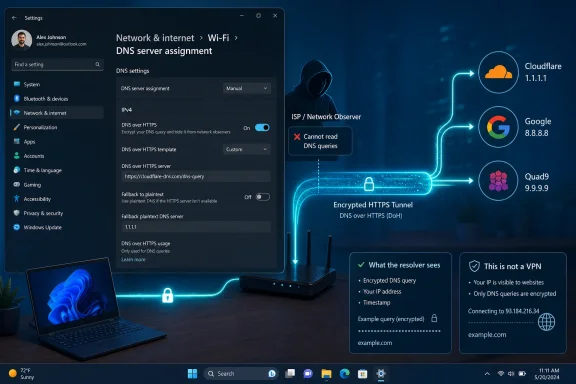 Windows Can Encrypt the Lookup, Not the Entire Session
Traditional DNS often sends a request such as “where is example.com?” unencrypted, normally over port 53. DNS over HTTPS, or DoH, sends that lookup inside HTTPS encryption, generally over port 443, making it harder for the ISP or somebody monitoring a Wi-Fi network to read the domain name from the DNS request itself.
That protection is meaningful, particularly on public or poorly secured networks. But the article’s broader premise needs a caveat: DoH is not a VPN. The ISP can still see that a device connected to particular IP addresses, how much data moved, and when connections occurred. Depending on the website and browser protections in use, other connection metadata may still reveal useful information.
The DNS provider selected in Windows also becomes the party handling those DNS lookups. Moving from an ISP resolver to Cloudflare, Google, Quad9, or another provider is a privacy and trust decision—not a setting that makes DNS disappear.
The Windows 11 Setting Requires a Resolver Change
Microsoft’s documentation confirms that Windows 11 supports encrypted DNS configuration at the connection level. In Settings, open Network & Internet, select the active Wi-Fi or Ethernet connection, then find DNS server assignment and choose Edit.
For a typical home configuration:
- Change DNS server assignment from Automatic to Manual and enable IPv4.
- Enter a compatible resolver pair, such as Cloudflare’s
1.1.1.1and1.0.0.1, Google’s8.8.8.8and8.8.4.4, or Quad9’s9.9.9.9and149.112.112.112. - Set DNS over HTTPS to On (automatic template) for each address, then save.
Microsoft maintains a known-server list for Cloudflare, Google, and Quad9, which is why Windows can populate the automatic DoH option for those addresses. Other providers can work, but may require an explicit DoH template configured through PowerShell or netsh.
The important operational detail is that users are not simply “turning on encryption” for their existing ISP DNS. In the common Settings workflow, they are replacing the configured DNS servers with a public resolver that Windows recognizes as DoH-capable.
Browser DNS May Override the OS Choice
Chrome, Edge, and Firefox can each use their own Secure DNS or DoH implementation. If browser-level secure DNS is enabled with a different resolver, browser traffic may use that resolver while Windows services, games, and other applications follow the DNS configuration set at the operating-system level.
That split is not necessarily a problem, but it can complicate support. An administrator troubleshooting name-resolution failures should check both Windows DNS settings and the browser’s secure-DNS setting before concluding that DoH is malfunctioning.
Enterprise Networks Need More Than a Privacy Toggle
For corporate devices, public DNS can be the wrong choice. Internal zones, split-DNS configurations, VPN name resolution, web filtering, and security monitoring may all depend on organization-managed DNS. Encrypting queries to an external resolver can break access to internal resources or bypass controls designed around DNS inspection.
IT teams that want encrypted DNS should configure it intentionally through managed resolvers, Group Policy, MDM, or Windows’ DNS client tooling—not advise users to point workstations at public resolvers individually.
For home users, enabling DoH with a trusted resolver closes a real privacy gap. It just should be understood for what it is: encrypted DNS, not anonymous browsing.
