
The email campaign is significant because it turns a previously published roadmap into an operational deadline. Microsoft’s current Entra documentation, updated August 3, says the move culminates on February 1, 2027, when Microsoft-provided SMS and voice delivery will be retired from Entra ID. Users whose only available MFA method remains SMS or voice will hit a blocking prompt during sign-in and must register a passkey before continuing.
For Windows administrators, the immediate task is not merely to enable a new authentication method. It is to identify every user who is still enabled for SMS or voice across both the modern Authentication Methods Policy and legacy MFA settings, decide which phishing-resistant method fits each group, and communicate the change before prompts appear in normal sign-in flows.
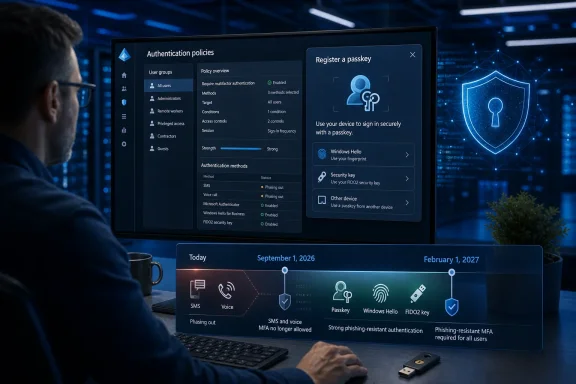 September 1 brings automatic enrollment, not immediate lockouts
Microsoft’s September 1 action is often described as making passkeys “the default,” but the implementation details matter. Users currently enabled for SMS or voice in Entra’s Authentication Methods Policy, or in legacy MFA settings, will be automatically enabled for passkeys. Microsoft will also place those users in a passkey profile that permits all passkey types and switch the tenant’s Registration Campaign to a Microsoft-managed state targeting passkeys.
The practical result is that, after completing MFA at a subsequent sign-in, affected users will be nudged to create a passkey. By default, those prompts can be snoozed indefinitely until the February cutoff. That gives organizations a transition period, but it also creates a familiar support problem: users can keep postponing the task until the organization’s remaining SMS and voice users become the exact people most likely to be disrupted later.
Microsoft does provide a temporary opt-out for the September 1 automatic enablement and registration campaign. That detail is absent from the broad “passkeys are mandatory” framing. Administrators can defer the automation by updating the Entra authentication methods policy through Microsoft Graph’s beta endpoint and setting the passkeyDynamicMigration opt-out property to true.
That is a delay mechanism, not a reprieve. Microsoft says the opt-out applies only from September 1, 2026 through February 1, 2027. On February 1, Microsoft will enforce the retirement regardless of that setting. Using a beta Graph property to suppress a tenant-wide user-experience change may also be uncomfortable for organizations with strict production-change controls, so it should be treated as time to complete a migration rather than a long-term configuration choice.
Neowin’s report that Microsoft is now sending customer emails is the only reporting located that establishes the timing of the email distribution itself. Microsoft’s public documentation independently confirms the policy, dates, enforcement behavior, and migration path.
February 1 ends Microsoft-hosted SMS and voice delivery
The February deadline is not simply a recommendation to choose stronger MFA. Microsoft will stop supplying the telecom delivery service behind SMS codes and voice-call verification for Entra ID. If a tenant has not moved its users to another method or configured an approved external telecom provider, SMS and voice will no longer satisfy MFA requirements as they did before.
Microsoft’s documentation is explicit about the enforcement path: a user whose only MFA method is SMS or voice will receive a blocking registration prompt and cannot proceed until a passkey is registered. There is no tenant-wide opt-out from this behavior.
That means organizations should not interpret the September prompts as evidence that the February change is optional. The first date changes registration behavior; the second removes the Microsoft-operated SMS and voice service. A user who ignores every passkey prompt can still reach a hard stop five months later.
The current deadline also has a less obvious impact on emergency-access planning. Organizations that use phone-based authentication as a fallback for contractors, field staff, call centers, shared-device users, or employees without managed mobile devices need to establish a viable alternative before they discover those people cannot complete a sign-in. Microsoft recommends passkeys, Windows Hello for Business, or FIDO2 security keys as phishing-resistant options, but each carries different enrollment, recovery, device, and support requirements.
Windows Hello for Business remains a valid phishing-resistant sign-in method after the SMS and voice retirement. Microsoft’s own guidance also says users already signing in through Windows Hello for Business or another phishing-resistant method can keep using it. However, users may still see passkey-registration nudges if they remain enabled for SMS or voice in policy. The relevant cleanup is therefore policy scope, not simply checking whether an employee already has a stronger credential enrolled.
Microsoft is retiring a delivery service, not banning every phone-based workflow
The largest correction to the simplified version of this story is that Microsoft is not forcing every organization to use passkeys alone. Its preferred path is passkeys, but it still recognizes that some regulated or operational environments require an out-of-band telecom channel.
Those tenants will be able to continue SMS or voice only through a customer-managed telecom provider selected through the Microsoft Security Store. Microsoft says provider information is due on September 18, 2026, while selection and configuration will not open until October 30, 2026.
The timing leaves only about 94 days between the opening of provider configuration and the February 1 shutdown. That is a narrow implementation window for organizations that need procurement approval, contractual review, data-residency checks, carrier testing, user pilot groups, and updated incident procedures. Microsoft has not yet publicly identified the available telecom providers or their prices, so an organization that believes it has a compliance requirement to retain SMS cannot yet complete the key vendor-selection work.
IT Pro reported that Microsoft warns customers will be responsible for telecom-related partner costs. That makes the post-February option a potentially material change in both ownership and expense: the old Microsoft-provided capability becomes a separate provider relationship, paid and operated under the customer’s responsibility.
Microsoft frames the retirement as a security decision. That is well founded. SMS and voice depend on channels and codes that can be intercepted, socially engineered, relayed through adversary-in-the-middle phishing kits, or compromised through SIM swapping. Passkeys use origin-bound public-key cryptography rather than a shared secret or one-time code, so a credential created for the genuine Entra sign-in service cannot simply be replayed on an attacker-controlled phishing domain.
Passkeys do not eliminate account-recovery risks, weak device security, or consent-phishing attacks. They do remove one of the most commonly targeted pieces of an MFA sequence: the code a victim can be manipulated into sharing.
The Windows passkey choice is broader than Microsoft Authenticator
For Windows-heavy organizations, the migration need not mean issuing every employee a hardware key or requiring every employee to use Microsoft Authenticator. Microsoft Entra supports device-bound and synced passkeys, subject to tenant policy and the organization’s risk model.
A device-bound passkey can be stored in Microsoft Authenticator, a FIDO2 security key, or the Windows Hello credential container. Microsoft’s new Entra passkey on Windows feature allows a user to create and store an Entra passkey locally in Windows Hello without requiring that PC to be Entra joined or registered. That capability is still labeled preview, and it is distinct from Windows Hello for Business.
The distinction deserves attention. Windows Hello for Business is Microsoft’s recommended route for signing into managed Entra-joined or Entra-registered Windows devices and for enabling single sign-on after device sign-in. An Entra passkey stored in Windows Hello, by contrast, is a device-bound FIDO2 credential for Entra authentication and does not replace the Windows Hello for Business device sign-in model.
Synced passkeys can lower deployment and recovery friction for ordinary users because they are backed by a passkey provider such as Apple iCloud Keychain or Google Password Manager. But highly privileged accounts and regulated environments may prefer device-bound FIDO2 keys or Authenticator-based passkeys, particularly where the organization requires a more controlled authenticator model. Microsoft’s Entra passkey policies can differentiate these groups rather than applying one credential type to every user.
The first audit should happen before the registration campaign starts
Microsoft supplies a PowerShell script to find active SMS and voice users and says Global Reader, Authentication Policy Administrator, or Security Reader access is required to run it. Administrators should use that inventory now, then compare it with their current policy assignments, Conditional Access authentication strengths, recovery procedures, and break-glass account design.
A sensible rollout separates users into groups rather than sending one generic notice:
- Users who already have Windows Hello for Business, FIDO2 keys, or approved passkeys should be removed from unnecessary SMS and voice policy scope after validating their recovery path.
- Standard knowledge workers can usually move through a managed registration campaign for Authenticator, Windows, or synced passkeys, with clear device-specific instructions.
- Privileged administrators, shared-device workers, and regulated populations should be piloted separately because their credential, device, and recovery constraints are different.
- Teams that genuinely require SMS or voice after February 1 should document the requirement immediately and prepare for the Security Store provider process once details appear on September 18.
The consequence of doing nothing will not arrive as a single outage on September 1. It will arrive in two stages: passkey prompts appearing in ordinary MFA events next month, followed by a non-bypassable registration block for remaining SMS- and voice-only users on February 1, 2027.
Update: Security experts flag passkey-transition social-engineering risk (August 13, 2026)
Neowin reports that Andrea Sivieri, CoreView’s chief product and technology officer, expects attackers to exploit user unfamiliarity with passkeys by impersonating Microsoft support staff and offering fraudulent enrollment “help.”
That concern adds a transition-specific risk beyond the security benefits of phishing-resistant credentials: users may be pressured into approving a malicious workflow, disclosing recovery information, or enrolling an attacker-controlled authenticator while they are trying to comply with new prompts.
According to Neowin, Sivieri also recommends that organizations capture a baseline of their authentication configuration before the September rollout, including dependencies involving service accounts, emergency-access accounts, frontline and shared-device staff, and password-reset flows. That record can help administrators identify unexpected policy changes and distinguish Microsoft-managed migration actions from unauthorized configuration changes.
For help desks, the immediate practical safeguard is to establish a clearly communicated, authenticated support process for passkey enrollment and to tell users that Microsoft support will not need their passkeys, recovery codes, or remote control of a device to complete registration.
