

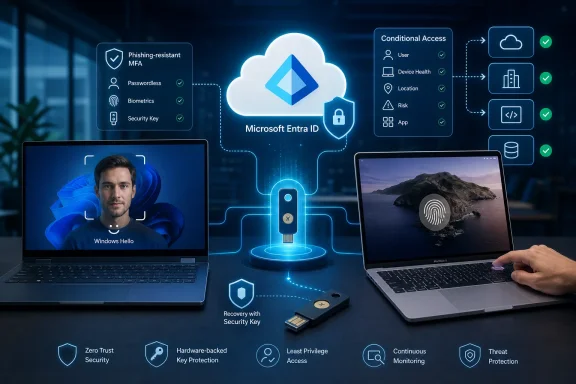
The practical result is narrower—and more important—than “passwordless gets easier.” A user who has already provisioned Windows Hello for Business on their work PC or a Platform SSO Secure Enclave credential on their managed Mac will be able to satisfy an MFA step-up, an Authentication Strength requirement, or a sign-in-frequency challenge with that credential alone. Today, those device-bound credentials can be involved in passwordless sign-in but may still leave users being asked to reach for a separate passkey, phone prompt, security key, or other registered factor when Entra wants fresh MFA.
Microsoft’s current public Entra documentation now lists Windows Hello for Business and Platform Credential for macOS as methods usable for both primary authentication and MFA. For Windows Hello, however, the documentation adds a condition that explains why this rollout needs attention: it can serve as a step-up MFA credential only when the user is enabled for passkeys and has a passkey registered. That makes MC1450134 less of a cosmetic prompt reduction than a change in how Entra classifies and consumes the credential already associated with the device.
The change closes a gap in the passwordless journey
Windows Hello for Business has always been built around a local cryptographic key protected by the device’s TPM and unlocked with a PIN, face recognition, or fingerprint. Platform SSO on macOS offers the comparable Entra experience through keys tied to Apple’s Secure Enclave and typically unlocked through Touch ID. In both cases, the user demonstrates possession of a hardware-protected key and local user verification; the PIN or biometric is not sent to Microsoft.
Microsoft already describes both methods as phishing-resistant. The missing piece was their inconsistent treatment in the Entra sign-in flow. A user could authenticate to a Windows PC with Windows Hello for Business, reach an Entra-protected application, and then be challenged for another factor to meet a policy demanding a new MFA event. The same friction could surface for Platform SSO users on Mac.
MC1450134 changes that behavior without asking admins to edit a baseline policy. Microsoft says that, once the rollout has reached a tenant, users will no longer need another registered factor simply to get past the affected MFA prompts. That should reduce the common “why am I being asked for my phone after I used Face ID?” support ticket, particularly in organizations pushing phishing-resistant Authentication Strength policies.
The timing also matters. Microsoft separately changed Entra registration behavior during 2026 so Conditional Access policies scoped to the “Register security information” user action apply when users provision Windows Hello for Business or register macOS Platform SSO credentials. In other words, Microsoft tightened the requirements for creating these credentials, then is preparing to let the completed credentials satisfy more authentication events on their own.
That is a coherent security model: enforce policy at enrollment, then trust the bound credential at sign-in. But it will expose configurations built around the old limitation.
“No admin action” does not mean no policy review
Microsoft’s message says no configuration change is required for the service-side rollout. It does not mean every existing tenant will receive the expected result without review.
The company explicitly calls out custom Authentication Strength policies. Administrators that created narrowly scoped strengths while Windows Hello for Business and Platform SSO could not meet fresh MFA may have intentionally excluded them, or may have a policy that requires a specific FIDO2 security key or certificate-based method. Those policies will still do what they are configured to do. Entra’s new capability does not override Conditional Access, and it does not silently broaden an Authentication Strength that excludes the relevant credential category.
Microsoft’s System-preferred authentication documentation reinforces the distinction. In Microsoft-managed mode, Entra ranks passkeys among its preferred phishing-resistant credentials, and that group includes security keys, synced passkeys, passkeys in Microsoft Authenticator, Windows Hello for Business, and macOS Platform SSO. Conditional Access is then evaluated for authorization, including whether the required authentication strength has been met.
For an IT team, the immediate task is to determine whether its policies mean what it now thinks they mean:
- Review each custom Authentication Strength that protects Microsoft 365, Azure, administrative portals, VPN gateways, and line-of-business applications.
- Confirm that the strength permits Windows Hello for Business and the macOS Platform SSO credential where those are intended to fulfill MFA.
- Check that the applicable users are enabled for the Entra passkey method and have actually completed the relevant credential registration.
- Test sign-in frequency and step-up scenarios in a pilot group before the broad deployment window begins in October.
This is especially relevant for organizations that use a transition design: Windows Hello for Business for managed PCs, FIDO2 security keys for privileged users, and Microsoft Authenticator or SMS as a fallback. After the change, the managed PC credential may satisfy prompts that previously forced the user into the fallback path. That is desirable when the policy intends it; it is an unintended weakening only if the policy was meant to demand a portable credential for that workload.
The recovery problem moves from enrollment to operations
The largest practical caveat is that Windows Hello for Business and Platform SSO are device-bound. The private key is designed not to travel with the user to another PC or Mac. A credential that makes everyday sign-ins easier is therefore a poor sole recovery mechanism when a laptop is replaced, lost, damaged, offline, or simply not the device in front of the employee.
Microsoft’s deployment guidance makes the same point in less direct terms: organizations should give users a portable credential to bootstrap local credentials across devices. For an employee with only Windows Hello for Business on a company laptop, access can become a help-desk event when that machine is unavailable. The equivalent problem applies to a Mac whose Platform SSO credential lives in that Mac’s Secure Enclave.
MC1450134 reportedly does not automatically prompt affected users to register a backup factor. That is the detail administrators should treat as an action item, even though the rollout itself needs no configuration. A user who completes a new-device enrollment successfully may conclude that their face, fingerprint, or PIN is now all they need. It is sufficient for routine access from that device; it is not a resilience plan.
A portable phishing-resistant backup such as a FIDO2 security key, a passkey in Microsoft Authenticator, or a properly governed synced passkey can preserve access during a device-loss incident. Which one fits depends on the organization’s risk model. Highly regulated administrators may reasonably require hardware security keys or certificate-based authentication, while information workers may be served by an app-based passkey and a controlled Temporary Access Pass recovery process.
The rollout also makes shared-device scenarios more conspicuous. Microsoft advises against Windows Hello for Business where people use a shared local account, and documents support for only up to 10 Windows Hello users per device. A device-bound credential is strongest when it belongs to one person using one assigned device—not a hot-desk PC, kiosk, classroom machine, or contractor pool.
macOS still has a local-password boundary
Platform SSO should not be mistaken for a complete replacement of every Mac password interaction. Microsoft’s Intune documentation says that Secure Enclave Platform SSO leaves the local macOS account name and password in place because FileVault uses that local password to unlock the encrypted disk.
After a restart, the user must enter the local account password once before Touch ID can unlock the Mac and the Entra hardware-backed Primary Refresh Token can restore device-wide single sign-on. Platform SSO can then use the protected credential as a passkey in supported browser flows and provide the lower-friction Entra experience that Microsoft is extending in October.
That distinction is operationally significant for support teams. A user may correctly report that Platform SSO met their Entra MFA challenge while still being unable to remember the local FileVault unlock password after a reboot. Those are separate credentials and separate recovery paths.
Platform SSO also remains an Intune-managed deployment with prerequisites that predate MC1450134. Microsoft lists macOS 13 or later, the Company Portal app, an Intune settings catalog policy, and an Entra registration flow among the requirements. The new Entra behavior reduces authentication friction after that deployment; it does not make unmanaged Macs or older Platform SSO configurations eligible by itself.
October is the point to test the whole chain
The deployment schedule—beginning in early October 2026 and completing in late November for worldwide and GCC tenants—gives administrators a short but useful window to review policies before user behavior changes. Microsoft has not indicated in the reported notice that GCC High or Department of Defense tenants are included, so regulated organizations in those clouds should not assume the worldwide-and-GCC timeline applies to them.
The better onboarding script after this rollout is simple: enroll the employee’s Windows Hello for Business or macOS Platform SSO credential, verify it satisfies the intended Authentication Strength, and register a portable phishing-resistant recovery method before the user leaves the setup process. The day-to-day experience becomes less interruptive, while the missing-device scenario remains survivable.
By late November, Entra tenants that have done that policy and recovery work should see fewer redundant MFA prompts without sacrificing phishing resistance. Tenants that have not will discover that eliminating the second prompt also eliminates the accidental reminder that their users never had a backup credential.